00196284_Install_WinXP_unattended_DVD.pdf - 第9页
Windows XP Unattended Setup DVD V4 .2 11/2015 Edition 9 - Subnet m ask - Default gatewa y (Optional, if no Rem ote Support was ins talled n o entry. Default: no entr y) 6 Custom Hosts - File entries as required - esp…

Windows XP Unattended Setup DVD V4.2 11/2015 Edition
8
Supported Touch Screen Displays:
Elo Touch (15”)
Micro Touch (15”)
PenMount Touchscreen (15”)
Not Supported Computer Hardware, Support Only In CD Version V 2.08 / V 3.0:
SCENIC C 600
with Board D1544
SIPLACE Compact
SCENIC C 610
with Board D1644
SIPLACE Compact
SCENIC N 300
with Board D1561
SIPLACE F5 HM / S-20 / S-23 / S-25HM / S-27HM / F4 / F5
SCENIC N 320
with Board D1521/D1561/D1961
SIPLACE F5 HM / S-20 / S-23 / S-25HM / S-27HM / F4 / F5
SCENIC P 300
with Board D1561
SIPLACE HS-60 / HS 50/ 50+
SCENIC P 320
with Board D1521/D1561/D1961
SIPLACE HS-60 / HS 50/ 50+
CPU 076
SIPLACE HF-Series
CPU 086
SIPLACE X-Series
3.2 Required configuration parameters
For the installation procedure, please note the following information:
3.2.1 Common settings
1
User Name
2
Company Name
3
License Key of the Operating System
4
Custom hard disk partition sizes, if required
Note:
We recommend gluing the Operating System License Key on the case of the computer to avoid
loss.
3.2.2 Station Computer settings
5
IP configuration of each network adapter, especially the connection(s) to the machine controller and
the line computer.
- IP address

Windows XP Unattended Setup DVD V4.2 11/2015 Edition
9
- Subnet mask
- Default gateway (Optional, if no Remote Support was installed no entry.
Default: no entry)
6
Custom Hosts- File entries as required - especially machine controller and line computer entries.
7
Used touch screen type
3.2.3 Vision Computer settings
5
IP configuration of each network adapter, especially the connection(s) to the stations.
- IP address
- Subnet mask
- Default gateway (Optional, if no Remote Support was installed no entry.
Default: no entry)
6
Custom Hosts- File entries, if required
3.2.4 Line Computer settings
5
IP configuration of each network adapter, especially the connection(s) to the stations and other
SIPLACE computers.
- IP address
- Subnet mask
- Default gateway (Optional, if no Remote Support was installed no entry.
Default: no entry)
6
Custom Hosts- File entries, if required
Windows XP Unattended Setup DVD V4.2 11/2015 Edition
10
4 Installation
Note:
During the setup you can navigate the dialogs with Next or Back buttons.
4.1 Installation Hardware specific requirements and restrictions
4.1.1 SIMATIC Box PC 627
→ Ensure you have the appropriate BIOS version and the corresponding settings, delivered on CDs. The
minimum BIOS version is V05.01.09.
→ Ensure the BIOS setting “Installed O/S” is set to “WinXP/2000” and “SATA Controller Mode” is set to
“Compatible” for the operating system installation
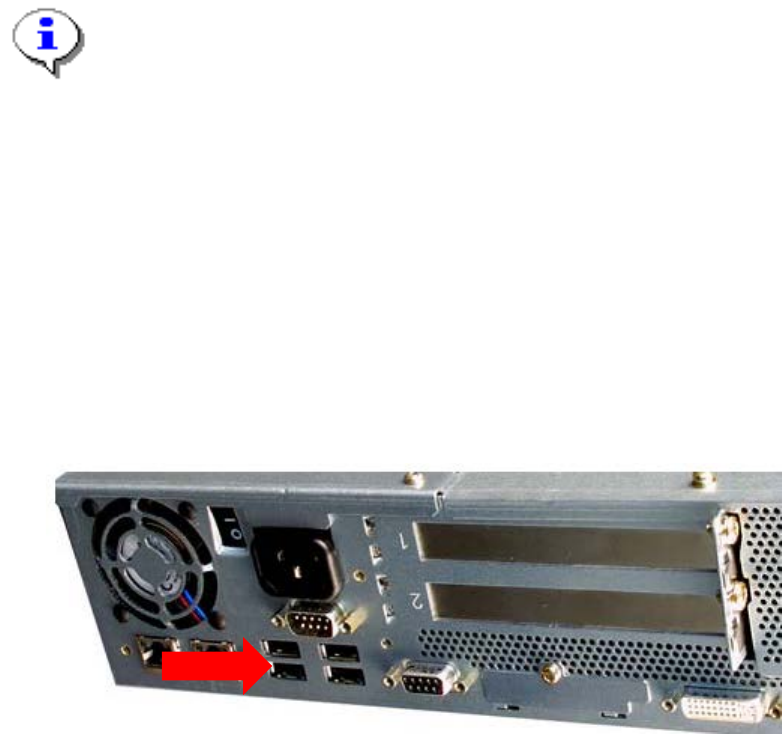
→ To avoid crashes, ensure your USB Hub is connected to Port 0, as shown in the following picture.
4.1.2 SIMATIC BoxPC 827B
You have to ensure you connect the USB devices on the correct ports. Otherwise the install routine will be
held on the point “Installing Windows”.
The USB devices must be plugged into the BoxPC 827B in the right position. The touch screens on the left
USB ports, the keyboards on the right ports.
See the following picture.
Port 0