00196284_Install_WinXP_unattended_DVD.pdf - 第61页
Windows XP Unattended Setup DVD V4 .2 11/2015 Edition 61 Line Computer basic – complex Pass word complexity Ad m i nistrator For the loc al adm inistrator t he unatt ended set up uses the d efault pas sword “ S iplace.1 …
Windows XP Unattended Setup DVD V4.2 11/2015 Edition
60
The user „Siemens-Techniker“ will be used by SIPLACE service. The SIPLACE Service Personnel knows
the password. Don’t change the password!
VisionDCOM
The user VisionDCOM is required for Vision. Please don’t modify it!
Administrator Group
The user „ Siemens-Techniker “ is in the local administrator group. Don’t remove this user from the group.
Otherwise the Support Personnel can’t perform any maintenance.
Other settings
The passwords never expire!
Line Computer basic – simple Password complexity
Administrator
For the local administrator the unattended setup uses the default password “MS128”. It is recommended to
assign a new password.
Siemens
This user should be used as replacement for the builtin- Administrator account. The password of this user
is equal to the password of the builtin- Administrator.
Plr
The default user „plr“ uses the default password “plr”.
SIPLACEServices
The user “SIPLACEServices“ is created for the COM+ components. The password must not be changed.
Otherwise the necessary rights of the SIPLACEPro Components are missed.
.
Administrator group
The user “SIPLACEAdmin“ is defined in the local administrator group. This user must not be removed
from the group. Otherwise the SIPLACE service technician can not perform any maintenance. The
password is known by the SIPLACE Service. The password must not be changed.
Other settings depend on the configuration specified by the user.
Windows XP Unattended Setup DVD V4.2 11/2015 Edition
61
Line Computer basic – complex Password complexity
Administrator
For the local administrator the unattended setup uses the default password “Siplace.1”. It is
recommended to assign a new password.
Siemens
This user should be used as replacement for the builtin- Administrator account. The password of this user
is equal to the password of the builtin- Administrator.
Siplace
The default user „Siplace“ uses the default password “Operator.1”.
SIPLACEServices
The user “SIPLACEServices“ is created for the COM+ components. The password must not be changed.
Otherwise the necessary rights of the SIPLACEPro Components are missed.
.
Administrator group
The user “SIPLACEAdmin“ is defined in the local administrator group. This user must not be removed
from the group. Otherwise the SIPLACE service technician can not perform any maintenance. The
password is known by the SIPLACE Service. The password must not be changed.
Other settings depend on the configuration specified by the user.
4.4 Interrupting an automatic login on Station Computers
To install new software (e.g. station software or machine controller) or to execute maintenance on the
operating system, you have to interrupt the automatic login. Press and hold the Shift key during rebooting
the system (when the Windows logo appears,) or during the system logout.
To activate the automatic login again, please login as Operator with the password operator.
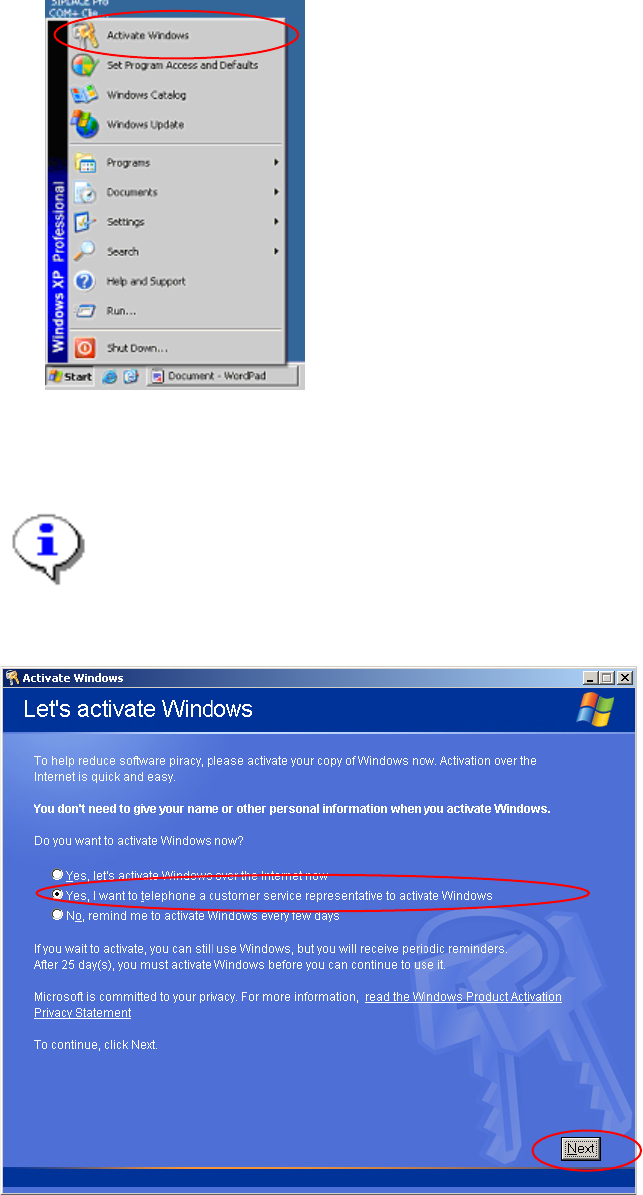
4.5 Activating Windows XP
You must activate your Windows XP license within 30 days after installation of Windows.
Windows XP Unattended Setup DVD V4.2 11/2015 Edition
62
→ Start the program to activate your Windows installation by selecting "Start->Activate Windows".
The dialog asks for your method for activation.
Note:
You can perform your activation over the internet. We do not describe it here, because most of
the installation will be performed without any connection to the internet.
→ Select the radio button "Yes, I want to telephone a customer service representative to activate Windows".
→ Select the button “Next”.
In the next dialog, you have to perform 4 steps to activate Windows XP.