YSM10安装调整(eng).pdf - 第41页
For Ser v ice E n gineer Service Information SI1610004E -000= YSM10_Proced ures for the adjustmen ts required after installing a machine 41/107 Base M A CS – “T imer (Minute)” Select “Setting” “Machine Data ” “Prec…
For Service Engineer
Service Information
SI1610004E-000= YSM10_Procedures for the adjustments required after installing a machine
40/107
5.2 Check the option setting
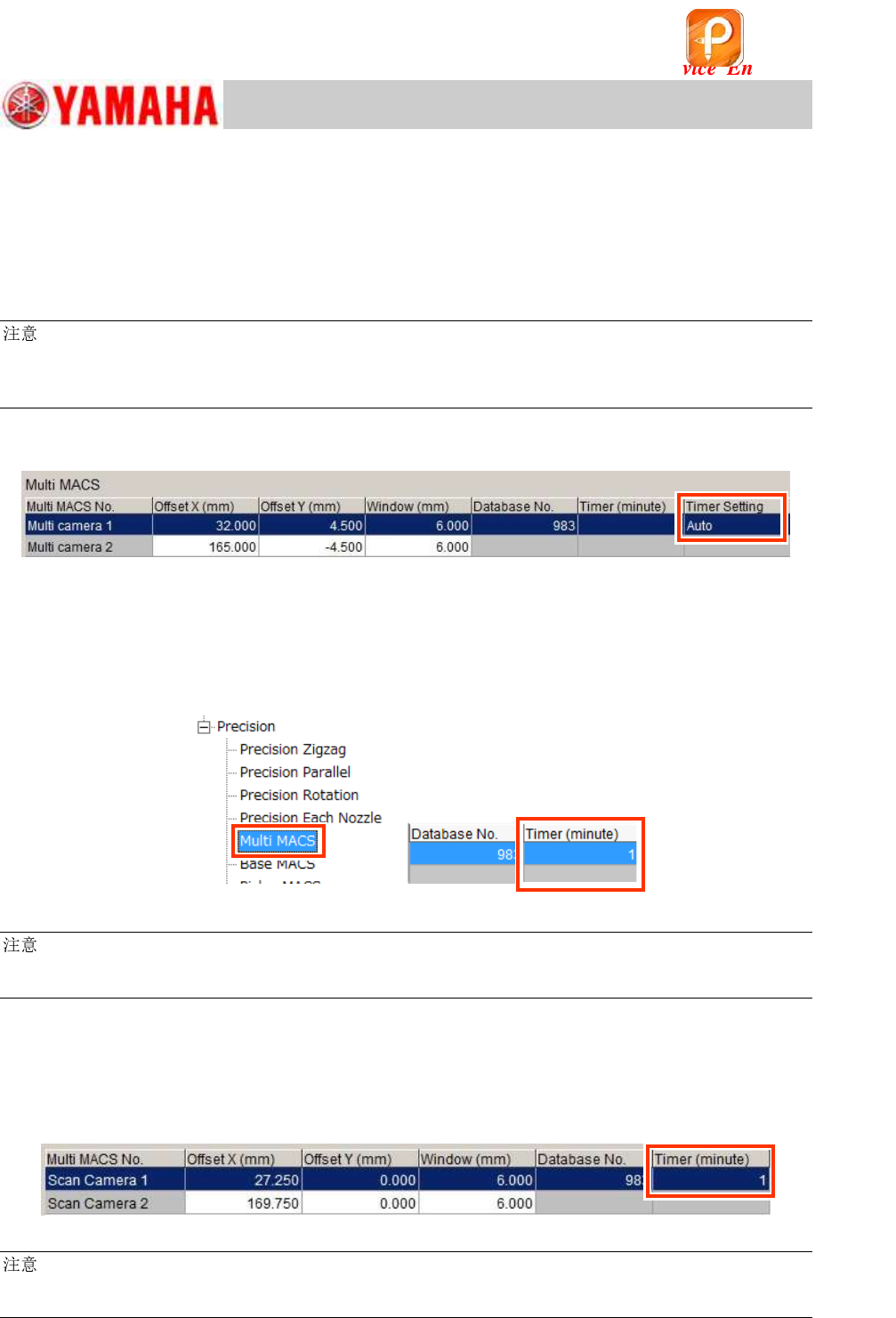
A new item “Timer Setting” has been added next to the “Timer (minute)” item on the “Multi MACS”
and the “BaseMACS” windows (See “Setting”
“Machine Data”
“Precision”
“MultiMACS/
Base MACS” on the VmSpec window).
Make sure that “Timer Setting” is set to “Auto”.
:
By setting the “Timer Setting” item to “Auto”, the recognition distance is automatically adjusted
according to the variation of the thermal expansion of the X and the Y axes.
If it is set to “Manual”, the recognition is performed by the distance set in the “Timer (minute)” field.
Multi MACS – “Timer Setting” (For Multi Camera)
Figure 50
[When “Timer Setting” is set to “Manual”]
Select “Machine Data”
”Precision”
“Multi MACS” from the tree view on the left side of the
VmSpec window, and make sure that “Timer (minute)” is set to “1”.
If the value is too large, it affects the mounting accuracy, and if it is too small, it affects the tact
time.
Figure 51
:
If the “Multi MACS” checkbox on the [Parts] – [Vision] window (Part Information - Ceramic 1005) is
ticked, the Multi MACS is recognized every time during the ACP-Chip adjustment process.
Multi MACS – “Timer Setting” (For Scan Camera)
Select “Machine Data”
”Precision”
“Multi MACS” from the tree view on the left side of the
VmSpec window, and make sure that “Timer (minute)” is set to “1”.
If the value is too large, it affects the mounting accuracy.
Figure 52
:
If the “Multi MACS” checkbox on the [Parts] – [Vision] window (Part Information - Ceramic 1005) is
ticked, the Multi MACS is recognized every time in the ACP-Chip adjustment.
该文档是极速PDF编辑器生成,
如果想去掉该提示,请访问并下载:
http://www.jisupdfeditor.com/
For Service Engineer
Service Information
SI1610004E-000= YSM10_Procedures for the adjustments required after installing a machine
41/107
Base MACS – “Timer (Minute)”
Select “Setting”
“Machine Data”
“Precision”
“BaseMACS” from the tree view on the left
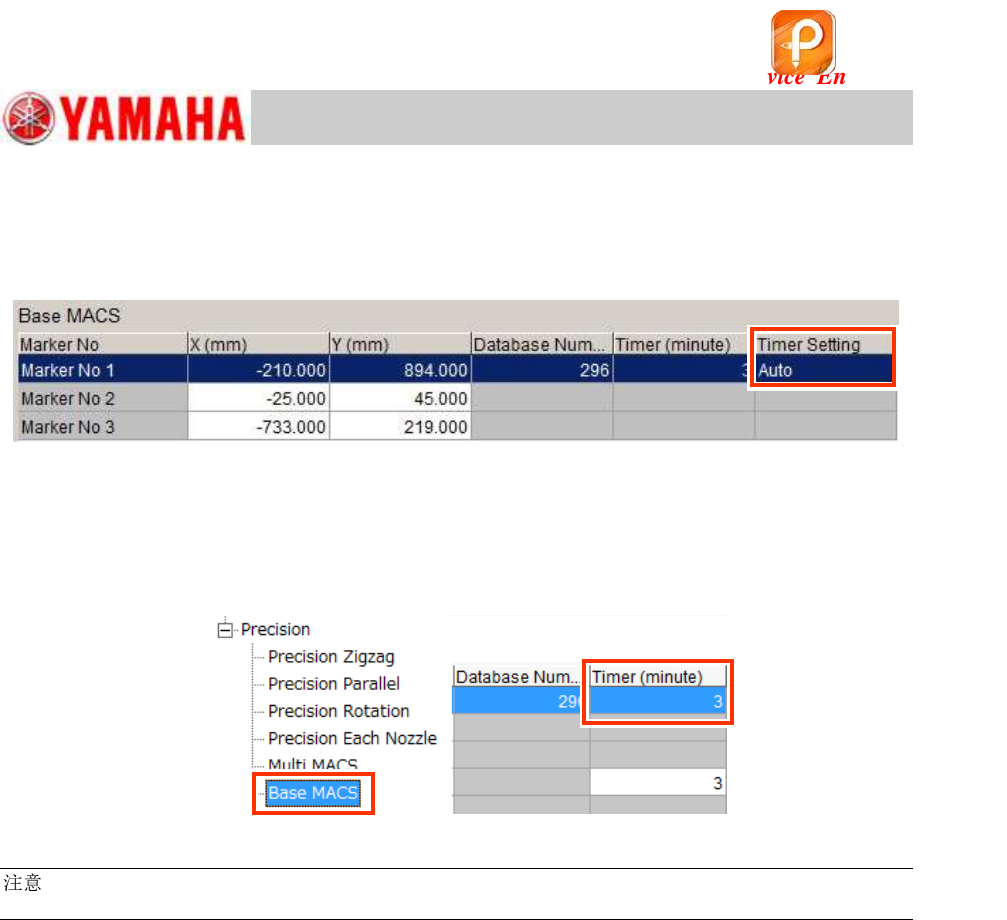
side of the VmSpec window and make sure that the “Timer Setting” is set to “Auto”.
Figure 53
[When “Timer Setting” is set to “Manual”]
Select “Machine Data” ”Precision” “Base MACS” from the tree view on the left side of the
VmSpec window. In order to prevent the accuracy from being degraded over time, make sure to
set “Timer (minute)” to “3”.
Figure 54
:
If the machine setting has been changed, read the board data again for the changes to take effect.
该文档是极速PDF编辑器生成,
如果想去掉该提示,请访问并下载:
http://www.jisupdfeditor.com/
For Service Engineer
Service Information
SI1610004E-000= YSM10_Procedures for the adjustments required after installing a machine
42/107
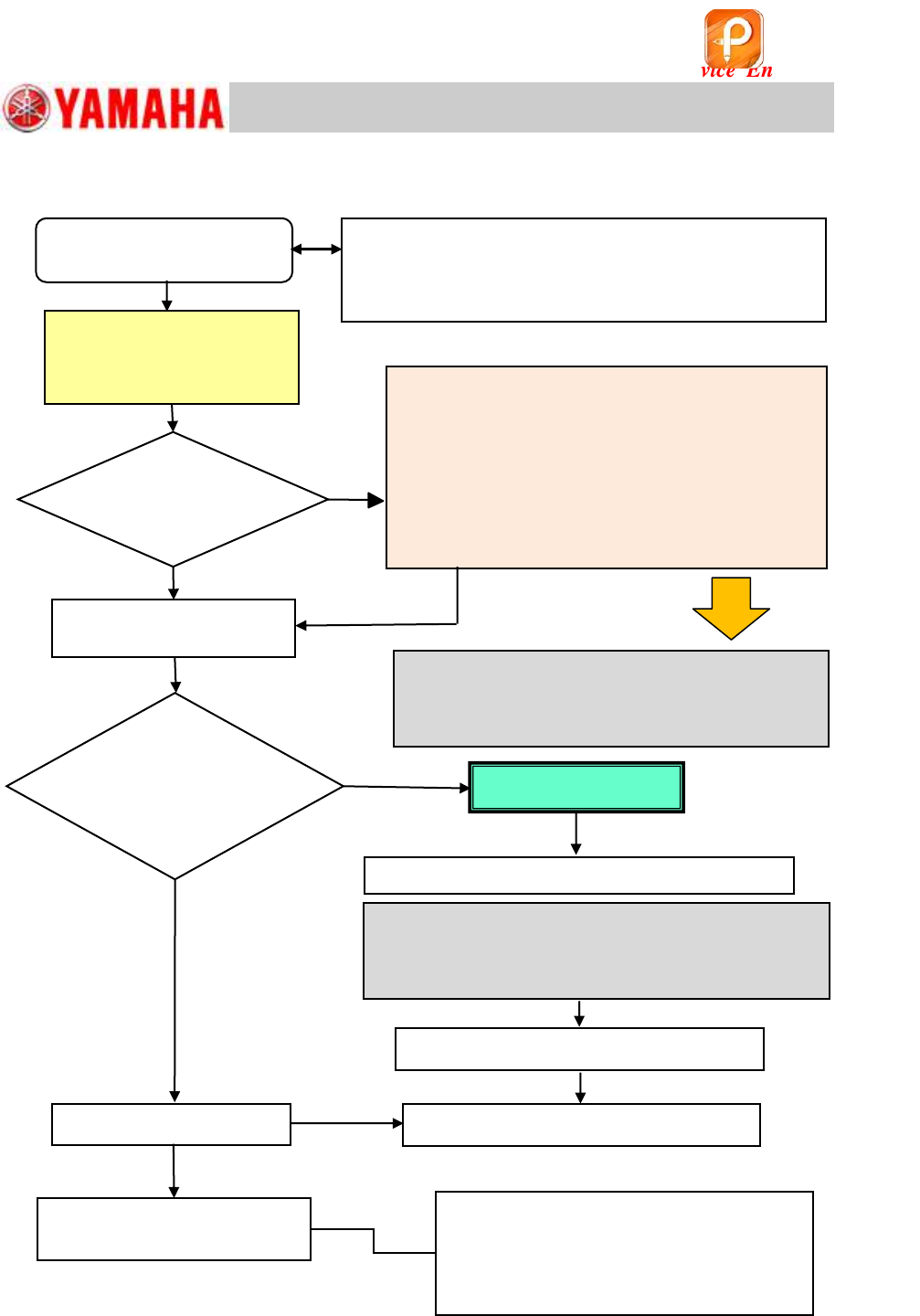
5.3 Basic flow of the ACP adjustment
Figure 55
1. Feed back the correction values
2. ACP-Chip accuracy adjustment
3. Check the AMF Index
If the result falls within the specification by
feeding back the correction values, complete
the ACP-Chip adjustment for the scan camera.
If it does not, feed back the correction values
again and check the accuracy.
Yes
No
Does the AMF
index value meet
the spec?
Check the operation of other
functions
Prepare for the ACP-Chip
adjustment
If the AMF Index value does not fall within the
spec even after feeding back the correction values
twice or more, perform all the basic adjustments.
(See “YSM10 Installation Check Sheet”)
・ Pickup position on the feeder plate
・ Operation of the Blow station
・ Edge Clamp position
・ Operation of the “ANC” (Option)
• Read the board data for adjustment.
• Initial setup for the board for adjustment.
• Recognition check for the component and the mark.
<Scan camera ACP-Chip
accuracy adjustment>
Check the AMF Index
Check the VgChart
No
Yes
Is the machine
equipped with the
Multi camera?
(Option)
Scan camera adjustment
is completed
Camera Acc. Copy
<Multi camera – ACP-Chip accuracy adjustment>
If the AMF Index value does not fall within the spec
even after feeding back the correction values twice or
more, perform the basic adjustments related to the
multi camera. (See “YSM10 Installation Check Sheet”)
Multi camera adjustment is completed
Adjustment completed
<Multi camera – ACP-Station adjustment>
该文档是极速PDF编辑器生成,
如果想去掉该提示,请访问并下载:
http://www.jisupdfeditor.com/