YSM10安装调整(eng).pdf - 第59页
For Ser v ice E n gineer Service Information SI1610004E -000= YSM10_Proced ures for the adjustmen ts required after installing a machine 59/107 6.5 Initial setup for the F AMF st ation Connect the air supp ly and wiring …
For Service Engineer
Service Information
SI1610004E-000= YSM10_Procedures for the adjustments required after installing a machine
58/107
6.4 Read the board data “MCH_SETUP”
The coordinate data in the board data “MCH_SETUP” is used to perform the “ACP-Station”
adjustment in CalibSm.
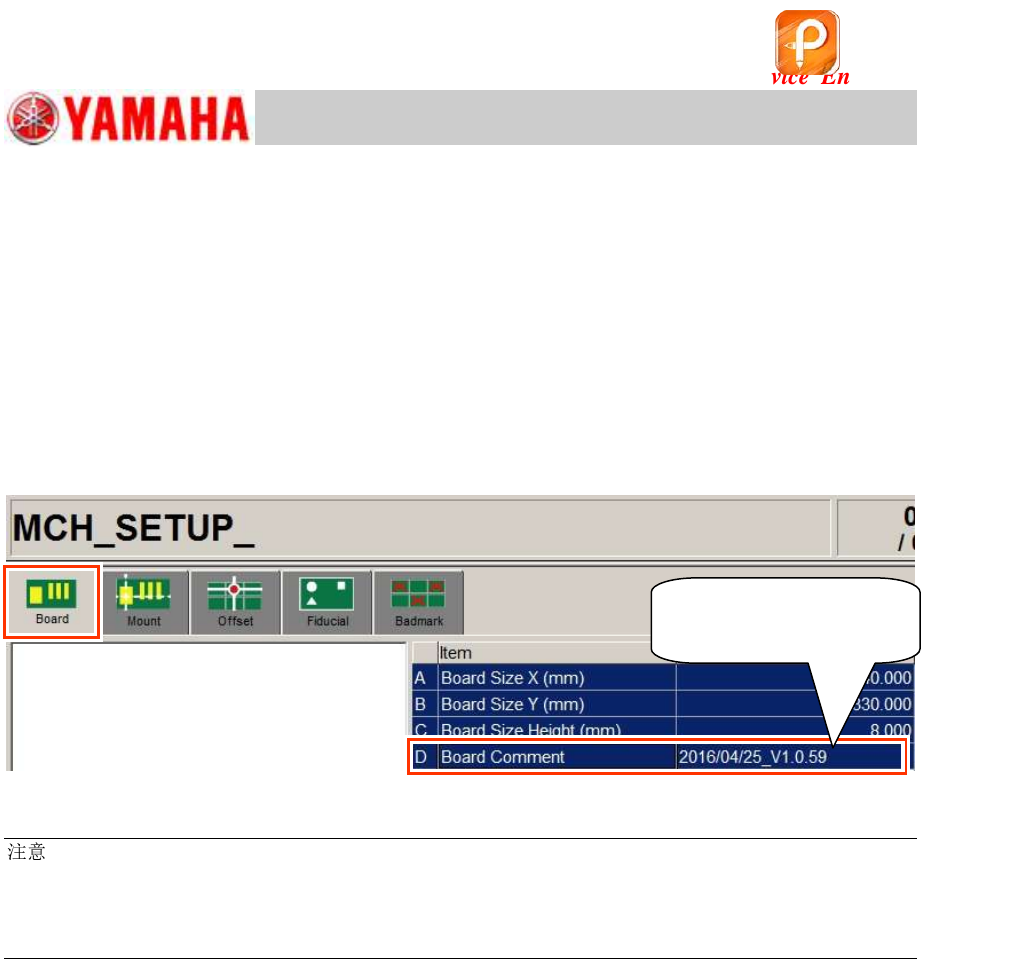
Check the board data version
Read the board data “MCH_SETUP”.
After reading the data, make sure that the board data version in the “Board Comment” field (on the
[Board]-[Board] window) corresponds to the “ACP-Station” utility.
Required version: V1.058 or later
Figure 74
:
If the version of the read board data is old, copy the data from the folder of the corresponding model in
“PCBDATA” folder in the application installation CD.
(The “MCH_SETUP.ygx” data is shared by all the models.)
Copy the board data for the ACP-Chip adjustment from the same location.
Make sure that the
version is V1.058 or later.
该文档是极速PDF编辑器生成,
如果想去掉该提示,请访问并下载:
http://www.jisupdfeditor.com/
For Service Engineer
Service Information
SI1610004E-000= YSM10_Procedures for the adjustments required after installing a machine
59/107
6.5 Initial setup for the FAMF station
Connect the air supply and wiring for the FAMF station.
6.5.1 When using a standard FAMF station
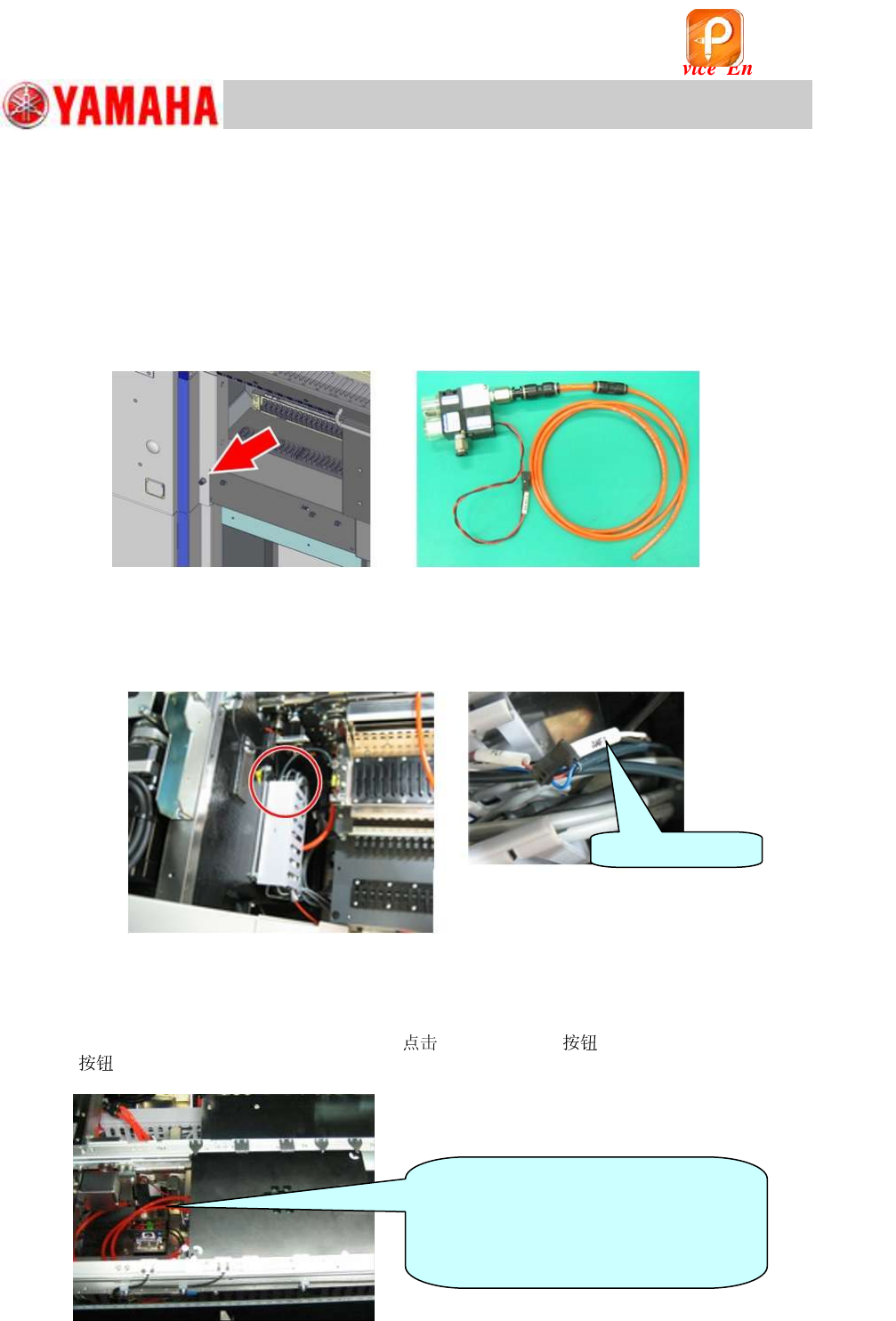
1. Connect the air supply to the ejector.
Connect the air hose of the ejector for the FAMF station (
mm) to the air joint (
mm) at the left
side of the feeder bank.
Figure 75
2. Connect the connector of the ejector.
Take out the harness for driving the ejector “AMF1” from the duct on the left of the feeder bank,
and connect it to the ejector connector.
Figure 76
3. Clamp the FAMF station board.
1) Connect the
6.0 mm air hose from the ejector to the air joint on the back of the station.
2) Change the conveyor width to 170.0mm,
[Main Stopper] and the [Board clamp]
to clamp the station with the board clamp.
Figure 77
AMF1 connector
[Caution]
Make sure that the air hose of the
ejector for the station is located under
the conveyor to avoid interference with
the head.
该文档是极速PDF编辑器生成,
如果想去掉该提示,请访问并下载:
http://www.jisupdfeditor.com/
For Service Engineer
Service Information
SI1610004E-000= YSM10_Procedures for the adjustments required after installing a machine
60/107
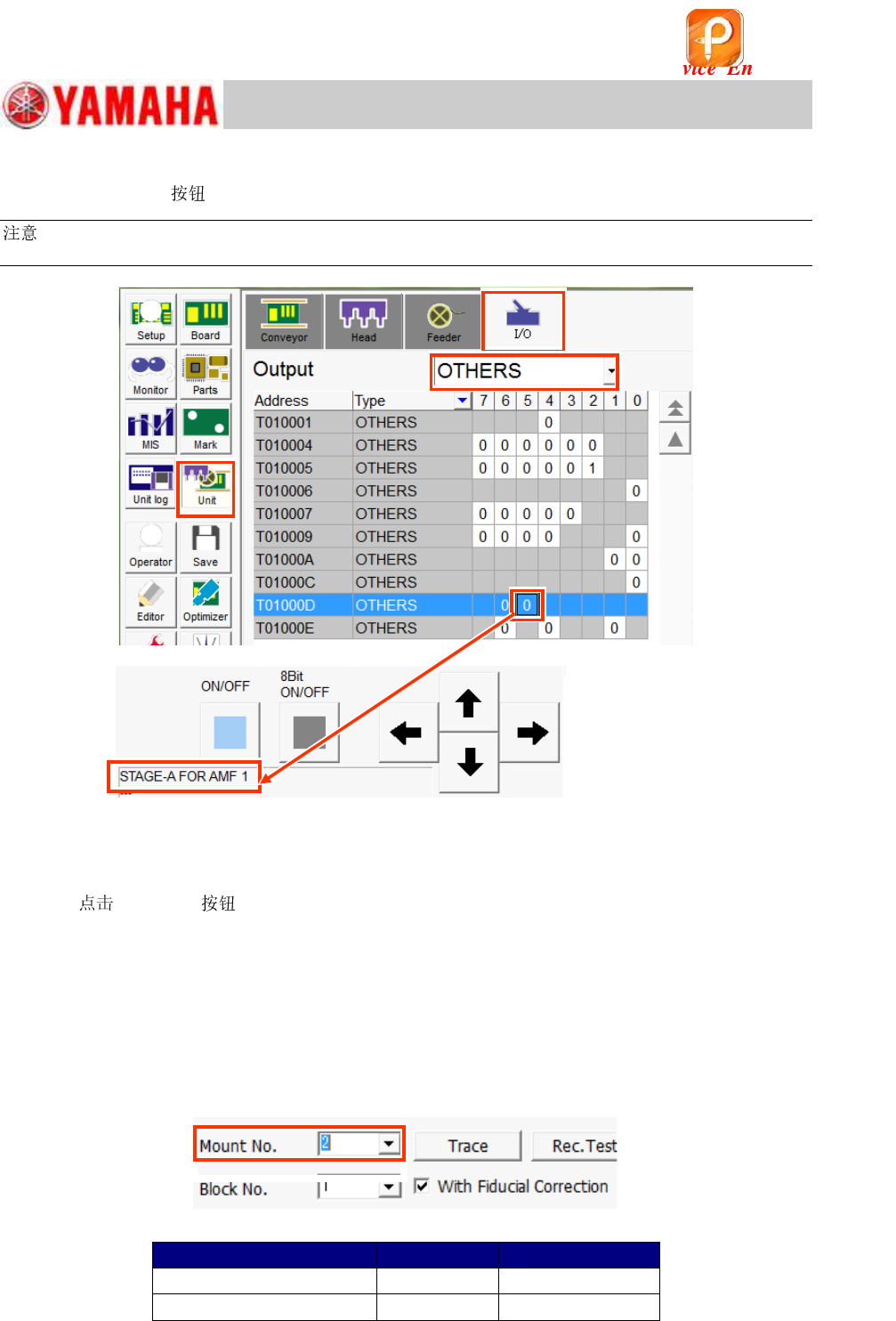
4. Display the “I/O” window to check the operation of the ejector.
Select the [Unit] and the “I/O” tab. Select “OTHERS” from the “Output” pull-down menu.
:
When the ejector is connected to “AMF 1”, select [T01000D5].
Figure 78
5. Make sure that the ejector operates properly.
1) Check the operation of the ejector by turning ON the output “T01000D5”.
2)
[ON/OFF] to make sure that the suction is active in the center hole of the
FAMF station.
6.5.2 When using a small FAMF station
The following is the procedure for how to change the setting when using a small FAMF station
(100x100).
1) Change the conveyor width to 100.0mm. (“Board Size Y” does not need to be changed.)
2) Change the setting of “Mount No.” on the “ACP-Station” window (CalibSm) from “1” to “2”.
Figure 79
Table 29
FAMF station
Mount No.
Local Fiducial
Standard (240X170mm)
1
1
Small (100X100)
2
2
该文档是极速PDF编辑器生成,
如果想去掉该提示,请访问并下载:
http://www.jisupdfeditor.com/