YSM10安装调整(eng).pdf - 第98页
For Ser v ice E n gineer Service Information SI1610004E -000= YSM10_Proced ures for the adjustmen ts required after installing a machine 98/107 11.3.5 “ Head Offset Z ” adjustment : Make sure to adjus t the “ Vacuum leve…
For Service Engineer
Service Information
SI1610004E-000= YSM10_Procedures for the adjustments required after installing a machine
97/107
3. Shift the 16-pin QFP 1.5mm to 2.0mm and make the suck the QFP.
Shift the 16-pin QFP from the center 1.5 to 2.0mm to the Y-direction (the direction of
the leaf spring) when setting it to the tip.
Figure 142
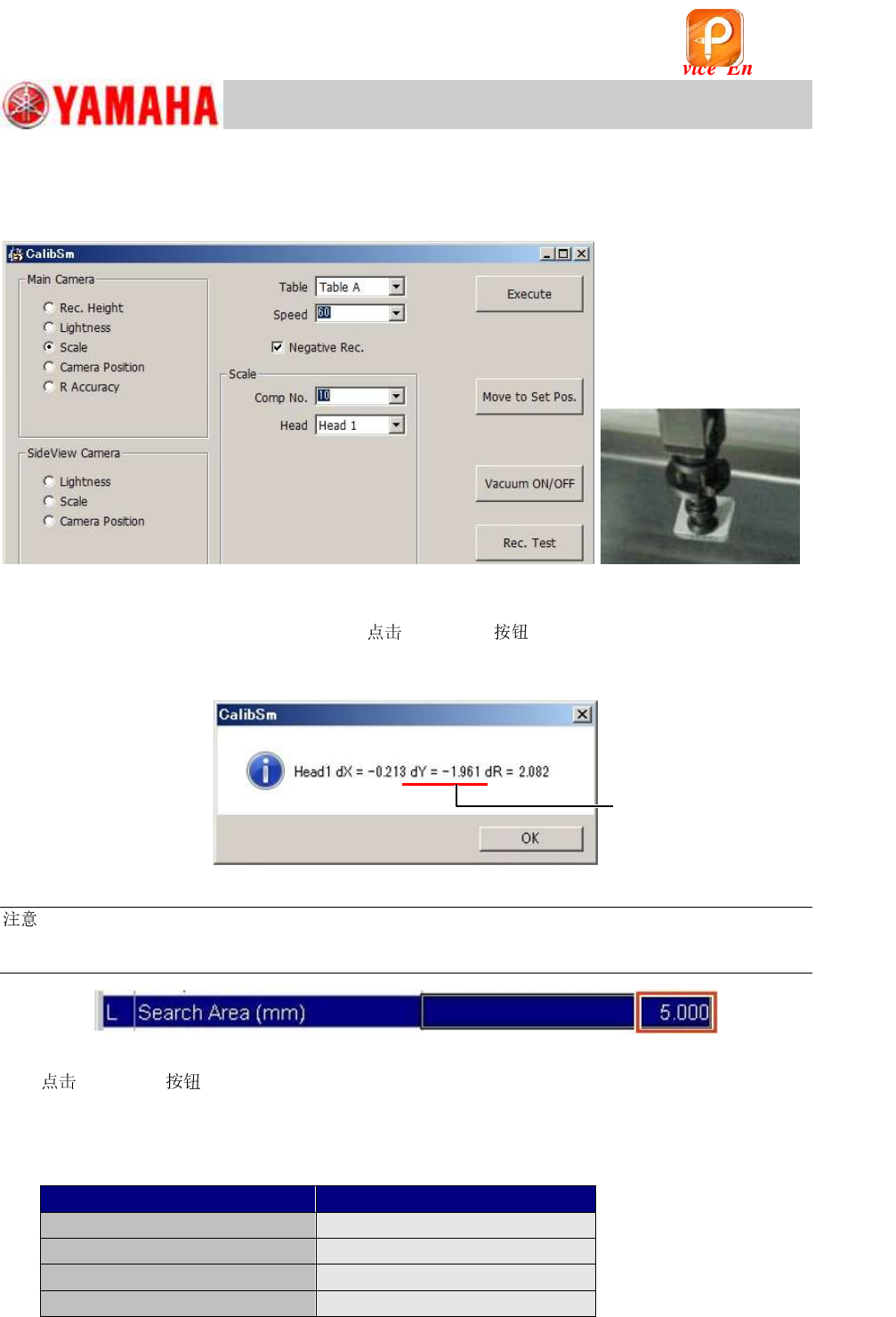
4. Perform the recognition test.
After attaching the QFP to the ,
[Rec.Test] to perform the recognition
test, and check if the shift amount of the result is within 1.5mm to 2.0mm.
If the shift amount is less than 1.5mm, set the QFP again.
Figure 143
:
If a recognition error occurs, change the setting of the “Search Area (mm)” of the Part information
“No.10 QFP16_P0.8” and “No.34 QFP16_P0.8_WHITE” to 5.0mm on the [Parts] – [Vision] window.
Figure 144
5.
[Execute] to start the adjustment.
6. Save the measured data.
Make sure that the measured values fall within the specification and save the
data.
<Specified value>
Item
Specified value
Camera Angle
0.000 +/- 0.500 degrees
X
26.000
m
Y
25.500 ~ 26.500
m
Dual Rec Offset
-0.052 ~ 0.052 mm
Table 44
The value of “dY” should
fall within 1.5 to 2.0.
该文档是极速PDF编辑器生成,
如果想去掉该提示,请访问并下载:
http://www.jisupdfeditor.com/
For Service Engineer
Service Information
SI1610004E-000= YSM10_Procedures for the adjustments required after installing a machine
98/107
11.3.5 “Head Offset Z” adjustment
:
Make sure to adjust the “Vacuum level” adjustment before performing the “Head Offset Z” adjustment.
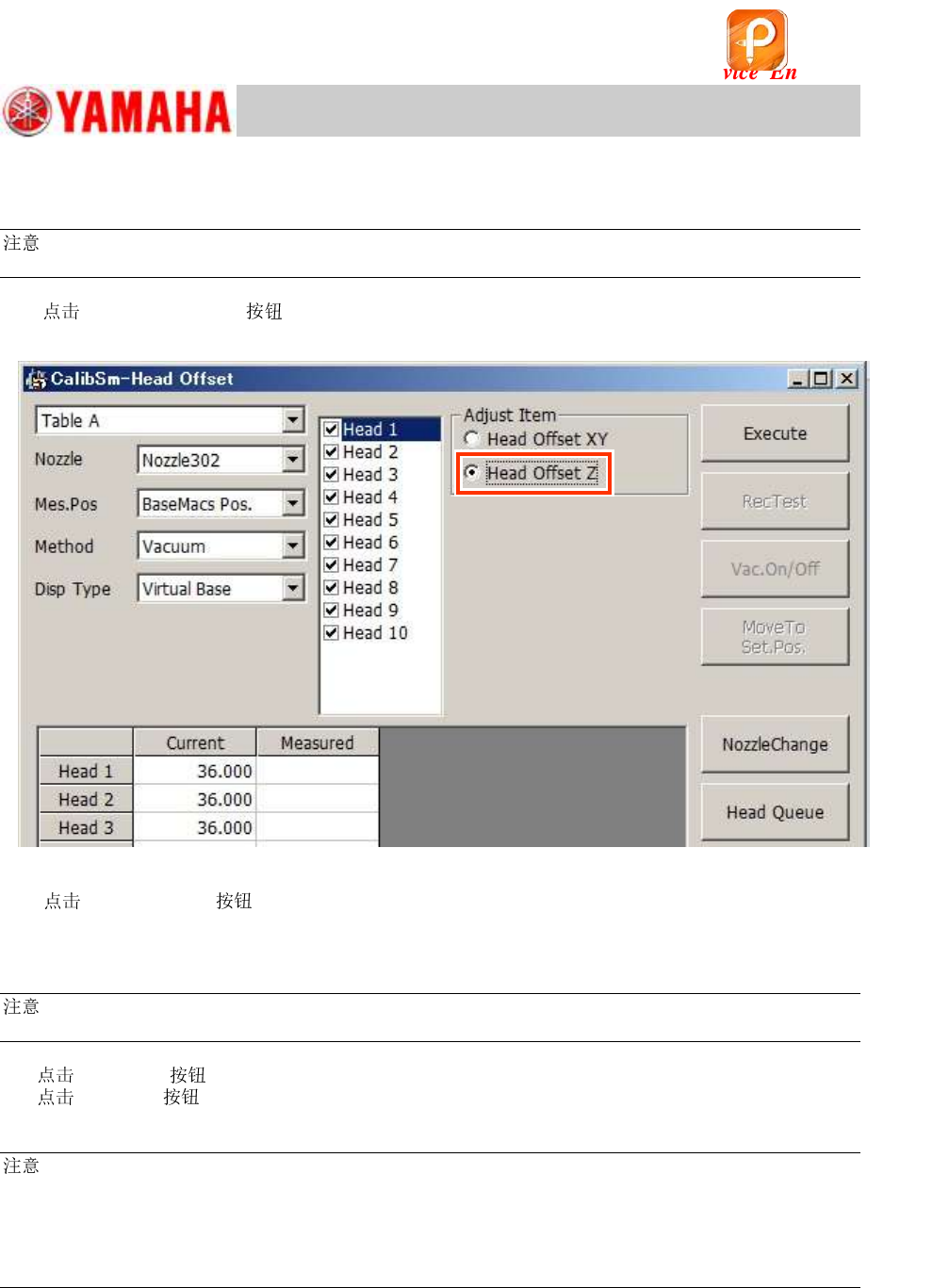
1. [015 Head Offset] on the CalibSm main menu and select “Head Offset Z”
from “Adjust Item”.
Figure 145
2. [ Change] to change the to the Type 302A (313A) .
If the machine is not equipped with an ANC, change the s by hand.
3. Make sure that “BaseMacs Pos.” is selected from the “Mes.Pos” pull-down menu.
:
As the Virtual origin is used for YSM10, the reference positon for the Head Offset Z is the BaseMACS.
4.
[Execute] .
[Execute] to start the adjustment. Make sure that the measured value is appropriate,
and save the data.
:
After performing the “Head Offset Z” adjustment, make sure to perform the “PCB Height” adjustment.
This is because both the “Head Offset Z” and the “PCB Height” is adjusted in reference to the virtual
origin, and the coordinates of the “PCB Height” may be changed by adjusting the Head Offset Z, which
may affect the mounting accuracy.
See “11.3.6 “PCB Height” adjustment” for the method.
该文档是极速PDF编辑器生成,
如果想去掉该提示,请访问并下载:
http://www.jisupdfeditor.com/
For Service Engineer
Service Information
SI1610004E-000= YSM10_Procedures for the adjustments required after installing a machine
99/107
11.3.6 “PCB Height” adjustment
The four (4) points on the upper surface of the aluminum frame of the board is measured,
and the height of the lowest point of the four (4) is saved as the “PCB height”.
The “PCB height” is the reference height for the head to mount components, and is automatically
measured according to the changes in the vacuum pressure of the when it contacts the
board surface.
The “Pick Level“ and the “Mount Level” adjustments need to be completed before measuring the
PCB height.
Required jigs
Part No.
Part Name
Jig
Qty
ACP board
PCB ASSY.4
KM0-M8810-40
1
Select either of the boards.
AMF board
PCB ASSY.1
KM0-M8810-10
Type 302A
302A ASSY.
KHN-M7720-A0
1
Select either of the s.
Type 313A
313A ASSY.
KHY-M7730-A0
Table 45
1.
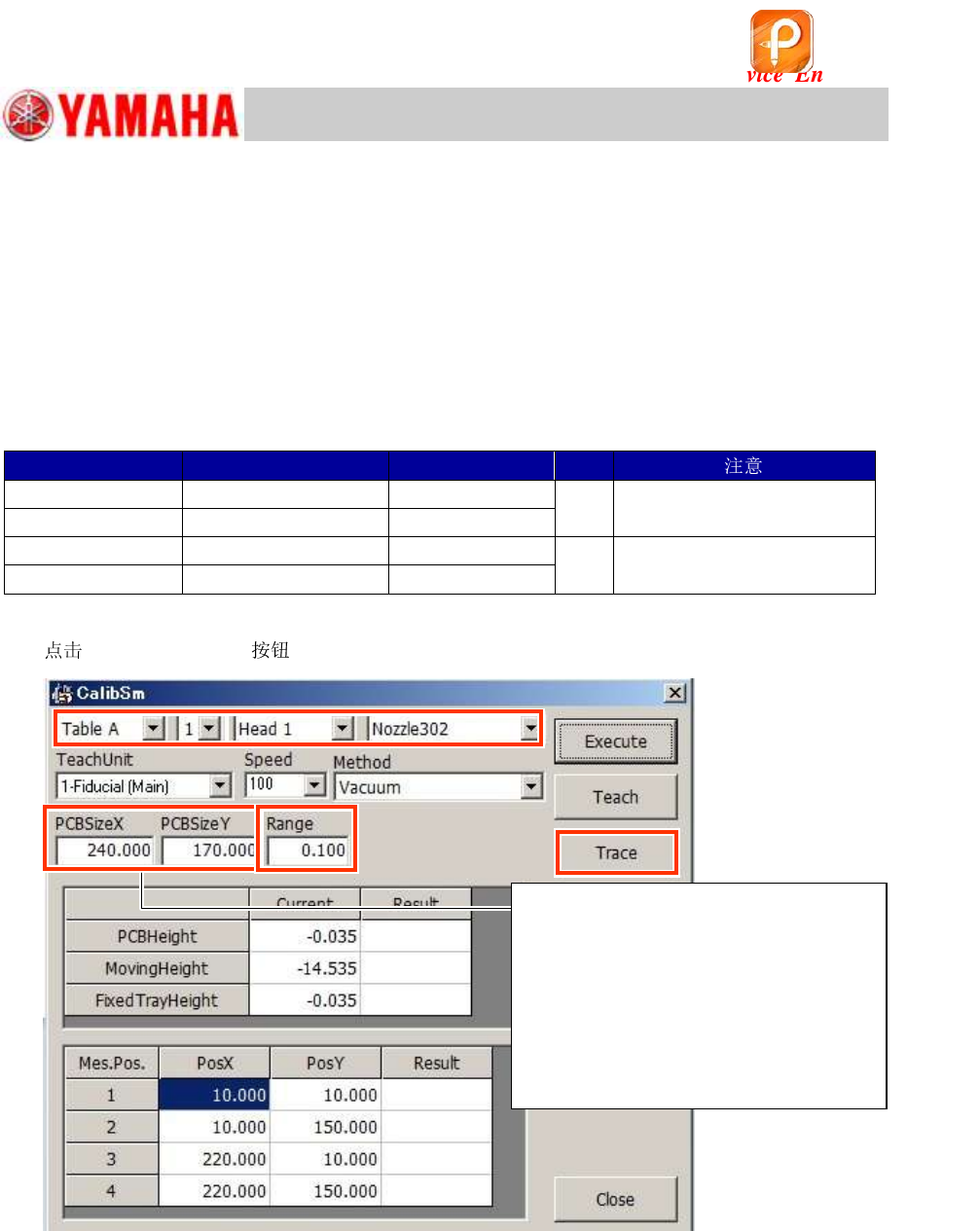
[006 PCB Height] on the CalibSm main menu.
Figure 146
2. Check the used for the measurement.
Select “ 302A” or “ 313A” as the PCB height is measured by the difference in the
vacuum pressure of the .
If the machine is not equipped with an ANC, attach the to the head by hand.
3. Check the value in the “Range” field.
Make sure that the value in the “Range” field (specified value) is “0.100”.
The four (4) points on the aluminum frame of the board are measured and the difference
between the maximum and the minimum values is checked automatically.
Step 3
“PCB Size X, Y” are the reference
values for the measurement point of
the PCB height.
When the board size is changed, the
coordinate of the measurement point
is changed automatically.
(It works the same for the machine
whose board flow direction is from left
to right.)
Step 2
该文档是极速PDF编辑器生成,
如果想去掉该提示,请访问并下载:
http://www.jisupdfeditor.com/