YSM10安装调整(eng).pdf - 第78页
For Ser v ice E n gineer Service Information SI1610004E -000= YSM10_Proced ures for the adjustmen ts required after installing a machine 78/107 7.2.2 Feeder Pic kup positi on Z adjustme nt Measure the height of the datum…
For Service Engineer
Service Information
SI1610004E-000= YSM10_Procedures for the adjustments required after installing a machine
77/107
3. Enter the correction values (Offset value) of the jig into the “ToolOffSet X, Y, Z” fields.
The correction values of the jig is labeled on the jig to be used for the adjustment. Enter the values
in the “ToolOffSet X, Y and Z” fields.
Figure 113
4. Select the section to be measured.
Tick the checkbox of the section to be measured.
5. Set the jig to the feeder plate.
Set the jig to the section number specified in the “Section Info”.
(If the measurement cannot be performed properly with the set position specified as the default
setting, change the “Tool Set No.”.)
6.
[XYExecute] .
If there is no problem with the default setting (the offset values, UnitXY, Speed, Mark No., and so
on),
[XYExecute] to measure the mark position of the jig.
Figure 114
7. Make sure that the variation amount is appropriate.
If the variation amount is abnormal, make sure that the Pickup position adjustment jig is set
properly and the settings are appropriate.
8. Check the Z-coordinate if needed.
See “7.2.2 Feeder Pickup position Z adjustment” for the method.
9. Perform the adjustment for the next section.
Select the next section to be adjusted, check the “Tool Set No.”, and then set the jig to the feeder
plate.
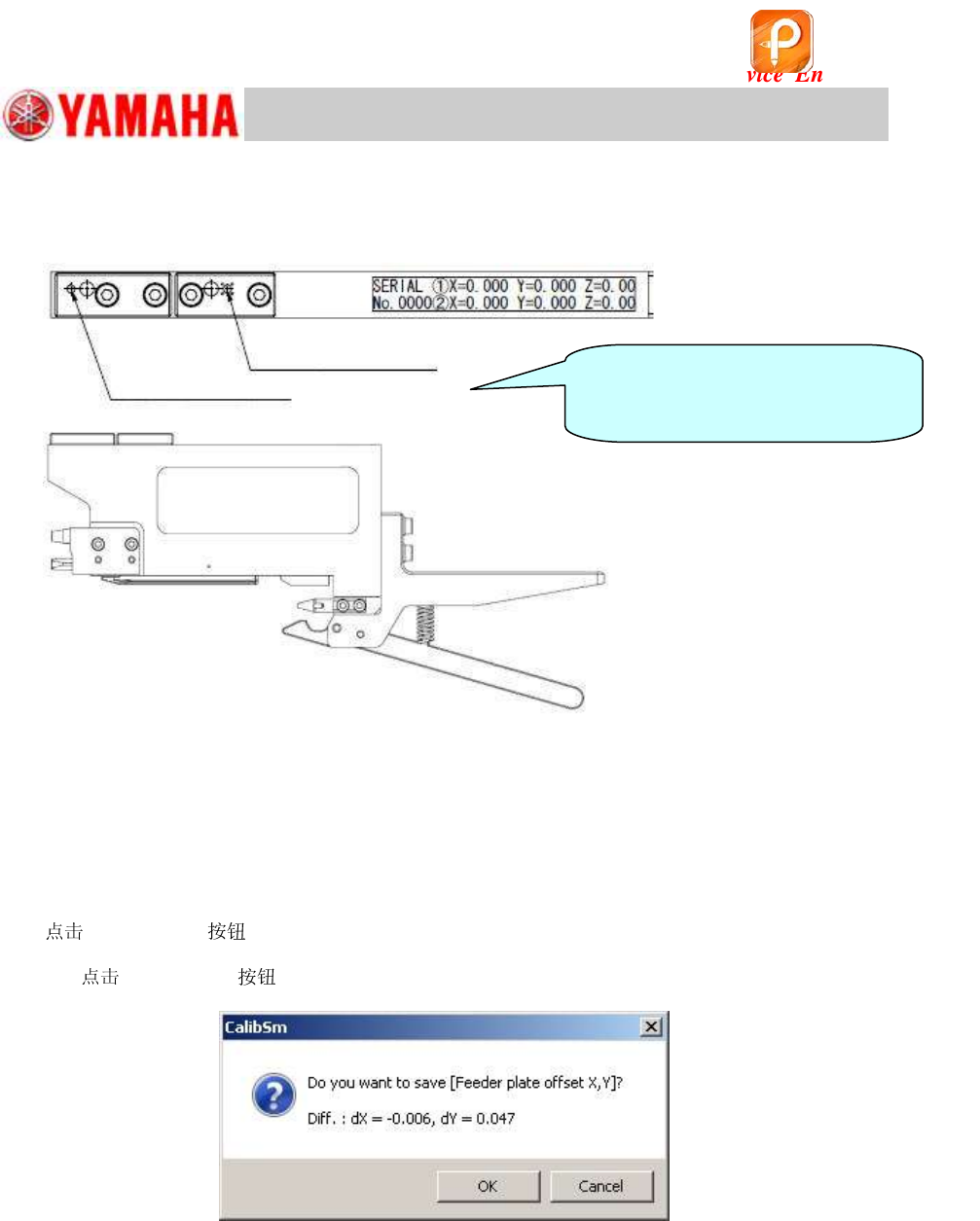
Pick up position
Pick up position: Only for YS88 rear side
It is used when measuring the rear
section of YS88 by the camera.
(Y 39.0mm Offset)
该文档是极速PDF编辑器生成,
如果想去掉该提示,请访问并下载:
http://www.jisupdfeditor.com/
For Service Engineer
Service Information
SI1610004E-000= YSM10_Procedures for the adjustments required after installing a machine
78/107
7.2.2 Feeder Pickup position Z adjustment
Measure the height of the datum feeder specified per section.
Although the datum head (Head 1) is basically used for the measurement, if the measurement
cannot be performed with it, other head is automatically selected.
Use a type 302A or a type 313A for the measurement.
If the machine is not equipped with the station (ANC), attach the to the head by
hand.
1. Select the section to be measured.
Tick the checkbox of the section to be measured.
2. Set the jig.
Set the jig to the position (number) shown in the ”Tool Set No” field in “Section Info”.
(If the measurement cannot be performed with the default setting, change the “Tool Set No.”.)
3.
[ZExecute] .
Check the measurement condition set as default (Offset value for each item, Unit Z, Speed, and so
on) and make sure that they are appropriate, and then
[ZExecute] .
The height of the upper surface of the jig is measured automatically.
该文档是极速PDF编辑器生成,
如果想去掉该提示,请访问并下载:
http://www.jisupdfeditor.com/
For Service Engineer
Service Information
SI1610004E-000= YSM10_Procedures for the adjustments required after installing a machine
79/107
7.2.3 Plate check
After adjusting the pickup position of all the sections,
[Plate Check] to check if the
pickup positions have been adjusted properly.
If any of the coordinate values does not meet the specification, the color of the value changes.
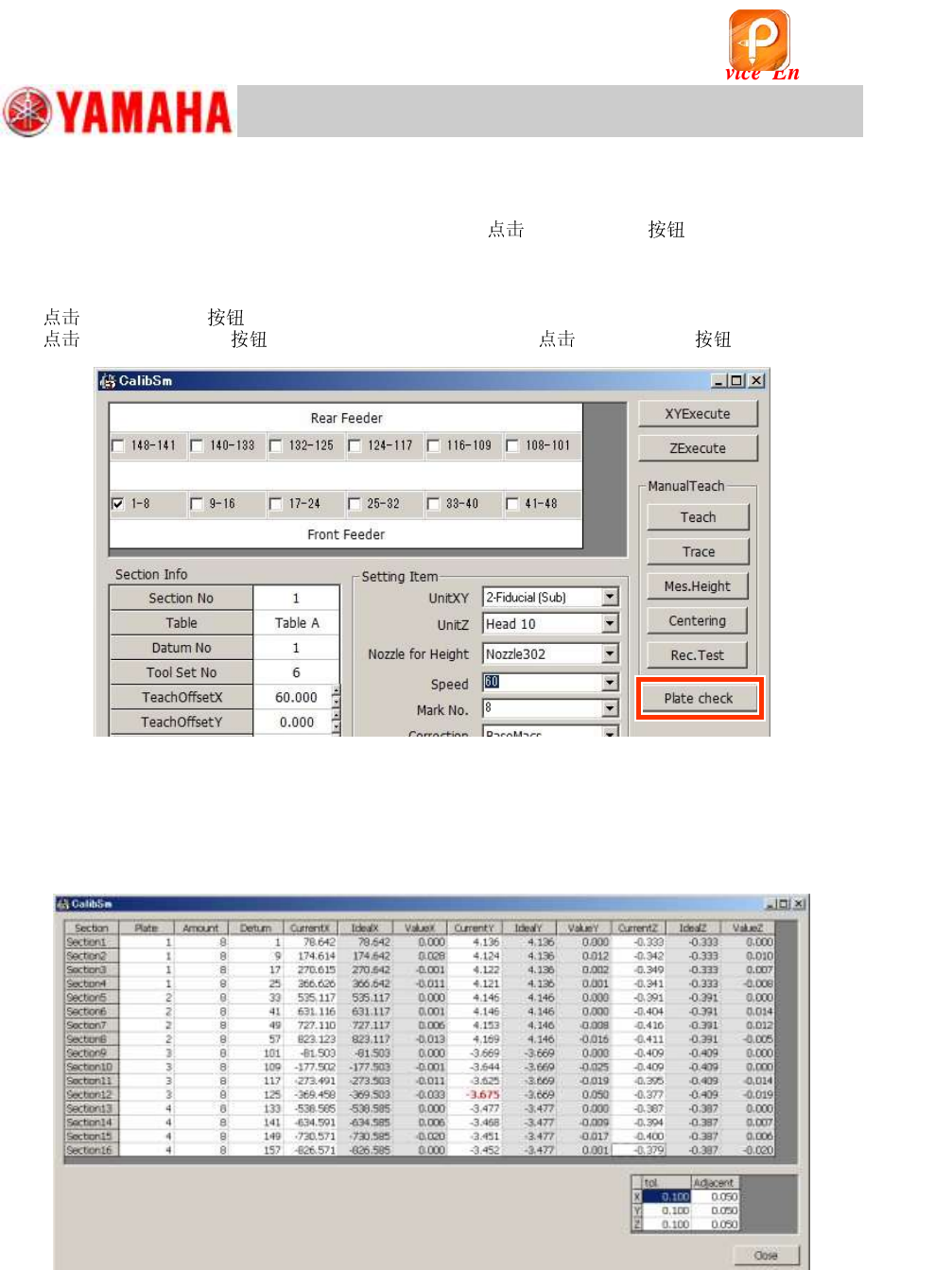
1. [Plate check] on the “FeederPos” window.
[005 FeederPos] on the CalibSm main menu and [Plate check] .
Figure 115
2. Check the coordinate data.
The adjusted coordinate data of all the sections are displayed. If there is any value that changes
the color, it indicates that the coordinate does not meet the specification.
Make sure that the jig is set properly and its set position is appropriate, and then perform the
adjustment again.
Figure 116
[“Adjacent”]
The offset amount of the coordinates between the adjacent sections where the simultaneous
pickup may occur is checked. (When an error occurs, the values turn red.)
[“tol”]
In reference to the first section of each feeder plate, the accumulated offset amount of the pickup
positions in the table is checked. (When an error occurs, the values turn yellow.)
该文档是极速PDF编辑器生成,
如果想去掉该提示,请访问并下载:
http://www.jisupdfeditor.com/