YSM10安装调整(eng).pdf - 第85页
For Ser v ice E n gineer Service Information SI1610004E -000= YSM10_Proced ures for the adjustmen ts required after installing a machine 85/107 4. Check the folder w here the data is saved. W h e n “Start Update(E) F5” i…
For Service Engineer
Service Information
SI1610004E-000= YSM10_Procedures for the adjustments required after installing a machine
84/107
10.3 How to bring back the adjusted data
By using the “Get Information” utility, the adjusted machine data in the “D: Machine¥Result folder”
is automatically saved in the USB drive.
:
Make sure to set a USB drive to the machine beforehand.
1.
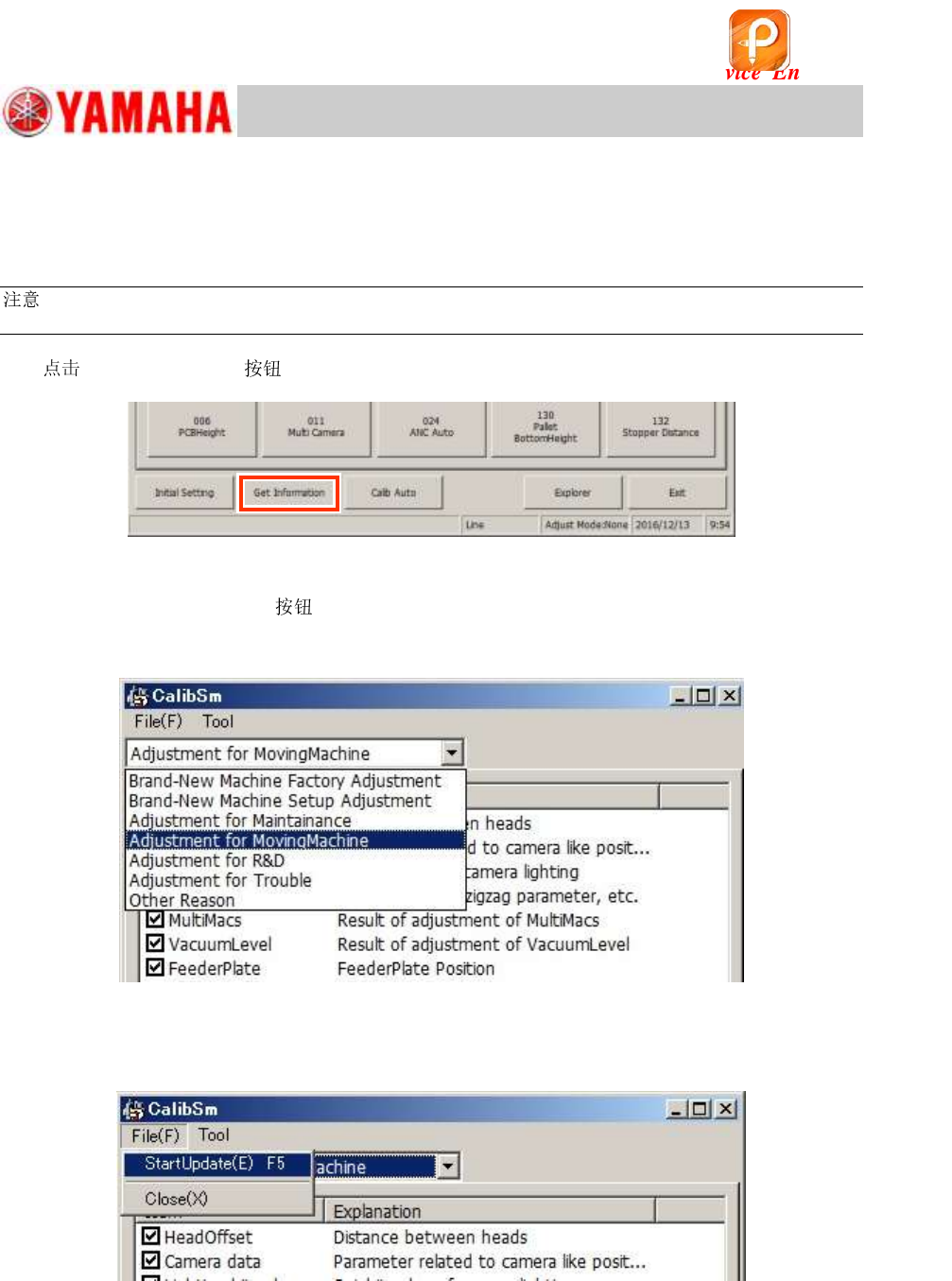
[Get Information] on the CalibSm main menu.
Figure 123
2. Select the adjustment item.
When the [Get Information]
is tapped, the data to be saved are displayed.
Select the adjustment item from the pull-down menu at the upper left of the window to identify the
contents and the condition of the data to be saved.
Figure 124
3. “Start Update (E) F5”
Select “Start Update (E) F5” from the “File (F)” pull-down menu.
Figure 125
该文档是极速PDF编辑器生成,
如果想去掉该提示,请访问并下载:
http://www.jisupdfeditor.com/
For Service Engineer
Service Information
SI1610004E-000= YSM10_Procedures for the adjustments required after installing a machine
85/107
4. Check the folder where the data is saved.
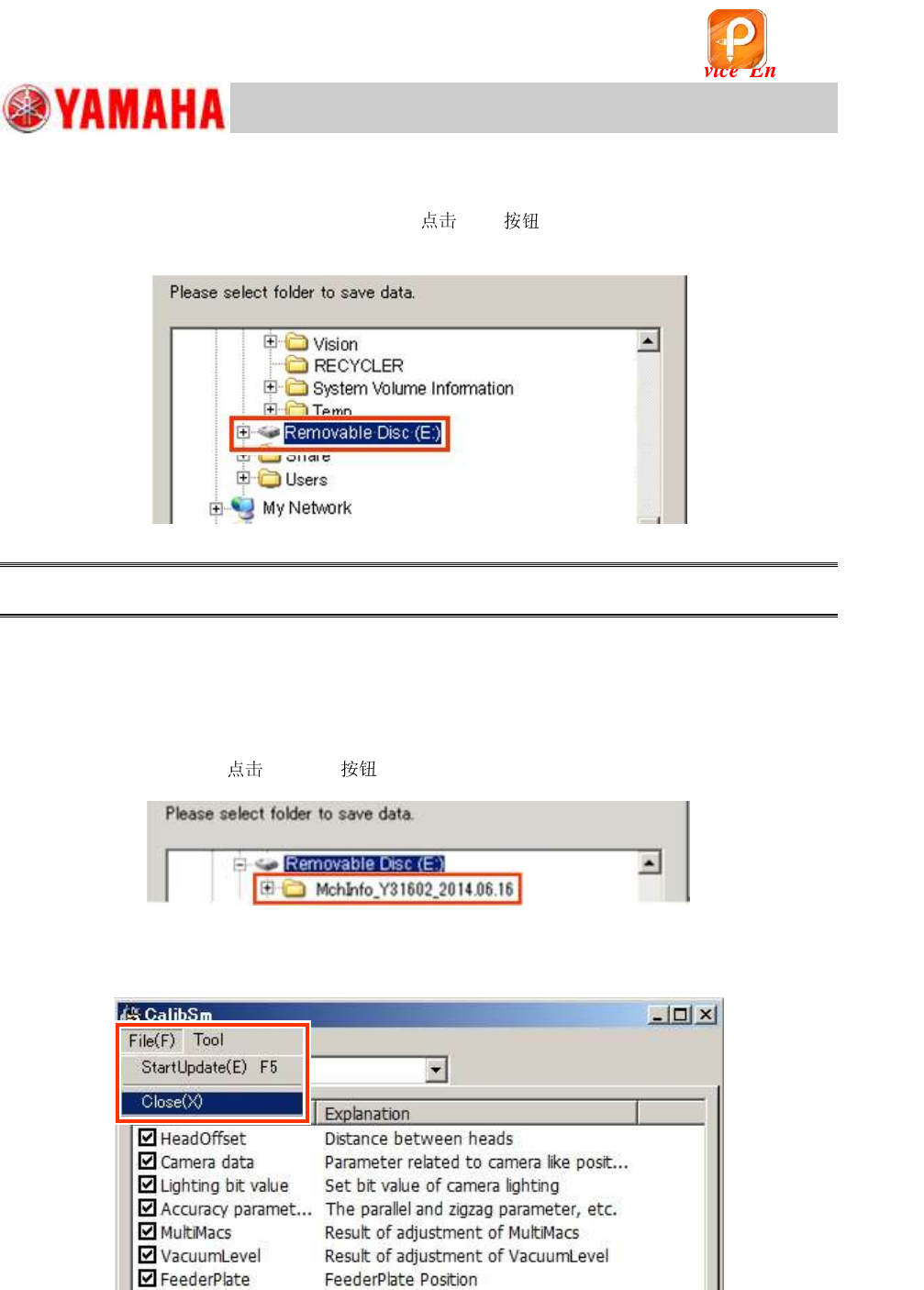
When “Start Update(E) F5” is selected, the following window is displayed.
As “Removable Disk (E) is selected as default,
[OK] . The folder with the name of the
date that the data is saved is automatically created and the data saving process starts.
Figure 126
Caution:
Make sure to select “Removable Disk”.
5. Check if the data has been loaded properly.
After the data saving process has been completed, tap “StartUpdate(E) F5” again and check if the
created file exists in the “Removable Disk”.
File name: MchInfo_Y****_2014.06.16 (MchInfo_Serial Number_date)
After checking the file,
[Cancel] to exit the window.
Figure 127
6. Select “Close” to exit the window.
Figure 128
该文档是极速PDF编辑器生成,
如果想去掉该提示,请访问并下载:
http://www.jisupdfeditor.com/
For Service Engineer
Service Information
SI1610004E-000= YSM10_Procedures for the adjustments required after installing a machine
86/107
11. Basic adjustments required when “AMF index 1” falls below 1.000
In the ACP-Chip accuracy check, if the “AMF index 1” value falls below 1.000 even after feeding
back the correction values twice, analyze the measured data on the “VgChart” and perform the
necessary adjustments.
If the mounting is unstable, the AMF index cannot be improved no matter how many times the
adjustment by the ACP-Chip is performed. Check the cause of the problem referring to the
analysis result, and perform the related basic adjustments again.
In case the cause of the problem cannot be identified, perform the “” adjustment for all the
fiducial cameras and the component recognition cameras.
When “AMF Index 1” falls below 1.000 only for the multi camera, perform the “” adjustment
for the multi camera.
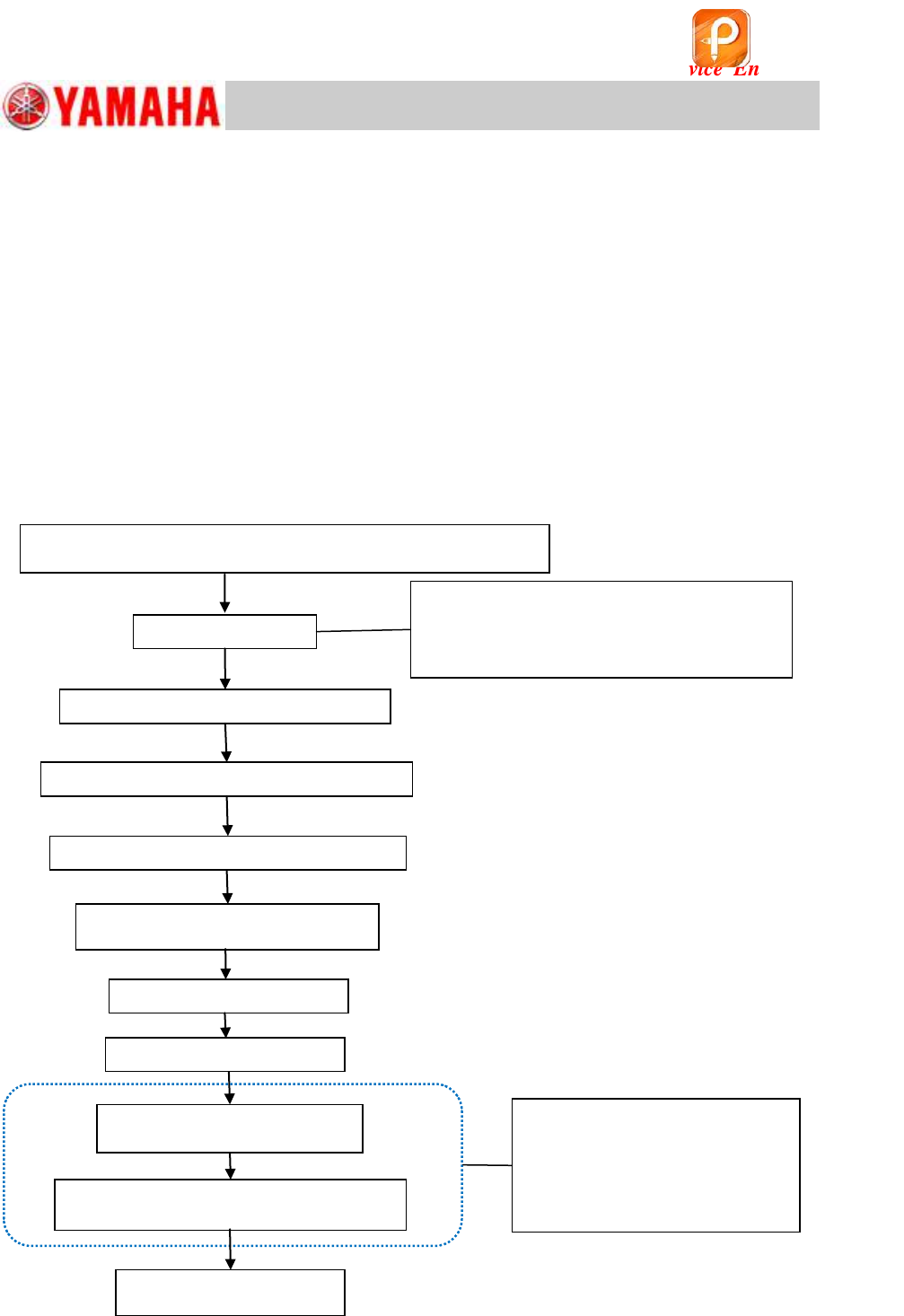
11.1 Flow of the basic adjustment
Figure 129
The result does not fall within the spec even after feeding
back the correction values twice or more in ACP-Chip
Check the VgChart
“Fiducial camera” – “Lightness” adjustment
“Scan camera” – “Lightness” adjustment
整
“Fiducial camera” – “” adjustment
(Option) “Multi Camera” –
“” & “Dual Rec Offset” adjustments
(Option) “Multi Camera” –
“Lightness” adjustment
・ Does the deviation occur to the specific
head?
・ Does the deviation occur repeatedly?
Check the related parts.
When the result does not fall
within the spec. only in the
multi camera, perform the
basic adjustments only for the
multi camera.
“Head Offset Z” adjustment
“PCB Height” adjustment
“Scan camera (Main)” – “” &
“Dual Rec Offset” adjustment
Mounting adjustment
(ACP-Chip)
该文档是极速PDF编辑器生成,
如果想去掉该提示,请访问并下载:
http://www.jisupdfeditor.com/