YSM10安装调整(eng).pdf - 第48页
For Ser v ice E n gineer Service Information SI1610004E -000= YSM10_Proced ures for the adjustmen ts required after installing a machine 48/107 5.5.3 Feed back the correcti on values w hen the “A MF Index 1“ falls belo w…
For Service Engineer
Service Information
SI1610004E-000= YSM10_Procedures for the adjustments required after installing a machine
47/107
4. Start the “ACP-Chip” measurement.
When the [Save]
is tapped, the adjustment and then the measurement are performed
continuously.
Figure 60
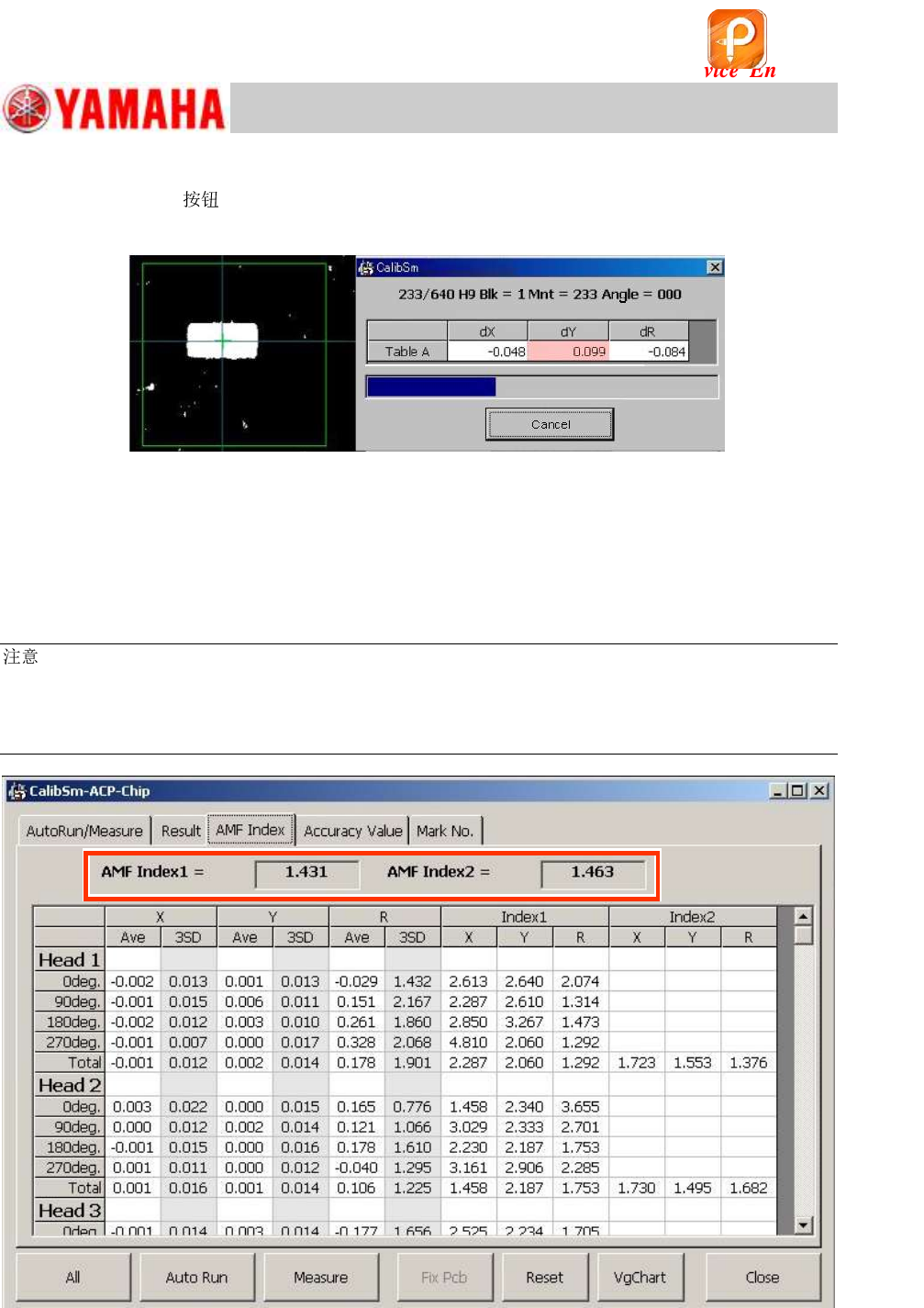
5. Check the “AMF Index 1” and “AMF Index 2” values.
When the measurement has been completed, the “AMF Index” window appears.
Fill in the values on the Check sheet as the values before the feedback
If the “AMF Index 1” value is 1.0 or above, it indicates that the mounting accuracy meets the
specification.
:
If the AMF Index is 1.0 or above, the ACP-Chip adjustment for the main camera (Scan camera) is
completed.
If the machine is equipped with the multi camera, go on to “5.6 ACP-Chip adjustment for the Multi
camera (Option)”.
Figure 61
该文档是极速PDF编辑器生成,
如果想去掉该提示,请访问并下载:
http://www.jisupdfeditor.com/
For Service Engineer
Service Information
SI1610004E-000= YSM10_Procedures for the adjustments required after installing a machine
48/107
5.5.3 Feed back the correction values when the “AMF Index 1“ falls below 1.0
When the “AMF Index 1” falls below 1.0, the accuracy does not meet the specification. Feed back
the correction values and perform the ACP-Chip measurement again.
:
As the camera position adjustment for the component recognition cameras and the Head offset
adjustment have been performed before performing the ACP-Chip adjustment, just feed back the
correction values to enhance the accuracy.
1. Check the VgChart window.
Check if any of the heads is the cause for the insufficient accuracy on the VgChart.
If an abnormarity is observed on a speficied head, check the following for the head.
・ Is the attached to the head properly?
・ Are the leaf springs straight (not bent) or installed properly?
・ Is the spring at the tip of the moves properly?
・ If the contaminated or chipped?
:
See “5.7.2 Check the “VgChart” window” for how to interpret the VgChart.
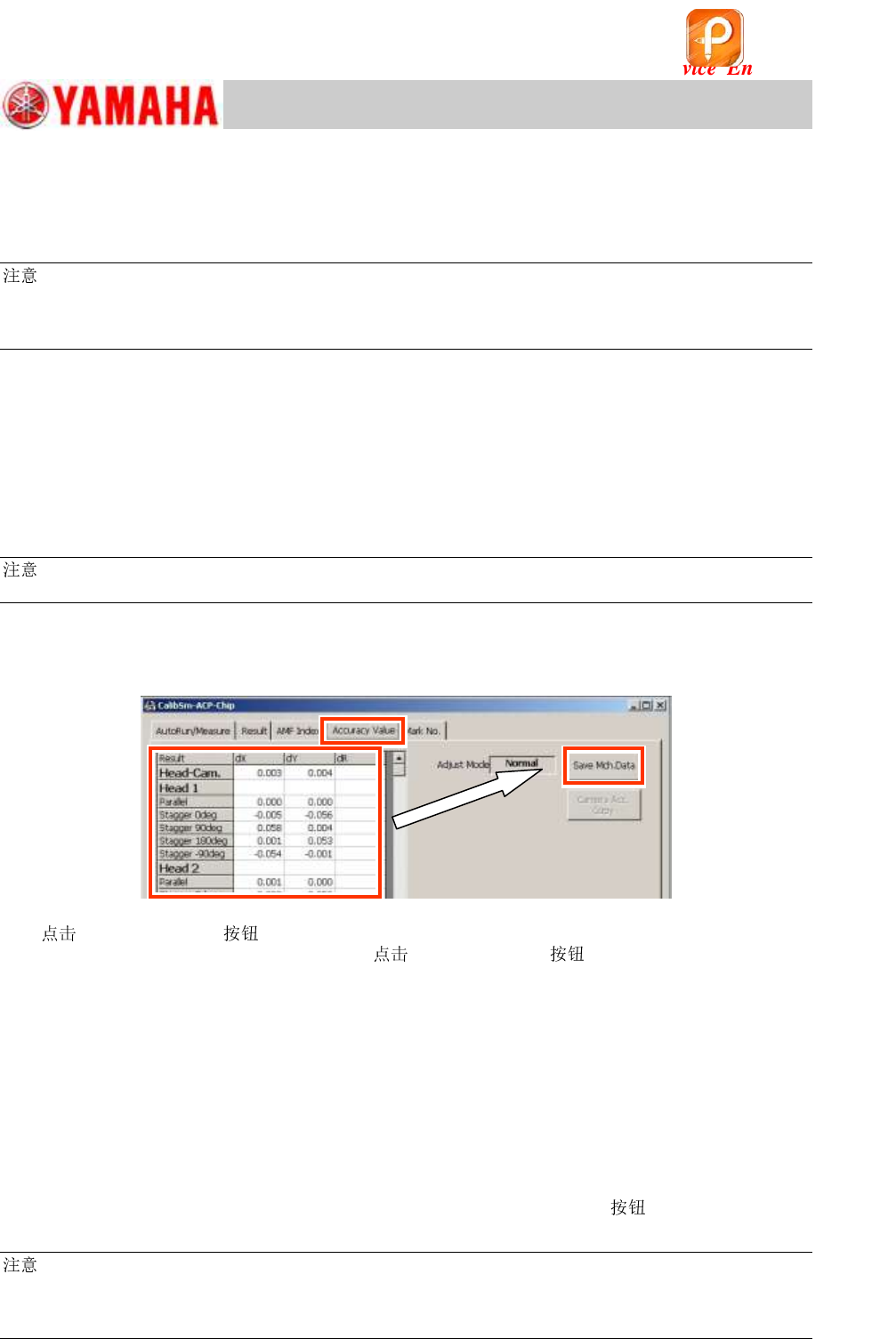
2. Select the “Accuracy Value” tab.
Select the “Accuracy value” tab to display the parameters to be corrected according to the
measurement results.
Figure 62
3. [Save Mch.Data] .
After checking the values to be corrected, [Save Mch.Data] .
4. Perform the accuracy check after feeding back the correction values.
After saving the correction values in the machine data, perform mounting and measurement by the
ACP-Chip, and perform the accuracy check again.
When the AMF Index 1 after the correction is 1.0 or above (OK)
Fill in the Index value after the adjustment as the “Data after feedback” on the check sheet.
* If the machine is not equipped with a multi camera, this is the end of the accuracy adjustment
process.
When the AMF Index 1 after the correction falls below 1.0 (NOT OK)
After feeding back the correction values by tapping the [Save Mch.Data]
, perform the
ACP-Chip accuracy check again.
:
If the “AMF Index 1” value is NOT 1.0 or above even after feeding back the correction values twice or
more, perform “11. Basic adjustments required when “AMF index 1” falls below 1.000”. (<Basic
adjustments 1> in “YSM10 Installation Check sheet”.)
该文档是极速PDF编辑器生成,
如果想去掉该提示,请访问并下载:
http://www.jisupdfeditor.com/
For Service Engineer
Service Information
SI1610004E-000= YSM10_Procedures for the adjustments required after installing a machine
49/107
5.6 ACP-Chip adjustment for the Multi camera (Option)
This section describes the procedures of the ACP-Chip adjustment for a YSM10 that is equipped
with the optional Multi camera.
:
Make sure that the “Head Offset (Each camera)” adjustment is performed for all the component
recognition cameras (not only for the main component recognition camera). Otherwise “Camera Acc.
Copy” cannot be performed. See “4.13 “Head Offset XY” adjustment” for the details of the Head offset
adjustment (for each camera).
5.6.1 Camera Acc. Copy
When the machine is equipped with the optional multi camera, perform “Camera Acc. Copy” and
then the ACP-Chip adjustment for the multi camera (5-Digital MultiC, 6-Digital MultiC) after
completing the ACP-Chip adjustment for the scan camera (3-Scan Main).
1. Make sure that the ACP-Chip
adjustment for the scan camera
(3-Scan Main) has been completed.
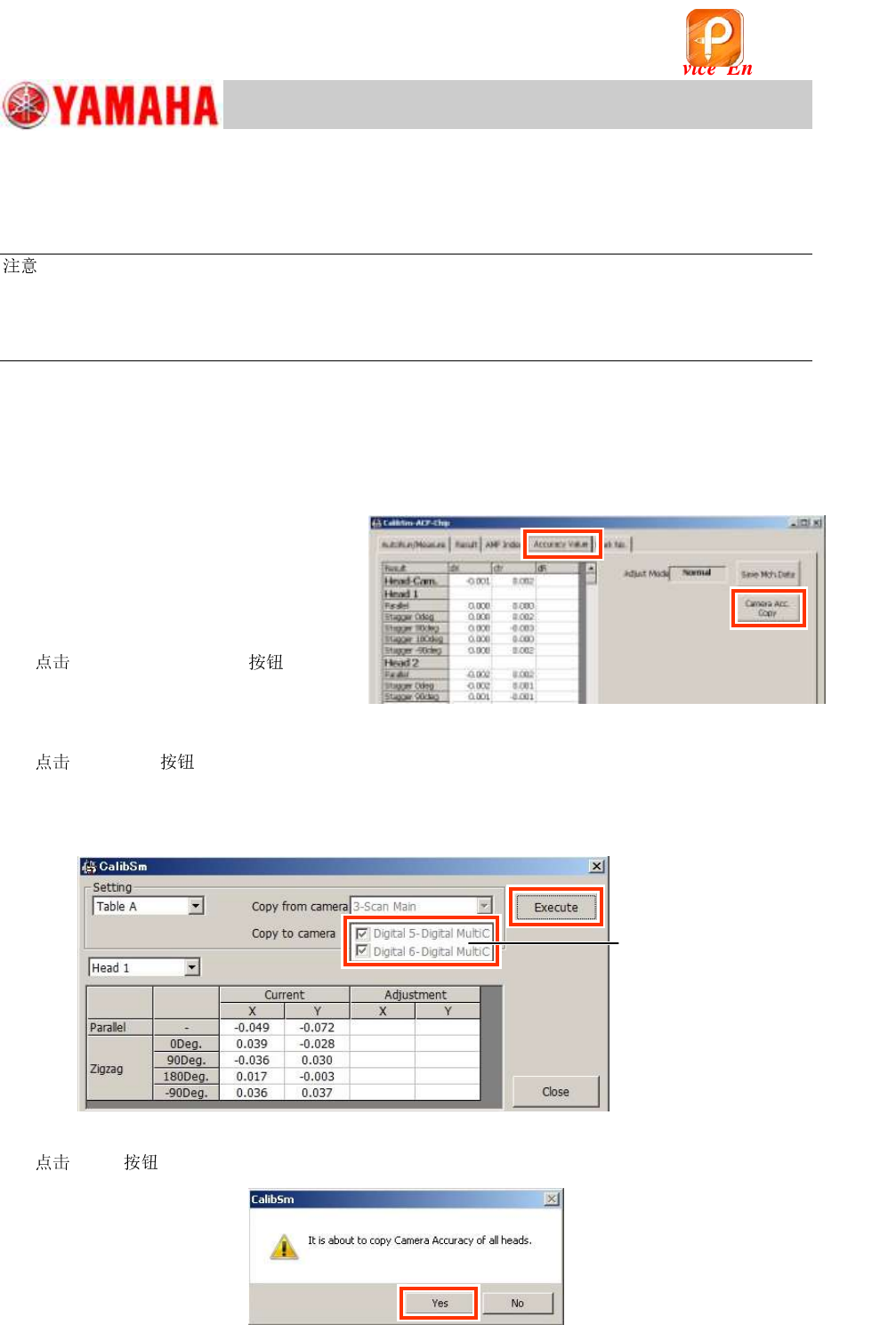
2. Display the “Accuracy Value” tab on
the “ACP-Chip” window.
3.
[Camera Acc. Copy] .
Figure 63
4.
[Execute] on the displayed window and copy the accuracy parameters.
“Copy from camera”: “3-Scan Main”
“Copy to camera”: “Digital 5- Digital MultiC and “Digital 6- Digital MultiC”
Figure 64
5.
[Yes] to perform “Camera Acc. Copy”.
Figure 65
All the sub cameras
are selected as
“Copy to Camera”
automatically.
该文档是极速PDF编辑器生成,
如果想去掉该提示,请访问并下载:
http://www.jisupdfeditor.com/