YSM10安装调整(eng).pdf - 第52页
For Ser v ice E n gineer Service Information SI1610004E -000= YSM10_Proced ures for the adjustmen ts required after installing a machine 52/107 5.7.2 Check the “Vg Chart” wi ndow 1. [VgChart] . The chart windo w is autom…
For Service Engineer
Service Information
SI1610004E-000= YSM10_Procedures for the adjustments required after installing a machine
51/107
5.7 “AMF Index” and “VgChart”
5.7.1 About “AMF Index”
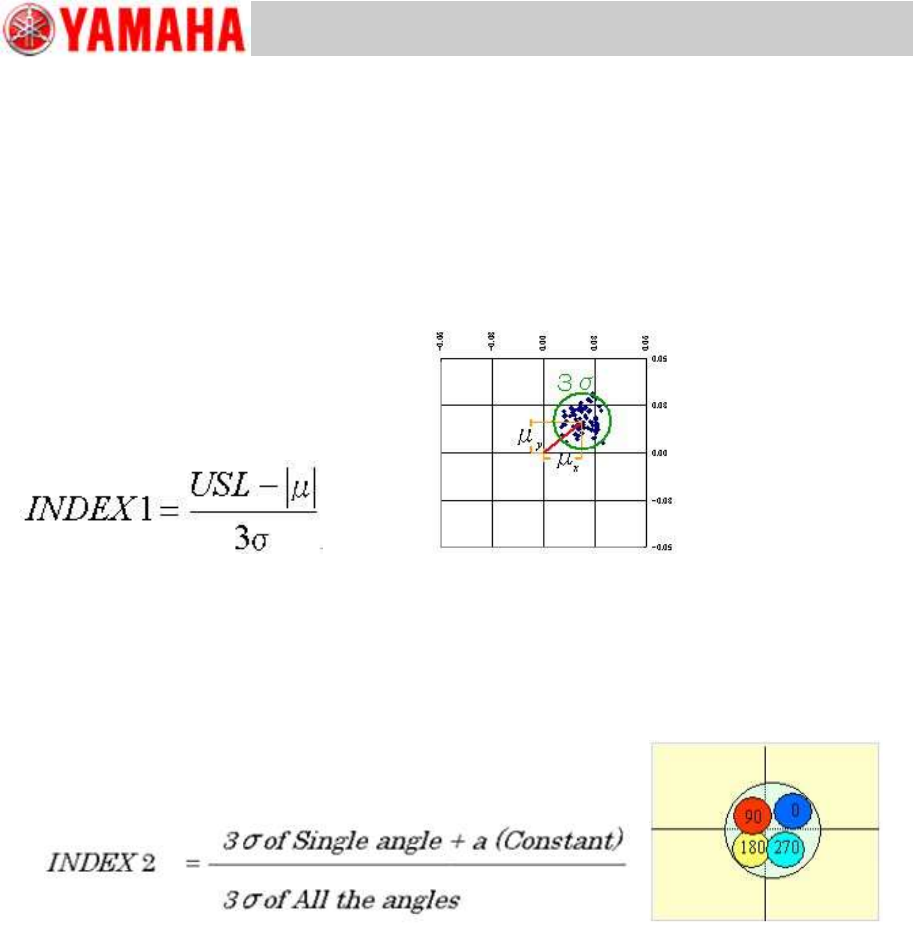
AMF Index 1
INDEX 1 (Total) --- CPK (Process Capability)
It indicates if the value obtained by the formula below meets the upper limit standard value (USL).
“Deviation with single head at a single angle (3σ) + “Average distance from the center (
)”
Figure 67
AMF Index 2
It quantifies the variation of mounting position at a single angle against the variations of all the four
angles (0, 90,180 and 270 degrees).
If it falls below 1.0, feeding back the correctio values is effective.
Figure 68
Only the “
” value can be improved by the feedback.
For Service Engineer
Service Information
SI1610004E-000= YSM10_Procedures for the adjustments required after installing a machine
52/107
5.7.2 Check the “VgChart” window
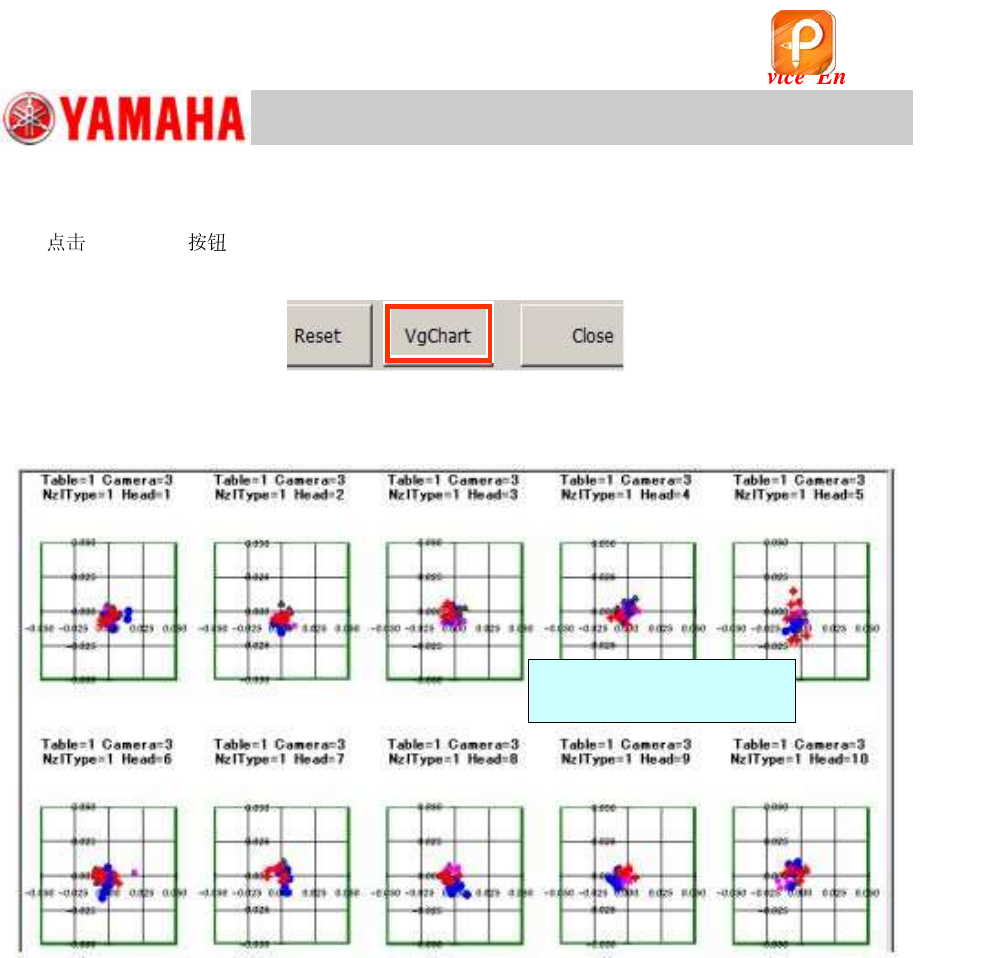
1.
[VgChart] .
The chart window is automatically created.
Figure 69
2. Check the mounting state for each head on the chart window.
Figure 70
<When the “AMF index 1” value falls below 1.0>
Check the chart window to determine which head is the causal factor that the “AMF Index 1” does
not meet the specification.
Analyze the chart and perform the further adjustment if needed.
* See “How to analyze the “VgChart”” for how to interpret the graphs.
* See “11.Basic adjustments required when “AMF index 1” falls below 1.000” for the adjustment
procedure.
Double-tap on the graph to
display the details.
该文档是极速PDF编辑器生成,
如果想去掉该提示,请访问并下载:
http://www.jisupdfeditor.com/
For Service Engineer
Service Information
SI1610004E-000= YSM10_Procedures for the adjustments required after installing a machine
53/107
5.7.3 How to analyze the “VgChart”
Refer to the following for the typical charts of the adjustment result
and how to take measures.
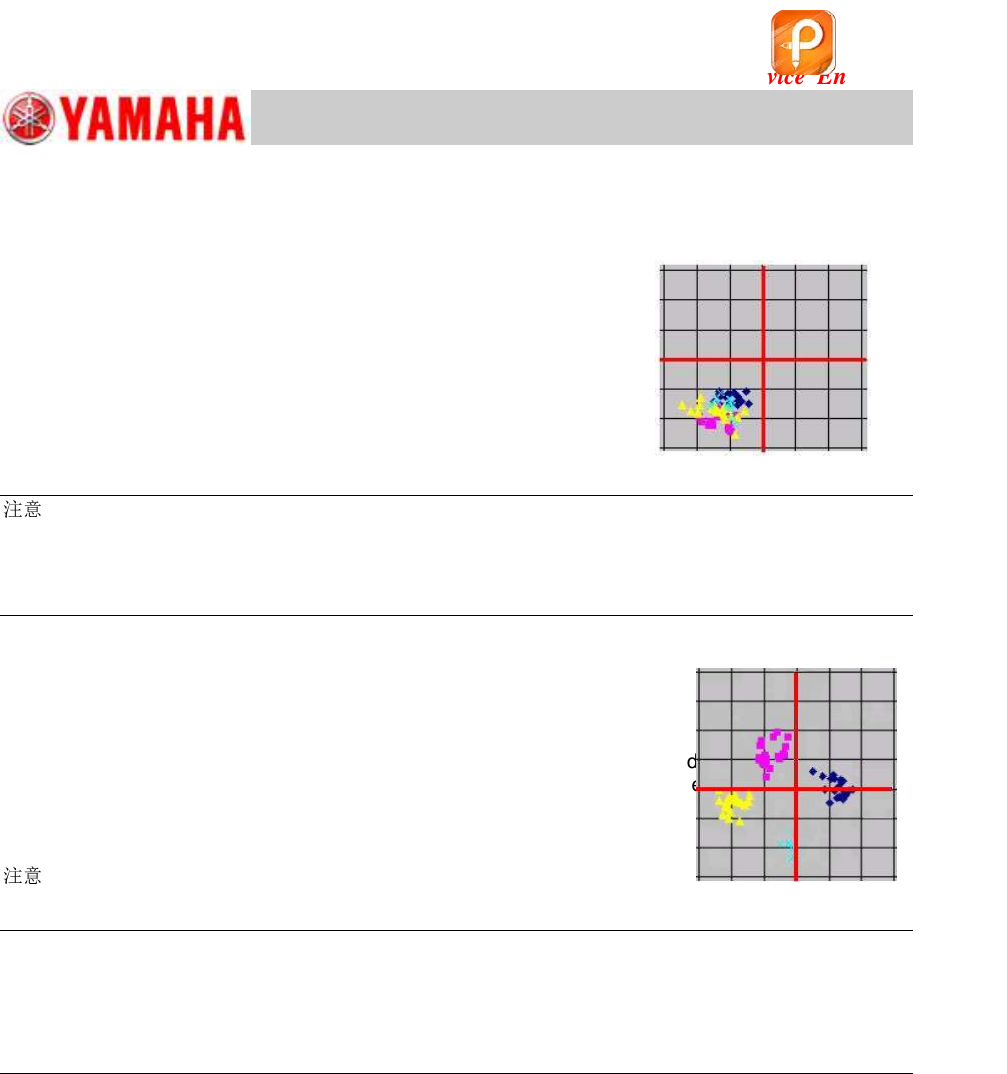
A. If the “XY offset shift” is found in the mounting result data
What is “XY offset shift”?
The components are mounted with deviation to the same direction
in all angles, as can be seen in Figure 71.
In this case, the “Index 2” value may be 1.00 or above.
Figure 71
:
Even when the “Index 1” value falls below 1.000, there is a case that the mounting positions are close
to one another, and are all deviated in the same way.
When this symptom occurs, there is a possibility that the positional coordinates of the fiducial camera
has been changed. Make sure that the camera is positioned properly before performing feedback.
B. If the mounting result data spreads in the X and Y directions
The mounting result data may spread in the X and Y directions in different ways depending on
the mounting angle as can be seen in Figure 72.
The “Index 2” value varies depending on the pattern of the mounting result data.
When this symptom occurs, any of the basic data may have been changed.
When the symptom still occurs even after feeding back the correction values, perform the basic
adjustments again.
Figure 72
:
When the “Index 1” value is 1.000 or above and the “Index 2” value falls below 1.000, there is a case
that the mounting result data slightly spreads in the X and Y directions. In this case, feed back the
correction values instead of readjusting the basic data.
When any problem related to mounting inaccuracy is found, take appropriate measures and perform
the readjustment.
Items of the basic data to be adjusted
Perform the adjustment for the following items:
・ Fiducial camera - “” adjustment
・ Scan camera - “” adjustment
・ “Head Offset Z” adjustment
When the machine is equipped with the Multi camera
After completing the basic adjustments for the scan camera, the basic data of the Multi camera
needs to be adjusted.
Perform the “” adjustment for the Multi camera.
该文档是极速PDF编辑器生成,
如果想去掉该提示,请访问并下载:
http://www.jisupdfeditor.com/