YSM10安装调整(eng).pdf - 第94页
For Ser v ice E n gineer Service Information SI1610004E -000= YSM10_Proced ures for the adjustmen ts required after installing a machine 94/107 7. Perform the “ Ligh tness ” adju stment for the coaxi al light. After savi…
For Service Engineer
Service Information
SI1610004E-000= YSM10_Procedures for the adjustments required after installing a machine
93/107
4. Set the light adjuster to the .
Make the head suck the light adjuster with its gray surface facing down.
Caution:
Set the light adjuster in the center of the so that it does not interfere with the Scan camera.
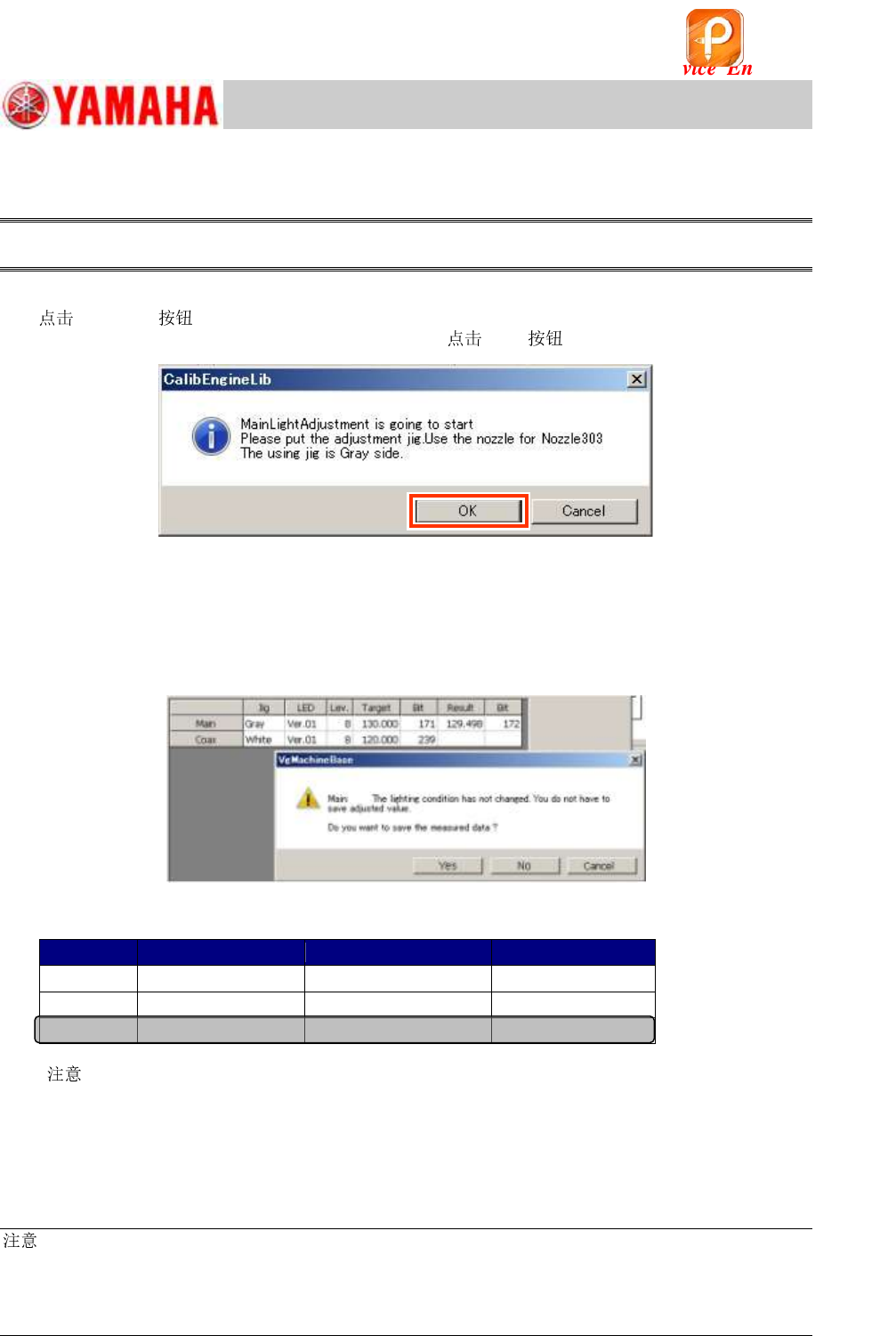
5. Start the “Lightness” adjustment for the main light.
[Execute] to display the following dialog box.
Make sure that the light adjuster is set properly and [OK] to start the adjustment.
Figure 136
6. Save the adjusted data.
When the adjustment is completed, a dialog box appears asking you to save the data.
Make sure that the values in the “Result” and the “Bit” fields fall within the specification, and save
the data.
If the values fall within the specification, fill in the values on the check sheet.
Figure 137
[Specified value]
Jig color
Tolerance
Bit value
Main
Gray
Target value +/- 2
128 ~ 448
Coax
White
Target value +/- 2
128 ~ 448
Side
White
Target value +/- 2
128 ~ 448
Table 41
[
]
When the Bit value does not meet the specification, check the following:
・ Is the correct light adjuster selected?
・ Is the adjuster clean? If it is not, clean it with alcohol.
・ Is the lighting environment affecting the adjustment result?
・ Is the lighting condition normal? (Are all the LEDs lit?)
:
As the upper limit of the specified Bit value is the warning value, the adjustment can be completed
properly even when the value exceeds the specified value.
If the measured result exceeds 448 (the 7/8 of the limit value), it may attribute to the deterioration of the
lighting device. It is recommended to replace the light. (Limit value of the Bit value: 511)
NOT USED (Cancel the adjustment process)
该文档是极速PDF编辑器生成,
如果想去掉该提示,请访问并下载:
http://www.jisupdfeditor.com/
For Service Engineer
Service Information
SI1610004E-000= YSM10_Procedures for the adjustments required after installing a machine
94/107
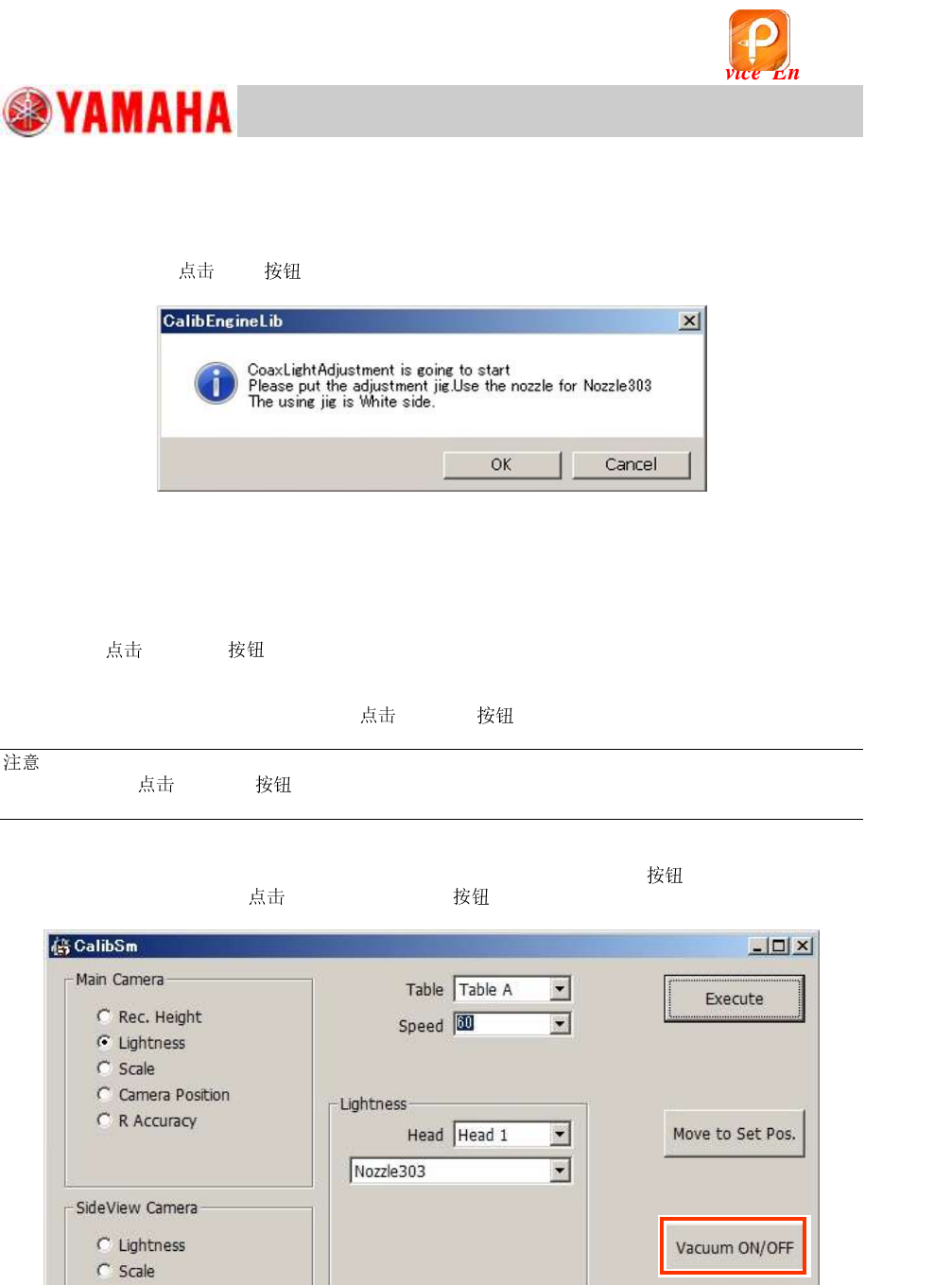
7. Perform the “Lightness” adjustment for the coaxial light.
After saving the adjustment result of the main light, perform the adjustment for the Coaxial light
according to the message on the dialog box.
Turn the light adjuster over and make the head suck the light adjuster with its white surface facing
down, and then
[OK] .
Figure 138
8. Save the adjusted data of the coaxial light.
When the adjustment is completed, a dialog box appears asking you to save the data. Make sure
that the “Result” and the “Bit” values fall within the specification, and save the data.
9. When the dialog box appears telling you that the “Lightness” adjustment for the side light
starts,
[Cancel] .
After saving the adjustment result of the coaxial light, a dialog box appears telling you that the
adjustment for the side light is going to start.
As the side light is currently not used,
[Cancel] .
:
Even when you
[Cancel] for the side light adjustment, the adjustment results of the
“Main” and the “Coaxial” lights are saved.
10. Remove the light adjuster from the head.
When the adjustment has been completed, press the [Emergency Stop]
and remove the
light adjuster. After that, [Vacuum ON/OFF] to turn the vacuum OFF.
Figure 139
该文档是极速PDF编辑器生成,
如果想去掉该提示,请访问并下载:
http://www.jisupdfeditor.com/
For Service Engineer
Service Information
SI1610004E-000= YSM10_Procedures for the adjustments required after installing a machine
95/107
“Lightness” adjustment for the Sideview camera
Perform the “Lightness” adjustment for the sideview camera continuously.
1. Remove the from Head 1.
:
The “Lightness” adjustment for the sideview camera is performed WITHOUT a on the head.
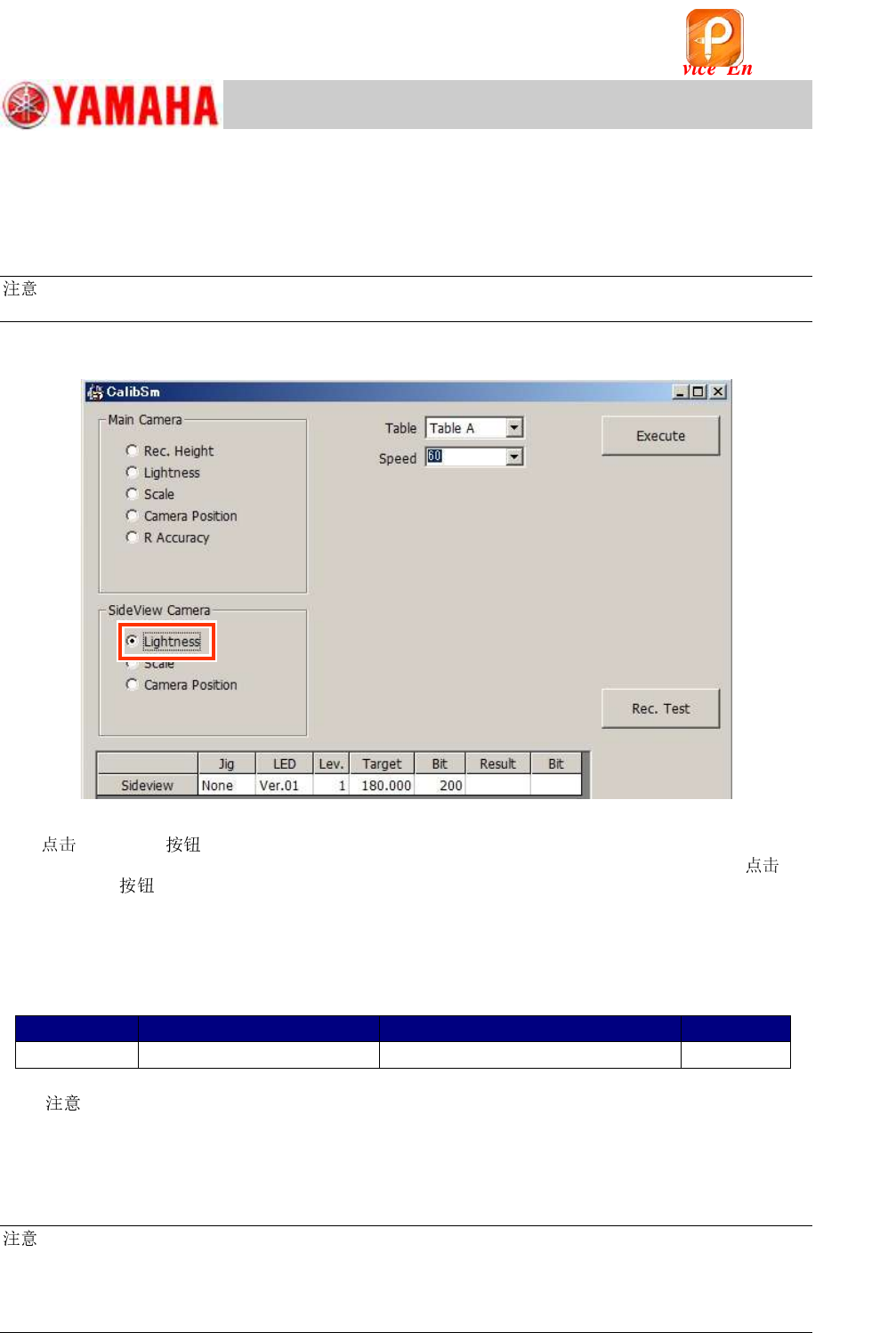
2. Select “Lightness” from “SideView Camera”.
Figure 140
3.
[Execute] .
As no light adjusters are used for the “Lightness” adjustment of the sideview camera, just
[Execute]
.
Make sure that the values in the “Result” and the “Bit” fields fall within the specification, and save
the data.
If the values fall within the specification, fill in the values on the check sheet.
[Specified value]
Color of the light adjuster
Tolerance of the measured value
Bit value
Side view
Not used
180 +/- 5
32 - 448
Table 42
[
]
When the Bit value does not meet the specification, check the following.
・ Is the lighting environment affecting the adjustment result?
・ Is the lighting condition normal? (Are all the LEDs lit?)
:
As the upper limit of the specified Bit value is the warning value, the adjustment can be performed even
when the value exceeds the specified value.
If the measured result exceeds 448 (the 7/8 of the limit value), it may attribute to the deterioration of the
lighting device. It is recommended to replace the lighting. (Limit value of the Bit value: 511)
该文档是极速PDF编辑器生成,
如果想去掉该提示,请访问并下载:
http://www.jisupdfeditor.com/