YSM10安装调整(eng).pdf - 第83页
For Ser v ice E n gineer Service Information SI1610004E -000= YSM10_Proced ures for the adjustmen ts required after installing a machine 83/107 8. Check the machine setting After com pleting the adjustm ent, perform the …
For Service Engineer
Service Information
SI1610004E-000= YSM10_Procedures for the adjustments required after installing a machine
82/107
7.4 Check the operation of the tray changer (Option)
When the machine is equipped with the tray component supply unit “sATS15”, make sure that all
the pallets can be pulled out from and returned to the rack smoothly.
Although it is possible to check the operation by using the “Pallet Set” function (* [Pallet
Set]
on the [Unit]-[Auto TC] window), this section describes how to check the “Tray Change”
function by using the CalibSm adjustment utility.
1. Set all the pallets to the ATS.
2.
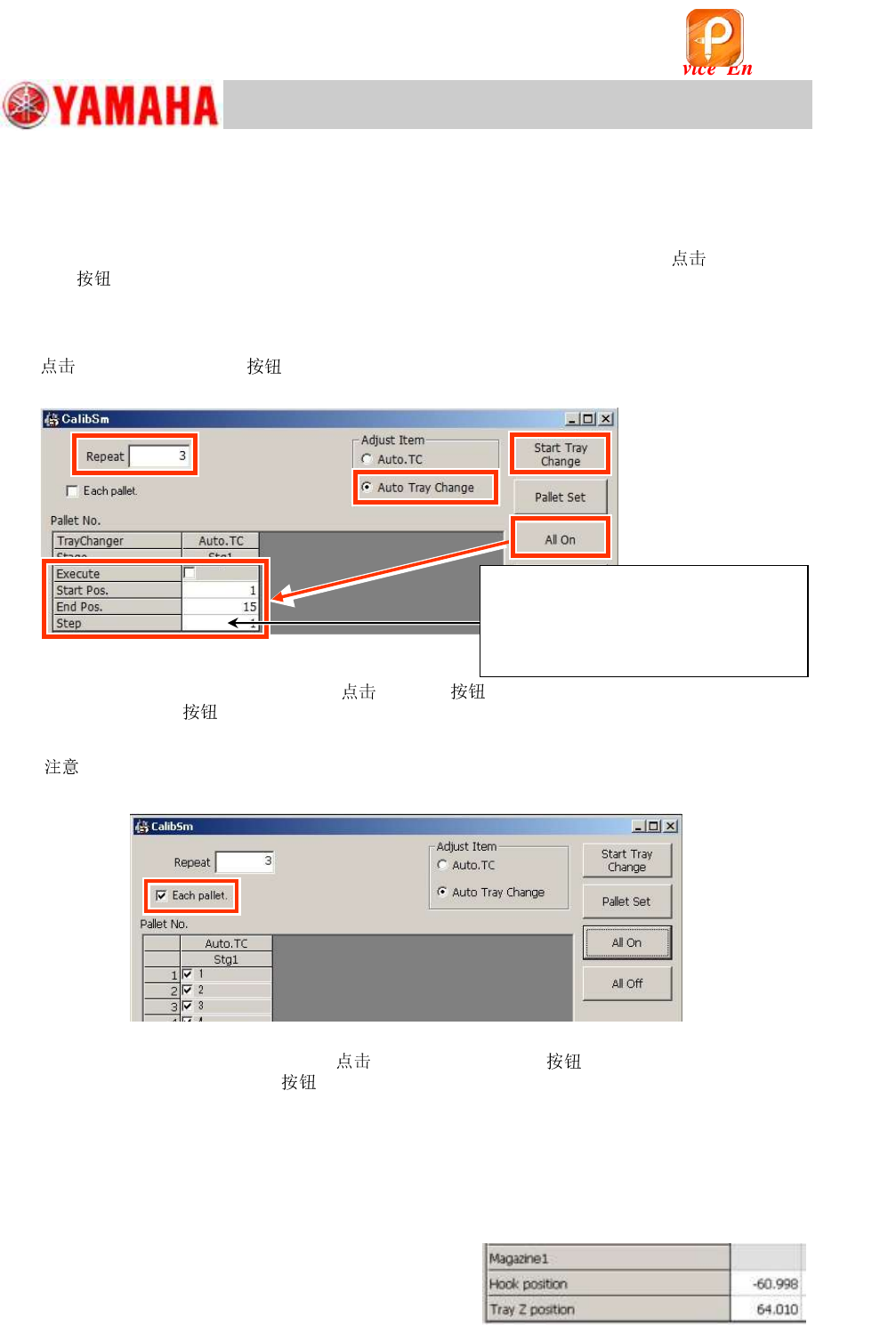
[031 Tray Changer] on the CalibSm main menu and select “Auto Tray
Change” from “Adjust Item”.
Figure 120
3. Select the pallet to be checked and
[All On] .
When the [All On]
is tapped, the pallet exchange process is performed for all the specified
pallets (From “Start Pos.” through “End Pos.”) automatically.
[
] If you wish to perform the pallet change operation for only the selected pallet, tick the “Each
pallet” checkbox and select the pallet.
Figure 121
4. Enter “3” in the “Repeat” field and
[Start Tray Change] .
When the [Start Tray Change]
is tapped, the pallets are pulled out from and returned to the
rack for the number of times specified in the “Repeat” field.
Make sure that no error or abnormal noise occurs during the “Tray Change” operation.
* Observe the condition throughout the ANC test.
5. If any abnormality is observed during the operation, perform the necessary adjustment.
If any abnormality is observed, select “ATS” from “Adjust Item” and check the coordinates related
to the tray change operation, and then perform the adjustment.
“Hook position”: The AH position where the hook
hooks a pallet
“Tray Z position”: The AZ position where a pallet
is pulled out.
Figure 122
Step 4
Step 4
Step 3
<Step>: Set the pitch to the pallets that perform
the operation of pulling out/returning the pallet
from/to the magazine within the specified range.
When setting the pallets alternately to the
magazine, enter “2”. When setting the pallets
every third shelf in the magazine, enter ”3”.
该文档是极速PDF编辑器生成,
如果想去掉该提示,请访问并下载:
http://www.jisupdfeditor.com/
For Service Engineer
Service Information
SI1610004E-000= YSM10_Procedures for the adjustments required after installing a machine
83/107
8. Check the machine setting
After completing the adjustment, perform the settings according to the customer’s demand.
:
See Service Information “SI1203007E=Setting for operating the machine after installation of the
machine” for the details.
When the settings were changed for the adjustment, change them back to the customer’s
original setting.
Before performing the settings, make sure to check the contents with the customer.
9. Move the board data for the adjustment
In order to reduce maintenance time, move the board data required for the adjustment of the
machine to “CalibPCBdata” folder.
Use the No.1 folder as the folder for the customer.
:
The “d:¥Machine¥CalibPCBdata” folder is newly created automatically when the application software is
installed.
10. Back up the system data and bring back the data
10.1 System data backup
After checking all the settings, back up the adjusted system data and save it in the USB drive that
comes with the machine and give it to the customer.
Save the data in a USB drive for bringing back.
Caution:
Some customers put restrictions on taking out the data. Confirm with the customer in advance if the
data can be brought back or not.
10.2 System full backup
Introduce the “System full backup” function to the customer and obtain the data in the USB drive
that comes with the machine.
If the machine is connected to the network, and the network is specified as the destination to save
the system backup data, save the data in the destination.
:
See “YS series Programming Manual - Chapter 6 Managing the data – Making a backup of system
data” for details.
该文档是极速PDF编辑器生成,
如果想去掉该提示,请访问并下载:
http://www.jisupdfeditor.com/
For Service Engineer
Service Information
SI1610004E-000= YSM10_Procedures for the adjustments required after installing a machine
84/107
10.3 How to bring back the adjusted data
By using the “Get Information” utility, the adjusted machine data in the “D: Machine¥Result folder”
is automatically saved in the USB drive.
:
Make sure to set a USB drive to the machine beforehand.
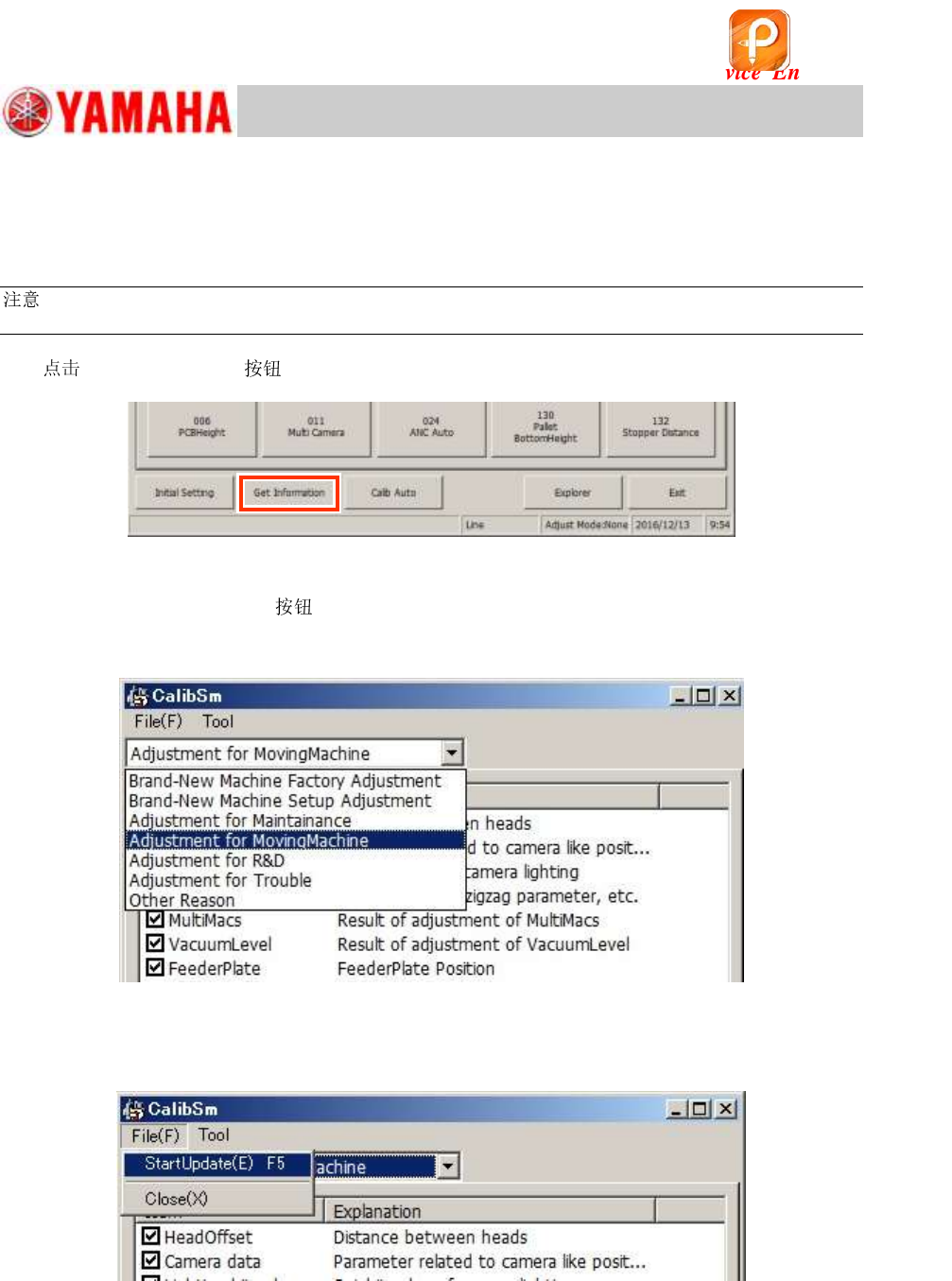
1.
[Get Information] on the CalibSm main menu.
Figure 123
2. Select the adjustment item.
When the [Get Information]
is tapped, the data to be saved are displayed.
Select the adjustment item from the pull-down menu at the upper left of the window to identify the
contents and the condition of the data to be saved.
Figure 124
3. “Start Update (E) F5”
Select “Start Update (E) F5” from the “File (F)” pull-down menu.
Figure 125
该文档是极速PDF编辑器生成,
如果想去掉该提示,请访问并下载:
http://www.jisupdfeditor.com/