YSM10安装调整(eng).pdf - 第61页
For Service Engineer Service Information SI1610004E - 000 = YSM10_Procedures for the adjustments required a fter installing a machine 61 / 107 6.6 Check the board dat a Use som e information of the board data “ MCH_SET U…
For Service Engineer
Service Information
SI1610004E-000= YSM10_Procedures for the adjustments required after installing a machine
60/107
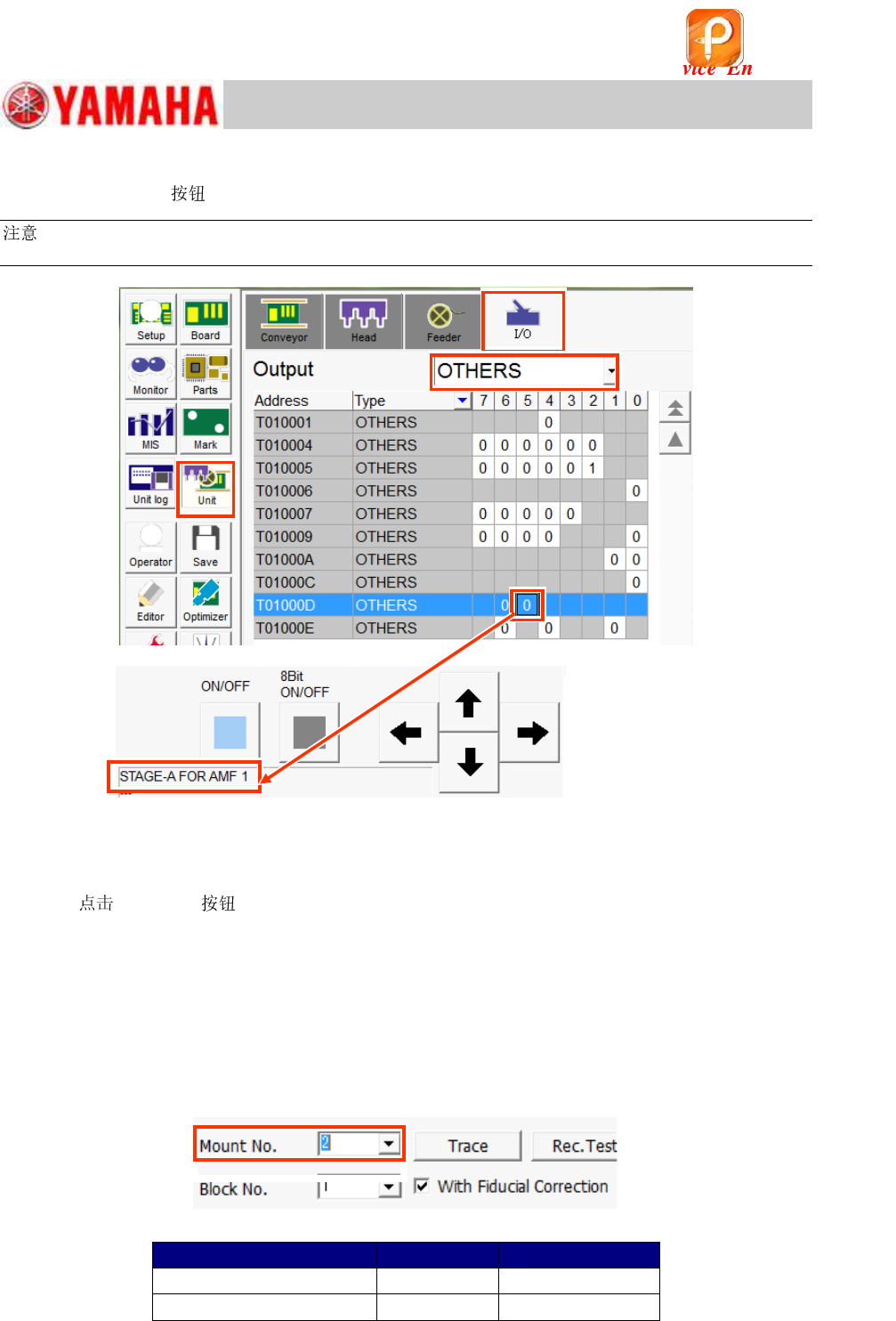
4. Display the “I/O” window to check the operation of the ejector.
Select the [Unit] and the “I/O” tab. Select “OTHERS” from the “Output” pull-down menu.
:
When the ejector is connected to “AMF 1”, select [T01000D5].
Figure 78
5. Make sure that the ejector operates properly.
1) Check the operation of the ejector by turning ON the output “T01000D5”.
2)
[ON/OFF] to make sure that the suction is active in the center hole of the
FAMF station.
6.5.2 When using a small FAMF station
The following is the procedure for how to change the setting when using a small FAMF station
(100x100).
1) Change the conveyor width to 100.0mm. (“Board Size Y” does not need to be changed.)
2) Change the setting of “Mount No.” on the “ACP-Station” window (CalibSm) from “1” to “2”.
Figure 79
Table 29
FAMF station
Mount No.
Local Fiducial
Standard (240X170mm)
1
1
Small (100X100)
2
2
该文档是极速PDF编辑器生成,
如果想去掉该提示,请访问并下载:
http://www.jisupdfeditor.com/
For Service Engineer
Service Information
SI1610004E-000= YSM10_Procedures for the adjustments required after installing a machine
61/107
6.6 Check the board data
Use some information of the board data “MCH_SETUP.ygx” to perform the “ACP-Station”
adjustment.
6.6.1 Information required for the adjustment
* The coordinates shown in this document are the default values.
Mounting coordinate X, Y
X, Y coordinates of “Board Offset” and “Block Offset”
X, Y coordinates and Mark number of “Local” on the [Board]-[Fiducial] window
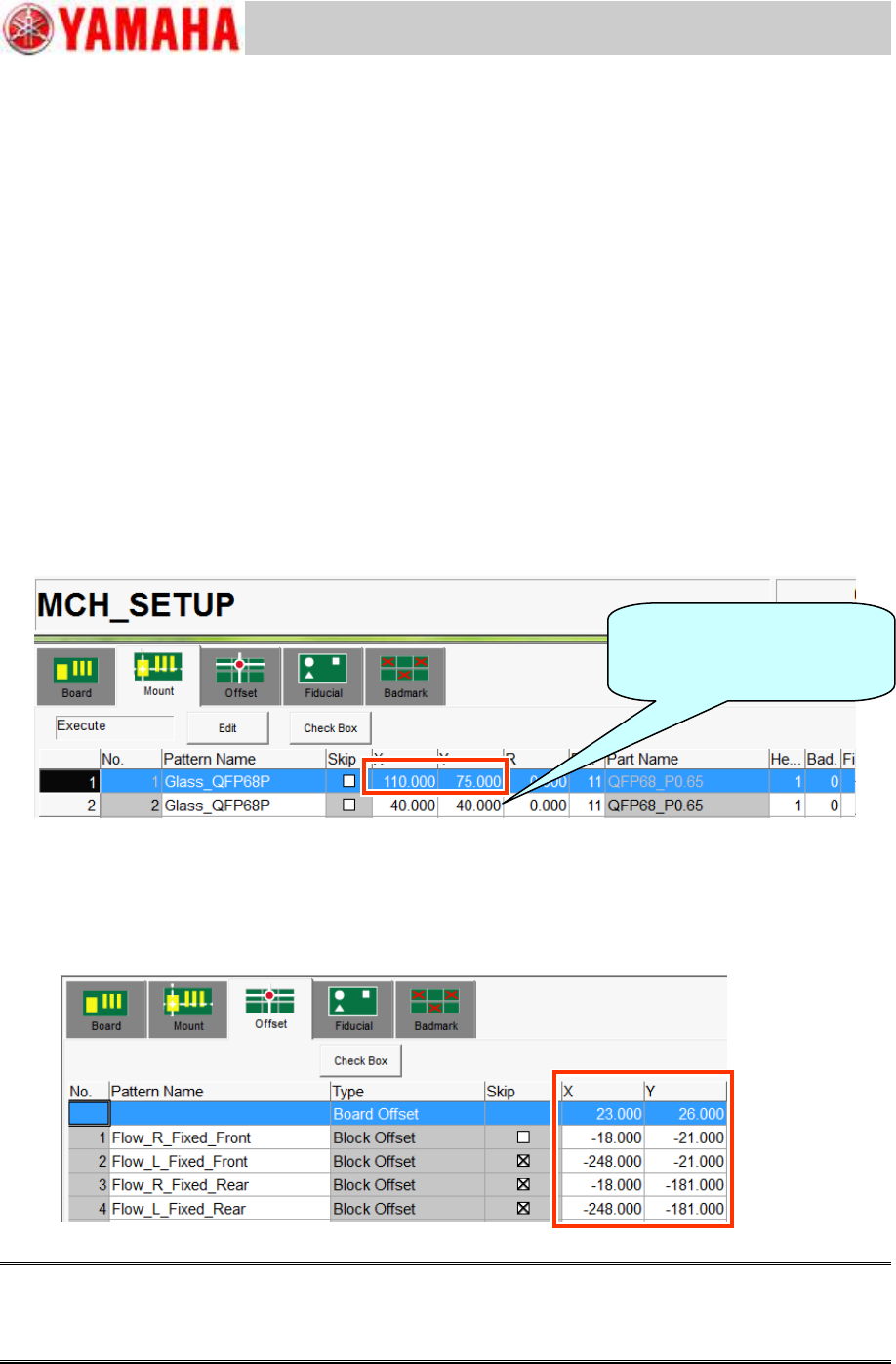
1. Check the mounting coordinate X, Y.
Use the X, Y coordinates of the mounting coordinate No.1 (on the “Mount” tab) as the coordinate
for mounting a component in the center of the station (Size: 240x170mm). When using a small
station (Size: 100x100) for the adjustment, use the coordinate No.2.
Do not change the X and Y coordinates.
The R coordinate and the Part number are not used here as they are set in the “ACP-Station”
utility.
Figure 80
2. Check the X, Y coordinates of “Board Offset” and “Block Offset”.
The coordinate of the block origin to be used varies depending on the conveyor specification of the
machine. Make sure that the block origin corresponds to the conveyor specification of the machine.
Set the same block origin number on the “ACP-Station” window in the adjustment utility.
Figure 81
Caution:
DO NOT change the “Board Offset” coordinate as it is used in other adjustment utilities.
If the block origin is off the position, check if the board is clamped properly, and the edge clamp
coordinate is appropriate.
When a small FAMF station is
used, select No.2.
Use “2” as the local fiducial.
For Service Engineer
Service Information
SI1610004E-000= YSM10_Procedures for the adjustments required after installing a machine
62/107
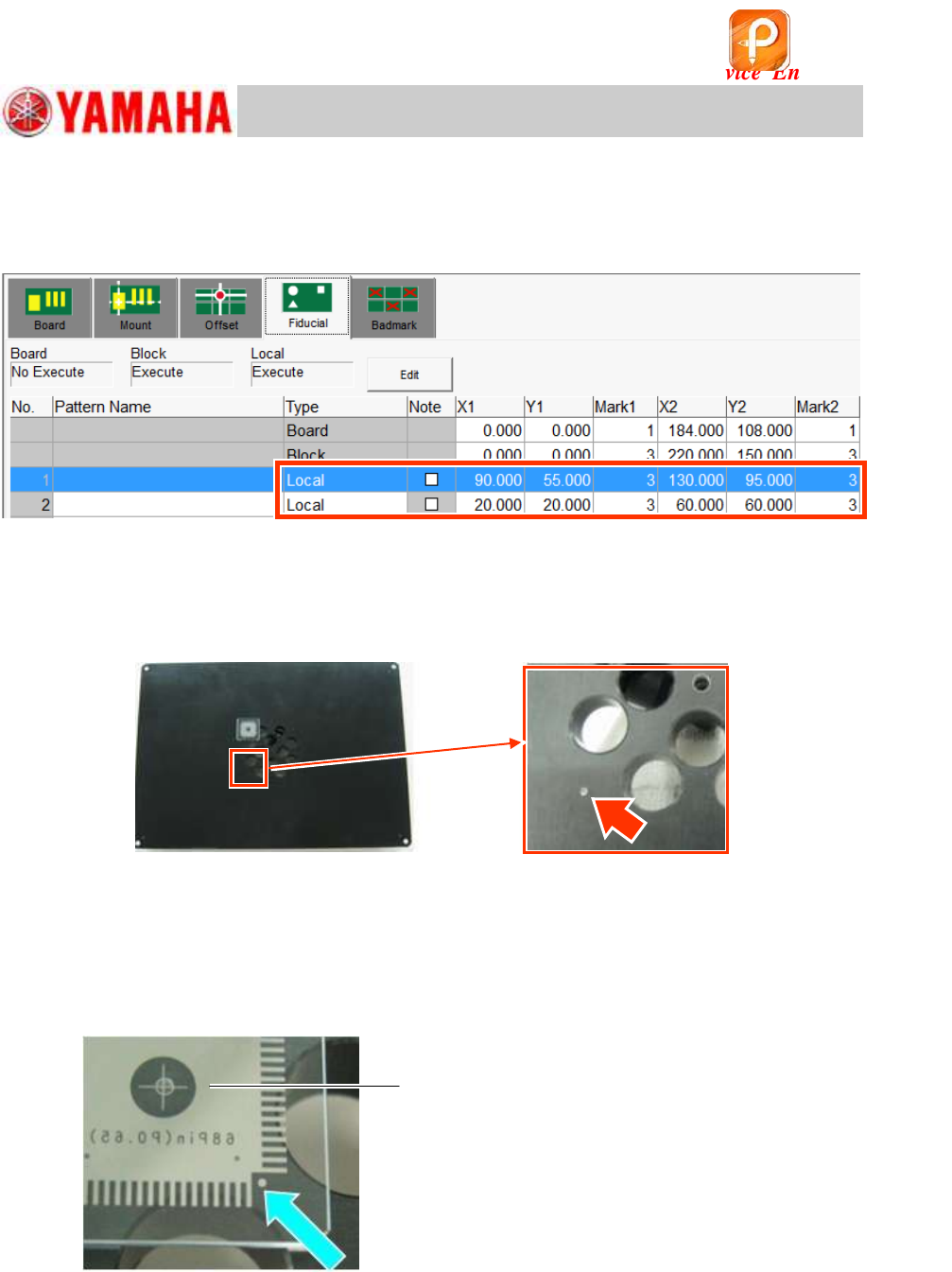
3. Check the XY coordinates of the Local fiducial and the mark number.
Use the coordinates of the local fiducial, and the mark number “3”.
Use the
1.0mm holes on the lower left and on the upper right on the station as the fiducial
marks.
Figure 82
4. Check if the fiducial mark can be recognized properly.
Make sure that the local fiducial mark can be recognized properly on the “Mark Adj” window.
Mark No.: Mark No.: No.3 “Hole_1.0_Circle/For_Station”
Figure 83
5. Check if the mark on the QFP can be recognized properly.
Place a QFP in the center of the FAMF station, and make sure that the
0.5mm marks of the
four (4) corners can be recognized properly.
(You can use either of the 68-pin QFP or the 208-pin QFP for the check.)
Mark No.: No.29 “QFP_0.5_Circle/4_Corners (Station)”
Figure 84
6. Make sure that the picked up QFP can be recognized properly.
Make the suck a 68-pin QFP, and make sure that the QFP can be recognized
properly.
Part No.: No.11 QFP68_P0.65/QFP_68Pin
Make sure to set the QFP so that the
printed side of it faces down.
该文档是极速PDF编辑器生成,
如果想去掉该提示,请访问并下载:
http://www.jisupdfeditor.com/