00197042-04_SM_X-Serie-S_Customer_EN.pdf - 第219页
7 Conveyor 7.4 Conveyor Drive Service Manual SIPLACE X-Serie S 06/2019 219 Removal ► Use the software to move the conveyor sides into a position which allows you best access. As an alternative, you can loosen the clamps …
7 Conveyor
7.4 Conveyor Drive
218 Service Manual SIPLACE X-Serie S 06/2019
7.4 Conveyor Drive
7.4.1 Replacing the conveyor drive
Parts, equipment and tools
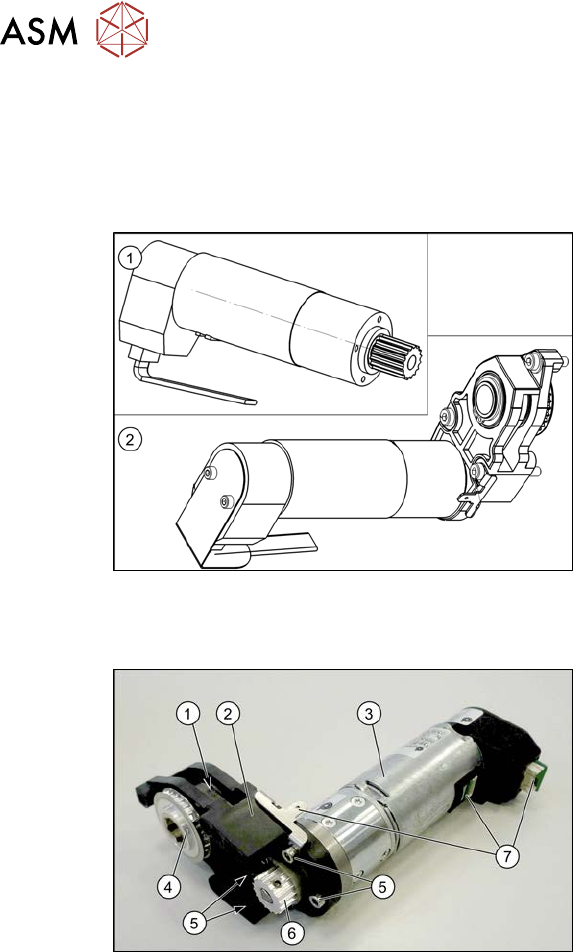
Fig.279: Spare parts for conveyor drive
●
(1) DC drive motor with synchronizing
disk SXa [03093387‑xx]
or
(2) Drive unit assembly SXa
[03092345‑xx] (incl. drive bracket,
toothed belt, etc.)
●
Bearing for hexagonal shaft SXa
(plastic bearing) – pack of 10
[03092024-xx]
●
Sealing varnish Loctite 241 [02101037-
xx]
Overview
Fig.280: Overview of conveyor drive
1. Toothed belt on conveyor drive
2. Drive bracket
3. Motor
4. Drive shaft
5. Four motor fastening screws on the
drive bracket (torque = 0.7 Nm)
6. Motor shaft
7. Electrical connections (incl. shield con-
nection)
7 Conveyor
7.4 Conveyor Drive
Service Manual SIPLACE X-Serie S 06/2019 219
Removal
► Use the software to move the conveyor sides into a position which allows you best access. As
an alternative, you can loosen the clamps for the relevant sides in dual conveyors.
7.2 "Loosening the Conveyor Side Clamps" [}207]
► Switch off the machine, disconnect it from the power supply and secure it to prevent
unauthorized reactivation.
1.2 "Preparatory work..." [}16]
► Loosen the hexagonal shaft on the belt drive/conveyor drive (motor), so that you can move
the hexagonal shaft freely. To do this, dismantle the hexagonal shaft fixture on one side and
the corresponding plastic bearing on both sides.
7.6.6 "Replacing the hexagonal shaft" [}253]
► Loosen the movable idler pulley.
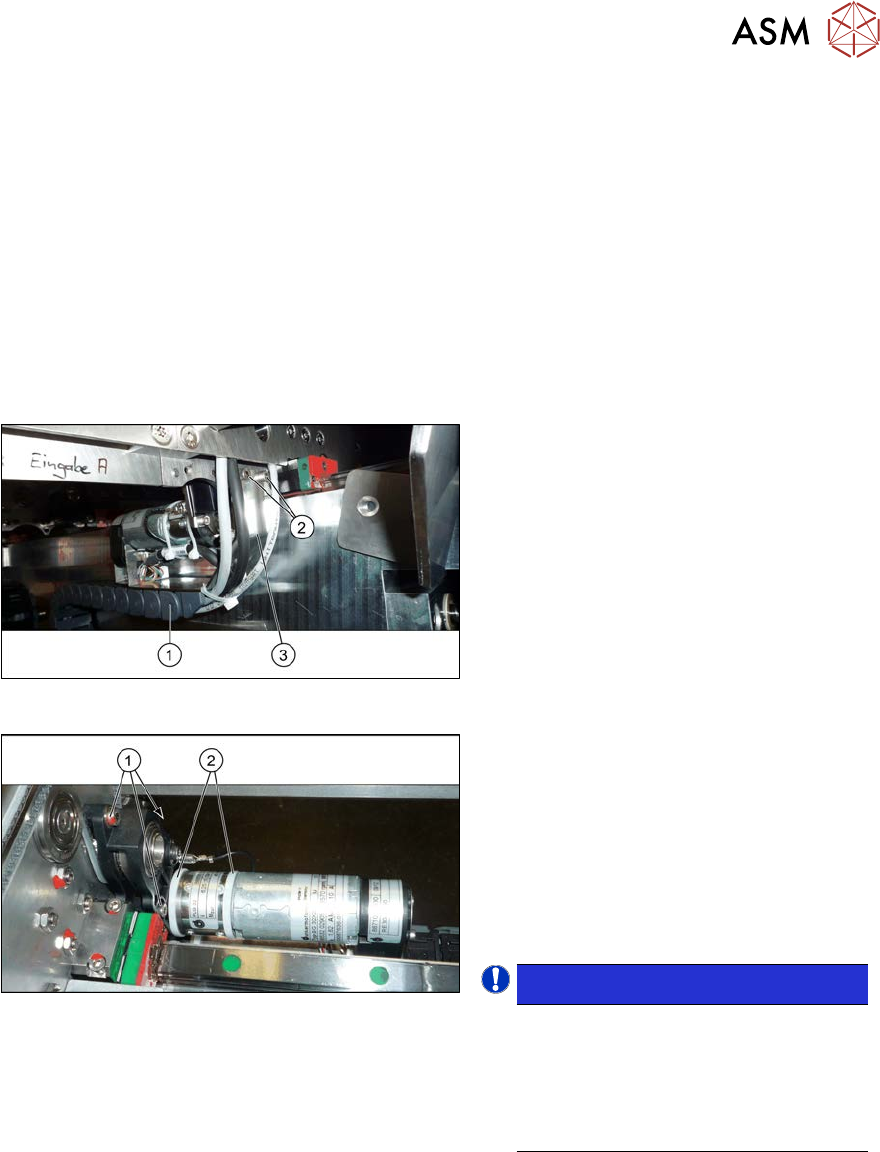
Fig.281: Holding plate
► To achieve a greater movement range,
it may be advisable to loosen the two
screws(2) fastening the retaining
plate(3) to the trailing cable(1).
These fastening screws are located on
the conveyor side opposite to the con-
veyor drive.
Fig.282: Cable ties and fastening screws
► Remove the two cable ties(2). You
may want to mark their positions for
easier replacement later on. Also pay
attention to the position of the cable
ties heads.
► Remove the three screws(1) (Allen key
3) fastening the conveyor drive. While
doing this, carefully unthread the con-
veyor drive from the conveyor belt.
NOTICE!
There is a washer under the top
fastening screw. This needs to be
placed back in when refitting.
These three fastening screws are
tightened with a torque of 1.7 Nm dur-
ing refitting.
.
► Remove the two screws fastening the cover plate above the connectors of the conveyor drive
and remove the cover plate.
► Unplug all electrical connections from the conveyor drive. If necessary, mark their positions to
make clear assignment easier later on. Loosen the corresponding cable ties, if required.
► Remove the conveyor drive and drive holder from the machine.
► Remove the four screws fastening the conveyor drive to the drive bracket.
► Carefully unthread the motor from the toothed belt.

7 Conveyor
7.4 Conveyor Drive
220 Service Manual SIPLACE X-Serie S 06/2019
Installation
► Follow the removal instructions in reverse order for installation. Also observe the following
instructions:
●
Make sure that you do not fold or otherwise damage the toothed belt.
●
Make sure that the toothed belt is accurately positioned in the guidance on the motor shaft.
●
Tension the toothed belt with 10 to 15 Hz.
●
Secure the four screws fastening the conveyor drive to the drive bracket with Loctite 241 and
tighten these with a torque of 0.7 Nm.
●
Tighten the three screws fastening the plastic holder with a torque of 1.7 Nm. A washer must
be placed under the top screw.
●
Replace any cables ties, where needed.
Replace, in particular, the cable ties on the motor. Make sure that the cables, cable ties and,
in particular, the cable tie heads are not damaged on edges or rubbed against anything when
you adjust the conveyor sides.
Check for this along the whole width of the conveyor.
Also pay attention to the cable ties on the trailing cable and to the shield connection on the
conveyor drive.
●
When you tighten the movable roller, set the tension of the toothed belt correctly.
7.6.2 "Setting the belt tension (conveyor belt)" [}247]
●
Check if the belt drive and the drive unit are correctly aligned to each other. To do this, push
the conveyor sides together until you can still just reach the fastening screws. Check the con-
veyor drive for ease of movement by turning the hexagonal shaft. The hexagonal shaft must
run evenly and may not hit any part of the conveyor sides. You may need to loosen the con-
veyor drive and readjust it.
Perform this check along the whole width of the conveyor.