00197042-04_SM_X-Serie-S_Customer_EN.pdf - 第60页
3 Power supply 3.4 Power supply and transformer module (up to serial number Gxxx) 60 Service Manual SIPLACE X-Serie S 06/2019 Removal ► Switch off the machine, disconnect it from the power supply and secure it to prevent…
3 Power supply
3.4 Power supply and transformer module (up to serial number Gxxx)
Service Manual SIPLACE X-Serie S 06/2019 59
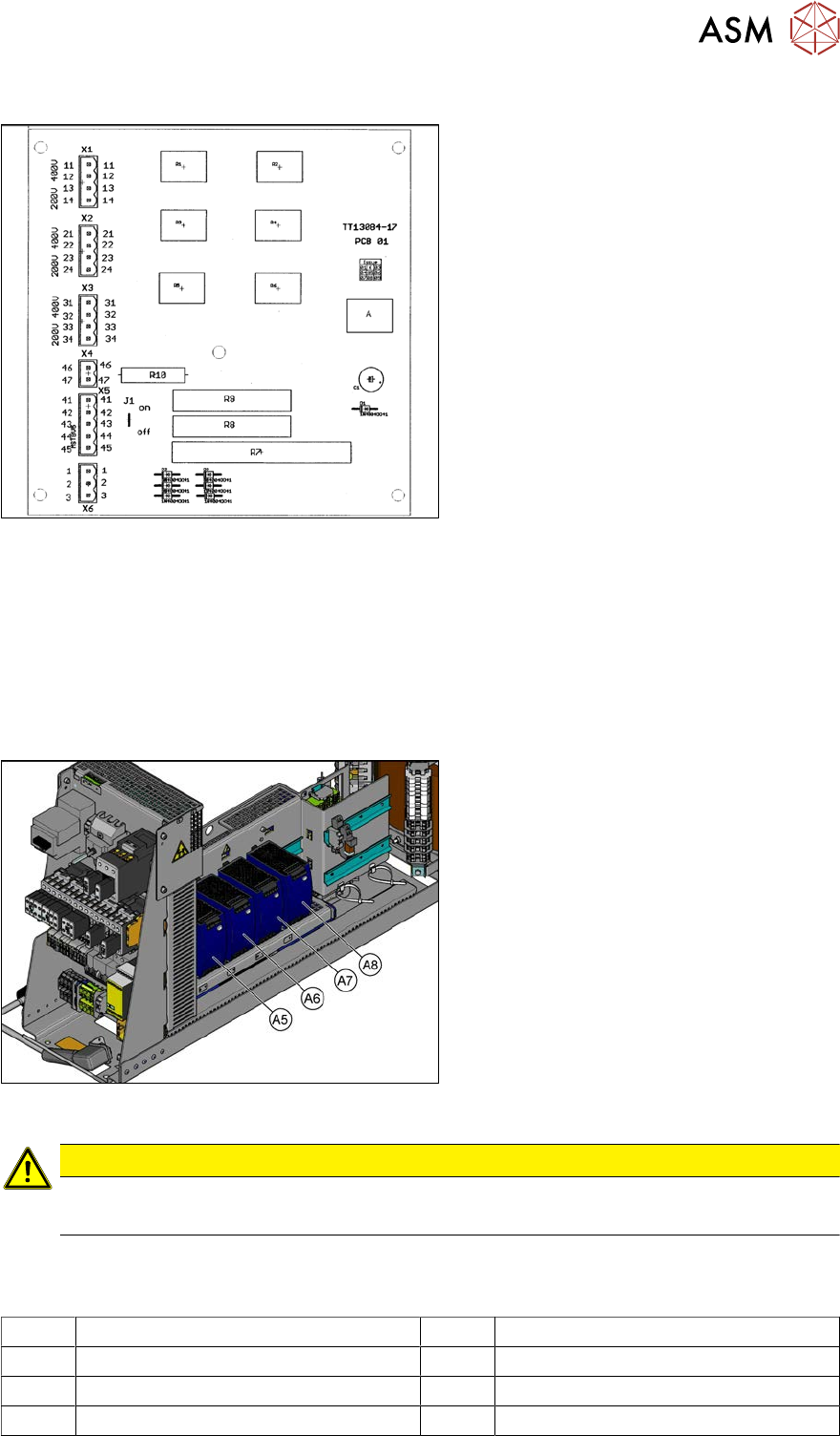
3.4.7 Inrush current limiter servo (A1)
Fig.57: 03066830-01
Jumper J1:
SIPLACE HF/X-Series: jumper to ON
SIPLACE SX4/X-Series S: jumper to OFF
SIPLACE SX1/SX2: The jumper is not quer-
ied here. The jumper setting is therefore ir-
relevant.
3.4.8 Replacing the AC/DC Converter (A5 to A8)
Parts, equipment and tools
●
AC/DC converter (A5, A6, A7) [03055232-xx]
●
AC/DC converter (A8) [03076588-xx]
Overview
Fig.58: AC/DC converter
The AC/DC converters are located in the
rack unit between location 3 and 4.
A5) AC/DC converter (24 VDC, set to 25
VDC)
for Power Fail, safety circuit SSK, tape cut-
ter, PCB handling
The power fail signal is generated by the
AC/DC converter A5 and sent to the GCU
and HCU. (X200:9, X200:10)
A6) AC/DC converter (27 VDC)
for FCU (gantry 1 and 4)
A7) AC/DC converter (27 VDC)
for FCU (gantry 2 and 3)
A8) AC/DC converter (36 VDC, set to 42
VDC)
for HCU (gantry 1 to 4)
CAUTION
Check the values
► Check the set values and correct if necessary.
To A5:
There is 24V present at the following fuses:
F10 Conveyor electrics F11 Y motor fan, safety circuit (internal)
F12 Distributor power (line 1) F13 Distributor power (line 2)
F14 Power fail F20 Cover fan gantry 1 and 4
F21 Cover fan gantry 2 and 3
3 Power supply
3.4 Power supply and transformer module (up to serial number Gxxx)
60 Service Manual SIPLACE X-Serie S 06/2019
Removal
► Switch off the machine, disconnect it from the power supply and secure it to prevent
unauthorized reactivation.
1.2 "Preparatory work..." [}16]
► Before you start working, check the power supply for absence of voltage and observe the
waiting times!
► Unplug all connections to the module. You may want to mark their positions, to make clear as-
signment easier later on.
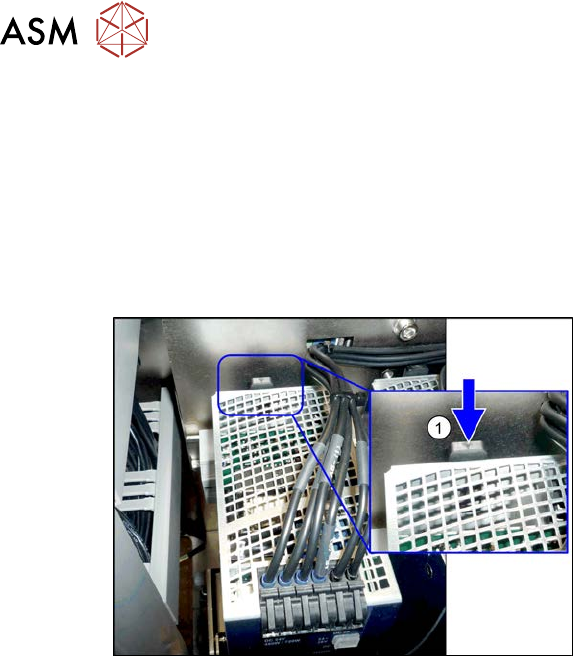
Fig.59:
► To release the module, press the lever
(1) at the back of the module down and
then pull the module off the rail.
Installation
► Follow the removal instructions in reverse order for installation. Also observe the following
instructions:
– Set the voltage (see 3.4.8.1 "Setting the Voltage on the AC/DC Converters" [}61]).
3 Power supply
3.4 Power supply and transformer module (up to serial number Gxxx)
Service Manual SIPLACE X-Serie S 06/2019 61
3.4.8.1 Setting the Voltage on the AC/DC Converters
Parts, equipment and tools
●
Voltage measuring device
Overview
Fig.60: AC/DC converter
The AC/DC converters are located in the
rack unit between location 3 and 4.
A5) AC/DC converter (24 VDC, set to 25
VDC)
for Power Fail, safety circuit SSK, tape cut-
ter, PCB handling
The power fail signal is generated by the
AC/DC converter A5 and sent to the GCU
and HCU. (X200:9, X200:10)
A6) AC/DC converter (27 VDC)
for FCU (gantry 1 and 4)
A7) AC/DC converter (27 VDC)
for FCU (gantry 2 and 3)
A8) AC/DC converter (36 VDC, set to 42
VDC)
for HCU (gantry 1 to 4)
CAUTION
Check the values
► Check the set values and correct if necessary.
To A5:
There is 24V present at the following fuses:
F10 Conveyor electrics F11 Y motor fan, safety circuit (internal)
F12 Distributor power (line 1) F13 Distributor power (line 2)
F14 Power fail F20 Cover fan gantry 1 and 4
F21 Cover fan gantry 2 and 3
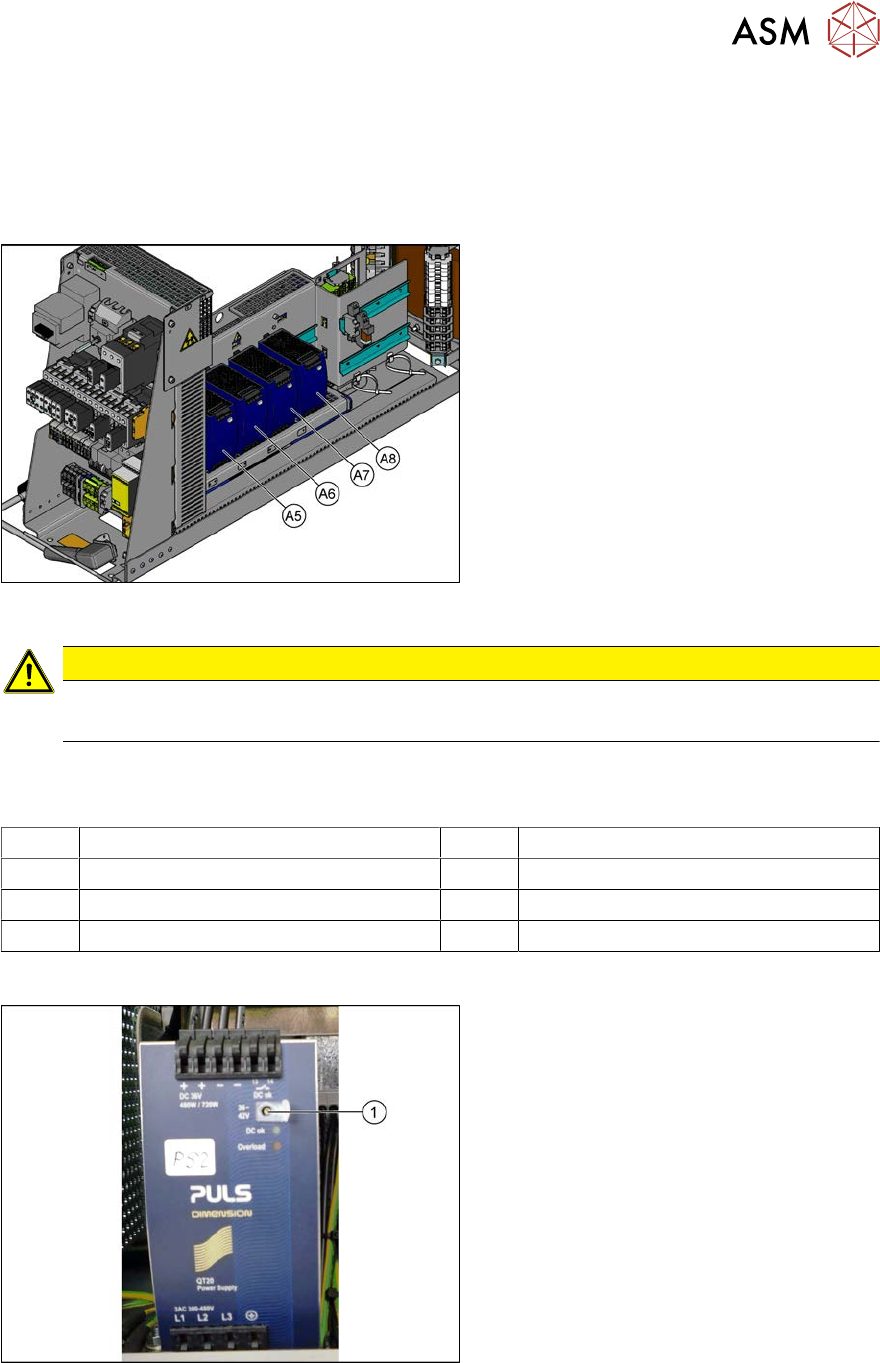
Setting
Fig.61: Setting the voltage
► Open the protective cap on the setting
screw(1).
► Use a flat-bladed screwdriver to set the
correct voltage on the AC/DC con-
verter.
Check the voltage with a suitable
voltage measuring device between the
terminals + and–.