APPENDIX.pdf - 第21页
Appendix A Optimizer A-15 The arrangement status of tape feeders, ANC s, and nozzles is displayed in this group. Pre indicates the number arranged by th e user , New indicates the number newly arranged in the Optimizer ,…
Samsung Component Placer CP-45F(V)/FS Operations Manual
A-14
program based on the optimization solution searched so far is created.
A.7. Optimization Result
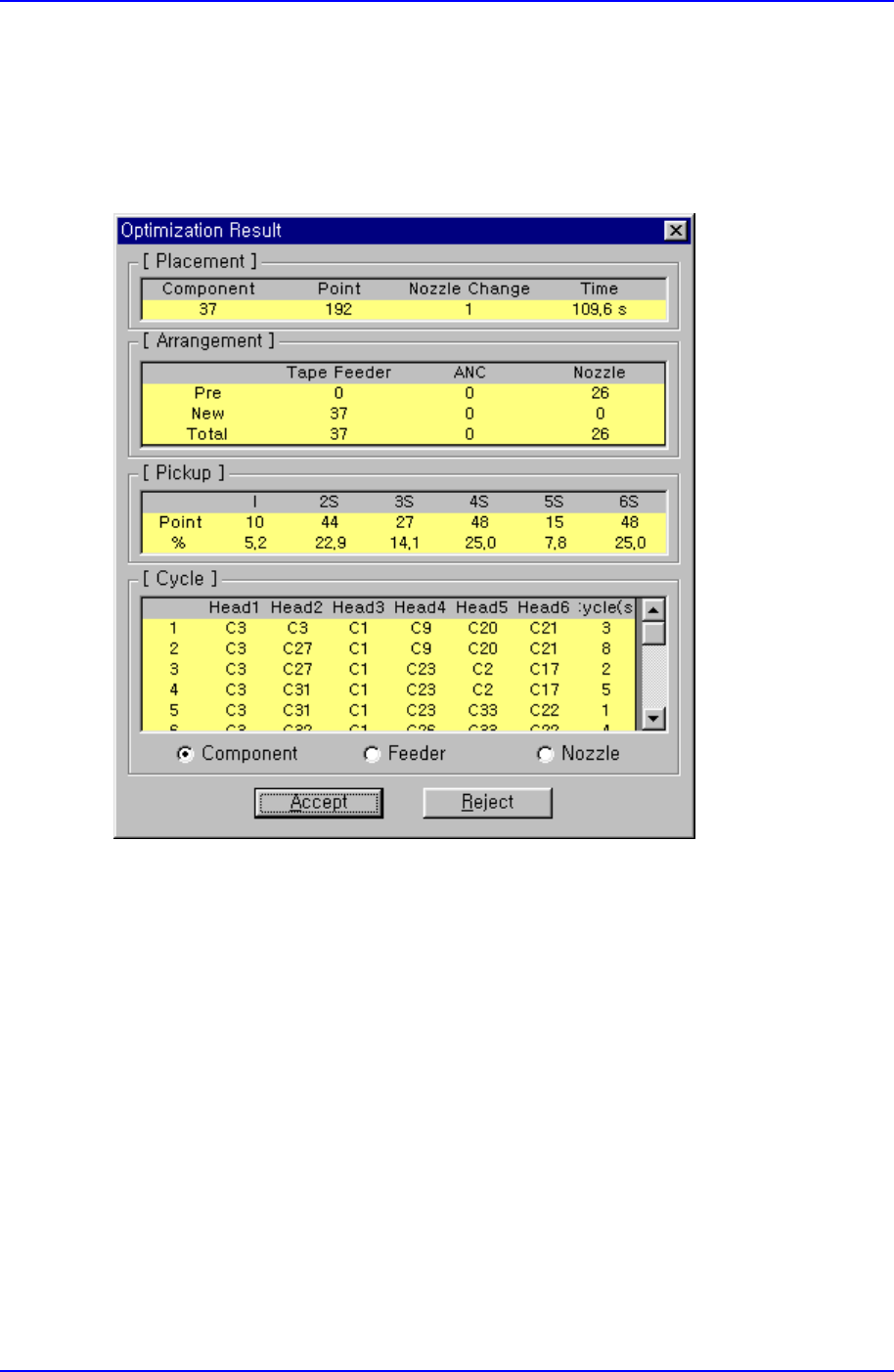
When the Optimizer execution is completed, the following dialog box is displayed.
Figure A-8. "Optimization Result" dialog box
This dialog box shows various results so that the optimized status can be seen at a glance.
When the <Accept> button is clicked on, closes this dialog box, ends the Optimizer and
the result is reflected in the MMI step program. When the <Reject> button is clicked on,
the result is not reflected in the MMI step program and the Optimizer option dialog box is
displayed again. If necessary, readjust the Optimizer options and execute again.
<Placement> group
The number of component types, total placement points, the number of nozzle
changes, and total operation time is displayed in this group. As the total operation
time is an estimate based on simulation, it might differ from the actual operation time.
To calculate production quantity, actually produce a PCB with the equipment and
refer to that time.
<Arrangement> group

Appendix A Optimizer
A-15
The arrangement status of tape feeders, ANCs, and nozzles is displayed in this group.
Pre indicates the number arranged by the user, New indicates the number newly
arranged in the Optimizer, and Total indicates the total number of arrangements.
<Pickup> group
The distribution of simultaneous component pickups is displayed in this group. As
the CP-45 model has 6 heads, there are 6 types of component pickups, from
individual pickup to 6 simultaneous pickups. The number of pickup points and its
percentage for each pickup type is displayed in this group.
I: Component pickup by one head only (individual pickup)
2S: Component pickup by two heads simultaneously
3S: Component pickup by three heads simultaneously
6S: Component pickup by six heads simultaneously
<Cycle> group
The status of component allocation, feeder allocation, and nozzle allocation in the
final step program is displayed in this group. Three radio buttons on the bottom let
the user to select one and see the allocation status. The number in the rightmost
column displays the number of cycle repetitions.
Component: In the component allocation status, the component to be operated by
each head is displayed with cx, x is the number given to a component. (Component
name is not displayed here)
Feeder: In the feeder allocation status, the feeder lane from which the head picks up
is displayed. The front feeder base is indicated by Fx, and the rear feeder base by Rx.
Here x is the feeder lane number. And, the stick feeder is indicated by Sx, and tray
feeder by Tx, here x is not a feeder unit name but a division by pickup point.
Nozzle: The nozzle allocation status shows which nozzle is used for which head.
The name of the nozzle to be used by each head is displayed.