APPENDIX.pdf - 第58页
Samsung Component Placer CP-45F(V)/FS Operations Manual B-36 Error Code $6009 Link Step Message E - No wanted nozzle in the ANC. - Check and compare the setting and current array of the nozzle in the ANC. Step1 - Please …
Appendix B 3D Trouble Shooting Guide
B-35
E - Error occurred while the PCB was taken out.
Step1
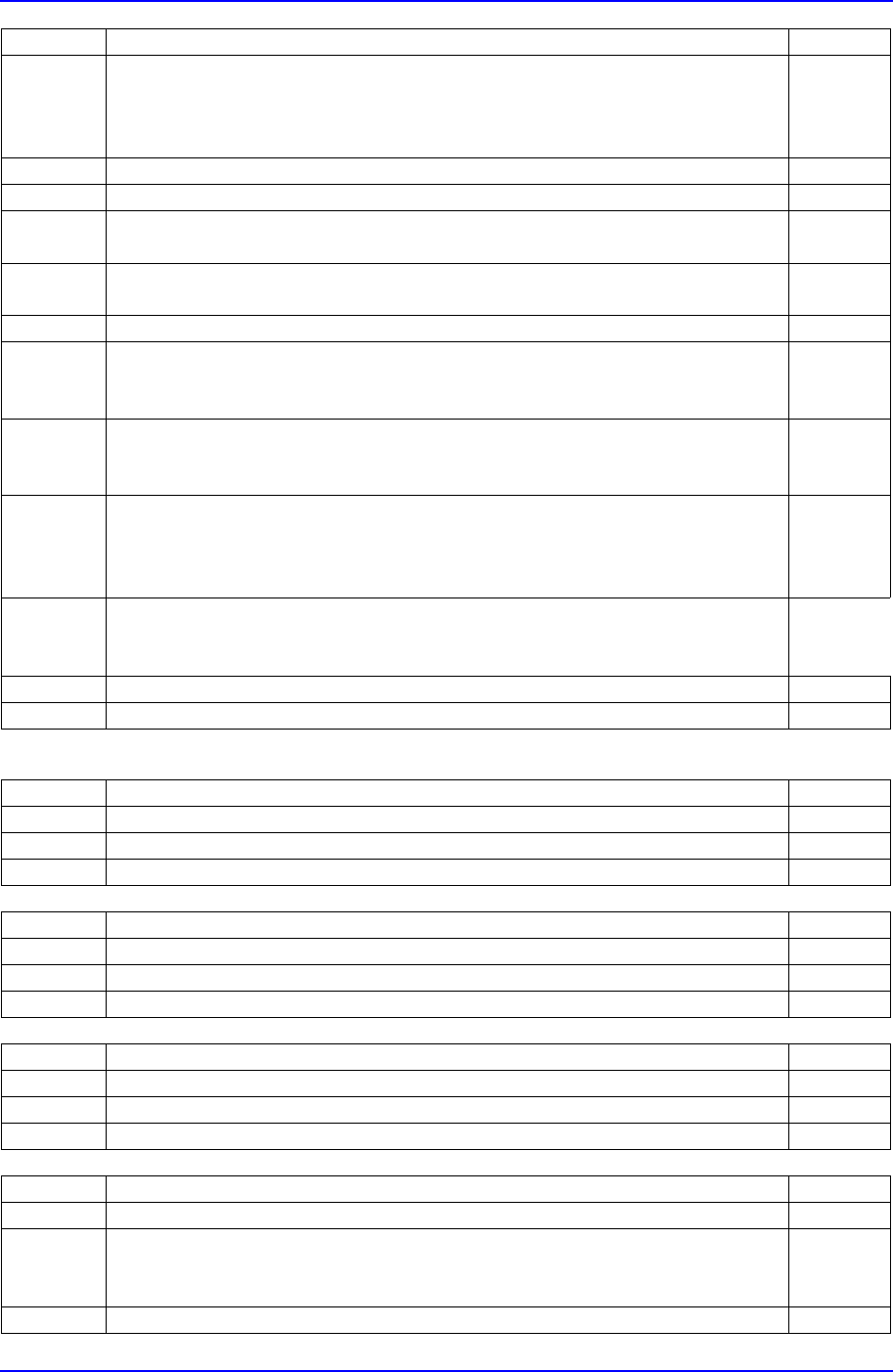
- Check the problem and choose the corresponding problem in the figure
above.
. When the problem is (a) or (b). Step3
. When the problem is (c) Step12
Step2 1. Press the STOP button. (Stop the buzzer sound).
Step3 - Open the equipment door.
Step4 - Manually remove the PCB.
- Then click on the NEXT button.
Step5
- Adjust the conveyor width from the Board setting in the PCB menu of
MMI.
Step6 - Close the equipment door.
Step7 1. Cancel it by turning the emergency switch.
2. Press the RESET button.
- Then click on the NEXT button.
Step8 1. Turn on the power for motor.
2. Press the READY button.
- Then click on the NEXT button.
Step9 1. Select the HOME mode by using the MODE button in the teaching box.
2. Turn off all the LEDs by using the AXIS button.
3. Press the HOME START button.
- Then click on the NEXT button.
Step10 - Click on START or CONTINUE on MMI.
… 'START': starts operation with a new PCB.
… 'CONTINUE': continues at the point where the operation stopped.
Step11 - Press the START button to resume operation.
Step12 - Please contact Our C/S.
Error Code $4400 Link
Step Message
E - Can't raise the side light of the head.
Step1 - Please contact Our C/S.
Error Code $6001 Link
Step Message
E - Can't open the Mirror.
Step1 - Please contact Our C/S.
Error Code $6004 Link
Step Message
E - XY Gantry couldn't move to the nozzle PUT position.
Step1 - Please contact Our C/S.
Error Code $6008 Link
Step Message
E - Unwanted nozzle in the ANC.
- Check and compare the setting and current array of the nozzle in the
ANC.
Step1 - Please contact Our C/S.

Samsung Component Placer CP-45F(V)/FS Operations Manual
B-36
Error Code $6009 Link
Step Message
E - No wanted nozzle in the ANC.
- Check and compare the setting and current array of the nozzle in the
ANC.
Step1 - Please contact Our C/S.
Error Code $600a Link
Step Message
E - XY Gantry couldn't move to the nozzle PICK position.
Step1 - Please contact Our C/S.
Error Code $a100 Link
Step Message
E - Error occurred while the Vision fiducial mark was processed.
Step1 - Specify the Fiducial Mark again and resume operation.
Appendix C Shuttle Tray Feeder
C-1
Appendix C. Shuttle Tray Feeder
C.1. Registering Shuttle Tray Feeder
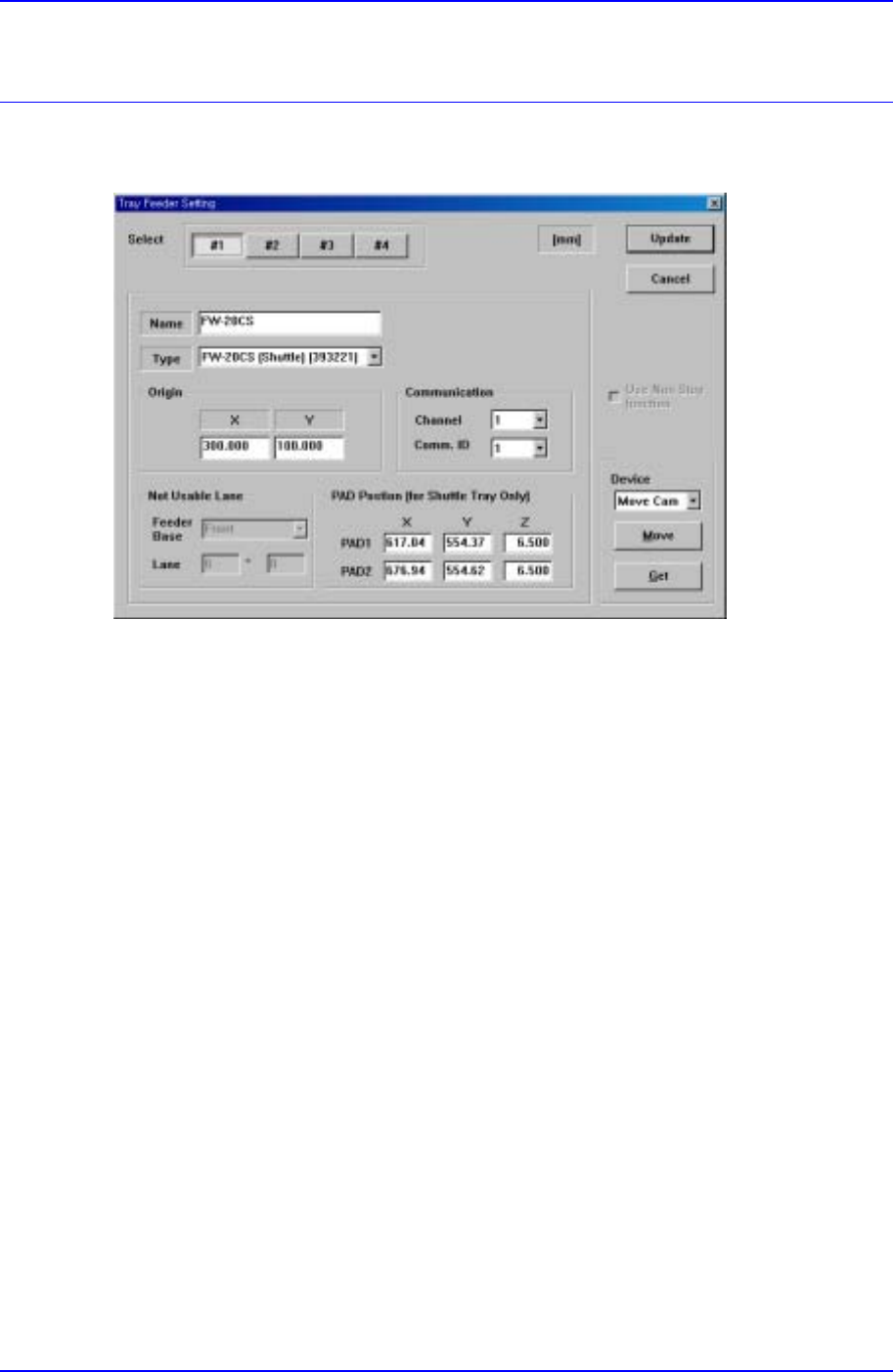
Figure C-1. "Tray Feeder Setting" Dialog box
After the Shuttle Tray Feeder has been installed, register it from the “Tray Feeder Setting”
dialog box (Sys. SetupTray) in Figure C-1 as follows.
① Enter the Tray Feeder name to specify in the Name item.
② Select ‘FW-20CS (Shuttle) (393221)’ from the Type item.
③ Enter the origin of Tray Feeder using the method same as that for setting the existing
Tray Feeder.
④ Set the Channel and Comm ID for the communication between the CP45 equipment
and the Tray Feeder.
⑤ Enter the PAD position of the Shuttle that is waiting for the component supply in the
CP45 equipment.
As the Shuttle Tray Feeder does not occupy a separate Feeder Lane unlike the existing
Tray Feeder, the default value is automatically set to Not Usable Lane.
C.2. Testing Shuttle Tray Feeder Operation
After the Shuttle Tray Feeder has been registered, the user can check whether it operates
normally from the "Tray Feeder Communication Diagnosis" dialog box