00198442-04_UM_TX-V2_EN.pdf - 第227页
Instruction manual SIPLACE TX 5 Tasks at the placement machine From software version 714.0 12/2020 5.4 Switching off the SIPLACE line 227 5.4 Switching off the SIPLACE line 5 5.4.1 Switching off the st ations T o switch …
5 Tasks at the placement machine Instruction manual SIPLACE TX
5.3 Switching on the SIPLACE line From software version 714.0 12/2020
226
5
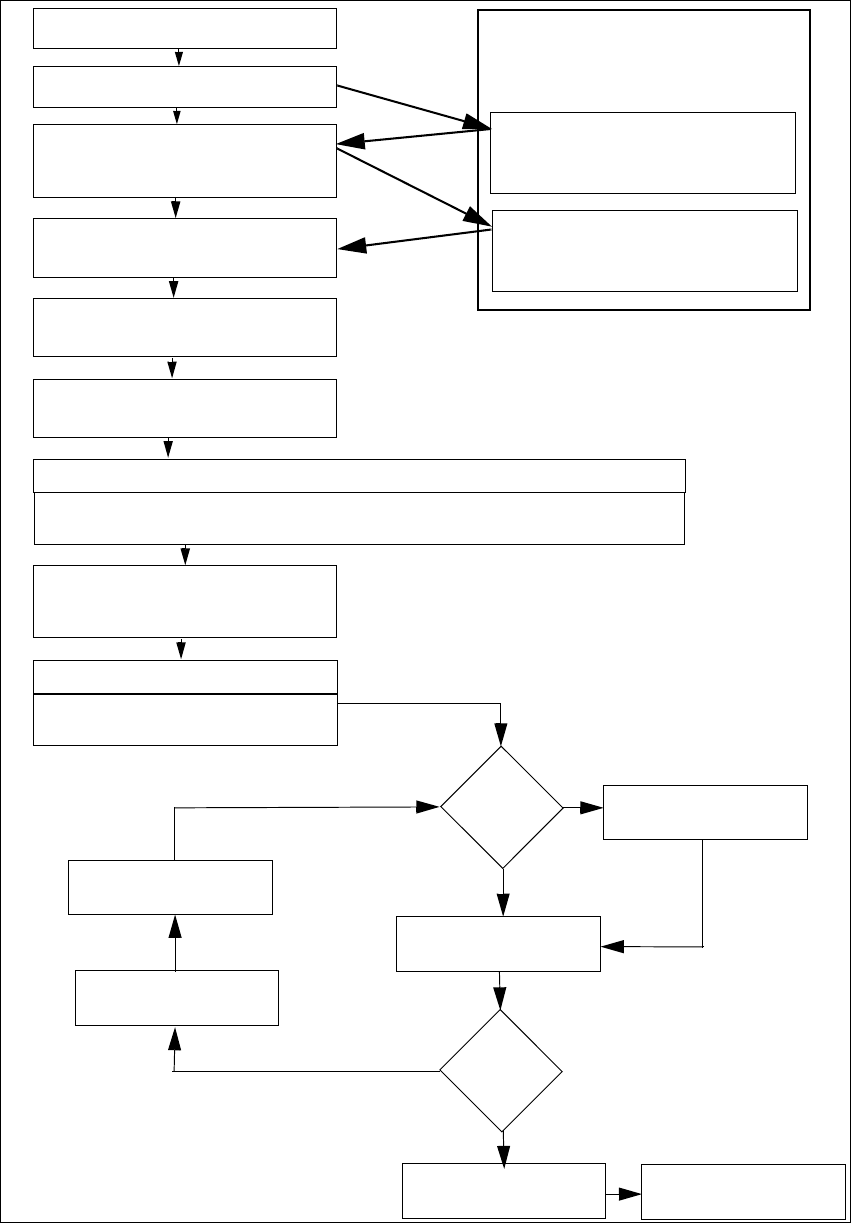
Fig. 5.3 - 2 Flow chart - switching on the "SIPLACE line"
Station computer
Switch on
Check setup
(configure feeder modules
Teach fiducials
Load board data
Press start button
Wait for reference run
Move board in
Wait for PCB
Check setup
(if table marked red
If required: change nozzle configuration
Nozzle check
Fiducials
OK?
Track error
Placement
Check setup
Fill up tracks
Placement
PCB in output conveyor
Italics: Performed or reported by the station
Yes
Yes
No
No
Presettings on the
placement ma-
chine
Download assistant
Programming system
Tasks
Confirm conversion in download
assistant
Bold lettering: job to be performed by op-
erator
Instruction manual SIPLACE TX 5 Tasks at the placement machine
From software version 714.0 12/2020 5.4 Switching off the SIPLACE line
227
5.4 Switching off the SIPLACE line
5
5.4.1 Switching off the stations
To switch off the stations, proceed as follows:
End all placement procedures, so that there are no more boards in the placement machine.
Check whether the Z axes of all placement heads are in their uppermost end positions.
Check whether there are still components on the placement heads and remove these.
Close the station computer software in the view
Settings --> Machine settings --> Shut down the placement machine...
Once the computer has been shut down, wait for the relevant message on the monitor at lo-
cation 2 and then switch off the station at the main switch.
5.4.2 Exiting SIPLACE Pro (Windows)
In the SIPLACE Pro menu, select Object --> Close.
Close all other programs on the computer.
Select Shut down from the Windows Start menu.
CAUTION
Before you switch off the line, observe the following procedures.
5 Tasks at the placement machine Instruction manual SIPLACE TX
5.5 The user interface From software version 714.0 12/2020
228
5.5 The user interface
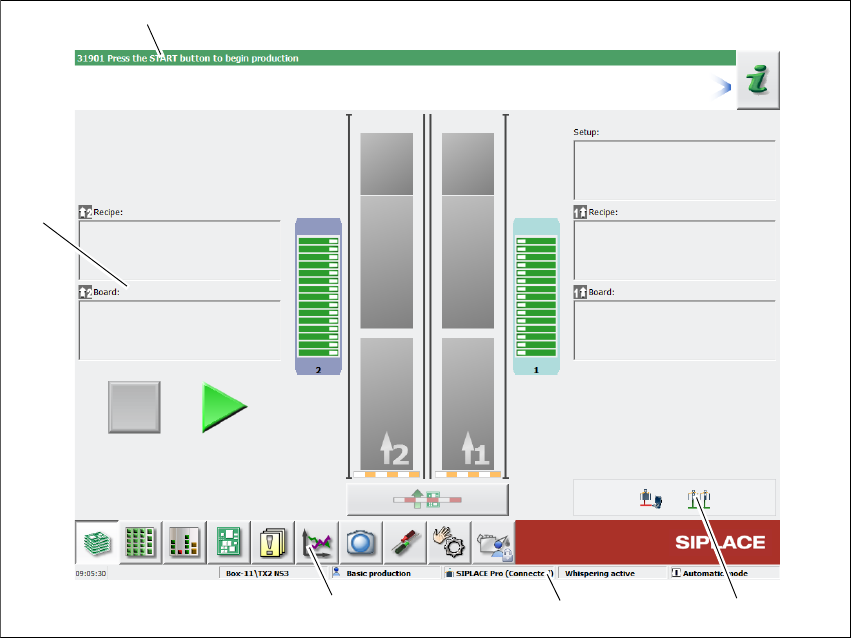
The user interface is divided into the following areas.
5
Fig. 5.5 - 1 Components on the user interface (example)
Legend
(1) Status field (status and error display)
(2) Processing area / display area
(3) Toolbar
(4) Information line
(5) View of changed configurations and additional options
(1)
(2)
(3)
(4)
(5)