Installationsanleitung_SuSE9.3_en.pdf - 第69页
Customized LRL SuSE 9.3 Installation Description 69 of 69 4.6 Notes Note The Linux version of the line computer only runs corre ctly with the SuSE distribution produced by SiemensAG, L&A. The original SuSE installati…
Customized LRL SuSE 9.3 Installation Description
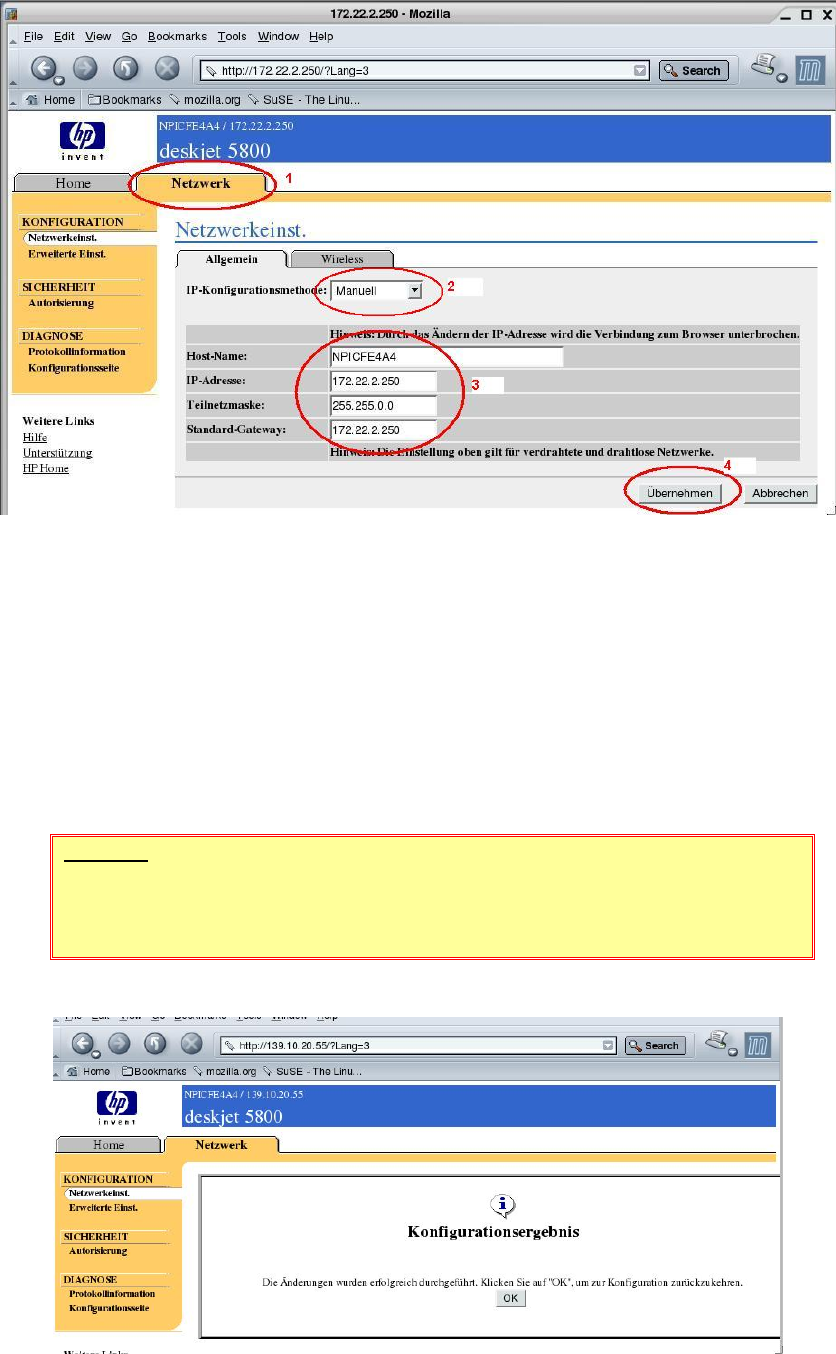
15. The network settings are shown by clicking the "Network" (1) tab.
Figure 4-47
16. Set the option "IP Configuration Method" to "Manual" (2).
17. (3) Specify the details for
the printer name ("Host Name")
the TCP/IP address of the printer ("IP Address")
the subnet mask of the printer ("Subnet Mask")
the address of the default gateway.
18. Click the "Apply" button (4) to change the settings in the printer.
WARNING
If you change the address of the printer, the connection to the printer is
interrupted when you click the "Apply" button.
19. The configuration program still informs you that the settings were updated successfully.
Figure 4-48
67 of 69

Installation Description Customized LRL SuSE 9.3
68 of 69
20. Confirm the message by clicking "OK".
21. Close the browser with "File" / "Quit".
22. The computer must be rebooted to cancel the temporarily changed address. After you have
performed a shutdown, the computer reverts to the original addresses.
4.5.4.4 Configuring a wireless network.
The "HP Deskjet 5850" printer can also be operated in a wireless LAN.
The customer's network administrator must configure the printer for a wireless LAN.
NOTE
The use of wireless LAN devices is prohibited within Siemens AG!
Whether or not the printer can be operated in wireless mode at the customer's
site must be clarified on a case-by-case basis.
Customized LRL SuSE 9.3 Installation Description
69 of 69
4.6 Notes
Note
The Linux version of the line computer only runs correctly with the SuSE distribution
produced by SiemensAG, L&A.
The original SuSE installation package as supplied as part of the line computer SuSE
distribution must not be installed. It is only included in the line computer SuSE distribution
in order to fulfill the licensing requirements.
Note
SOKOs (special designs) on the basis of LRL 503.03 or LRL.503.04 will not run under
SuSE 9.3. An upgrade is required.