MEC-CP842-1.0E.pdf - 第110页
Replacing Consumable Parts >> Fluorescent Nozzle Stickers 6-2 MEC-CP842-1.0E 6.2 Fluorescent Nozzle S tickers Point Fluorescent nozzle stickers that are dirty may cause vision pr ocessing errors and should be repl …
Replacing Consumable Parts >> Nozzles
MEC-CP842-1.0E 6-1
6. Replacing Consumable Parts
6.1 Nozzles
Point
A nozzle that is bent, deformed, or clogged can cause part pick-up errors and should be
replaced. When replacing a nozzle, use care to avoid losing the nozzle spring.
Procedure
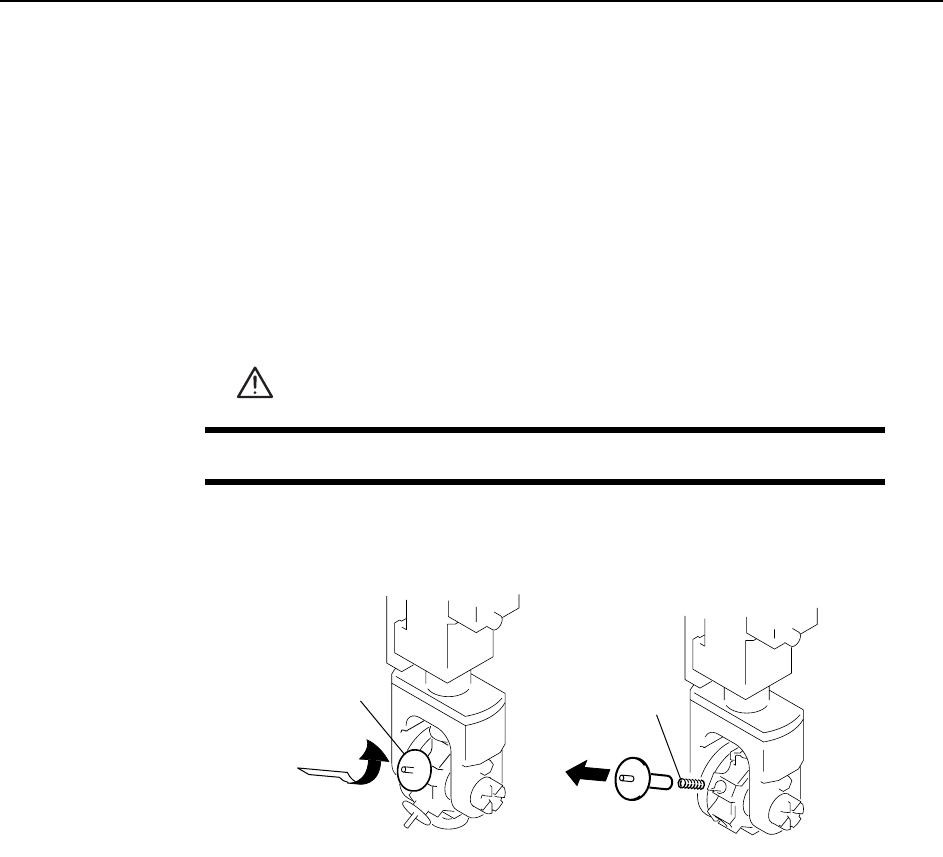
1 Remove the nozzle and spring as shown in the figure below.
Caution
1. When removing the nozzle, take care not to lose the spring. Also check that the spring is not
left within the nozzle holder.
2. To avoid nozzle bend, do not hold the nozzle at the tip during removal.
2 Reverse the removal procedure to attach a new nozzle.
WARNING
Press EMERGENCY STOP before performing this procedure.
C746M4001
Press and turn
Remove slowly
Nozzle
Spring
Replacing Consumable Parts >> Fluorescent Nozzle Stickers
6-2 MEC-CP842-1.0E
6.2 Fluorescent Nozzle Stickers
Point
Fluorescent nozzle stickers that are dirty may cause vision processing errors and
should be replaced.
Procedure
1 Wash hands before replacing the sticker.
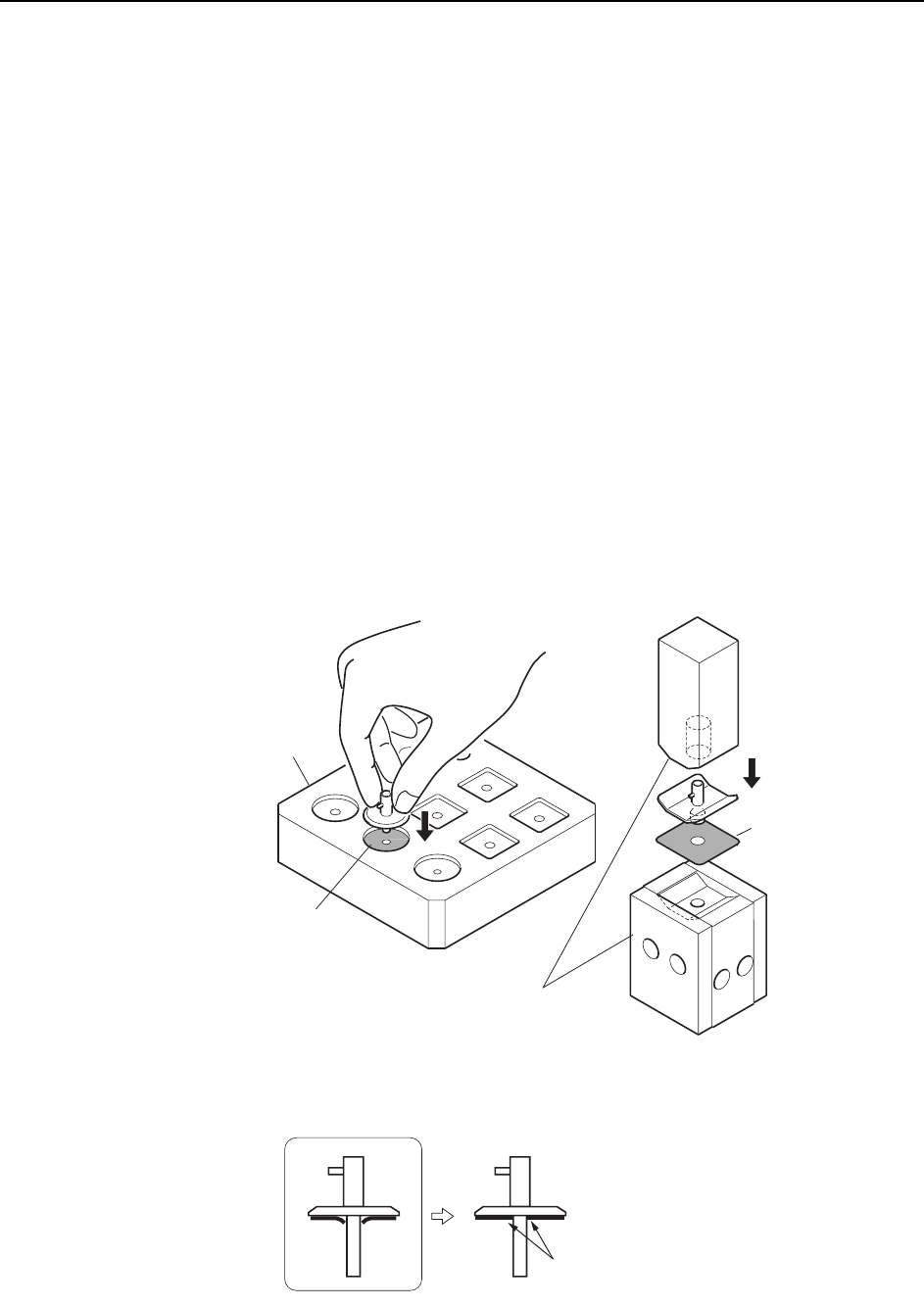
2 Use a cutter to peel (from outer edge) the old sticker off the nozzle disk.
3 Use a cloth to wipe any residual adhesive off the disk.
4 Verify that the new sticker is clean and not damaged.
5 Peel the backing off the new sticker, and push out the center hole from the fluo-
rescent side.
Note: Pushing out the center hole from the adhesive side may damage the fluorescent coating
around the hole.
6 Align the nozzle and sticker centers, and push the sticker into place using the
jig. Be sure that there is no gap between the nozzle disk and the sticker.
Note: Make sure that the sticker is attached firmly to the nozzle.
C746M4002
Nozzle sticker
Nozzle sticke
r
Jig ( DCPJ046* )
Jig
( ADCPJ824*)
C746M4003
Attached neatly without lifting.
Replacing Consumable Parts >> Fluorescent Nozzle Stickers
MEC-CP842-1.0E 6-3
7 Use a cutter to trim off any of the sticker that protrudes beyond the disk.
8 Remove any of the adhesive that may have adhered to the nozzle pipe.
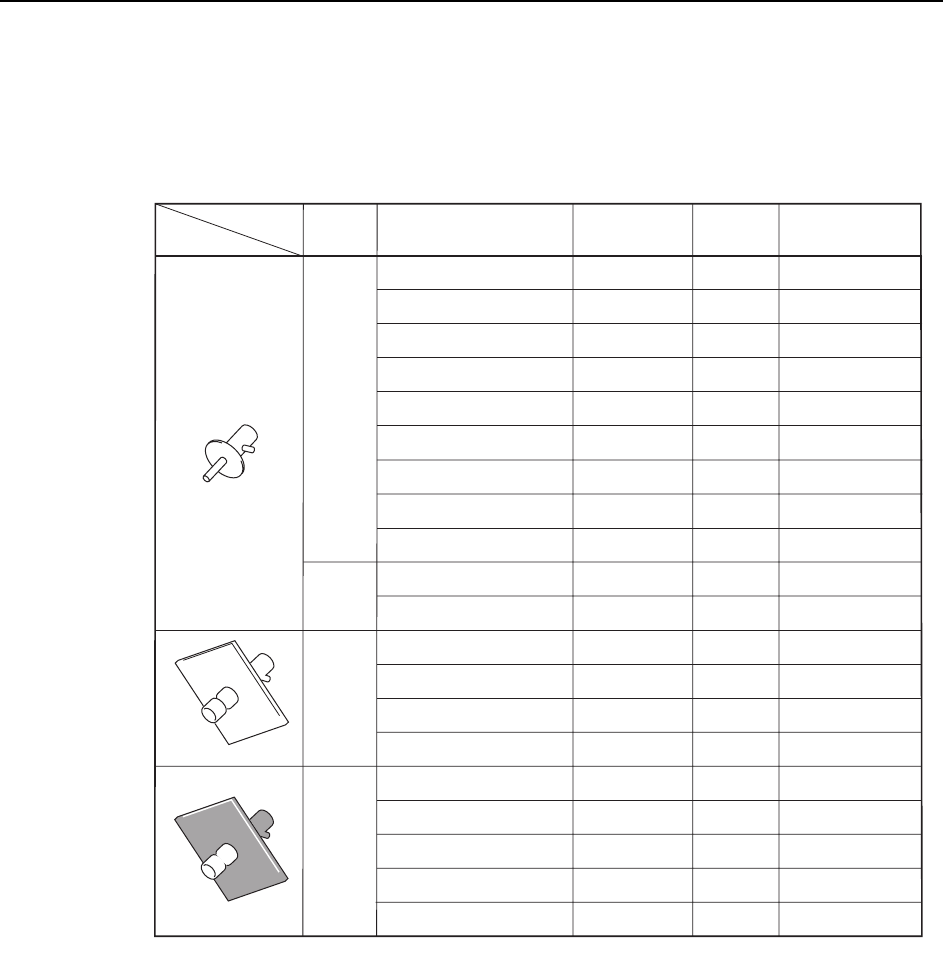
Nozzle and fluorescent sticker drawing numbers
C746M4T01
ADCPH751*
ADCPH769*
ADCPH752*
ADCPH753*
ADCPH754*
ADCPH955*
ADCPH956*
ADCPH957*
ADCPH958*
ADCPH770*
ADCPH971*
ADCPH959*
ADCPH961*
ADCPH963*
ADCPH965*
ADCPH960*
ADCPH962*
ADCPH964*
ADCPH966*
ADCPH968*
DCPH851*
DCPH851*
DCPH852*
DCPH853*
DCPH854*
DCPH855*
WPH820*
WPH821*
DCPH856*
DCPH854*
WPH820*
DCPH857*
DCPH858*
DCPH859*
DCPH860*
DCPH881*
DCPH882*
DCPH883*
DCPH884*
DCPH885*
Nozzle Size
Nozzle
shape
Round
Round
Round
MELF
Nozzle Assy
Dwg. No.
Disk Size
Fluorescent Seal
Dwg. No.
f 0.4 ( R08-004 )
f 0.4 ( R08-004 ) Short
f 0.7 ( R08-007 )
f 1.0 ( R08-010 )
f 1.3 ( R08-013 )
f 1.8 ( R16-018 )
f 2.5 ( R16-025 )
f 3.7 ( R16-037 )
f 5.0 ( R16-050 )
f 1.3 ( M08-013 )
f 2.5 ( M16-025 )
f 1.8 ( S16-018 )
f 2.5 ( S16-025 )
f 3.7 ( S16-037 )
f 5.0 ( S16-050 )
f 1.8 ( B16-018 )
f 2.5 ( B16-025 )
f 3.7 ( B16-037 )
f 8
f 8
f 8
f 8
f 8
f 16
f 16
f 16
f 16
f 8
f 16
16x16
16x16
16x16
16x16
16x16
16x16
16x16
16x16
21x21
f 5.0 ( B16-050 )
f 5.0 ( B21-050 )