MEC-CP842-1.0E.pdf - 第60页
Basic Operati on >> Ch anging Pallets (CP-842ME option) 4-10 MEC-CP842-1.0E Pallet Loading 1 Push the fork of the PCU (containing the repla cement pallet) into the machine and clamp it using the [Stage1 Clamp] comm…
Basic Operation >> Changing Pallets (CP-842ME option)
MEC-CP842-1.0E 4-9
4.5 Changing Pallets (CP-842ME option)
Point
The PCU (Pallet Change Unit) enables batch changes of feeder pallets.
Procedure
Pallet unloading
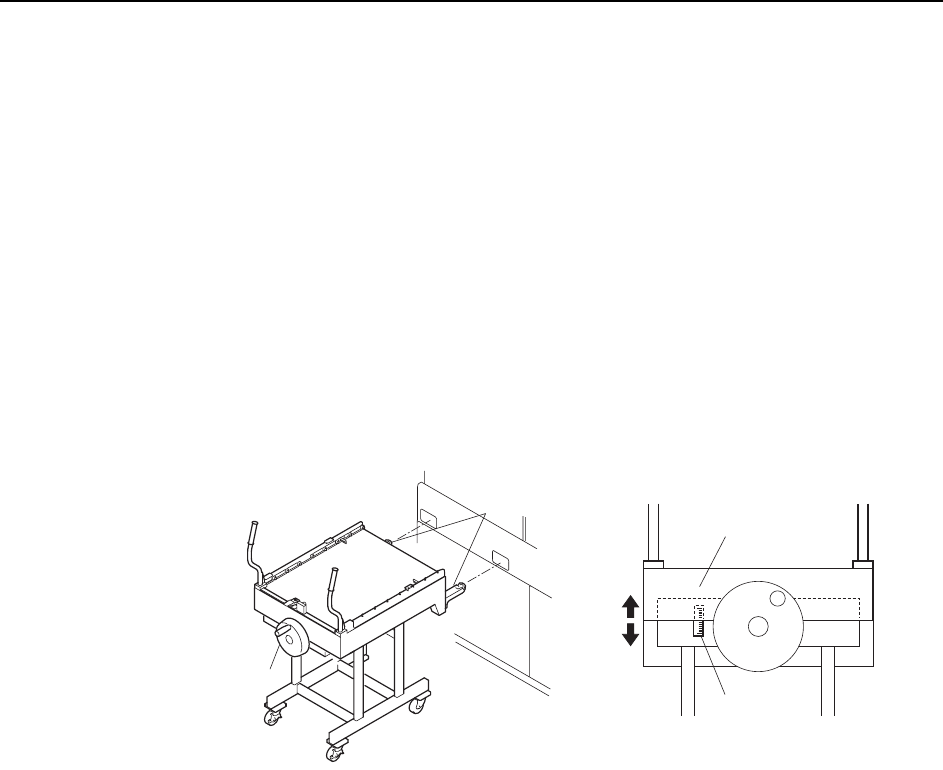
1 Align the height of the PCU forks (at the end of the PCU) with the fork slots on
the machine. Turn the handle and raise the upper section of the PCU.
Note: Use the guide seal at the side of the handle as a reference when adjusting the height of the
forks. Adjust so that the lower surface of the plate falls within plus or minus 10 mm of the
standard value.
2 Push the PCU to insert the forks into the machine, then clamp it with the
[Stage1 Clamp] command.
Note: The following explanation describes the D1-axis (stage 1) pallet change.
3 Close the rear door and select the [Stage1 Start] command, then press START.
The D-axis pallet moves to the change position and is unclamped.
4 Open the rear door and pull the pallet out of the machine and onto the PCU.
Caution:
1. Remove the pallet slowly.
2. To avoid damage to the door stoppers, the door should be opened and closed with care.
5 Select the [Stage1 Unclamp] touch-panel command, then slowly retract the
loaded PCU.
Caution:Exercise extreme care when using the PCU to move a fully loaded pallet. A dropped pallet
may result in serious injury or damage to the machine.
C746M2010
Handle
Forks
Plate
Guide seal

Basic Operation >> Changing Pallets (CP-842ME option)
4-10 MEC-CP842-1.0E
Pallet Loading
1 Push the fork of the PCU (containing the replacement pallet) into the machine
and clamp it using the [Stage1 Clamp] command.
Caution:Exercise extreme care when using the PCU to move a fully loaded pallet. A dropped pallet
may result in serious injury or damage to the machine.
2 Push a pallet onto the machine’s D-axis.
3 Close the rear door and clamp the pallet at the D-axis.
Caution:
1. To avoid damage to the door stoppers, the door should be opened and closed with care.
2. If the rear door is closed as the pallet is being changed, the clamp will be activated even
though the pallet is not present.
4 Select the [Stage1 Set] command.
5 Select the [Stage1 Unclamp] command, then slowly retract the PCU. This com-
pletes the pallet change.
Maintenance >> Cleaning
MEC-CP842-1.0E 5-1
5. Maintenance
5.1 Cleaning
5.1.1 Waste Tape Box and Filter (Every 8 Hours)
Point
Waste tape that is cut by the cutter is carried through a duct to the waste tape box.
This box should be emptied after every 8 hours of operation.
Procedure
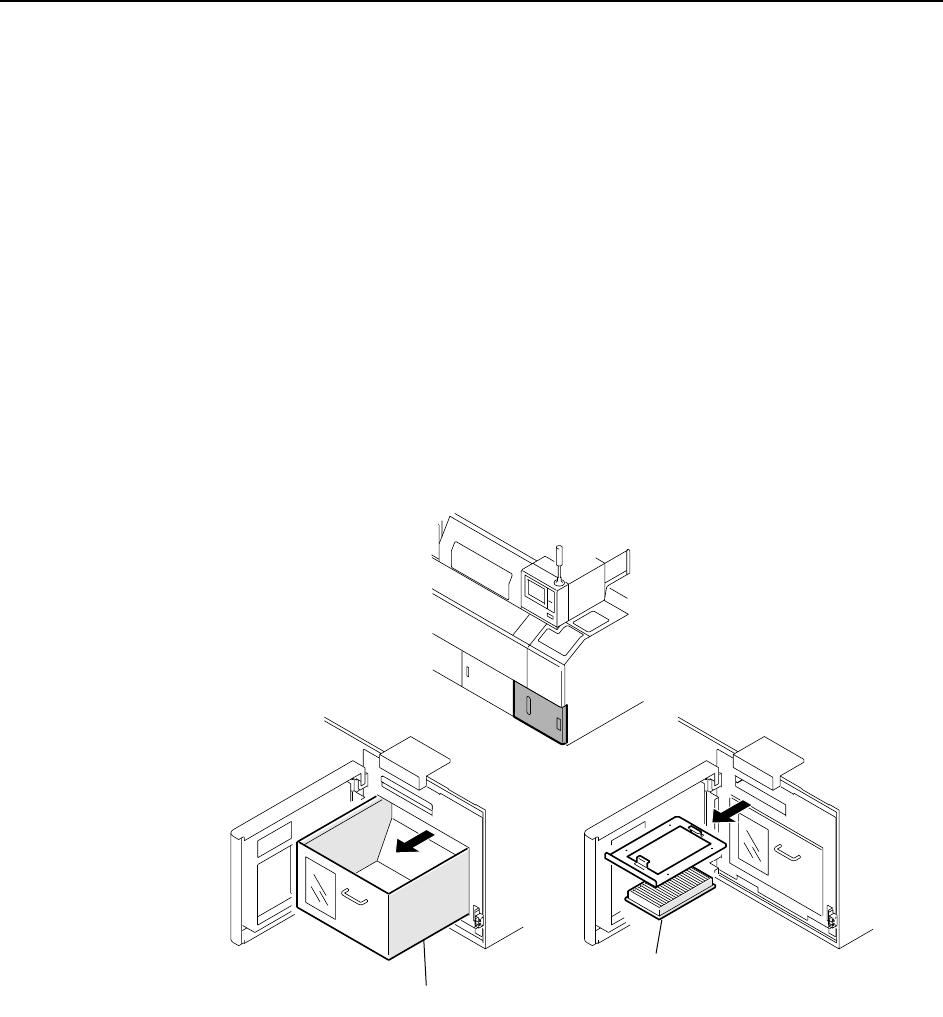
Open the door, remove the waste tape box, and empty the contents.
When emptying the waste tape box, also check the filter immediately above it. If the
filter is dirty, clean it with a vacuum cleaner.
Note: When cleaning is complete, ensure that the waste tape box and filter are inserted all the way
back to their original positions. Also, ensure that the door is properly closed.
C746M3001
Waste tape box
Filter