00198168-02_Technical_Training_TX-Series_EN.pdf - 第229页
9 Control and Communication 9.10 VISION GigE Technical Training SIPLACE TX-Series 10/2016 229 Vision GigE Overview Power Vision GigE Overview Camera Communication
9 Control and Communication
9.10 VISION GigE
228 Technical Training SIPLACE TX-Series 10/2016
9.10 VISION GigE
GigE is the term used for the vision system hardware including camera types and a bus structure
on TX machine.
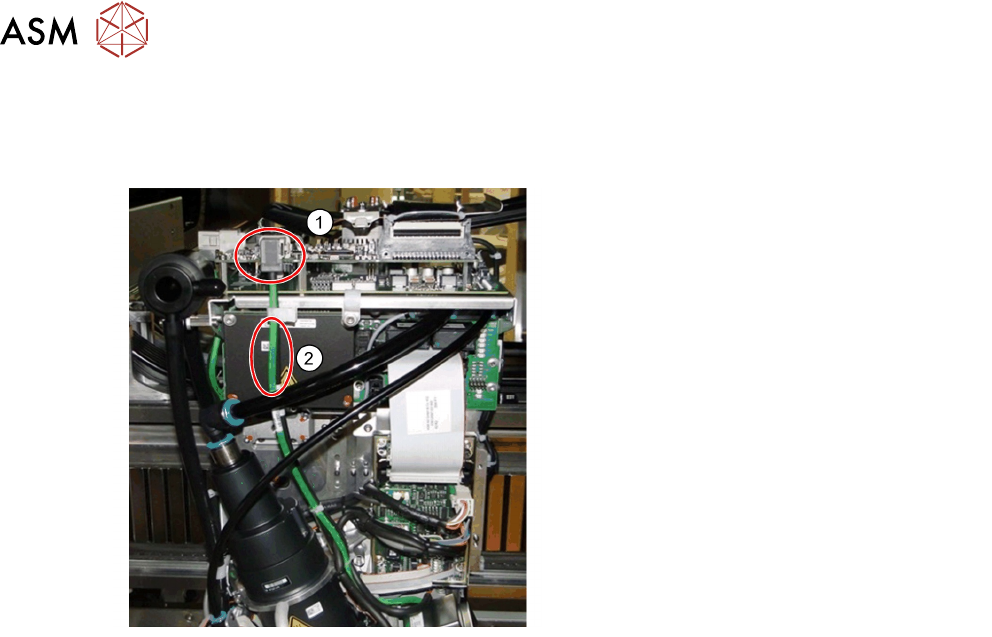
1. Ethernet connectors
2. Communication via Ethernet cable
(may be black or green)
●
GigE is an interface standard for high-performance industrial cameras. It provides a
framework for transmitting high-speed video and related control data over Ethernet networks.
●
It’s incompatible to the existing SIPLACE Vision System Hardware.
●
A GigE-network interface card (Ethernet Adapter) is inside the BoxPC.
●
All GigE cameras use the same sensor type number as for SIPLACE Vision with an additional
G at the end, e.g. SST23G.
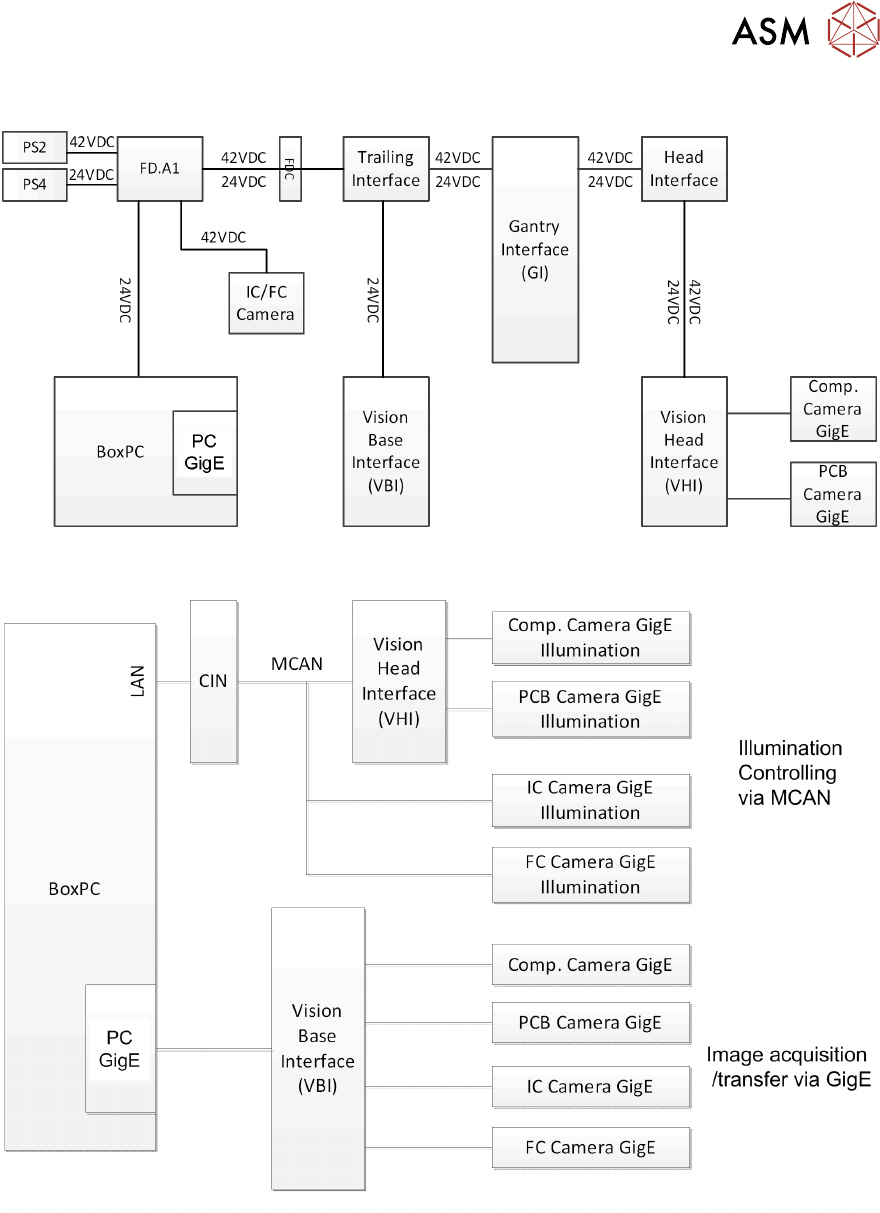
The Vision communication on TX over GigE and CAN bus
●
The images from the Component and PCB cameras are sent digitally to the Vision Base
Interface (VBI).
●
The transfer takes place via the trailing cable “Spread Spectrum“ (without coax cable).
●
The images from the IC and FC cameras are sent directly to the GigE adapter in PC via the
Vision base Interface (VBI).
●
The machine CAN bus provides the illumination control.
●
The individual illumination values stored in the component shape are transferred to the
camera via CAN bus.
9 Control and Communication
9.10 VISION GigE
Technical Training SIPLACE TX-Series 10/2016 229
Vision GigE Overview Power
Vision GigE Overview Camera Communication

9 Control and Communication
9.11 Analysis - Common Error List
230 Technical Training SIPLACE TX-Series 10/2016
9.11 Analysis - Common Error List
Code Error Description Possible Cause Action
30447
30451
30456
30256
30262
●
Communication on GCU-
GCU fast drive bus
interrupted
●
Specified CAN bus is
switched off
●
Secondary CAN bus is off
●
Cannot initialize CAN
hardware
●
Cannot initialize CAN
interface
●
Problem with cable
connection
●
Problem with CIN
●
Problem with certain
content/board in the
CAN circuit
●
Defective MGCU
●
Defect adapter/HCU
●
Check cable
connection
●
Restart the
machine
●
Check the status
and switch setting
on the CIN
●
Check and
redownload
firmware of the
CAN interface
●
Check status /
indication on the
board related in
CAN circuit
●
Check status /
indication of
MGCU/HMCU
●
Replace adapter/
HCU
37752
●
The LED test of the
camera illumination failed
●
No image captured from
camera
●
Power for illumination
of camera failed
●
LED failed but camera
can be operated
●
Problem with camera
GigE
●
Problem of cable GigE
●
Check relevant
circuit of power for
illumination
●
Check output
relevant power
supply (PS)
●
Check the
functionality of
camera
●
Check connection
of the GigE cable
33378
33520
33606
33331
●
Camera cannot be
addressed
●
Board camera cannot be
addressed
●
Image capture from
camera canceled
●
Signal path between
PC and camera inter-
rupted
●
Problem with camera
●
Check cable
connection on
BoxPc
●
Check the coax
cable connection
and trailing cable
connector
●
Check the camera
cable
●
Check the camera
and replace if
necessary
30365
30572
●
Moving the axis is not
permitted, Z Axis is not in
a safe position
●
Incorrect time sequence
when moving Star and Z
Axis
●
Sporadic communica-
tion error for axis con-
trol sequence
●
Permitted overlap
region of Star and Z
been reached
●
Perform head axis
reference run
●
Check the head
and axis
●
Perform overall
reference run
●
If certain segment
defective, replace it