00197195-02-UG SetupCenter 5.1_en.pdf - 第116页
Working with the Setup Center Application Setup Information Filter Settings 116 User Guide SIPLACE Setup Center 5.1 ▪ Setup Change ▪ Set up ve rification dat a query ▪ Length of p ackaging chain exceeded ▪ Splice Monitor…
Working with the Setup Center Application
Verification History View Settings Verification History
User Guide SIPLACE Setup Center 5.1 115
▪ Table or feeder removed
– A table with feeders or a single feeder has been taken out of the machine.
▪ Packaging unit set
▪ Packaging unit split
▪ Packaging unit chain split
▪ Packaging unit torn down
▪ Packaging unit unlocked
Sources in the verification history view
▪ Docking station
▪ Feeder mounted
▪ Feeder removed
▪ Setup Center interface
▪ Setup Center GUI
▪ Scanner
▪ Setup Center
▪ Setup Center upgrade
▪ Station
▪ Table registered
▪ Table removed
▪ Unknown
Reasons in the verification history view
▪ Wrong brightness class
▪ Wrong component
▪ Component not present in the partial setup
▪ Component is not to be placed
▪ No verification required
▪ Component omitted
▪ Delta setup
▪Error
▪ Feeder type changed
▪ Foil torn
▪ Forced activation
▪ Packaging unit in use by different Setup Center
▪MES
▪ Packaging unit moved
▪ MSD open time expired
▪ New setup active
▪ Not specified
▪ Packaging unit data cleared
▪ Packaging Unit Editor
▪ Expiry date exceeded
▪ Wrong packaging unit!
▪ Packaging unit removed from feeder
▪ Packaging unit replaced
Working with the Setup Center Application
Setup Information Filter Settings
116 User Guide SIPLACE Setup Center 5.1
▪ Setup Change
▪ Set up verification data query
▪ Length of packaging chain exceeded
▪ Splice Monitor - Missing Refill
▪ Splice Monitor - Missing Splice
▪ Splice monitor: Unexpected splice
▪ Torn down outside the setup
▪ Verification history cleared
▪ Verification status uncertain
▪ Incorrectly refilled
7.3.2 Filter Settings
The data are shown with an advisable filter setting, which differs according to where the verification his-
tory is opened. These filter settings can be edited here as required.
► Enable the required filter setting and select the required data from the relevant list boxes. You may
need to enter values in the fields Packaging unit ID, Feeder ID and Table ID.
7.4 Setup Information
7.4.1 Opening Setup Information + Overview
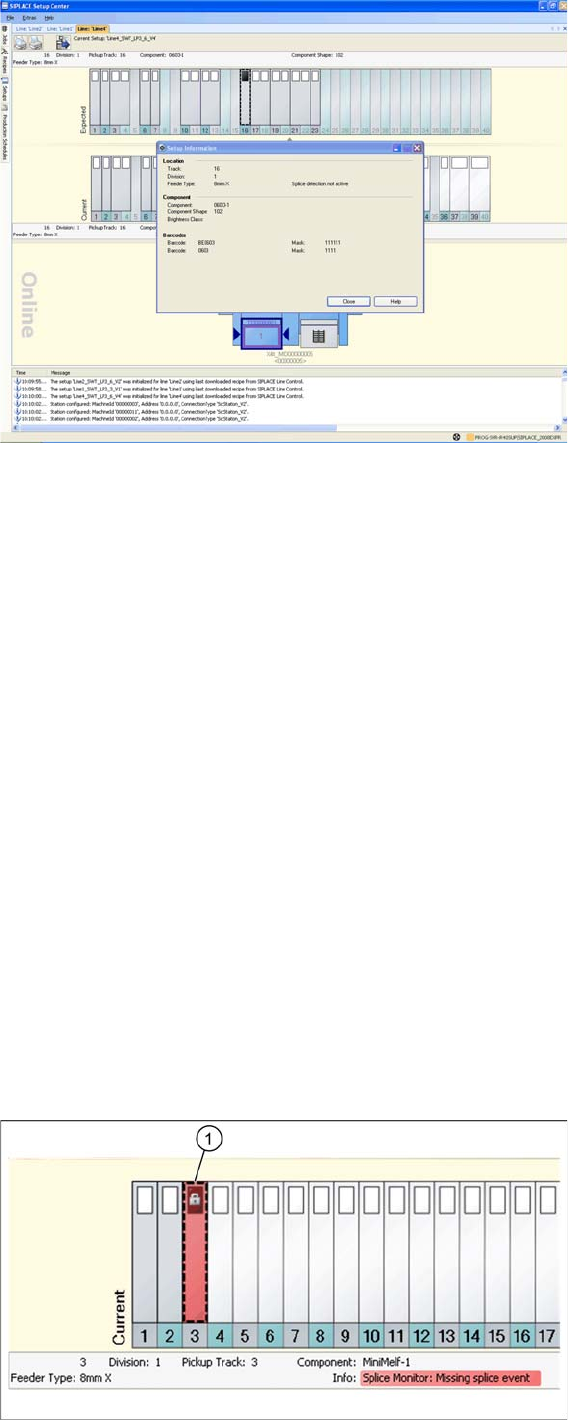
This dialog shows the setup information from the SIPLACE Pro target setup for the selected track.
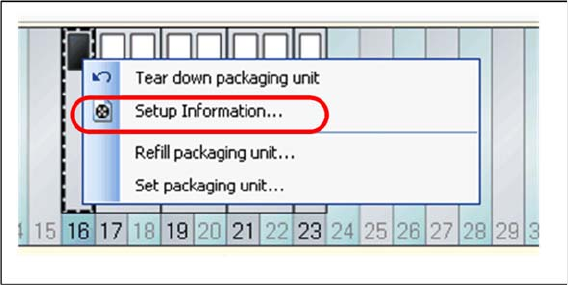
Open the context menu for a configured feeder and select the function => Setup information...
This dialog shows the setup information from the SIPLACE Pro target setup for the selected track.
Working with the Setup Center Application
Splice Monitoring Splice Monitor
User Guide SIPLACE Setup Center 5.1 117
Location (for feeders)
▪The Track, the Division and the Feeder type should come form the SIPLACE Pro target setup.
Location (for trays)
▪The Level, the Division and the Feeder type come from the SIPLACE Pro target setup.
Component
▪ The name of the Component, the Component shape and, if available, the Brightness class from the
SIPLACE Pro target setup.
Barcodes
▪ The Barcodes (supplier barcodes) and Filter come from the SIPLACE Pro target setup.
Alternative components
▪ If you have defined alternative components for this component, these will be shown here.
7.5 Splice Monitor
The splice sensor must be active. You can see the settings for the splice sensor via Extras Settings
Common Settings for Online setup verification Splice Monitoring. See "3.2.1 Settings of Online Setup
Verification" [ ➙ 27].
7.5.1 Splice Monitoring
If a splice point is expected for a track and the set overshoot value is reached, this track is deactivated
at the station and displayed in red with an error symbol in Setup Center (1). Detailed information will be
shown in the notifications window.