00197195-02-UG SetupCenter 5.1_en.pdf - 第37页
Configuring Setup Center Verification Settings for Lines Lines User Guide SIPLACE Setup Center 5.1 37 3.4.3 Verification Settings for Lines A line has been selected in the tr ee view. The followin g settin gs are possibl…
Configuring Setup Center
Lines Adding, Deleting and Repairing Lines
36 User Guide SIPLACE Setup Center 5.1
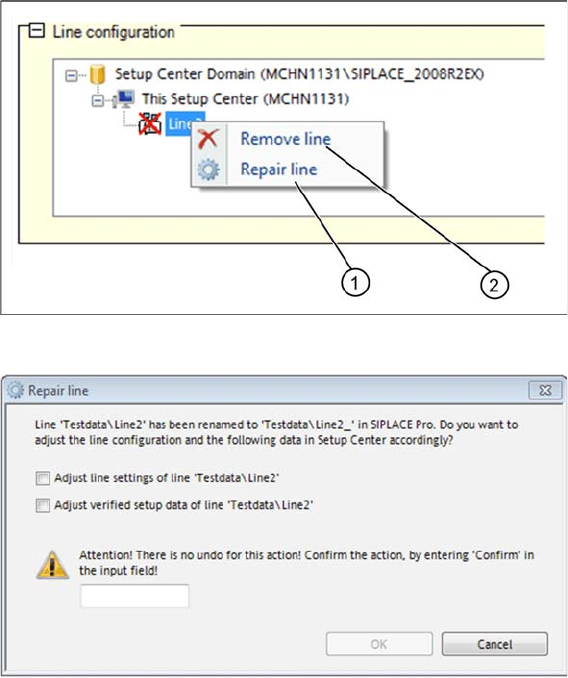
► Open the context menu and select Repair Line(1). Alternatively, you could also remove the line (2).
► The Repair Line dialog box will open.
► Observe the information in the Repair Line dialog box.
► Select the required options and perform the necessary tasks.
► Acknowledge the information shown with OK.
Configuring Setup Center
Verification Settings for Lines Lines
User Guide SIPLACE Setup Center 5.1 37
3.4.3 Verification Settings for Lines
A line has been selected in the tree view. The following settings are possible for the selected line:
3.4.4 Threshold Settings
Threshold settings
This is where the threshold settings for the component level indicator are defined (from station software
701 and higher). The parameters shown differ, according to whether a line or station was selected. The
line settings apply to all 7xx stations on the line but can be modified for individual stations.
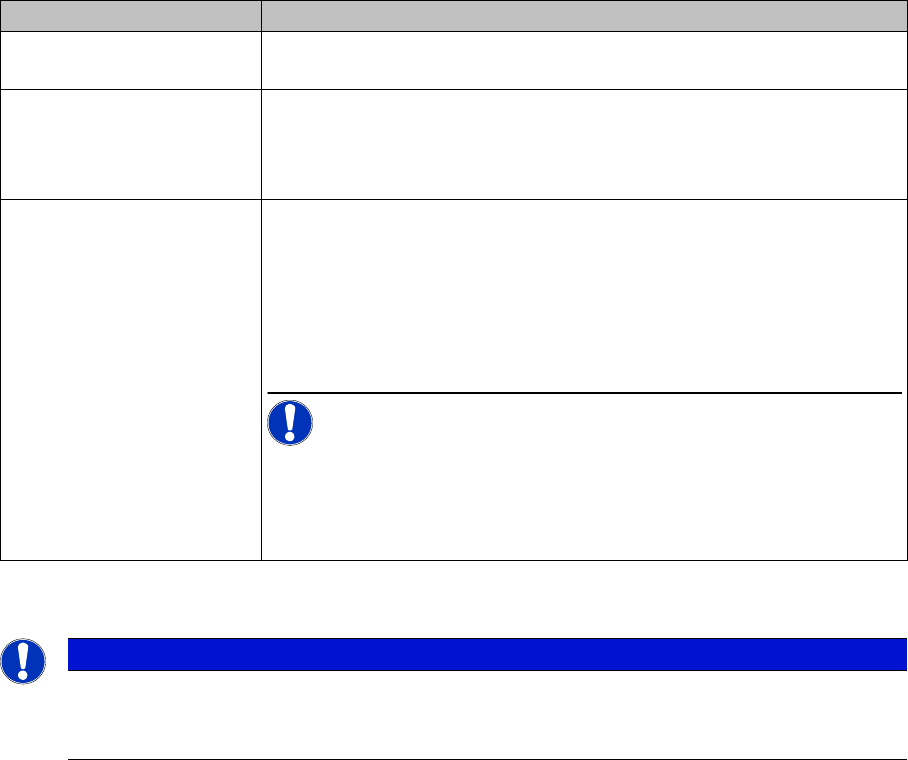
Settings Meanings
Allowed splice length The maximum number of tape parts (max. 30) of a packaging unit can be
set here for each line.
Allow feeder substitution
"8mmX“ ⇔ „2 x 8mm X"
The feeder types 8 mm X and 2x8mm X can be substituted for one an-
other, without changing the setup in SIPLACE Pro. The machine is able
to start the pickup immediately after a feeder type changeover. For pos-
sible exchange scenarios see the station software documentation.
Allow random feeder setup
during offline verification.
Active:
This enables the Random Setup setting, as defined in the SIPLACE Pro
setup, in Setup Center (at line level). The table-wise random setup func-
tion is not permitted for offline verification, irrespective of the downloaded
SIPLACE Pro setup.
NOTICE! If this option is disabled, the setup for this line must be
configured for the exact track in the pre-setup area, irrespective of the
setup setting in SIPLACE Pro. For detailed information about Random
Setup, refer to the operating manual for Random Setup, item no
[00196838-xx].
NOTICE
Only for lines with stations which have station software 701 or higher.
This view is only available if you have selected a line with stations which have station software
701 or higher.
Configuring Setup Center
Lines Verification Settings for Stations
38 User Guide SIPLACE Setup Center 5.1
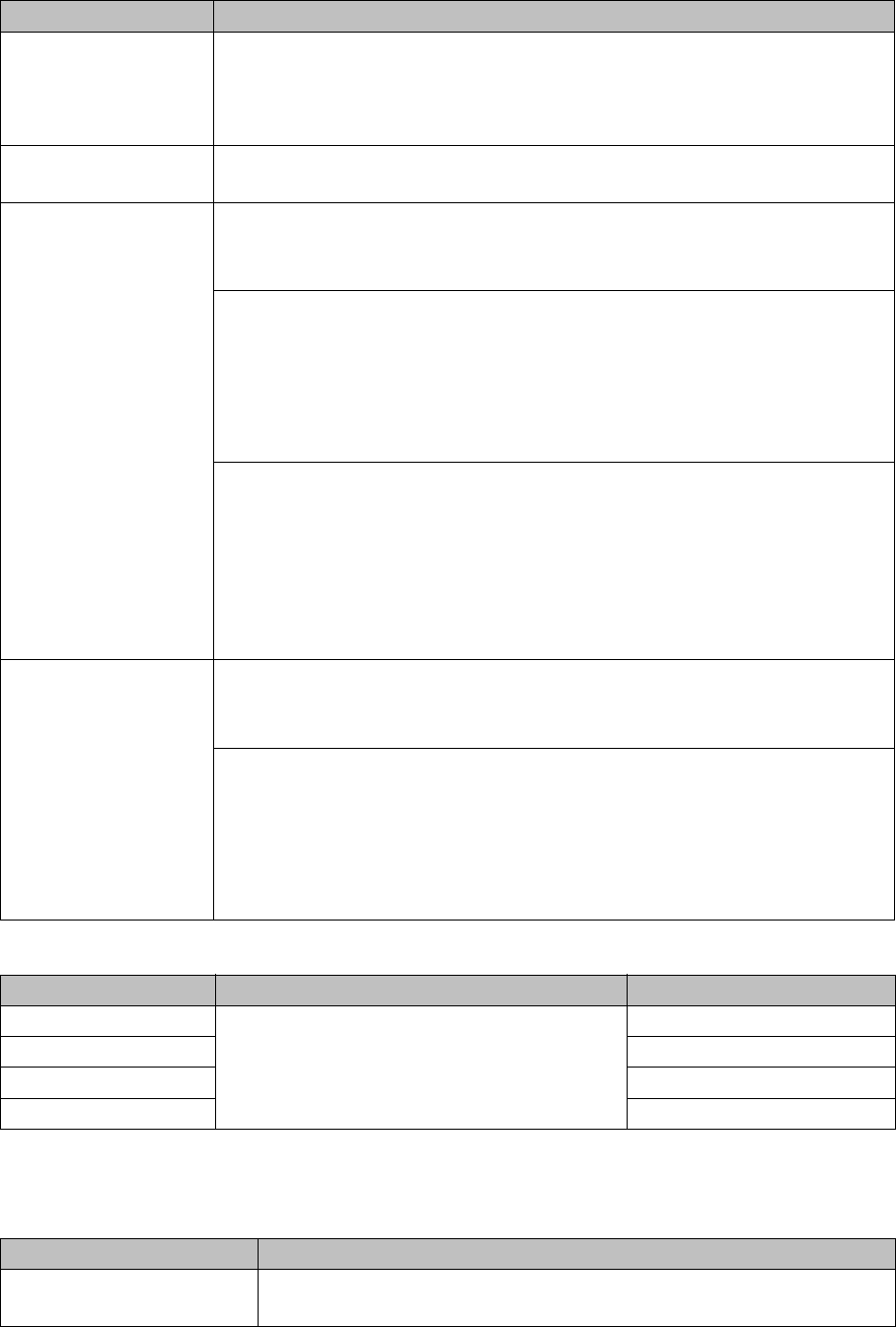
We recommend the following settings:
3.4.5 Verification Settings for Stations
A station has been selected in the tree view. The following settings are possible for the selected station:
Settings Meanings
Threshold settings for
line:
Only available if you have selected a station which has station software 701
or higher.
The quick start values which are entered in the line are also applied to the se-
lected station.
Feeders Tape | Bulk case | Linear | Tray: tracks configured with the appropriate feeder
type, are set with the warning and stop threshold values.
Warning level Component count
If the calculated number of components drops below the specified number of
components, the track will be highlighted in orange in the view.
Residual length (mm)
If the remaining component tape (measured from the trailing edge of the feed-
er) is shorter than the indicated value, a warning ("Track Error") will be issued
and the track will be highlighted in yellow in the view.
Note: To monitor the residual length, the correct Feeder Pitch must be entered
for the component and/or component shape in SIPLACE Pro.
Residual time [hh:mm]
The remaining runtime is only possible from station software version 706. If
the residual time is lower than the value specified, the track will be marked or-
ange on the screen.
The residual time is the time until the track is disabled (stop threshold). If there
is no threshold defined to disable the track, the residual time is calculated as
the time until the feeder runs empty.
Deactivate track Component count
If the calculated number of components drops below the specified number of
components, the track will be deactivated and highlighted in red in the view.
Residual length (mm)
If the remaining component tape (measured from the trailing edge of the feed-
er) is shorter than the specified value, the track will be deactivated and high-
lighted in red in the view.
Note: To monitor the residual length, the correct Feeder Pitch must be entered
for the component and/or component shape in SIPLACE Pro.
Feeders Remaining runtime warning Disable at remaining length
Tape feeders Enter the time in minutes which is required to
procure and prepare the refill material.
300 mm
Bulkcase feeders Component count = 0
Linear feeder Component count = 0
Waffle-pack tray Component count = 0
Settings Meanings
Check MSD Level The MSD verification is activated for this station (monitoring of moisture-
sensitive components).