00197195-02-UG SetupCenter 5.1_en.pdf - 第157页
Setup Verification in Practical Cases Using the Reader (Steps with Machine ID) Online Setup Verification User Guide SIPLACE Setup Center 5.1 15 7 Step 3 Select the Table Che ck function and click on Enter to confirm. Ste…
Setup Verification in Practical Cases
Online Setup Verification Using the Reader (Steps with Machine ID)
156 User Guide SIPLACE Setup Center 5.1
The advantage is that the process of forced setup verification ensures that the setup is correct.
Forced setup verification is possible with both "line based Traceability" and "station based Tracea-
bility". The disadvantage is that during a defective setup verification troubleshooting becomes nec-
essary, e.g. the operator needs to get a new reel from storage which minimizes throughput.
8.2 Online Setup Verification
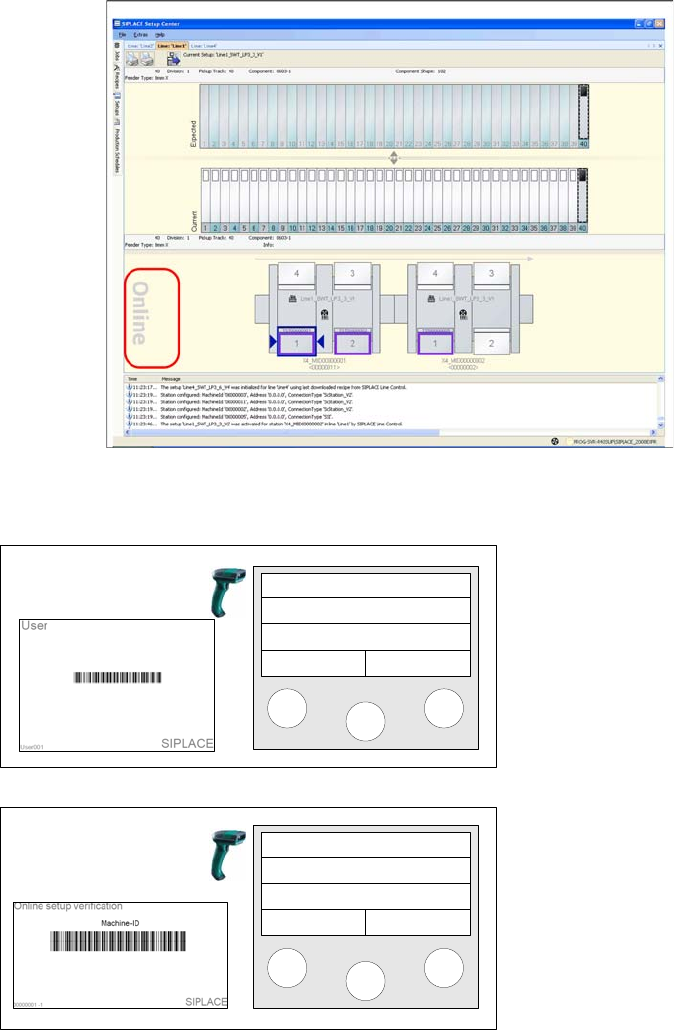
▪ Activate the "Settings for online setup verification“ option via
Extras Settings Common
.
▪ The setup to be verified is displayed as Online setup.
8.2.1 Using the Reader (Steps with Machine ID)
Step 1 (optional)
Scan in the the User if the "User registration at the reader
required“ option has been activated via
Extras Settings
Reader
.
Step 2
Scan in the Machine ID barcode of the verifying location.
Setup Center
Menu
Setup Center
Menu
Setup Verification in Practical Cases
Using the Reader (Steps with Machine ID) Online Setup Verification
User Guide SIPLACE Setup Center 5.1 157
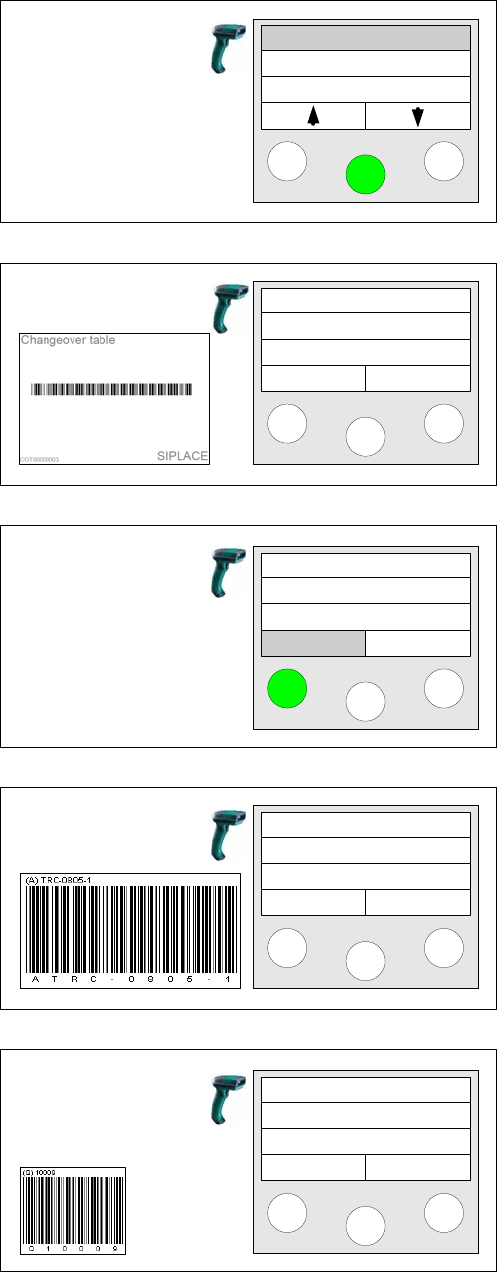
Step 3
Select the Table Check function and click on Enter to
confirm.
Step 4 (optional)
Scan in the Changeover table barcode, if changeover ta-
ble management has been activated via
Extras Settings
Common
.
Step 5 (optional)
Click on Enter to confirm that the table is to be verified.
Yes - Setup verification will continue.
No – Setup verification will be aborted.
Step 6a
Depending on the configuration of the barcode rule, the
Component barcode or the unique barcode will be
scanned.
Step 6b (optional)
If additional barcodes have been defined for the packag-
ing unit, they must be scanned consecutively.
If all packaging unit barcodes have been scanned, Setup
Center then switches to the next track left to be verified.
Tablecheck
Missing tracks
Refill
Scan COT barcode
Verify
now?
Yes No
Verify
Track: 55
Scan component
Info >>
Next barcode
Info >>
Setup Verification in Practical Cases
Online Setup Verification Alternatives
158 User Guide SIPLACE Setup Center 5.1
The barcode reader confirms each action with a signal and, once the last packaging unit has been
scanned, issues a longer signal as confirmation.
Online setup verification is finished when you have verified all the tables.
If the online setup verification has been already completely prepared in the offline area, the online setup
verification will be completed after step 4 provided that the tables have been assigned to the correct lo-
cation.
8.2.2 Alternatives
In this first step, you can select "Table check" and other actions. Use the soft keys to browse up and
down through the menu and select the required actions. Then press the Enter key.
The alternative actions available are explained in brief below:
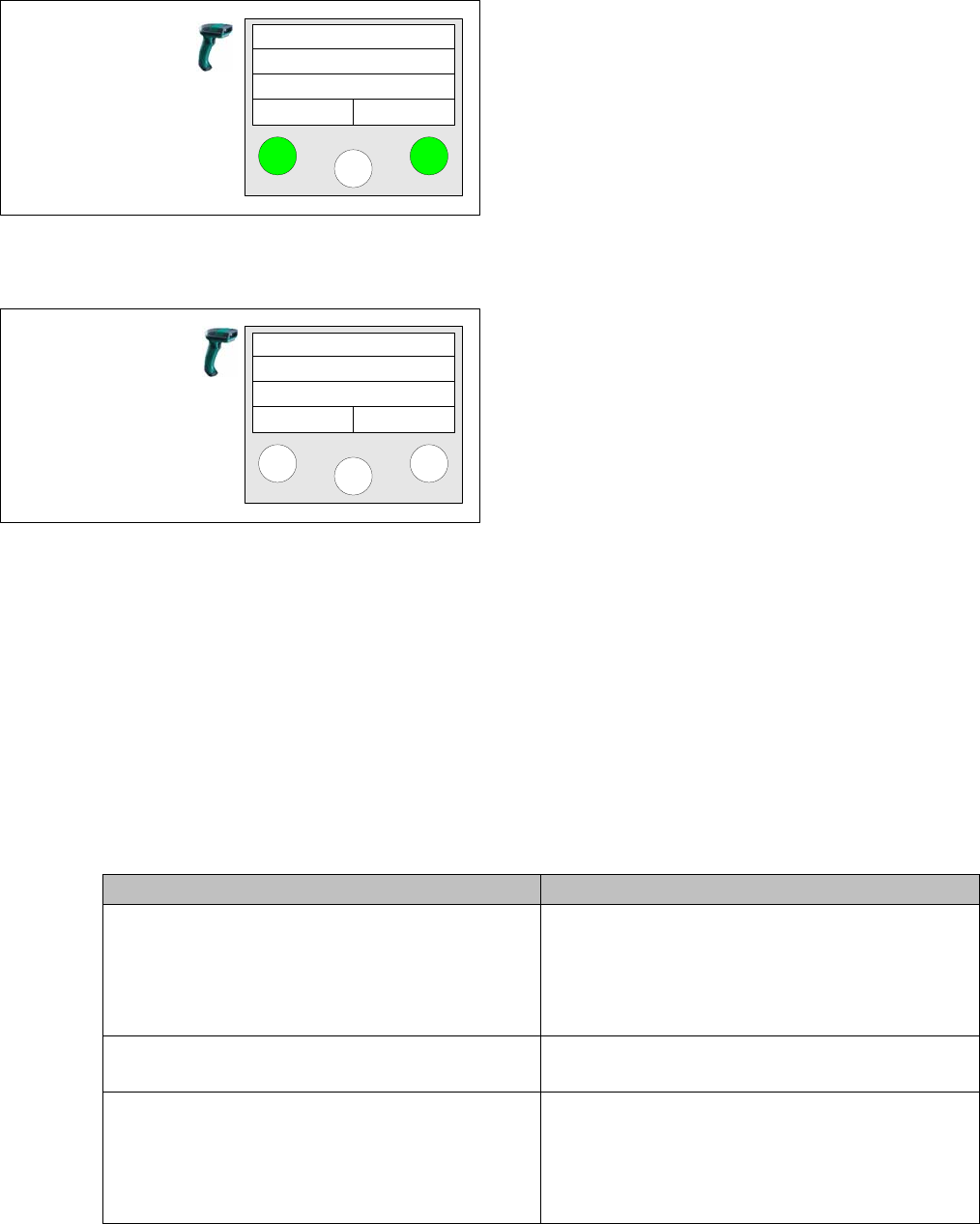
Step 6c (optional)
Query for reordering packaging units.
Yes - Information for reordering is saved in the SC data-
base.
No – No information for reordering.
The query only appears if the Enable quantity correction
during refill option has been activated via
Extras Set
-
tings Common
.
Steps 6a, 6b and 6c are repeated until all location tracks
have been verified.
Step 7
When the last track in the location has been verified (or
has been skipped with the right reader button) the main
menu appears at the reader.
Recorder
Component?
Yes No
Setup Center
Menu
Action Description
Table Check Complete table check, which rechecks even those
tracks which have already been successfully
checked. In other words, it checks all tracks. All
scanned data for this table before will be overwrit-
ten with the newly scanned values.
Missing tracks Table check which checks all tracks that have not
been checked yet.
Shift Change Verification Complete table check, without quantities being
sent to the station. This enables you to perform a
new setup verification during the current produc-
tion run. No packaging unit data are changed in the
Setup Center database.