00197195-02-UG SetupCenter 5.1_en.pdf - 第182页
Setup Verification in Practical Cases Working with X-Feeders Setting Up and T earing Down X-Feeders 182 User Guide SIPLACE Setup Center 5.1 8.12.5 Setting Up and T earing Down X-Feeders Setup Cent er autom atically detec…
Setup Verification in Practical Cases
Refill Working with X-Feeders
User Guide SIPLACE Setup Center 5.1 181
8.12.4 Refill
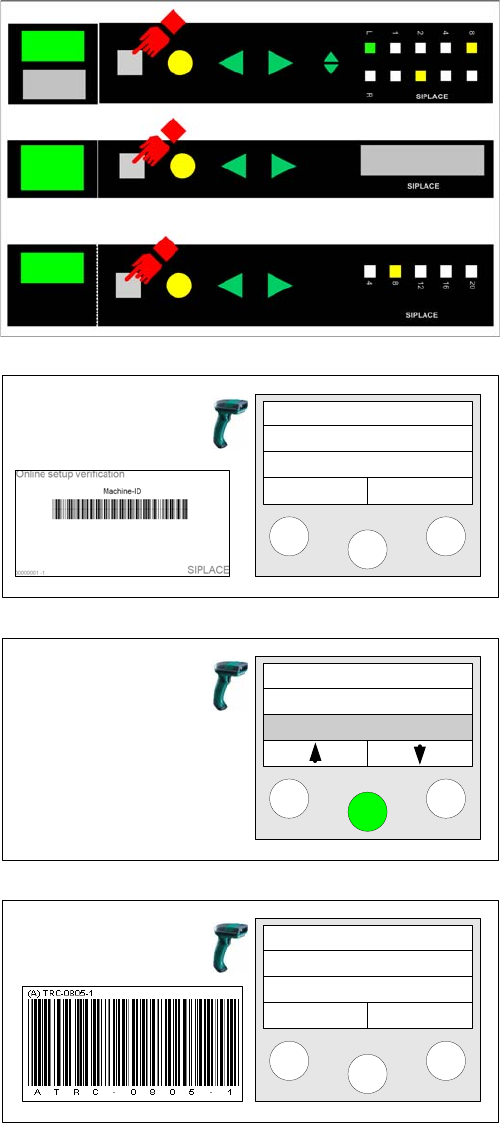
Tracks need to be refilled during production. Alternatively, refilling can be directly started at the X-feeder.
This is explained in the following steps.
Prerequisites:
An X-feeder with a successfully verified packaging unit is set on a changeover table at the machine.
Step 1
Press the Set button on the feeder for the track to be
checked.
Step 2
Scan in the Machine ID barcode of the location to be ver-
ified. Setup Center switches to the selected track.
Step 3
Select the Refill function and click on Enter to confirm.
Step 4
The selected track can now be refilled according to the
steps already described.
Setup Center
Menu
Tablecheck
Missing tracks
Refill
Track: 55
Scan component
Info >>
Setup Verification in Practical Cases
Working with X-Feeders Setting Up and Tearing Down X-Feeders
182 User Guide SIPLACE Setup Center 5.1
8.12.5 Setting Up and Tearing Down X-Feeders
Setup Center automatically detects that an X-feeder has been set up on or torn down from a changeover
table in the docking station or machine. This is also possible during board production in the machine.
Setup
The X-feeder is set up on any position on the changeover table. The Setup Center GUI will automatically
show the feeder at the relevant place. When the feeder is set up, the system checks the feeder type. If
an error occurs, the appropriate message will be issued.
Teardown
For the Setup Center, the teardown of an X-feeder means that the connection between the feeder and
the packaging unit is deleted in the database. This can be done both through the Setup Center applica-
tion (context menu for the feeder or Packaging Unit Editor) or directly at the feeder.
Teardown at the feeder is described below:
Teardown in the station
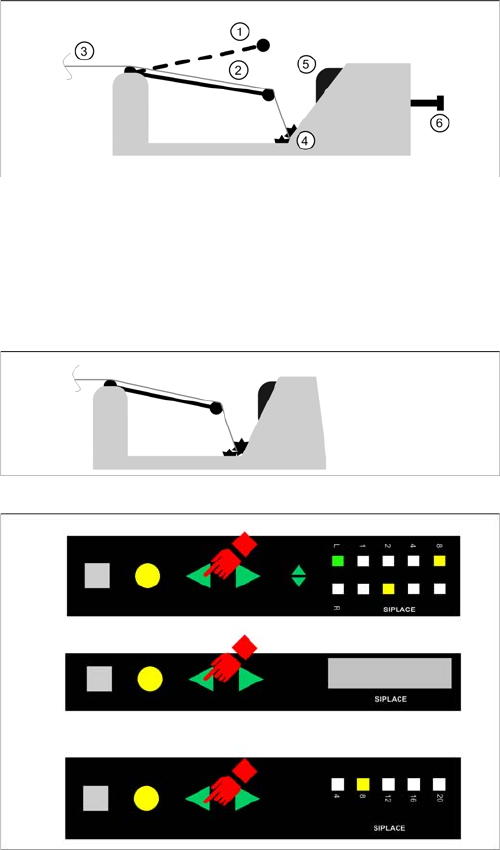
Explanations concerning the X-feeder:
1. Foil rocker in top position: feeder is empty or there is
a torn foil strip.
2. Foil rocker in middle position: Feeder is configured
and ready for operation.
3. Tape cover sheet.
4. Toothed wheels for foil insert.
5. Release switch for foil insert.
6. Button for unlocking the X-feeder
Step 1 (Starting situation)
The feeder is in the ready state.
Step 2
Press the BACKWARDS button of the feeder for at least
2 seconds.
▪ Feeder with LCD display
– The feeder display will show the state Teardown.
▪ Feeder with LCD display
– After 0.75 seconds the pitch display indicates by
a backwards running light that the tear down pro-
cedure is enabled. The BACKWARDS button is
now released.
Setup Verification in Practical Cases
Setting Up and Tearing Down X-Feeders Working with X-Feeders
User Guide SIPLACE Setup Center 5.1 183
The teardown state remains even after the feeder has been removed or the station has been switched
off.
Teardown outside the station
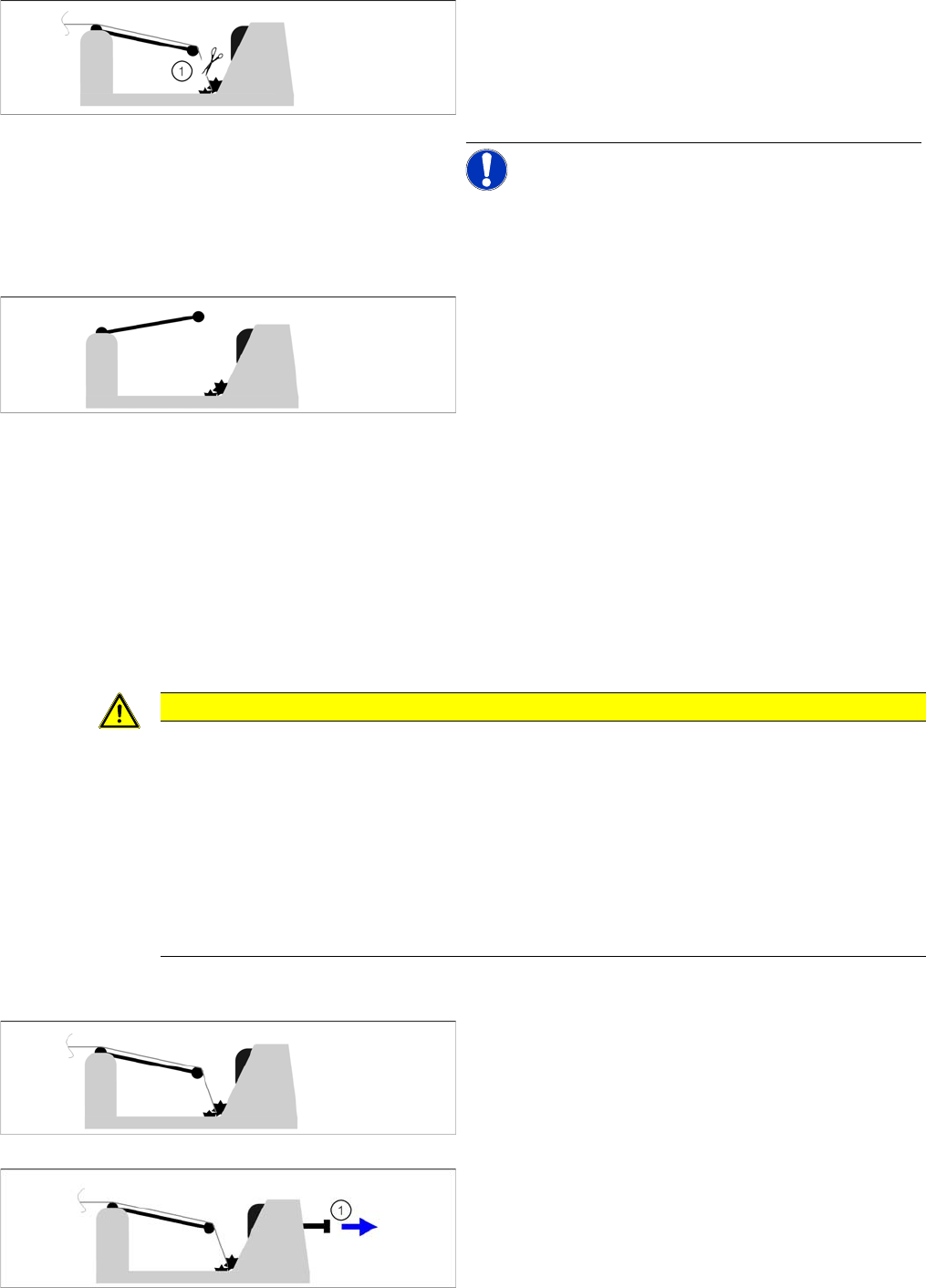
Step 3
After you have released the button, the foil rocker must
be relaxed within 5 seconds (e.g. cut and foil or relax the
foil disposal rolls). The foil rocker must be in the upper-
most position.
NOTICE! If the foil rocker is still tensioned after
5 seconds, the tear down procedure will be canceled and
the system will assume that the button was pressed un-
intentionally.
Step 3
If the foil rocker is in the upper position, the tear down pro-
cedure has been completed.
▪ Feeder with LCD display
– The feeder display will show the state Reel re-
moved.
▪ Feeder with LCD display
– The pitch display LED will now switch back to its
original state.
In Setup Center the packaging unit to feeder relation is
deleted and the track is now shown as not verified. The
quantity can be printed.
CAUTION
Changing a tape without the teardown process
If a tape is changed in the station without using the feeder teardown process, Setup Center
does not receive any information about it. Traceability data could be faulty as a result of this.
So always initiate a tape change with the teardown process.
Exceptions:
If the setting Teardown after foil torn error (X-feeder) is activated in Setup Center, Setup Center
will be informed of the tape change.
Or, the option Tear down the packaging unit if the verification status of the X-feeder is unreliable
has been enabled at Tools => Settings => Line => Domain-Wide Verification Settings.
Step 1 (Starting situation)
The feeder is in the ready state.
Step 2
Unlock the feeder (1) mechanically and remove it from
the station. The feeder display or LCD display is off.