00197195-02-UG SetupCenter 5.1_en.pdf - 第83页
Barcode Practical Example Barcode Labels User Guide SIPLACE Setup Center 5.1 83 5.1.3 Practical Example You need to create a setup verification barcode label for the f ollo wing pa ckaging units. The barco de lab el can …
Barcode
Barcode Labels Structure of Barcode Label
82 User Guide SIPLACE Setup Center 5.1
A Fragment type can only occur once within a barcode label. The barcode fragment type "Ignore" is an
exception to this rule and may occur any number of times.
The maximum length of a barcode fragment is 255 characters, except for the UniqueID fragment which
can have up to 40 characters.
Supplier barcodes from SIPLACE Pro
SIPLACE Pro allows you to define alternative supplier barcodes for components. This means that defi-
nitions in SIPLACE Pro are as equally valid as those in Setup Center. This applies to the barcode frag-
ment "Component".
When scanning the component, the barcode is first compared to the barcode definition in Setup Center
and then with those in SIPLACE Pro. From Setup Center V2.3, the comparison of the supplier barcode
can also be performed with the barcode fragment "Component". This simplifies the entry of filter rules, if
the barcode fragment is defined in a barcode which also has other barcode fragments.
Material label (MAT label, Version 2.4 1D / 2.42D)
The automotive industry is experiencing growing demands for traceability throughout the supply chain.
This requires that the flow of materials and information from the suppliers to the customers is brought
into line. One solution is to use a unique material label (MAT label), which is attached to the smallest
packaging unit and contains a clearly defined set of information. As there was no industrial standard for
material labelling available in the past, Bosch, Siemens, Hella and Continental joined forces to define
the MAT label specification.
The following MAT label fragments are stored together with the relevant barcode fragments in Setup
Center:
RoHS RoHS Restriction of hazardous substances
"Y" means compliance with the current RoHS reg-
ulations
"N" means non-compliance.
"0" (zero) means that RoHS is not applicable.
PurchaseOrderNumber Purchase Order Num-
ber
Is assigned by the customer to identify a purchase
transaction.
ShippingNoteNumber Shipping Note Number Identification of the shipment.
Batch2 Batch 2 Supplier-specific designation of the packaging
unit if "Batch1" does not suffice.
SupplierData Supplier Data Freely usable data field for the supplier.
NOTICE
When defining the component barcode, always observe the following:
► If the barcode begins with the numbers 1, 2, 3 or 4, this barcode must be at least 5 charac-
ters long.
MAT Label Fragments Setup Center Barcode Fragments
Supplier-ID + Package-ID UniqueID
Customer Part Number Component
Quantity OriginalQuantity
Manufacturer Number Manufacturer
Date of Manufacturing ManufactureDate
Expiration Date ExpiryDate
Supplier-ID Supplier
Batch No. #1 Batch
Fragment type Displayed name Description
Barcode
Practical Example Barcode Labels
User Guide SIPLACE Setup Center 5.1 83
5.1.3 Practical Example
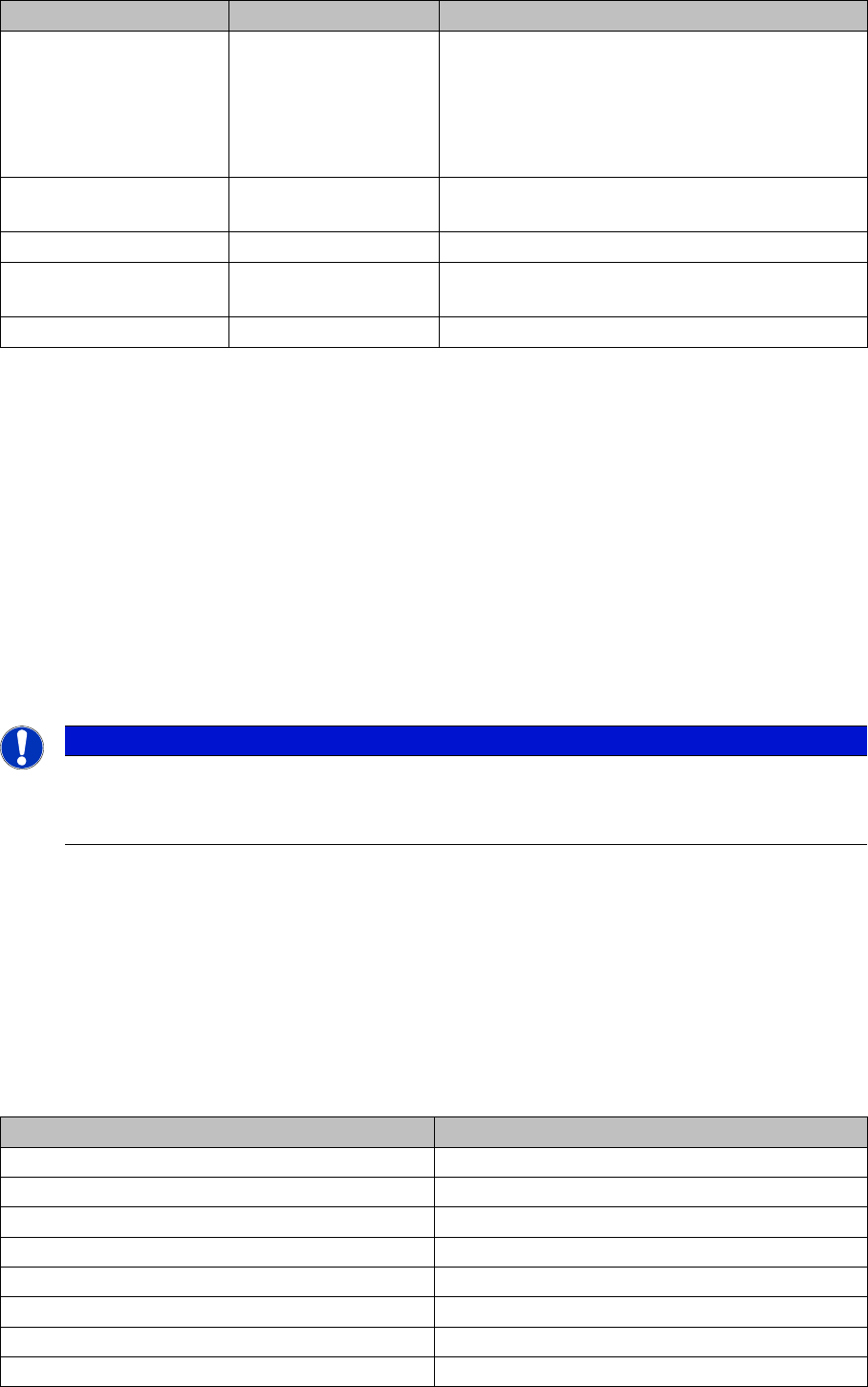
You need to create a setup verification barcode label for the following packaging units. The barcode label
can then be extended in the same way later on, to include batch information about the packaging unit.
Prerequisite:
The configuration dialog Barcode labels has been opened via
Extras Settings
.
MS-Level MsdLevel
Manufacture Part Number ManufacturerPartNumber
Ordering Code OrderingCode
Manufacture Location ManufacturerLocation
Revision Level / Index RevisionLevel
Additional Part Information AdditionalPartInformation
RoHS RoHS
Purchase Order Number PurchaseOrderNumber
Shipping Note Number ShippingNoteNumber
Package ID Serial
Batch No. #2 Batch2
Supplier Data SupplierData
MAT Label Fragments Setup Center Barcode Fragments
Component Barcode
TRC-0805-1 Component barcode: ATRC-0805-1
Quantity barcode: Q10000
Unique barcode: PIDA0021; PIDB0101
TRC-0805-2 Component barcode: CTRC-0805-2
Quantity barcode: Q5000
Unique barcode: PIDA0022; PIDB0102
TRC-1206-1 Component barcode: CTRC-1206-1
Quantity barcode: Q20000
Unique barcode: PIDA0023; PIDB0103
TRC-1206-2 Component barcode: CTRC-1206-2
Quantity barcode: Q8000
Unique barcode: PIDA0024; PIDB0104
TRC-0805-1-A Component barcode: CTRC-0805-1-A
Quantity barcode: Q2500
Unique barcode: PIDA0025; PIDB0105
Barcode
Barcode Labels Practical Example
84 User Guide SIPLACE Setup Center 5.1
5.1.3.1 Creating a Barcode Label
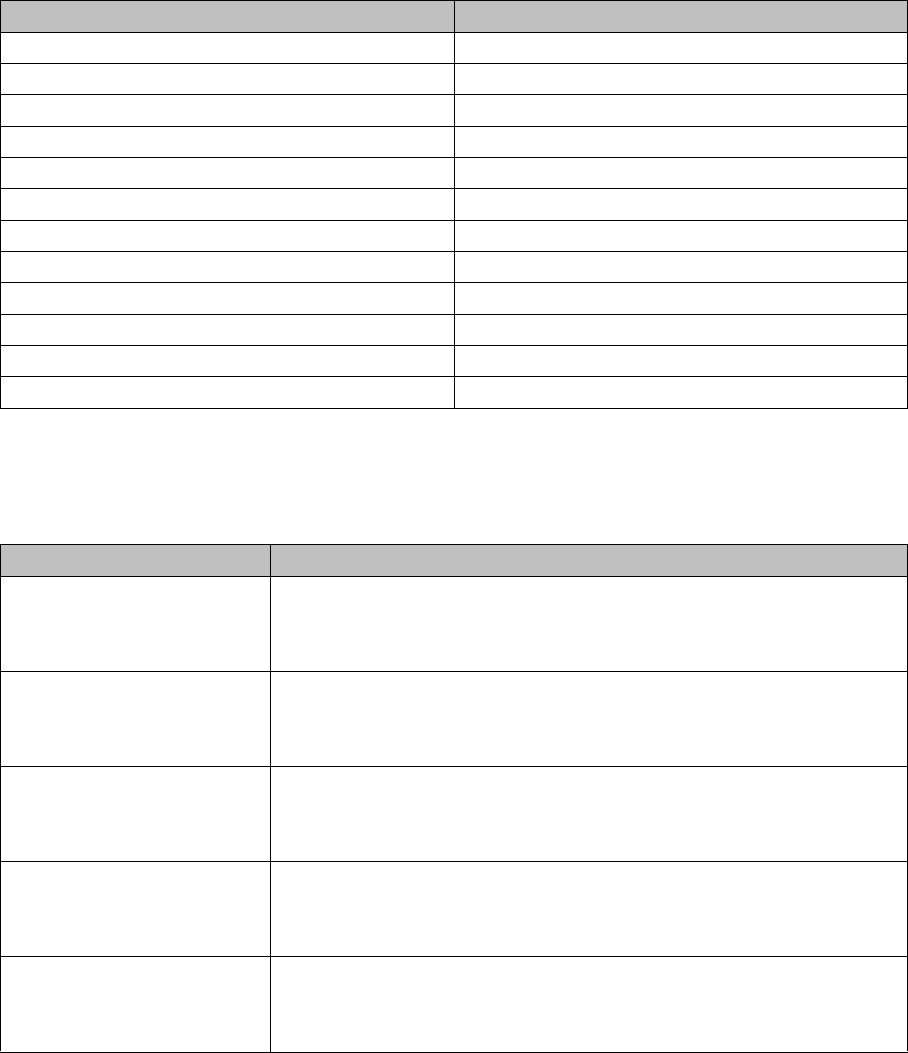
Right-click with the mouse to open the context menu in the white field of the Label overview. Then select
Add and enter a name for the barcode label.
After you have selected Add, a barcode label with the fragment Component will be created automatically.
5.1.3.2 Creating Component Barcodes
The component barcode (fragment Component) is essential for setup verification of a packaging unit
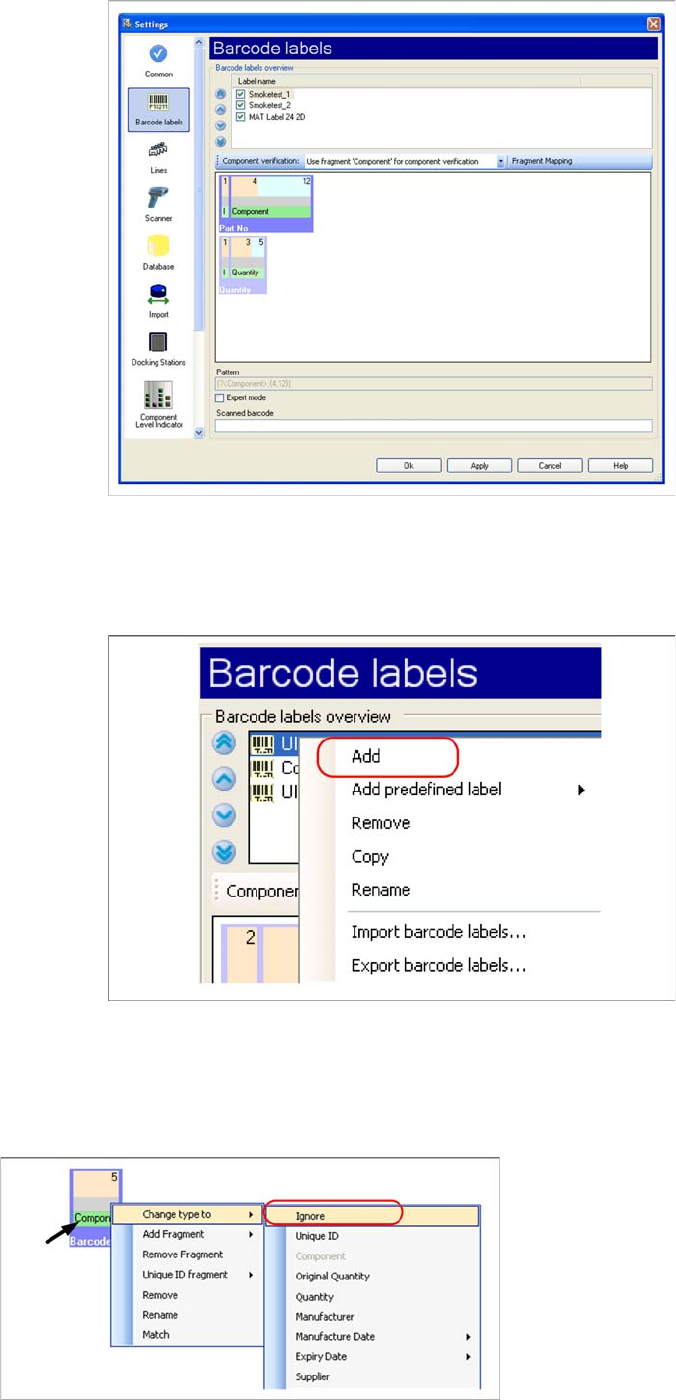
Step 1
In the component barcode (e.g.
C
TRC-0805-1), ignore
the first character. You therefore need to change the
Fragment type to Ignore:
▪ Right-click with the mouse in the green field.
▪ Go to Change type to: and select the fragment type
Ignore.