00197195-02-UG SetupCenter 5.1_en.pdf - 第135页
Working with the Setup Center Application Offline Setup Verification Setup Verification for Partial Setups User Guide SIPLACE Setup Center 5.1 13 5 The feeders with components which are not needed in the current par tial…
Working with the Setup Center Application
Setup Verification for Partial Setups Stationwise Download
134 User Guide SIPLACE Setup Center 5.1
7.9.2 Stationwise Download
SIPLACE Pro permits stationwise downloads.
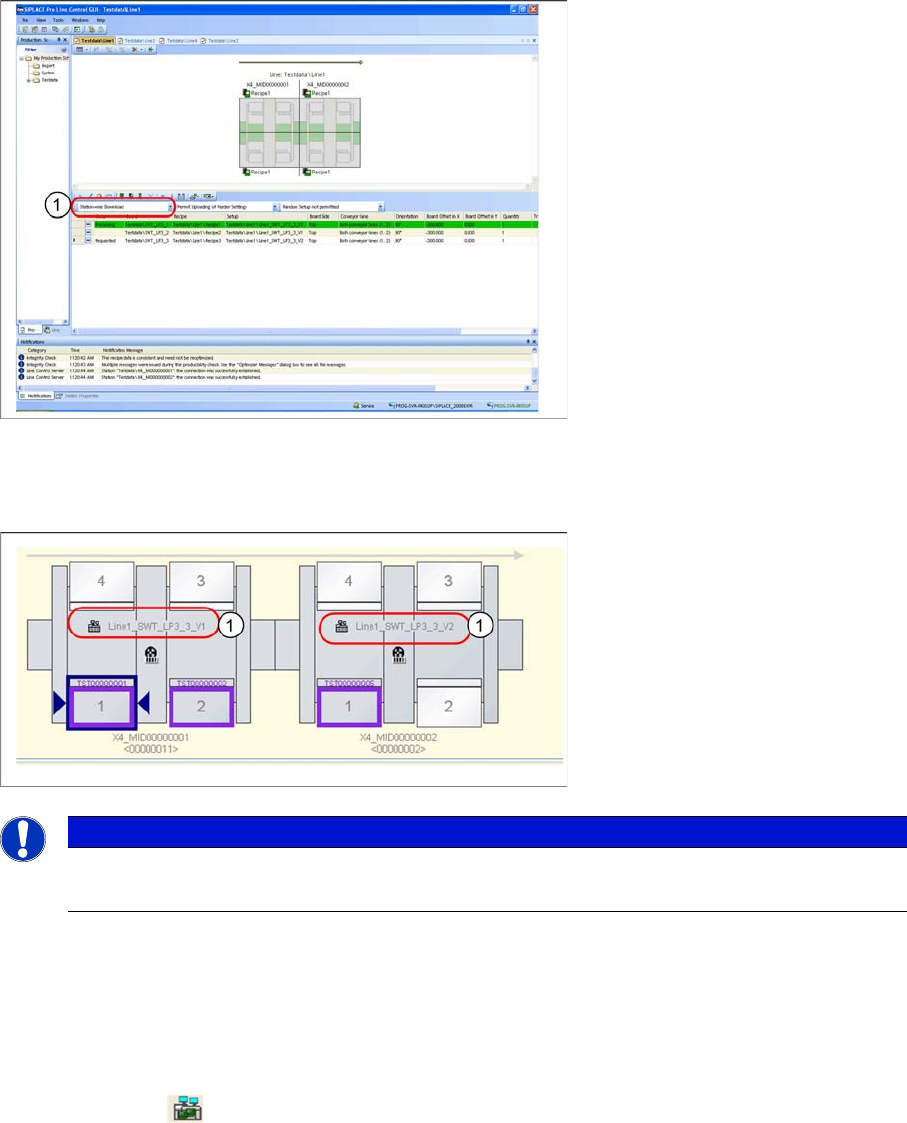
► Select the function Stationwise Download from the list field (1) on the SIPLACE Line Control GUI.
Result:
Setup Center shows the different setup names (1).
7.9.3 Online Setup Verification
With Setup Center, it is possible verify only parts of a setup. Together with the SIPLACE Line Control
GUI, the line operator can select which recipes are to be produced and, using Setup Center, can subse-
quently verify the components needed in the recipes.
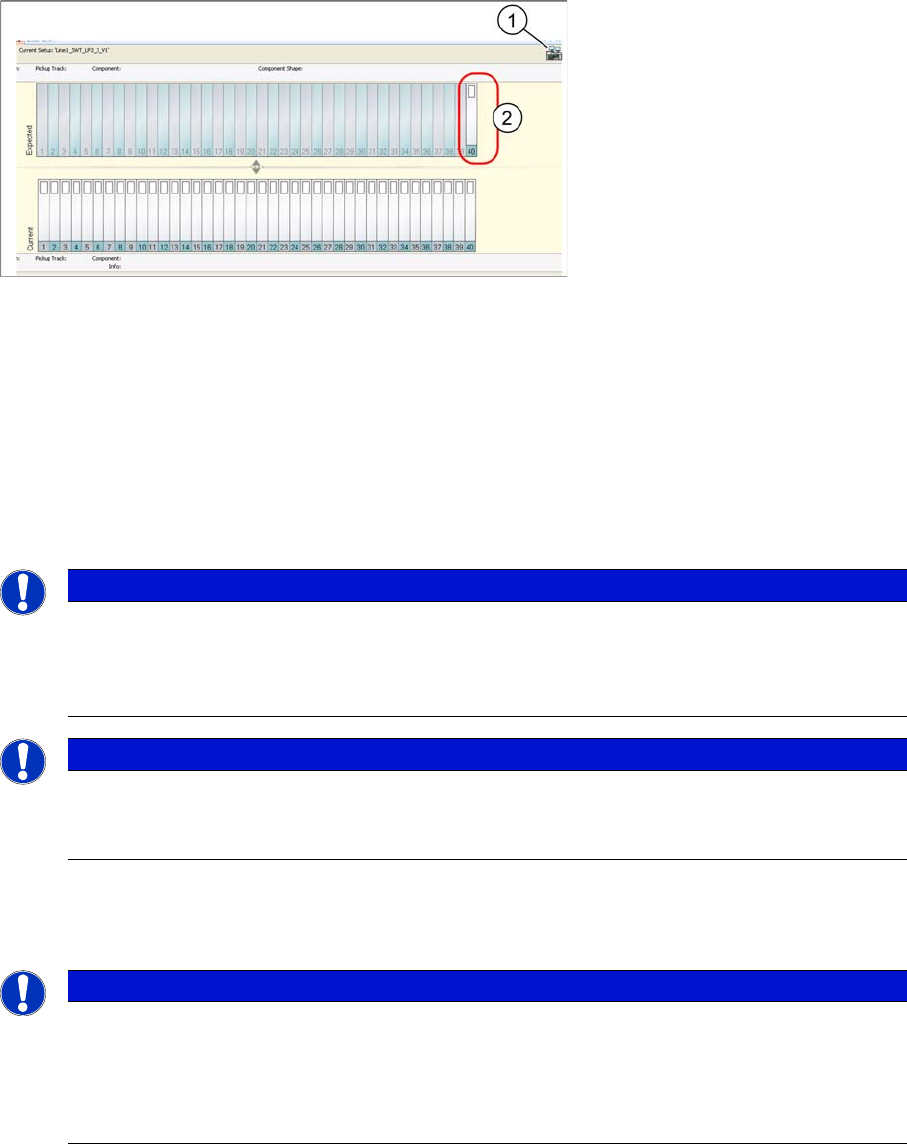
If Setup Center detects the download of a partial setup, this will be marked on the user interface with a
special symbol (1) .
NOTICE
Stationwise Download
For details about "stationwise downloads" refer to the current SIPLACE Pro user guide.
Working with the Setup Center Application
Offline Setup Verification Setup Verification for Partial Setups
User Guide SIPLACE Setup Center 5.1 135
The feeders with components which are not needed in the current partial setup are shown as transparent
on the Setup Center user interface (2). In other words, although these are included in the cluster setup,
they are not needed for the production of this recipe.
7.9.4 Offline Setup Verification
A partial setup can also be defined in the pre-setup area with the help of the SIPLACE Line Control GUI.
The procedure is the same as that for Online setup verification.
► On the SIPLACE Line Control GUI, mark those recipes which you want to verify in the pre-setup ar-
ea, as a partial setup.
► After opening the corresponding setup with the quick start barcode on the Setup Center user inter-
face for offline setup verification, only those tracks needed for the partial setup will be active and
available for verification.
NOTICE
The Line control GUI supports offline mode
The Line Control GUI also supports the offline mode (without Line Control Server connection).
This enables you to also edit a production schedule in the pre-setup area, via the Line Control
GUI.
NOTICE
Recipe data for a cluster setup
Make sure that any previously marked recipe data in a cluster setup, which you have already
sent to the machine, are now no longer marked!
NOTICE
Partial setup in offline area
If one or more recipes are marked for the offline area, in the Line Control GUI and if the corre-
sponding setup is opened for checking in Setup Center, using a quick start barcode, only those
components needed for the marked recipes will be made available for checking. Marked reci-
pes which are in a different setup will not be taken into account.
Working with the Setup Center Application
Setup Verification for Partial Setups Synchronizing Frozen Tracks
136 User Guide SIPLACE Setup Center 5.1
Offline setup report
The following diagram shows an example of a setup report printout for a partial setup:
The setup report shows that a partial setup is concerned. Those tracks which are not included in the par-
tial setup will not be shown on the printed report.
7.9.5 Synchronizing Frozen Tracks
In rare cases, tracks may be locked by Setup Center at a station, although this locked status is no longer
available in Setup Center, preventing automatic release of the tracks.
In this case, the locks can be synchronized with the station.
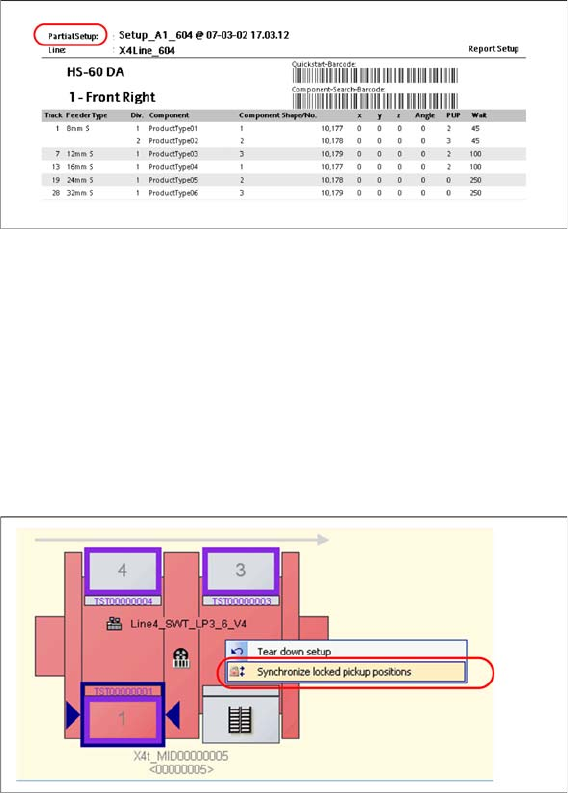
► Right-click with the mouse on the relevant station to open the context menu and select the function
Synchronize locked pickup positions.
7.9.6 Limits and Sources of Error
▪ Recipes which have been selected for a partial setup contain various different setups.
When you open a production schedule for setup verification, you will see a message informing you
that different setups are contained in the schedule.
▪ The selected production schedule already contains a setup which has been selected for online setup
verification. You will see a message, informing you that this setup is already open.
▪ Although various different recipes from a cluster setup have been selected as a partial setup on the
SIPLACE Line Control GUI, Setup Center will show the complete setup for verification.
Check at the Line Control GUI, whether you have marked other recipes from this setup as partial
setups in other production schedules. In this case, deselect these.