3OM-1751-002w_G5S.pdf - 第111页
3OM-1751 1-57 1303-001 • Head Rotational Center Offset Xm-Ym: Machine Reference Coordinate System Xm(+) Ym(+) Head Rotational Center PEC Recognition Camera Center Pm. Machine Reference Coordinate Origin PEC Recognition C…
3OM-1751
1-561303-001
•
Teaching Jig
For the head rotational center offset/reference mark offset teachings, the QFP
glass jig JG-0188(KYB-M381P-00) is used.
•
Jig Pick-up Nozzle
For the pick-up of the QFP glass jig, the jig nozzle (standard equipment) or
normal vacuum nozzle HV19C is used.
·
Teaching Procedure
Procedure
(1) Before the teaching operation, change the nozzle to the jig nozzle and setup
the QFP glass jig in the jig setup position over the component recognition
camera.
(2) Select the head (1, 2 or All) for which the head rotational center offset /
reference mark offset teachings are performed.
Note
In the case that the multi-functional head is selected in the "Select Head"
section, select the nozzle to be taught and press the [Teach Start] button.
(3) Press the [Teach Start] button on the "Head Cntr" tab sheet.
(The head rotational center offset teaching will be executed.)
•
When the teaching is started, the start conditions are checked.
•
During this temporary stop mode, the selection of any other menu item is
unavailable.
When the offset teaching is completed, the designated head returns to the
home position automatically.
The teaching results are displayed in the "Head Cntr Teaching" Display Area.
(4) Press the [Teach Start] on the "Mark Pos" tab sheet.
(The reference mark offset teaching operation will be executed.)
•
When the teaching is started, the start conditions are checked.
•
During this temporary stop mode, the selection of any other menu item is
unavailable.
When the offset teaching is completed, the designated head returns to the
home position automatically.
The teaching results are displayed in the "Mark Pos Teaching" Display Area.
(5) When the teaching operation is completed, remove the QFP glass jig.
(6) Press the [Save] button.
(When this button is pressed, the teaching results are saved.)
5.11 "Head Cntr Mark Pos" Window
3OM-1751
1-571303-001
•
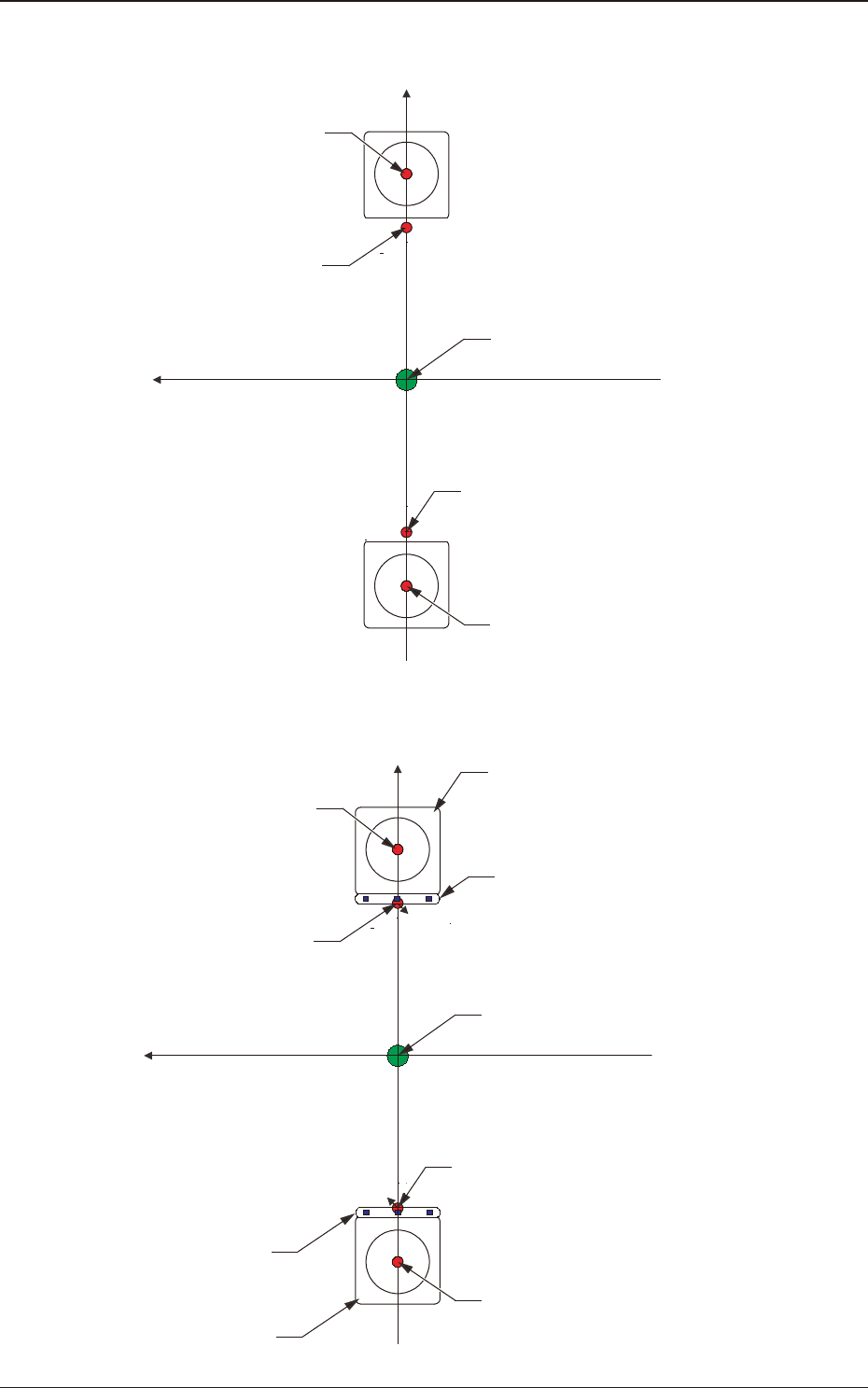
Head Rotational Center Offset
Xm-Ym: Machine Reference Coordinate System
Xm(+)
Ym(+)
Head Rotational Center
PEC Recognition Camera Center
Pm. Machine Reference Coordinate Origin
PEC Recognition Camera Center
Head Rotational Center
F3A41
•
Reference Mark Offset
Xm-Ym: Machine Reference Coordinate System
Xm(+)
Ym(+)
Component Recognition Camera
Head Rotational Center
Reference Mark
PEC Recognition Camera Center
Pm. Machine Reference Coordinate Origin
Reference Mark
PEC Recognition Camera Center
Component Recognition Camera
Head Rotational Center
F3A42
5.11 "Head Cntr Mark Pos" Window
3OM-1751
1-581303-001
5.12 "Fly Recog Camr" Window
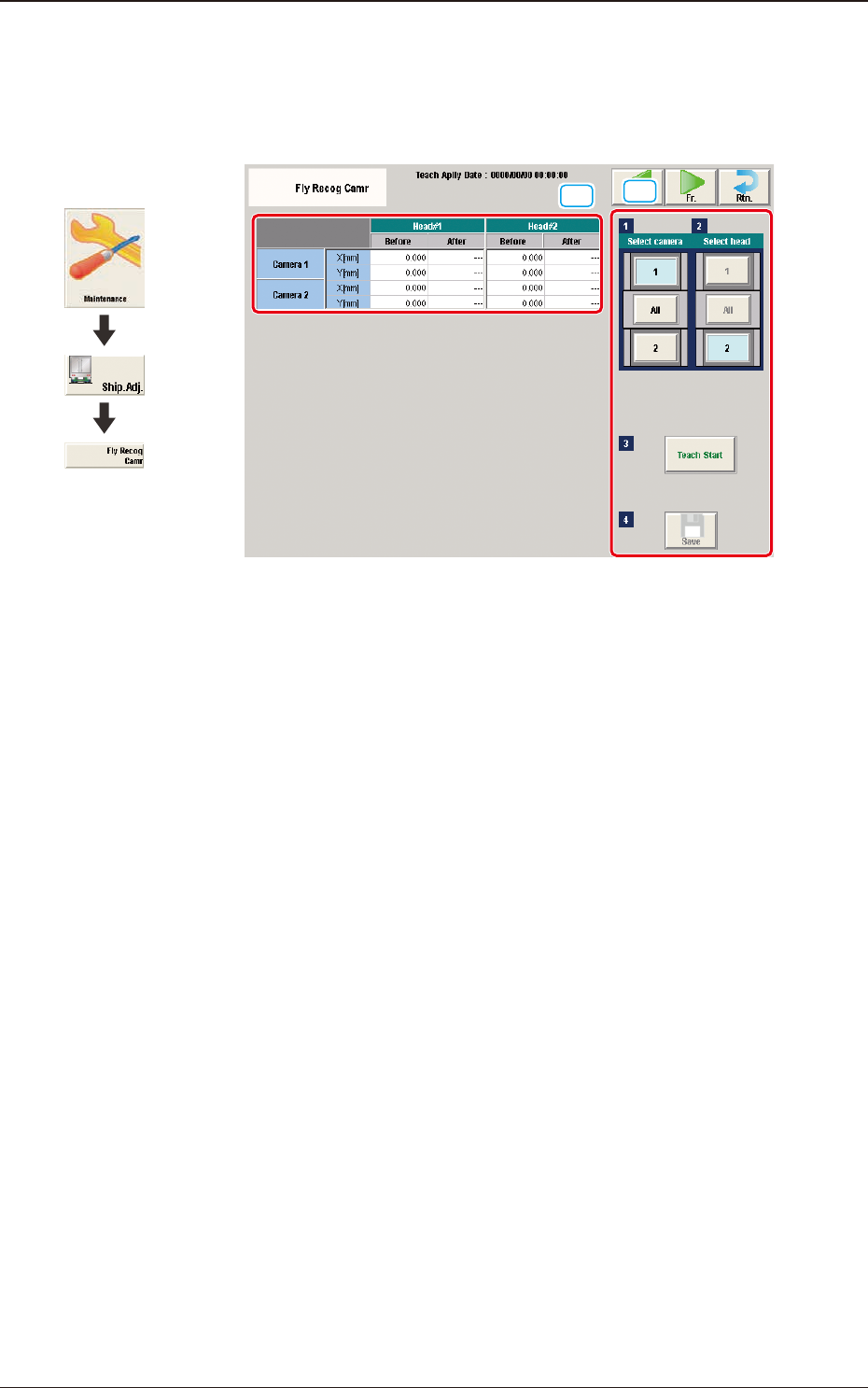
The set parameters are used to prevent a component from getting affected by the
delay and staying out of camera eld of view.
[1]
[2]
F3A43
[1] Teaching Data Display Section
Displayed are the offset data items for the designated camera.
[2] Teaching Procedure Display Area
Displayed are the buttons to be used for the teaching operations.
Select camera
Each component recognition camera in the graphic image of the machine is
provided with a button function. When a button is pressed, the corresponding
component recognition camera is selected as an object one for the teaching
operation.
Select head
Each head in the graphic image of the machine is provided with a button
function.
When a button is pressed, the corresponding head is selected as an object
head for the teaching operation.
The teaching is performed in accordance with the selected and displayed
window.
[Teach Start] button
When pressed, this button executes the teaching operation.
[Save] button
When this button is pressed, the teaching results are saved.
Graphic
Development
5.12 "Fly Recog Camr" Window