3OM-1751-002w_G5S.pdf - 第146页
3OM-1751 1-92 • Component Recognition Lighting Conrmation Procedure Procedure Procedure (1) Using the button [1], select the component recognition camera with which the conrmation is to be performed. (2) Using the butt…
3OM-1751
1-91
6.3.2.1 "Cmp. Recog" Tab Sheet
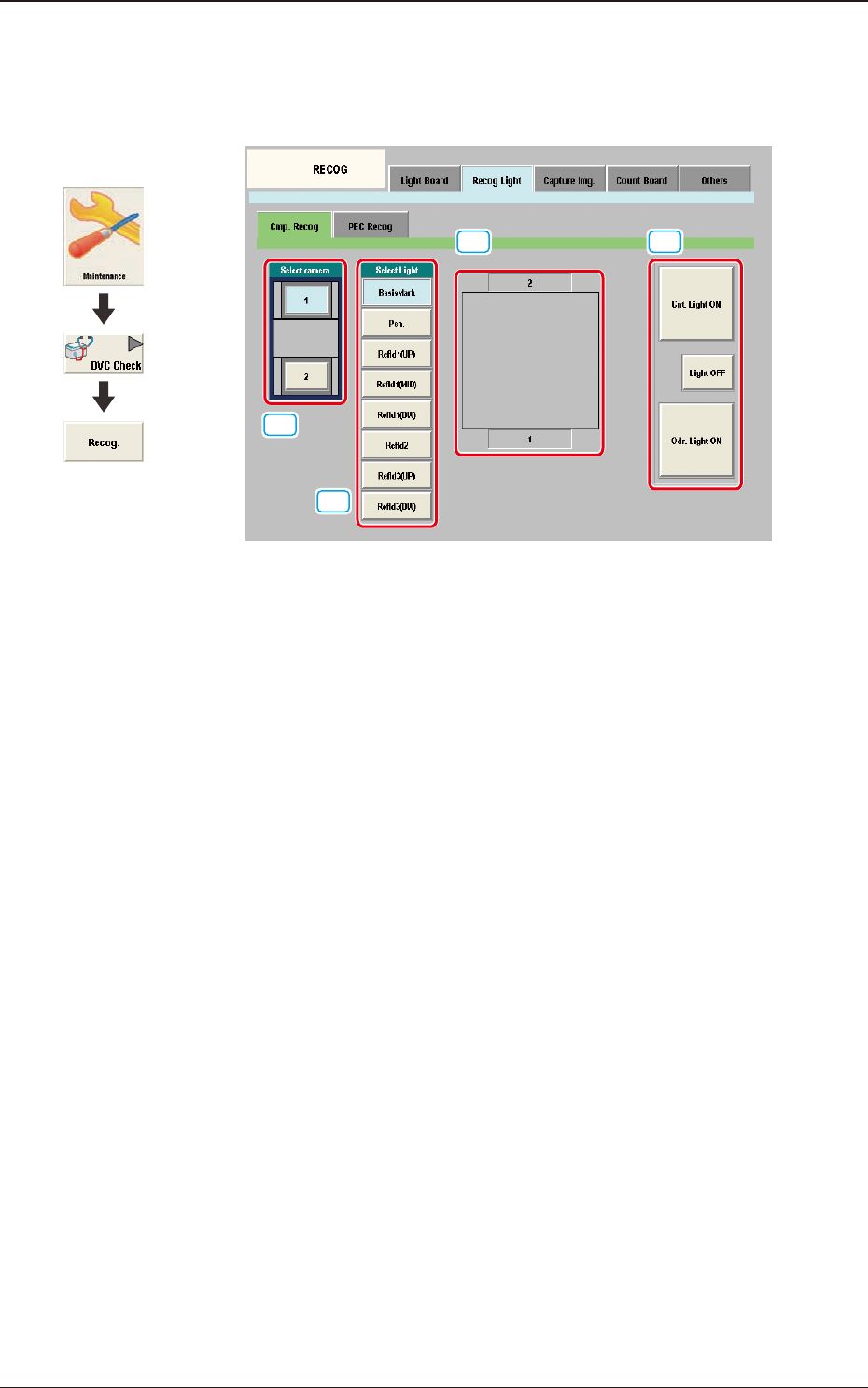
When the [Cmp. Recog] tab sheet is pressed on the [Recog Light] tab, the
following tab sheet appears.
[1]
[2]
[3] [4]
F3A74
[1] Select camera Buttons
Displayed are the buttons showing the positions of the component
recognition cameras. Using these buttons, the component recognition camera
to check the component recognition lighting, is selected.
[2] Recognition Lighting Selection Buttons
Using these buttons, the lighting pattern to be checked is selected.
[3] Recognition Lighting Image Display Section
Displayed is the recognition lighting image.
The recognition lighting pattern is changed according to the lighting pattern
selected using the "[2] Recognition Lighting Selection Buttons".
[4] [Cnt. Light ON] Button
When this button is pressed, the recognition lighting selected in [2] is turned
ON continuously.
[Light OFF] Button
When this button is pressed, the recognition lighting that has been
continuously turned ON, is turned OFF.
[Odr. Light ON] Button
All of the recognition lighting shown in [2] are turned ON or OFF
consecutively.
1303-001
6.3 "RECOG" Window
Graphic
Development

3OM-1751
1-92
•
Component Recognition Lighting Conrmation Procedure Procedure
Procedure
(1) Using the button [1], select the component recognition camera with which
the conrmation is to be performed.
(2) Using the button [2], select the lighting pattern with which the conrmation
is to be performed.
(3) Using the button [4], select the lighting condition.
(The lamp is turned ON according to the selected lighting condition).
Note
The lamps which currently turn ON, are indicated in yellow.
1303-001
6.3 "RECOG" Window
3OM-1751
1-931303-001
6.3.2.2 "PEC Recog" Tab Sheet
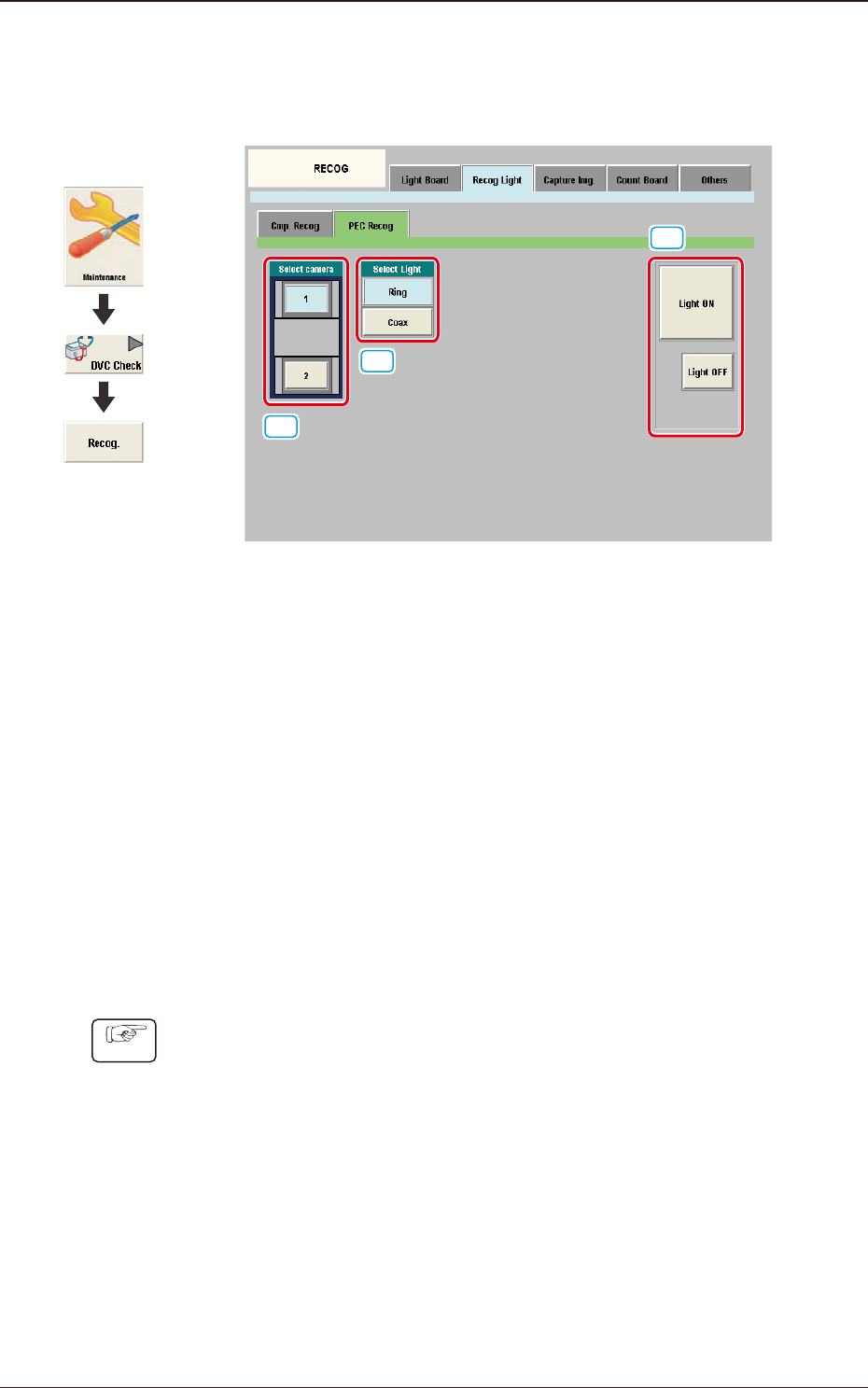
When the [PEC Recog] tab sheet is pressed on the [Recog Light] tab, the
following tab sheet appears.
[1]
[2]
[3]
F3A75
[1] Select camera
Displayed are the buttons showing the positions of the PEC recognition
cameras. Using these buttons, the PEC recognition camera to check the PEC
recognition lighting, is selected.
[2] Select Light
Using these buttons, the lighting pattern to be checked is selected.
[3] [Light ON] Button / [Light OFF] Button
When this button is pressed, the lighting selected using "[2] Recognition
Lighting Selection Buttons" is turned ON or OFF.
•
PEC Recognition Lighting Conrmation Procedure
Procedure
(1) Using the button [1], select the PEC recognition camera with which the
conrmation is to be performed.
(2) Using the button [2], select the lighting pattern with which the conrmation
is to be performed.
(3) Using the button [4], select the lighting condition and conrm the lighting.
6.3 "RECOG" Window
Graphic
Development