3OM-1751-002w_G5S.pdf - 第244页
3OM-1751 2-76 1303-001 [4] Fdr(Noz) msg rate Err count [times], pick [times] Error counts and # of picks [times] Set the parameters to show the nozzle No. whose pickup rate has deteriorated during automatic operation. Wh…

3OM-1751
2-751303-001
[2] Cmp rcg cam pos crct of Mnt cnts [times]
Press the value to display the "Ten-key Input" window and enter one of the
following values.
"0"
: No automatic correction operation is performed for
each number of components to be placed.
"1" to "9999"
: Correction is made according to the specied number
of components to be placed.
Note
(a) When "Correct" is set in the "Mode" text box, the corrective actions
take place automatically before the PCB is transferred to the PCB
positioning section and the component recognition operation is
performed.
(b) When the number of components (components to be placed on
a production PCB) per beam is smaller than the set number of
components, the corrective actions do not take place in the middle of
placement operation.
Because the internal counter for interval monitoring is cleared
through the above-described corrective actions (the actions which
take place during PCB positioning), no corrective actions take place
in compliance with the number of components to be placed on several
PCBs.
[3] Fdr msg rate
Err count [times], pick [times]
Set the parameters to show the feeder slot No. (Fdr. No.) of the tape feeder
whose pickup rate has deteriorated during automatic operation.
When the number of picks has reached the specied value, the parameter in
the "Error counts" text box is cleared.
Note
The number of picks and pick-up errors is managed for each individual
feeders but the parameters of "Error counts" and "# of picks" is equally
reected on every feeder.
Guide
"WARNING", "Stop (Cycle stop), or "Pause" can be selected to determine
in which mode the machine should be set when the number of pickup errors
has reached the specied error counts before the number of picks reaches the
specied number of picks. When "Warning" is selected, a warning message
is issued as machine information. "Stop (Cycle stop)" stops the machine after
one cycle of operation and "Pause" sets the machine in the "PAUSE" mode.
Note
When both "Error counts" and "# of picks" are set "0" (zero) or "Error
counts" is set to a number larger than "# of picks", no warning message is
issued.
3.1 "Auto Ope. Set-up" Tab Sheet

3OM-1751
2-761303-001
[4] Fdr(Noz) msg rate
Err count [times], pick [times]
Error counts and # of picks [times] Set the parameters to show the nozzle
No. whose pickup rate has deteriorated during automatic operation.
When the number of picks has reached the specied value, the parameter in
the "Error counts" text box is cleared.
Note
The number of picks and pick-up errors is managed for each individual
nozzles but the parameters of "Error counts" and "# of picks" is equally
reected on every nozzle.
Guide
"WARNING", "Stop (Cycle stop), or "Pause" can be selected to determine
in which mode the machine should be set when the number of pickup errors
has reached the specied error counts before the number of picks reaches
the specied number of picks. When "WARNING" is selected, a warning
message is issued as machine information. "Stop (Cycle stop)" stops the
machine after one cycle of operation and "Pause" sets the machine in the
"PAUSE" mode.
Note
When both "Error counts" and "# of picks" are set "0" (zero) or "Error
counts" is set to a number larger than "# of picks", no warning message is
issued.
[5] Noz replace in the lowering of picks
Select "Enable" or "Disable" to change the nozzle automatically to a spare
nozzle in the stocker when the successful component handling rate is lowered
during the automatic operation.
Note
(a) The automatic change only for the high-speed nozzle is available.
(b) A spare nozzle should be setup in the stocker in advance.
[6] Feeder Base Up/Down Opn restrictions
3.1 "Auto Ope. Set-up" Tab Sheet
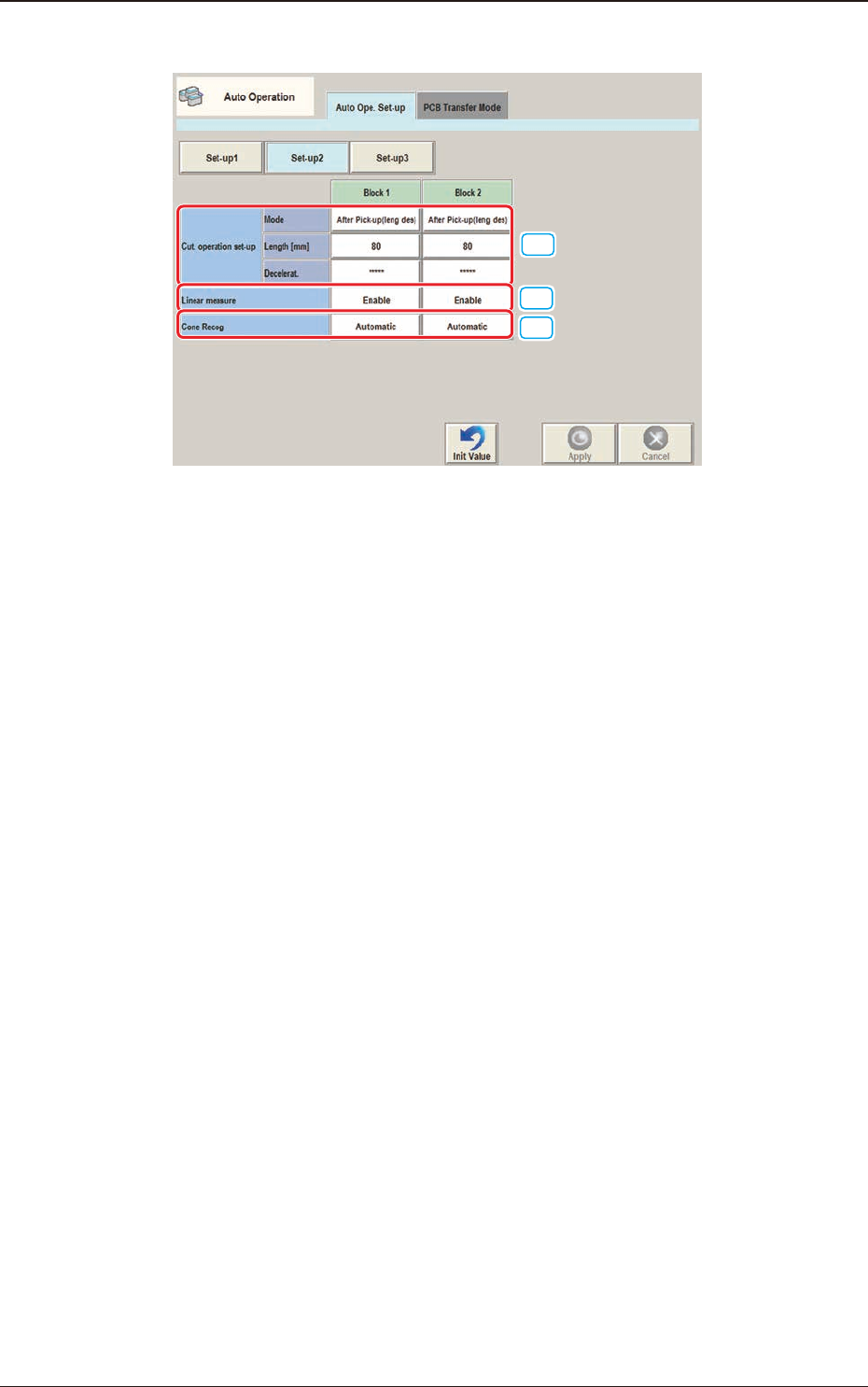
3OM-1751
2-771303-001
·
Set-up 2
[1]
[2]
[3]
F3B74
[1] Cutter operation set-up
Block 1, 2
Specify the following items for each cutter operation.
Mode
Select one of the following options to determine whether or not the cutter
function should be used.
Not Cut
After Pick-up(leng des)
At Transfer(leng des)
At Transfer(every time)
Cancel
Length [mm]
Set the length of the tape to be cut by each cutter.
Deceleration
Select one of the following options to determine the rate of the speed
reduction.
Full Speed, 10%Decr, 20%Decr, 30%Decr, 40%Decr,
50%Decr, 60%Decr, 70%Decr, 80%Decr, 90%Decr
[2] Linear measure
Block 1, 2
Whether or not the measurement using the linear measure is enabled, is
selected in this data box.
3.1 "Auto Ope. Set-up" Tab Sheet