3OM-1751-002w_G5S.pdf - 第86页
3OM-1751 1-32 1303-001 5.1 "NL-Axis Org Master Noz Lv" Window This window enables the operator to perform the teaching on the offsets to correct the difference in level between the nozzle up/down mechanism and …
3OM-1751
1-31
Notice
•
The teaching operation might affect the component placement
accuracy. Therefore, consult with out marketing department or sales
agent.
•
Some operations require special jigs (options).
Consult our marketing department or sales agency before
performing any teaching operations.
•
Follow the teaching procedures in the specied order. Otherwise,
some trouble (such as inaccurate component placement, frequent
mechanical errors, etc.) will arise.
•
Before performing any teaching operation, conrm that the
component recognition offset jig, the jig setting position, and the
back light stage (teaching plate) are not nicked and stained.
1303-001
5. "Shipment Adj." Window
3OM-1751
1-321303-001
5.1 "NL-Axis Org Master Noz Lv" Window
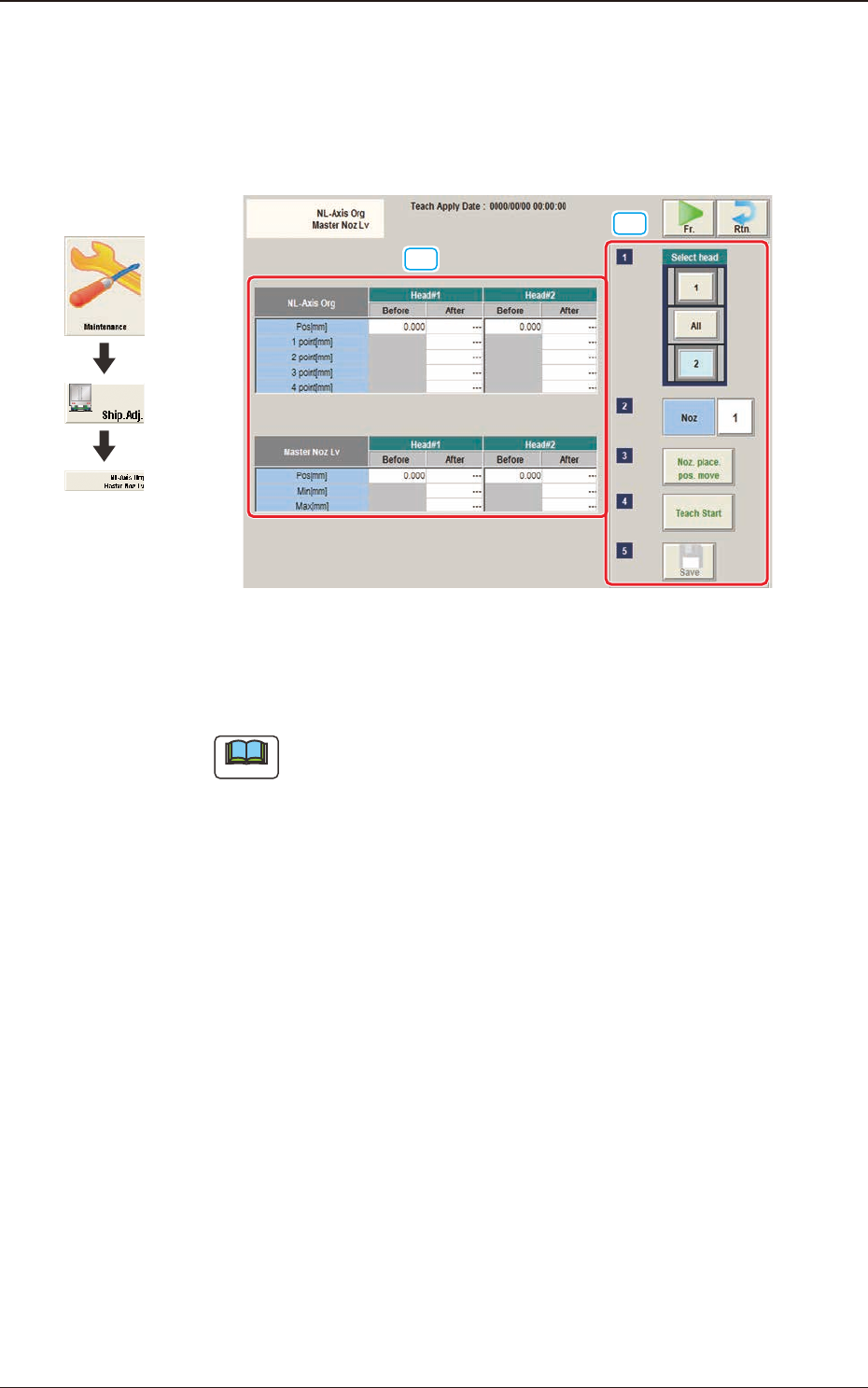
This window enables the operator to perform the teaching on the offsets to correct
the difference in level between the nozzle up/down mechanism and the nozzle
roller to avoid the impact given to the component in the NL-axis rotation.
[2]
[1]
F3A24
[1] Teaching Data Display Section
Displayed are each offset data for the designated head.
Note
When the multi-functional head has been selected, they are not displayed.
NL-Axis Org
The nozzle level is measured using the line sensor and based on the data
read after the NL-axis is moved to four positions, the NL-axis origin offset is
calculated automatically.
Before
: Shows the value before the teaching
After
: Shows the resultant value after the teaching
Master Noz Lv
Displayed is the offset data (L Up/Down (mm)) for the designated nozzle.
Before
: Shows the value before the teaching
After
: Shows the resultant value after the teaching
Graphic
Development
5.1 "NL-Axis Org Master Noz Lv" Window
3OM-1751
1-331303-001
[2] Teaching Procedure Display Area
Displayed are the buttons to be used for the teaching operations.
Select head
Each head in the graphic image of the machine is provided with a button
function. When a button is pressed, the corresponding head is selected as an
object one for the teaching operation.
[Noz] Button
Using this function, the nozzle for which the teaching is preformed, is
designated.
When the [Noz] button is pressed, the input window appears.
[Noz place. pos. move] Button
When pressed, this button rotates the turret such that the specied nozzle can
be located in front of you, making it easier for you to attach or detach the
nozzle.
[Teach Start] Button
When pressed, this button executes the teaching operation.
[Save] Button
When this button is pressed, the teaching results are saved.
·
Teaching Procedure
Procedure
(1) Select the Head (1 or 2) for which the teaching is performed.
(2) Press the [Noz] button and select the nozzle No. (from 1 through 15) in the
[Noz] selection window.
(3) Press the [Noz place. pos. move] button to attach the master nozzle.
(4) Press the [Teach Start] button.
(5) Press the [Save] button.
5.1 "NL-Axis Org Master Noz Lv" Window