3OM-1751-002w_G5S.pdf - 第115页
3OM-1751 1-61 1303-001 [Save] button When this button is pressed, the teaching results are saved. • Automatic T eaching Procedure Procedure (1) Select the nozzle stocker (1 or 2) for which the teaching is performed. (2) …
3OM-1751
1-601303-001
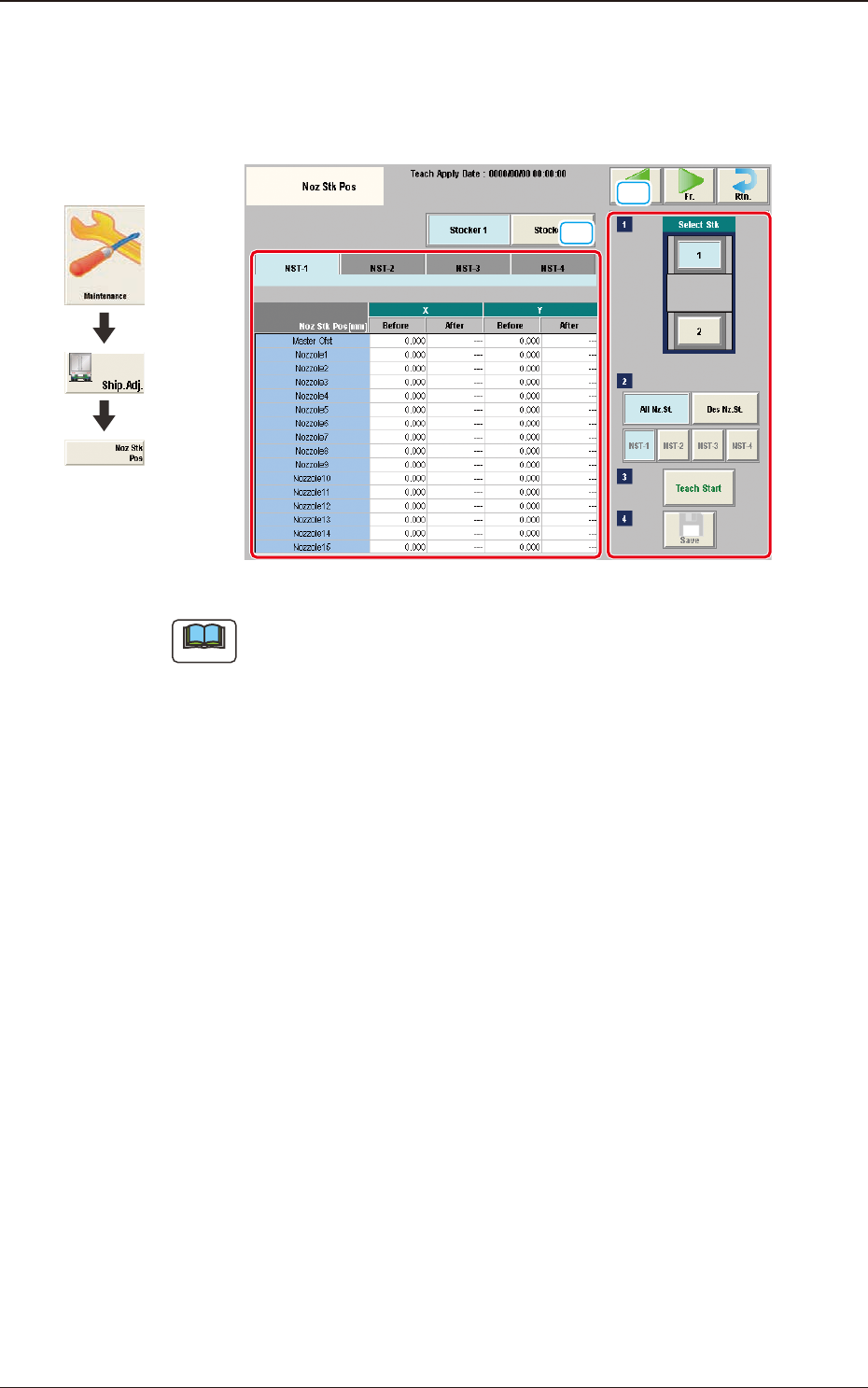
5.13 "Noz Stk Pos" Window
This session describes how to perform a teaching operation on the offset that can
be used to keep the position (machine coordinate reference) of the nozzle stocker.
[1]
[2]
F3A44
Note
The window display varies depending on the number of added nozzle stockers
(option).
[1] Teaching Data Display Section
Displayed are the teaching data items for the designated stocker.
[2] Teaching Procedure Display Area
Displayed are the buttons to be used for the teaching operations.
Select Stk
In this section, the buttons for the nozzle stockers for each head are displayed
as images.
Select the stocker for which the teaching is performed.
Nozzle Stocker Selection
Select the nozzle stocker for which the teaching is performed.
All Nz. St
: When selected, all the nozzle stockers selected in [1] are
taught.
Des Nz. St
: When selected, the nozzle stocker is designated for which
the teaching operation is performed, from the nozzle stockers
selected in [1].
[Teach Start] button
When pressed, this button executes the teaching operation.
Graphic
Development
5.13 "Noz Stk Pos" Window

3OM-1751
1-611303-001
[Save] button
When this button is pressed, the teaching results are saved.
•
Automatic Teaching Procedure
Procedure
(1) Select the nozzle stocker (1 or 2) for which the teaching is performed.
(2) Press the nozzle stocker selection button [NST-1] or [NST-4] to select the
nozzle stocker for which the teaching is performed.
(3) Press the [Teach Start] button.
•
When the teaching is started, the start conditions are checked.
•
The teaching results are displayed in the "After" data boxes in the
"Teaching Data" display area.
•
When any recognition error occurs during the teaching operation or the
[STOP] button is pressed on the operation penal, the machine is stopped
temporarily. In this case, re-start is available.
•
During this temporary stop mode, the selection of any other menu item is
unavailable.
When the teaching is completed, the designated head returns to the home
position automatically.
(4) Press the [Save] button.
(When this button is pressed, the teaching results are saved.)
5.13 "Noz Stk Pos" Window
3OM-1751
1-621303-001
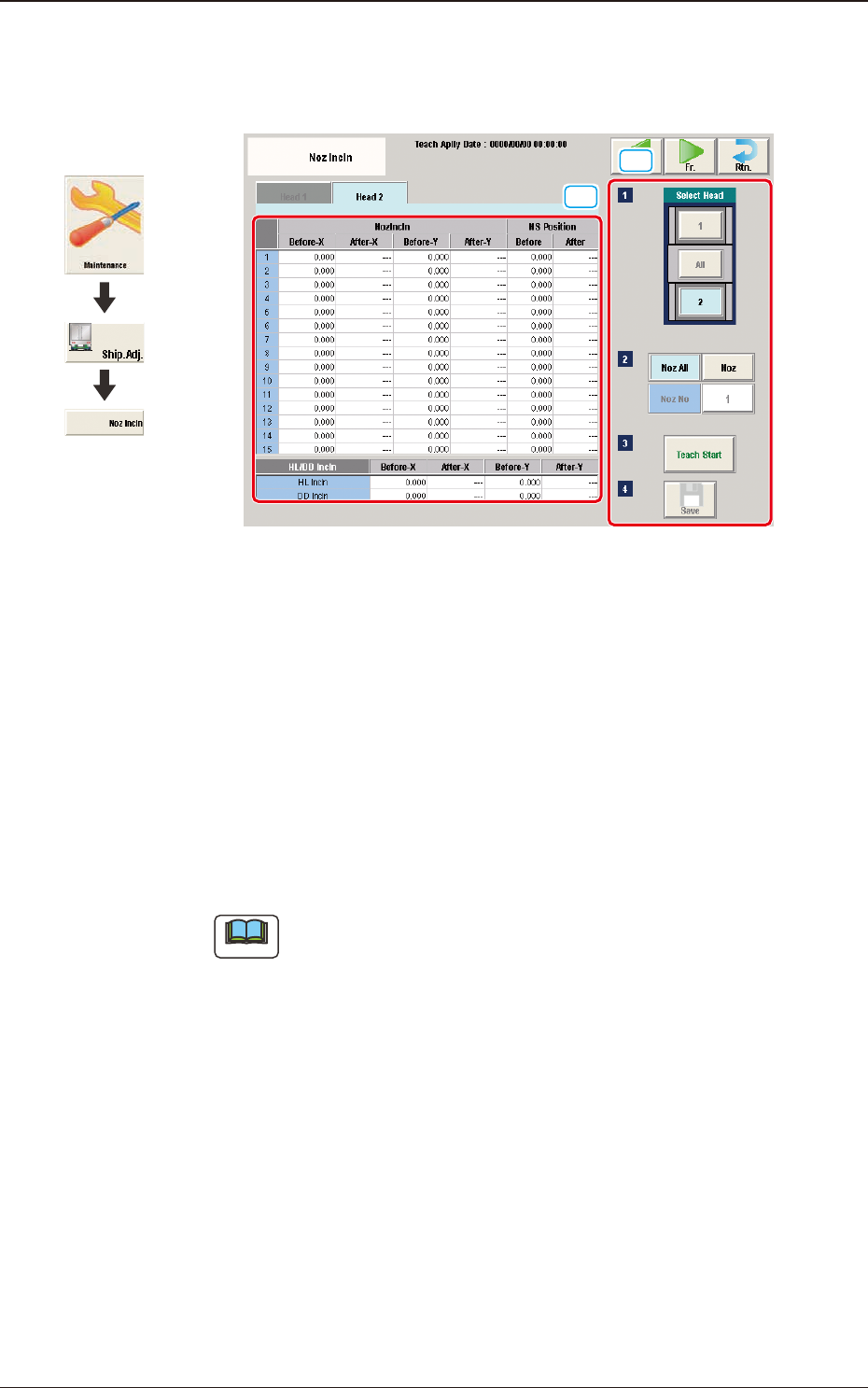
5.14 "Noz Incln" Window
The teaching for the offset data to correct the head nozzle inclination is performed.
[1]
[2]
F3A45
[1] Teaching Data Display Section
Displayed are the teaching data items for the nozzle in the designated head.
[2] Teaching Procedure Display Area
Displayed are the buttons to be used for the teaching operations.
Select Head
The buttons showing the head positions are displayed as images.
Select the head corresponding to the nozzles for which the teaching is
performed.
Note
The window can be changed over using the tabs in the window.
[Noz All] button
When pressed, the teaching operation for all the nozzles is performed.
[Noz] button
Designate the nozzle to be taught in this area.
When the [Noz] button is selected and [Noz No] is pressed, the input window
appears.
Graphic
Development
5.14 "Noz Incln" Window