00198442-01_UM_TX-V2_EN.pdf - 第198页
4 Setting up and commissioning User manual SIPLACE TX V2 4.7 Commissioning the placement machine Fr om software version 711.1 04/2018 198 4.7.3 Instructing the cu stomer's personnel Explain all customer-specific i…
User manual SIPLACE TX V2 4 Setting up and commissioning
From software version 711.1 04/2018 4.7 Commissioning the placement machine
197
4
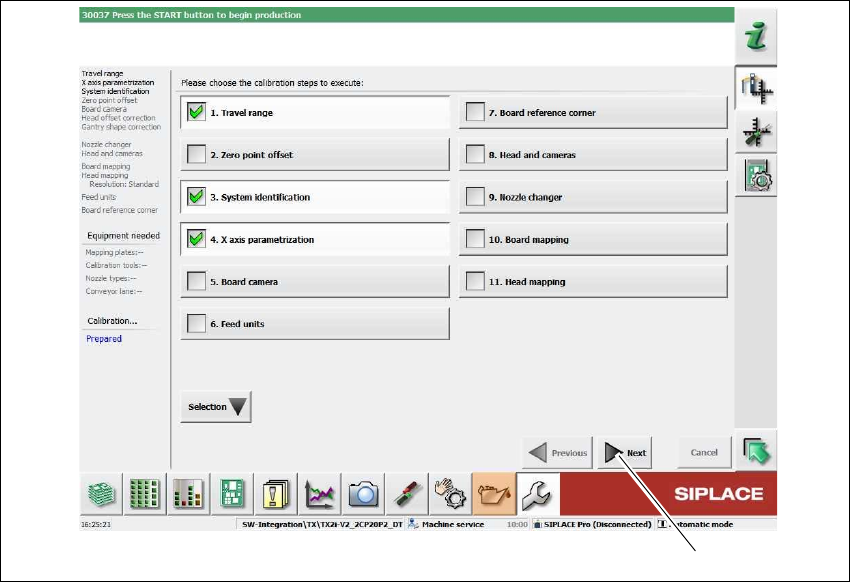
Fig. 4.7 - 2 Service tools => automatic calibration => calibrating the gantry axes
The following calibration steps are enabled:
– 1. Travel range
– 3. System identification
– 4. Parameterization X axis
Click on Next (1).
The calibration must be completed without errors.
(1)
4 Setting up and commissioning User manual SIPLACE TX V2
4.7 Commissioning the placement machine From software version 711.1 04/2018
198
4.7.3 Instructing the customer's personnel
Explain all customer-specific installed options, in particular software / software compatibility.
Explain the programming of SIPLACE Pro editors.
Instruct the operators and line engineers in using the station software.
Explain about password protection.
Instruct the customer's personnel according to the user manual and the preventive mainte-
nance.
4.7.4 A test run or starting production
Test the line using the test PCB or a PCB provided by the customer.
Record the customer product and performance data, prepare the data and document the data
in the installation report.
Secure the data and give the customer security copies.

User manual SIPLACE TX V2 5 Tasks at the placement machine
From software version 711.1 04/2018 5.1 Staff profiles
201
5 Tasks at the placement machine
This chapter contains a number of subjects that are intended to help you during your daily work
on a SIPLACE line. For example, you are provided with preventative measures that you can take
to minimize the downtime on the placement machine to obtain the highest possible level of effi-
ciency for the SIPLACE line during production.
5.1 Staff profiles
5
Certain functions or menus may only be executed or can only accessed by specially trained per-
sonnel. A differentiation is made between the following operator levels:
– Production
– Advanced production
– Service (customer)
The operator levels "Advanced production" and "Service (customer)" can be password protected.
PLEASE NOTE
Proper usage by qualified personnel
Incorrect usage poses a risk to life and limb and a risk of damage to equipment.
Only appropriately qualified personnel may put the placement machine into opera-
tion, operate it or perform work to the placement machine. You will find further infor-
mation about this in section 1.3.5
, page 23.
Evidence of these qualifications must be obtained in training or instructions of per-
sonnel. These instructions must be given by personnel trained and authorized by SI-
PLACE. For an overview of the training courses, refer to section 1.4
, page 25.