00190802-02.pdf - 第33页
User’s Manual Line Computer UNIX 1 Hardware / Software Install ation Software Version 402.xx Edition 06/96 1.2 Hardware Installation 1 - 19 1.2.5. 2 Cle aning the Monitor - The mon itor sho uld only be clea ned in the sw…

1 Hardware / Software Installation User’s Manual Line Computer UNIX
1.2 Hardware Installation Software Version 402.xx Edition 06/96
1 - 18
Activating the factory settings
The factory settings for image size, position, edges, synchronization and Power Management can be
recalled.
●
On the first level of the OSD menu select the symbol
➩➪
(Recall).
●
Press the CONFIRM button.
All aforementioned settings are restored to their preset values.
☞
NOTE
The colors can be restored to their preset values in the
CA
submenu using the symbol
➩➪
(Recall
Color) .
☞
NOTE
If you use a different monitor type than the one described in sections 1.2.3, 1.2.4 and 1.2.5, please refer to
the manual supplied with your monitor for details on connections and setting possibilities.

User’s Manual Line Computer UNIX 1 Hardware / Software Installation
Software Version 402.xx Edition 06/96 1.2 Hardware Installation
1 - 19
1.2.5.2 Cleaning the Monitor
-
The monitor should only be cleaned in the switched off condition using a soft cloth.
-
The interior of the cabinet may only be opened and cleaned by a service technician.
●
Prior to cleaning disconnect plug from UPS.
●
Wipe monitor enclosure using a soft cloth.
In the case of persistent stains, moisten cloth with a mild cleaning agent.
●
Clean screen using a soft, non-linting cotton cloth or lens tissue.
CAUTION
∆
!
- No cleaning sprays, wax or compressed air are to be used on the enclosure (see also instructions
supplied with the monitor).
- Ensure that no alcohol comes into contact with the enclosure.
- Never use any strong solvents such as thinners or benzine or abrasive cleaning agents as these
would cause damage to the enclosure.
- When cleaning the monitor with a moist cloth it must be ensured that no moisture can enter the
interior of the cabinet.
- Do not place any objects onto the unit.
- Be sure that the ventilation louvers are not covered.
1 Hardware / Software Installation User’s Manual Line Computer UNIX
1.2 Hardware Installation Software Version 402.xx Edition 06/96
1 - 20
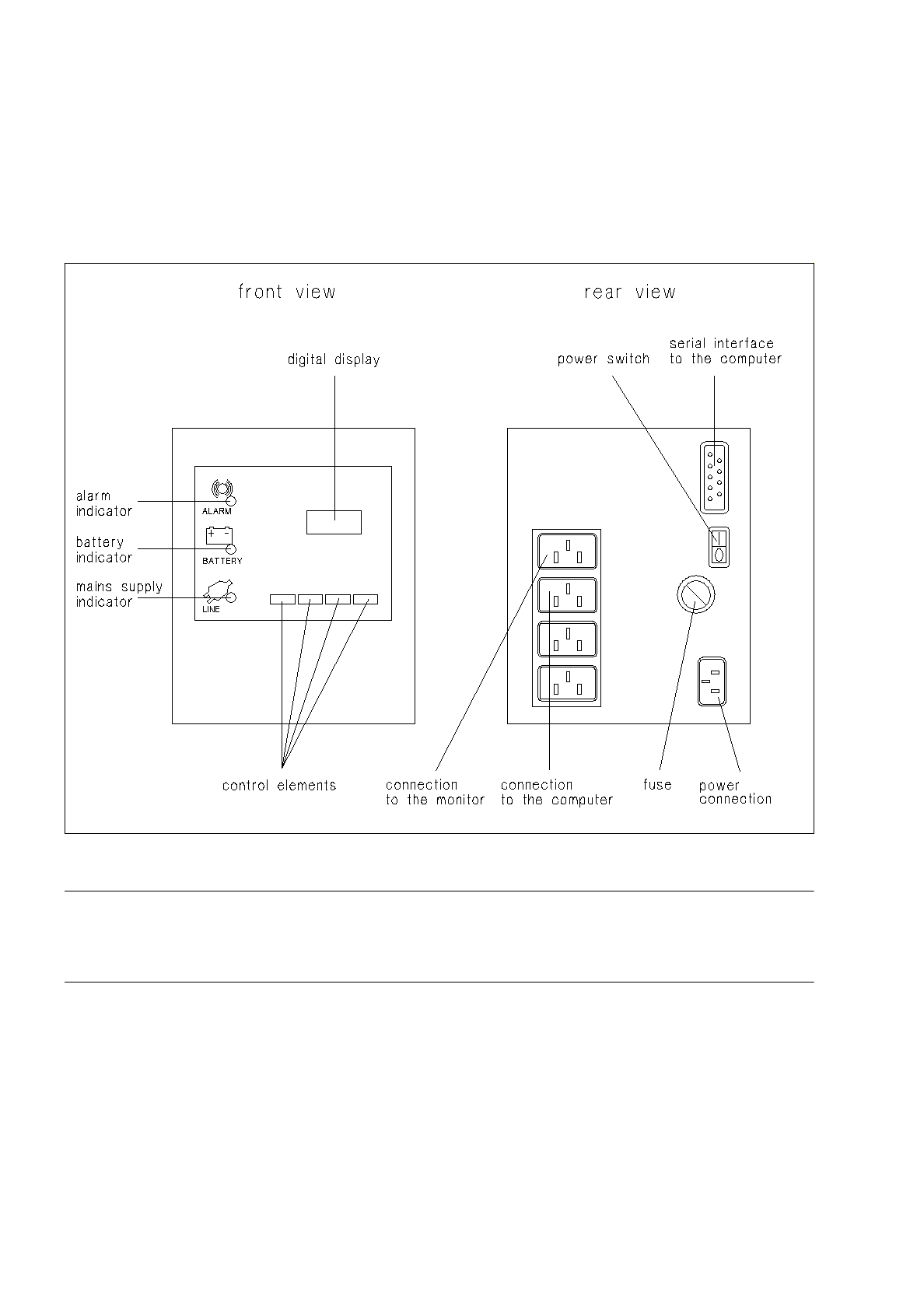
1.2.6 Uninterruptible Power Supply UPS
The UPS is designed to compensate for line losses and to act as emergency power supply system in the event
of electrical power failures. It can therefore be ensured that the connected equipment can continue to operate
without interruption even in the event of power failures, and it allows you to shut down the computer safely.
Fig. 1.2.6 UPS - connections, indicators, control elements
☞
NOTE
Prior to using the UPS for the first time it must (owing to loss of capacity during storing) be charged for approx.
24 hours to be able to guarantee safe operation of the line computer system.