00190802-02.pdf - 第400页
User’s Manual Line Computer UNIX 13 Production Tools / Set-Up Software Version 402.xx Edition 06/96 13.1 Set-Up Edit or (Feeder Part and WPC Editors) 13 - 1 13 Pr oduction T ools / Set-Up 13.1 Set-Up Editor (Feeder P ar …
13 Production Tools / Set-Up User’s Manual Line Computer UNIX
13.1 Set-Up Editor (Feeder Part and WPC Editors) Software Version 402.xx Edition 06/96
13 - 2
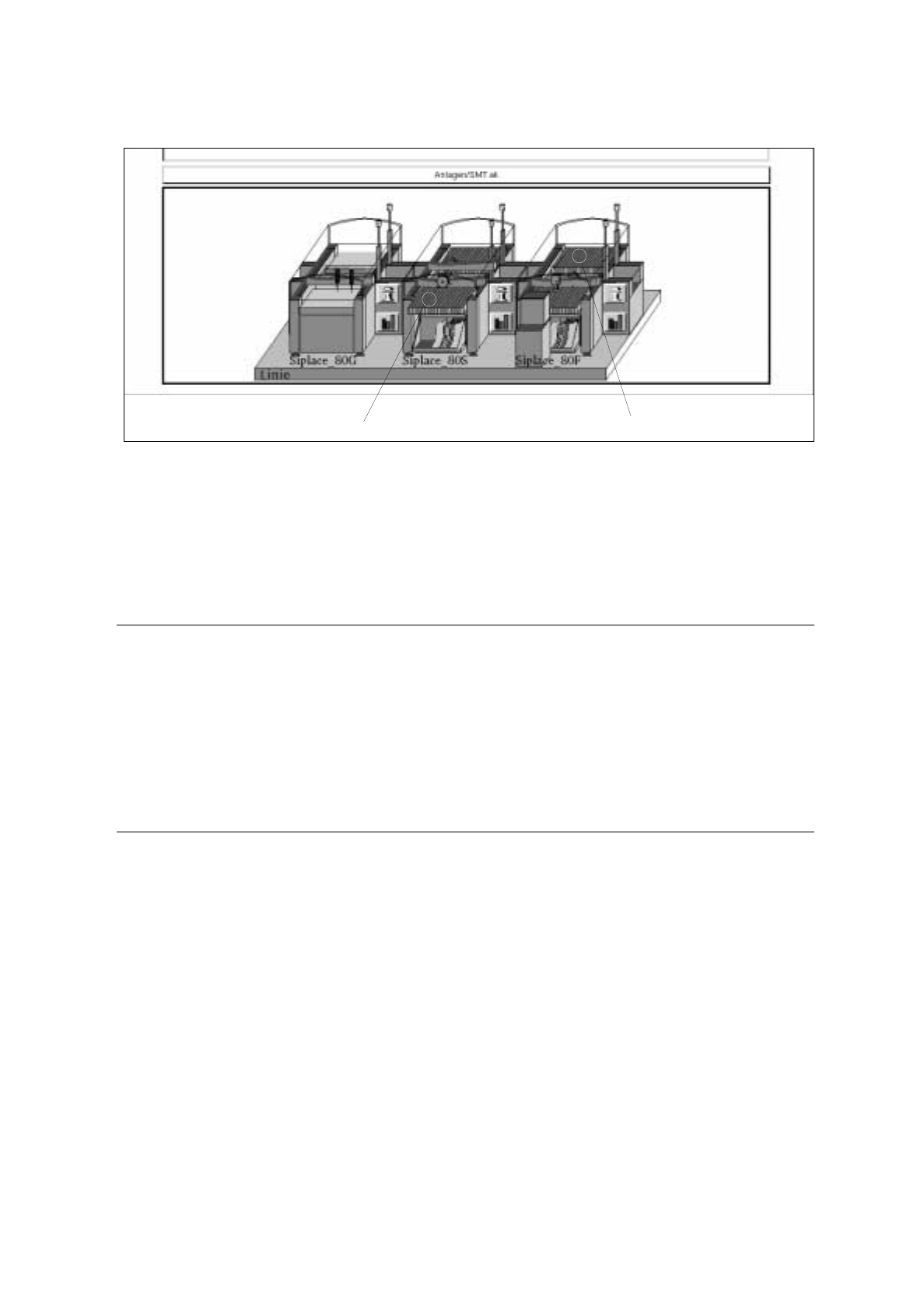
Fig. 13.1.1 Starting the Feeder Part Editor
●
Click on a feeder part of the station highlighted in green.
The FSB containing the file selection "Set-up selection" is opened.
●
Select a set-up from the list or enter a name (xx.ar), click on OK.
The Feeder Part Editor is opened after approx. 1 minute.
☞
NOTE
The Feeder Part Editor is opened for the selected station, i.e. for the feeder part that was clicked on.
It is possible to switch between the feeder parts of a station.
To edit the feeder parts of another station of a line, the Feeder Part Editor must be opened anew for
the station concerned.
It is possible to work on several lines simultaneously.
If the Feeder Part Editor of the selected station has already been opened, the same will be displayed,
the appropriate feeder part may have to be switched to.
13.1.2 Main Window of Feeder Part Editor
The Feeder Part Editor is opened for the feeder part of a station that was clicked on upon starting the editor.
If a set-up has already been defined, the feeders are displayed on their defined tracks and the waffle-pack trays
on the respective waffle-pack tray carriers. If no set-up has been defined, only the empty tracks are displayed
(see Fig. 13.1.2).
Set-ups that were defined in the Set-Up Editor can be changed in the Set-Up Editor at any time.
If, however, fixed set-ups were configured upon configuring the station, these cannot be changed in the Set-
Up Editor. These can only be changed in the Station Configuration (see chapter 12).
feeder part, right feeder part, left

User’s Manual Line Computer UNIX 13 Production Tools / Set-Up
Software Version 402.xx Edition 06/96 13.1 Set-Up Editor (Feeder Part and WPC Editors)
13 - 1
13 Production Tools / Set-Up
13.1 Set-Up Editor (Feeder Part and WPC Editors)
The Set-Up Editor enables the manual creation of new set-ups and the manual modification of existing set-ups.
When so doing, the feeders and waffle-pack trays contained in the feeder list are allocated to the individual
feeder parts. The components are allocated to the individual divisions and compartments of the feeders and
waffle-pack trays.
Predefined allocations of components and package forms are accessed by means of the RI-file option. This
option permits an effective and error-free creation of set-ups and its use should be given preference to other
methods.
The Packaging Editor allows waffle-pack trays to be defined and correction values for the pick-up position of a
component in the division as well as the vibration time to be entered.
In the Machine Option Data Editor the Nozzle Changer can be configured.
The options list contains all possible options available for a given line. The individual options can be allocated
to the feeder parts upon setting up the station configuration.
The Set-Up Editor is to be called up separately for the feeder parts of the stations and the Waffle-Pack Changer.
The two editors - Feeder Part Editor and WPC Editor - are identical as far as their functions are concerned,
they do, however, differ in the layout of their display area. They are described separately in the following sections
of this manual.
A separate section is dedicated to the description of the Virtual Level of an HS180.
13.1.1 Feeder Part Editor
The Feeder Part Editor is designed for the creation of set-ups on placement stations. It must be called up
separately for each individual station.
13.1.1.1 Starting the Feeder Part Editor
The Feeder Part Editor is invoked from the desktop. The feeder parts of the individual stations are identified in
green color on the graphical display of the line configuration. Clicking on these areas highlighted in green causes
the Feeder Part Editor to be opened (see Fig. 13.1.1).

User’s Manual SIPLACE Line Computer UNIX
Software Version 402.xx Edition 06/96
14 - I
Contents
Page
Control / Control Modules
14.1 Introduction. . . . . . . . . . . . . . . . . . . . . . . . . . . . . . . . . . . . . . . . . . . . . . . . . . . . . . . . . . . . . 14 - 1
14.1.1 Functions of the Individual Control Modules. . . . . . . . . . . . . . . . . . . . . . . . . . . . . . . . . . . . . 14 - 1
14.2 Job Control . . . . . . . . . . . . . . . . . . . . . . . . . . . . . . . . . . . . . . . . . . . . . . . . . . . . . . . . . . . . . 14 - 3
14.2.1 Processing of Jobs. . . . . . . . . . . . . . . . . . . . . . . . . . . . . . . . . . . . . . . . . . . . . . . . . . . . . . . . 14 - 4
14.2.2 Starting the "Job Control" Application Program . . . . . . . . . . . . . . . . . . . . . . . . . . . . . . . . . . 14 - 4
14.2.3 Main Display Window of Job Control . . . . . . . . . . . . . . . . . . . . . . . . . . . . . . . . . . . . . . . . . . 14 - 5
14.2.3.1 FILE Menu . . . . . . . . . . . . . . . . . . . . . . . . . . . . . . . . . . . . . . . . . . . . . . . . . . . . . . . . . . . . . . 14 - 7
14.2.3.2 SERVICES Menu . . . . . . . . . . . . . . . . . . . . . . . . . . . . . . . . . . . . . . . . . . . . . . . . . . . . . . . . . 14 - 8
14.2.3.3 Editing Barcode Type Allocation List . . . . . . . . . . . . . . . . . . . . . . . . . . . . . . . . . . . . . . . . .14 - 11
14.2.3.4 Editing Basic Optimization Data . . . . . . . . . . . . . . . . . . . . . . . . . . . . . . . . . . . . . . . . . . . . .14 - 14
14.2.3.5 OPTIONS Menu . . . . . . . . . . . . . . . . . . . . . . . . . . . . . . . . . . . . . . . . . . . . . . . . . . . . . . . . . 14 - 17
14.2.3.6 Command Area, Section "Actions". . . . . . . . . . . . . . . . . . . . . . . . . . . . . . . . . . . . . . . . . . .14 - 18
14.2.3.7 Command Area, Section "Edit". . . . . . . . . . . . . . . . . . . . . . . . . . . . . . . . . . . . . . . . . . . . . . 14 - 22
14.3 Line Control . . . . . . . . . . . . . . . . . . . . . . . . . . . . . . . . . . . . . . . . . . . . . . . . . . . . . . . . . . . 14 - 25
14.3.1 Definition of Terms . . . . . . . . . . . . . . . . . . . . . . . . . . . . . . . . . . . . . . . . . . . . . . . . . . . . . . .14 - 25
14.3.2 Starting the "Line Control" Application Program. . . . . . . . . . . . . . . . . . . . . . . . . . . . . . . . . 14 - 27
14.3.3 Main Display Window of Line Control. . . . . . . . . . . . . . . . . . . . . . . . . . . . . . . . . . . . . . . . . 14 - 27
14.3.3.1 FILE Menu . . . . . . . . . . . . . . . . . . . . . . . . . . . . . . . . . . . . . . . . . . . . . . . . . . . . . . . . . . . . . 14 - 28
14.3.3.2 Line. . . . . . . . . . . . . . . . . . . . . . . . . . . . . . . . . . . . . . . . . . . . . . . . . . . . . . . . . . . . . . . . . . . 14 - 29
14.3.3.3 Subline . . . . . . . . . . . . . . . . . . . . . . . . . . . . . . . . . . . . . . . . . . . . . . . . . . . . . . . . . . . . . . . . 14 - 30
14.4 Station Controllers . . . . . . . . . . . . . . . . . . . . . . . . . . . . . . . . . . . . . . . . . . . . . . . . . . . . . . 14 - 33
14.4.1 Tasks . . . . . . . . . . . . . . . . . . . . . . . . . . . . . . . . . . . . . . . . . . . . . . . . . . . . . . . . . . . . . . . . .14 - 33
14.4.2 Features . . . . . . . . . . . . . . . . . . . . . . . . . . . . . . . . . . . . . . . . . . . . . . . . . . . . . . . . . . . . . . .14 - 33
14.4.3 Opening the "Station Controller" User Interface. . . . . . . . . . . . . . . . . . . . . . . . . . . . . . . . . 14 - 34
14.4.4 Main Display Window of the Station controller. . . . . . . . . . . . . . . . . . . . . . . . . . . . . . . . . .14 - 35
14.4.4.1 Display Area. . . . . . . . . . . . . . . . . . . . . . . . . . . . . . . . . . . . . . . . . . . . . . . . . . . . . . . . . . . .14 - 36
14.4.4.2 Command Area . . . . . . . . . . . . . . . . . . . . . . . . . . . . . . . . . . . . . . . . . . . . . . . . . . . . . . . . . 14 - 37
14.5 Set-Up Modification Generator . . . . . . . . . . . . . . . . . . . . . . . . . . . . . . . . . . . . . . . . . . . . 14 - 39
14.5.1 Terms Used in the Connection With Set-Ups (Set-Up Types) . . . . . . . . . . . . . . . . . . . . . . 14 - 39
14.5.2 Opening the Selection Window of the Set-Up Modification Generator. . . . . . . . . . . . . . . . 14 - 40
14.5.3 Selection Window of Set-Up Modification Generator . . . . . . . . . . . . . . . . . . . . . . . . . . . . .14 - 41
14.5.3.1 OPTIONS Menu . . . . . . . . . . . . . . . . . . . . . . . . . . . . . . . . . . . . . . . . . . . . . . . . . . . . . . . . . 14 - 42
14.5.3.2 Selection Area . . . . . . . . . . . . . . . . . . . . . . . . . . . . . . . . . . . . . . . . . . . . . . . . . . . . . . . . . .14 - 42
14.5.4 Main Window of Set-Up Modification Generator . . . . . . . . . . . . . . . . . . . . . . . . . . . . . . . .14 - 47
14.5.4.1 FILE Menu . . . . . . . . . . . . . . . . . . . . . . . . . . . . . . . . . . . . . . . . . . . . . . . . . . . . . . . . . . . . . 14 - 50
14.5.4.2 Command Area . . . . . . . . . . . . . . . . . . . . . . . . . . . . . . . . . . . . . . . . . . . . . . . . . . . . . . . . . 14 - 51