00190802-02.pdf - 第350页
12 Production Tools / Station and Line Confi guration User’s Manual Line Computer UNIX 12.1 Configuration Edit or Software Version 402.xx Edition 06/96 12 - 14 - Identifi cation fi eld This field co ntains the f oll owin…
User’s Manual Line Computer UNIX 12 Production Tools / Station and Line Configuration
Software Version 402.xx Edition 06/96 12.1 Configuration Editor
12 - 13
12.1.3 Machine Options Editor
For each of the machine options "Station and Station Extension", "Head", "Adapter Changer" and "Nozzle
Changer" a separate Machine Options Editor can be opened. All component-specific data are entered in these
editors.
12.1.3.1 Window Layout of the Machine Options Editor
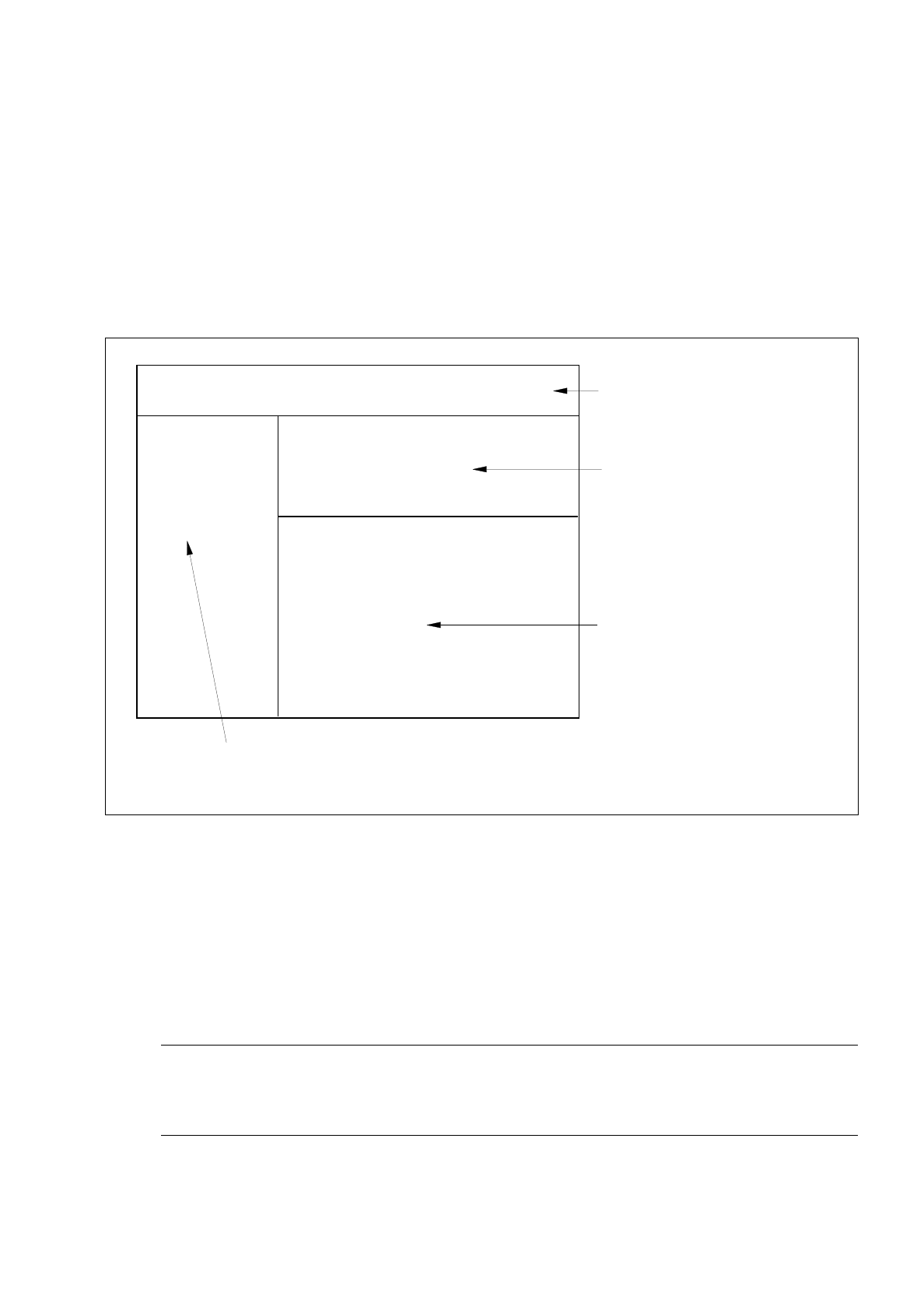
Fig. 12.1.3 Window Layout "Machine Options Editor"
The window of the Machine Options Editor is structured as follows:
-
Menu bar
The menu bar contains the "FILE", "EDIT" and "HELP" menus.
A description of the "EDIT" menu is contained in section 12.1.3.2
☞
NOTE
Since the functions and operation of the "OPTIONS" and "HELP" menus are similar to those in other
application programs of the line computer, they are described comprehensively in chapter 2.
FILE EDIT HELP
menu bar
identification field
setting area
by Machine Options Editor for
"Station, StationExtension" and
"Head"
command area
(only by Machine Options Editor "Nozzle Changer")
or
selection fields
by Machine Options Editor for
machine option "Nozzle Changer"
Station:
Mach. Opt.:
Location:

12 Production Tools / Station and Line Configuration User’s Manual Line Computer UNIX
12.1 Configuration Editor Software Version 402.xx Edition 06/96
12 - 14
-
Identification field
This field contains the following data:
Station: name of the station containing the component
Mach. Opt.: component name
Location: location of the component within the station
(no entry is contained on this line if the component is not set up).
-
Setting area (depending on the type of machine option, see Fig. 12.1.4 to Fig. 12.1.6)
In this area the settings required for the respective machine option are selected.
●
A setting is activated or deactivated by clicking on the appropriate button.
-
Selection fields (see Fig. 12.1.7)
These fields are only available in the Machine Options Editor for the Adapter or Nozzle Changer.
In the left field the divisions of the changer are displayed, and in the right field the factory-defined
nozzle types are listed.
12.1.3.2 EDIT Menu
The menu only contains the "Reset" function. This function enables you to reset any settings you may have
selected to their initial state.
●
Click on EDIT --> Reset.
The settings are reset to their factory-defined values.
User’s Manual Line Computer UNIX 12 Production Tools / Station and Line Configuration
Software Version 402.xx Edition 06/96 12.1 Configuration Editor
12 - 15
12.1.3.3 Main Window of Machine Options Editor "Station and Station Extension"
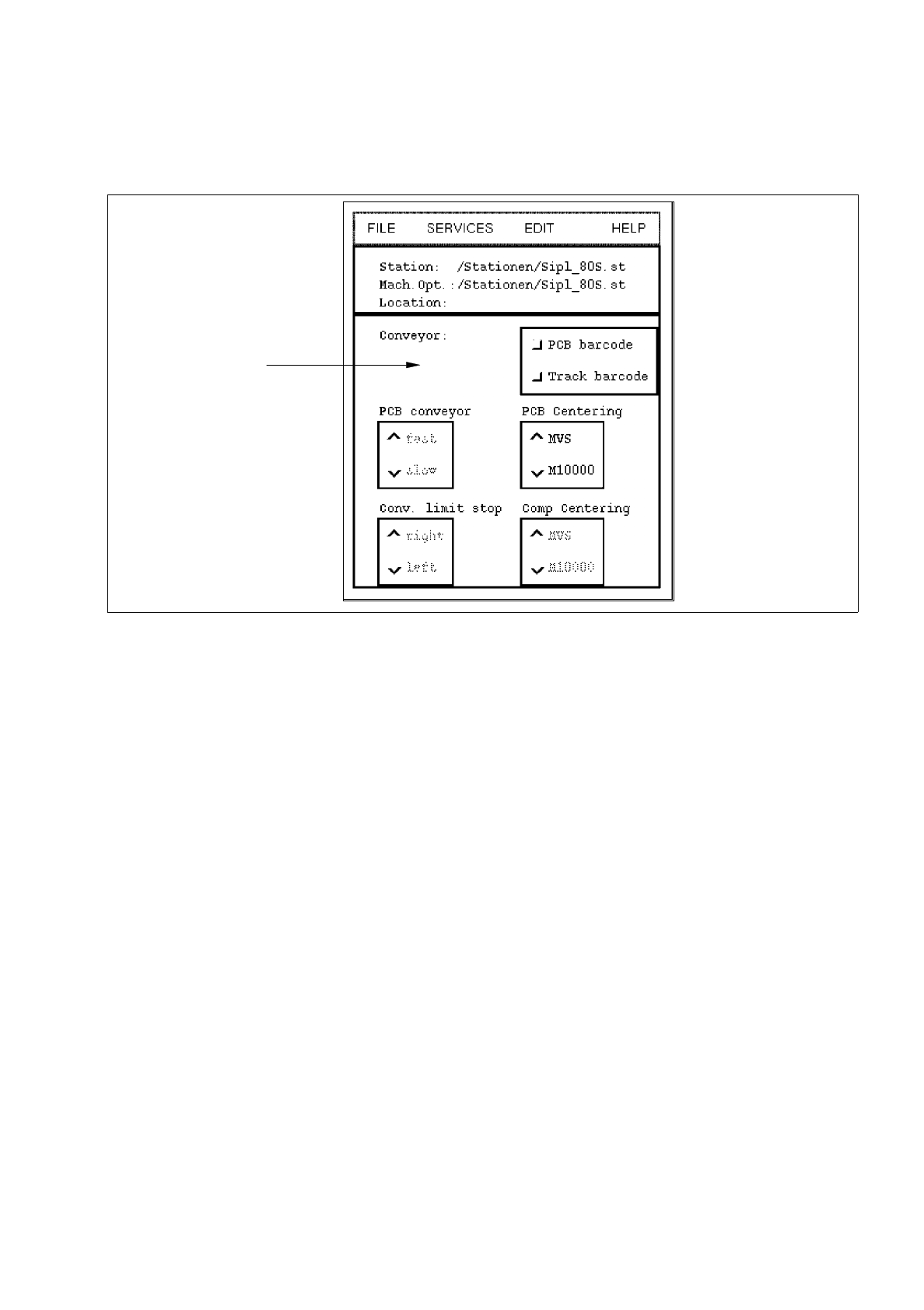
Fig. 12.1.4 Machine Options Editor "Station SIPLACE"
POSSIBLE SETTINGS for the machine option "SIPLACE station" (standard machine)
-
Conveyor -> PCB barcode PCB recognition with/without barcode
-
Conveyor -> Track barcode component type recognition for track-related refilling
with/without barcode
-
PCB Centering -> MVS selection of image processing system type for PCB centering
PCB Centering -> M10000 ("MVS" for all-SIPLACE" lines,
"M10000" for SIPLACE lines with HS-180)
-
Comp Centering -> MVS selection of image processing system type for component
Comp Centering -> M10000 centering ("MVS" for "all-SIPLACE" lines,
"M10000" for SIPLACE lines with HS-180)
-
Conv. limit stop -> right determining the right or left conveyor stop
Conv. limit stop -> left
setting area