80S-20贴片机.pdf - 第242页
7 Components Table SIPLACE 80 S-20/F4 Service Manual 7.6 Empty Tape Cutting Unit and Empty Tape Channel Edition 03/97 7 - 40 ● Quit the S ITEST progr am. DANGER QQQ Switch o ff the machi ne at the ma in swi tch and d isc…

SIPLACE 80 S-20/F4 Service Manual 7 Components Table
Edition 03/97 7.6 Empty Tape Cutting Unit and Empty Tape Channel
7 - 39
7.6.9.3 Checking the Functioning of the New Motor
DANGER OOO
When the SITEST program is used for the following work with the components changeover table moved out
(connected) there is an increased danger of accidents, particularly at the tape cutting unit, due to the cutter
wheel and cutter strip. Please note the detailed DANGER note in Section 7.6.2, page 7 - 30!
● Connect the components changeover table which has been moved out to the power supply (mains plug,
interface connector X37).
● Connect the multimeter to the motor of the tape cutting unit, making sure the measuring cables are long
enough.
● Position the multimeter so that you can read it easily during the activation which follows.
● Switch on the machine and load the SITEST program.
● Have a cutting stroke made. Select: "Component table" → "Single functions" → "Tape cutting unit".
● During the stroke, read the multimeter: If the cutter wheel pretensioning and the toothed belt tension are
correct you will read 2 - 2.5 A which is desired the power consumption.
● The cutter wheel carriage must actuate the right-hand limit switch and move back to the parking position.
– If the motor now is activated, carry out the "Concluding work" (see Section 7.6.15).
– If the motor still does not activate, proceed, as described below.
– The cutter wheel carriage must not hit against the buffer (replace clamping connector, if necessary).
7.6.9.4 Checking the Cable Y559-W1 for Breaks
● Quit the SITEST program.
DANGER QQQ
Switch off the machine at the main switch and disconnect it from the main power supply.
● To check the cable for breaks proceed now as described in Section 7.5 ’Communications Unit’.
– In the event of a fault replace the cable Y559-W1 as described in Section 7.5.
– If, however, there is nothing wrong with the cable Y559-W1, continue fault location as follows.
7.6.9.5 Determining whether the Communications Unit is Defective
The + 30 VDC voltage and the signal for the tape cutter are routed as follows:
processor board, plug X5 → processor board, plug X4 (see circuit diagrams folder, circuit diagrams 1710460-
Y0069-...-L-..., Sh. 3 and -Y0014-...-L-.., Sh. 1).
– You can quickly narrow down the location of the break by connection to an intact communications unit
(replacement of the components changeover tables). The procedure in detail is as follows:

7 Components Table SIPLACE 80 S-20/F4 Service Manual
7.6 Empty Tape Cutting Unit and Empty Tape Channel Edition 03/97
7 - 40
● Quit the SITEST program.
DANGER QQQ
Switch off the machine at the main switch and disconnect it from the main power supply.
● Pull out the plug connections of both components changeover tables (interface connector X37, mains plug
and, if applicable, pneumatics connection), in each case on the right-hand side of the machine base.
● Remove the components changeover tables: See the Section 7.6.2.2 ’Checking the Limit Switch and
Cable Y637, Y638’.
● Connect the changeover tables in reversed position in each case on the right-hand side of the machine
base.
● Please note with the following work the DANGER notice above: danger of physical injury!
● Switch the machine on, load the SITEST program and select:
"Component table" → "Single functions" → "Tape cutting unit".
● Check now the motor activation:
– If the motor is now activated, there is an interruption on the processor board of the associated com-
munications unit or in the components table interface cable Y559-W1.
Check the cable Y559, replace the cable or the communications unit as described in Section 7.5
’Communications Unit’.
● When refitting the empty tape channel align it with the pressure rod (see Section 7.6.12).
● Carry out the Section 7.6.15 ’Concluding Work’.
7.6.10 Checking, Replacing and Tensioning the Cut Toothed Belt at the
Cutter Wheel
If the cut toothed belt is damaged or incorrectly tensioned, this can be the cause of the motor being switched
out, premature wear or the tapes not being cut.
● If you have not yet done so, select "Abort placement".
DANGER QQQ
Switch off the machine at the main switch and disconnect it from the main power supply.
● Remove the components changeover table. To do so, carry out all steps as described in Section 7.6.2.2
’Checking the Limit Switch and Cable Y637, Y638’. Pay attention to the placement head!
● Remove the empty tape cutting unit (see Section 7.6.6 ’Checking and Replacing the Cutter Wheel and
Cutter Strip’).
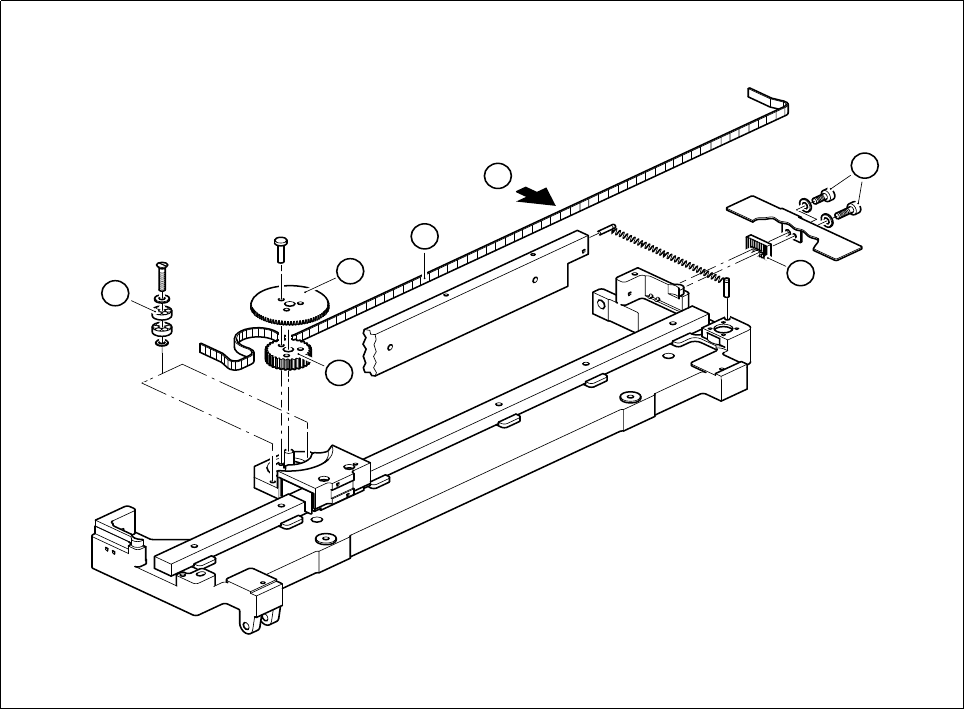
● Unscrew and remove the two tension pieces (see Section Fig. 7.6.4 ’Replacing and tensioning the cut
toothed belt’) and thread out the toothed belt.
● Fit the new toothed belt in the reverse sequence of operations, first fastening the tension pieces so that the
toothed belt is at "normal" tension.
SIPLACE 80 S-20/F4 Service Manual 7 Components Table
Edition 03/97 7.6 Empty Tape Cutting Unit and Empty Tape Channel
7 - 41
Fig. 7.6.4 Replacing and tensioning the cut toothed belt
Key to Fig. 7.6.4
1 Cut toothed belt
2 Cutter wheel
3 Deflection pulleys
4 Synchronous pulley
5 Spanner
6 2 M4 hexagon socket screws
A Measure belt tension in the center of the belt, setpoint value: 40-45 Hz
4
2
3
1
6
5
A