00197385-03_SR70x_FeatureDescription_DE_EN.pdf - 第101页
SIPLACE Statio n Softw are 70x / Feature D esc ription Ausgabe 05/2014 Edit ion 101 Depende nt on th e pick - up pos ition, the follow ing def ault pitch valu es are valid. For 8mm X f eeder s: Pick - up position Default…
SIPLACE Station Software 70x / Feature Description Ausgabe 05/2014 Edition
100
● Icon / Warning for changed feeder parameters
Changed feeder parameters are displayed with the icon and, if applicable, a warning if
the concerned feeder is present in the current setup. The warning is displayed in the Details
view of the feeder and is highlighted in orange in the location and main views. Depending on
the set handling option, the following is valid:
– Handling option 1: Display of icon and warning.
– Handling option 2: Display of icon, no warning.
– Handling option 3: Display of icon, no warning.
● Icon/ Warning for changed pick-up coordinates (XY, angle)
Changed pick-up coordinates and pick-up angle are displayed with the icon if the
operator has changed the pick-up position by teaching or has adjusted the pick-up angle. This
display is only displayed if the feeder is present in the current setup, as well.
If the pick-up coordinates (XY) are changed, the icon is displayed only. If the pick-up angle is
adjusted, a warning will be additionally displayed, as this causes another alignment of the
component on the board, what might lead to a faulty placement angle.
The warning mechanism is always activated, independent of the set handling options.
● Icon / Warning if pitch settings to high in dependance of the pick-up position
If the operator tries to set a too large pitch in dependance of the pick-up position (larger as the
default values in the subsequent tables) or changes the pick-up position, a warning will be
displayed. The warning is displayed in the Details view of the feeder and is highlighted in
orange in the location and main views.
Additionally, the icon is displayed in the setup view.
The warning mechanism is always activated, independent of the set handling options.
SIPLACE Station Software 70x / Feature Description Ausgabe 05/2014 Edition
101
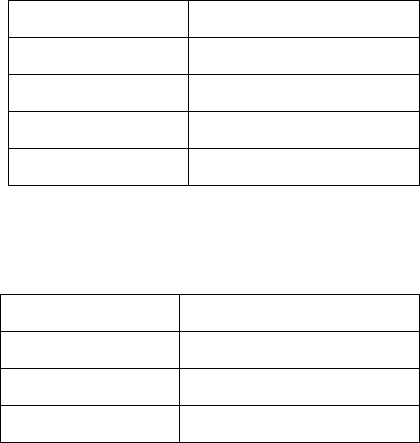
Dependent on the pick-up position, the following default pitch values are valid.
For 8mm X feeders:
Pick-up position
Default pitch
1
2 mm
2
4 mm
3
4 mm
4
8 mm
For 2x8mm X feeders:
Pick-up position
Default pitch
1
2 mm
2
4 mm
3
8 mm
Priorities in the Display
If multiple problem situations occur simultaneously, the warning or the state text of the situation
with the highest priority will be displayed in the Details view of the feeder. The following
precedence is valid (descending priority):
– Pick-up angle has been changed (with warning/icon)
– Pitch to small (with warning/icon)
– Settings mismatch (for handling option 1 only, with warning/icon)
– Pick-up position has been changed (without warning/icon)
If the current displayed problem case is solved first things first, the message for the next subjacent
priority level will be visible.
SIPLACE Station Software 70x / Feature Description Ausgabe 05/2014 Edition
102
Example
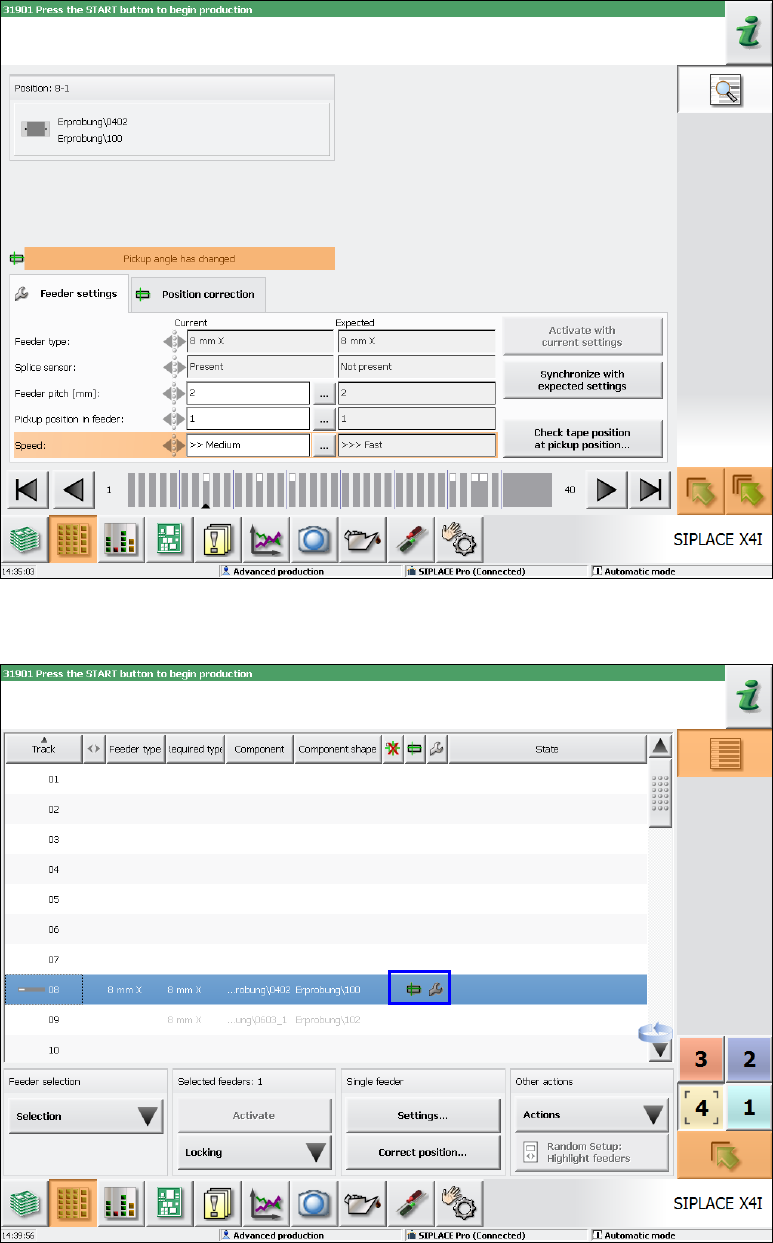
In the following example the pick-up angle is adjusted simultaneously with the problem situation in
Figure 7-36 (Settings mismatch, because the speed was changed). Thus, the Pickup angle has
changed warning is activated and the warning text for the mismatching settings is overlain.
Figure 7-37: Changed pick-up angle
In the setup view of the locations, the icons are displayed for both problem situations.
Figure 7-38: Warning icons in setup view