00197385-03_SR70x_FeatureDescription_DE_EN.pdf - 第75页
SIPLACE Statio n Softw are 70x / Feature D esc ription Ausgabe 05/2014 Edit ion 75 Figure 7- 17 : Set up view for MTC / WPC – The Activate butt on is ne w and is activa ted if the oper ator can activate the s elected tra…
SIPLACE Station Software 70x / Feature Description Ausgabe 05/2014 Edition
74
7.20 Changed User Guidance at Pickup Errors
As of this station software version the user guidance at pickup errors and the corresponding
deactivation of the feeders has been changed.
At pickup errors (i.e. for every deactivation reason) the colored marks now lead up to the setup
views and no longer to the Deactivated tracks view. For this, the Activate button has been added
to some views in order for the operator to handle the error in these views. The changes apply to the
following views:
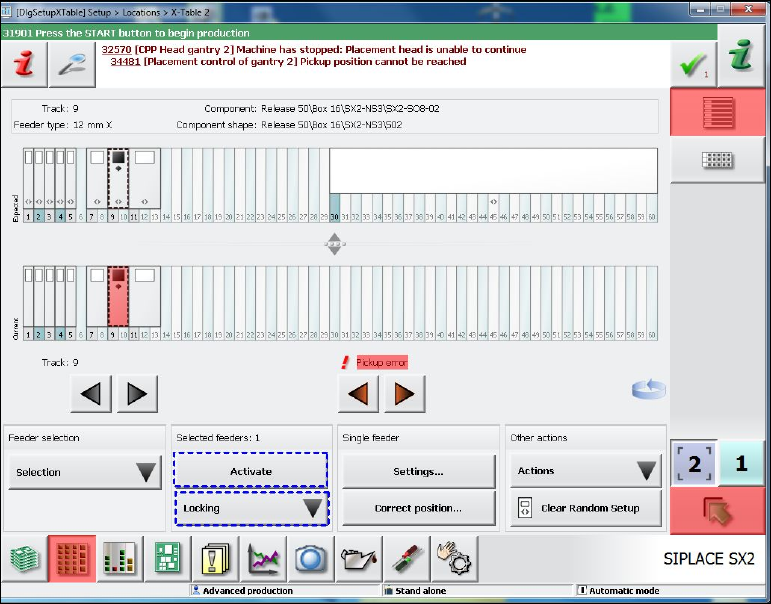
Figure 7-16: Setup view for X-table
– The Locking menu with the selection Lock/Unlock.
– The Activate button is new and is activated if the operator can activate the selected track (in
the Current graphic).
SIPLACE Station Software 70x / Feature Description Ausgabe 05/2014 Edition
75
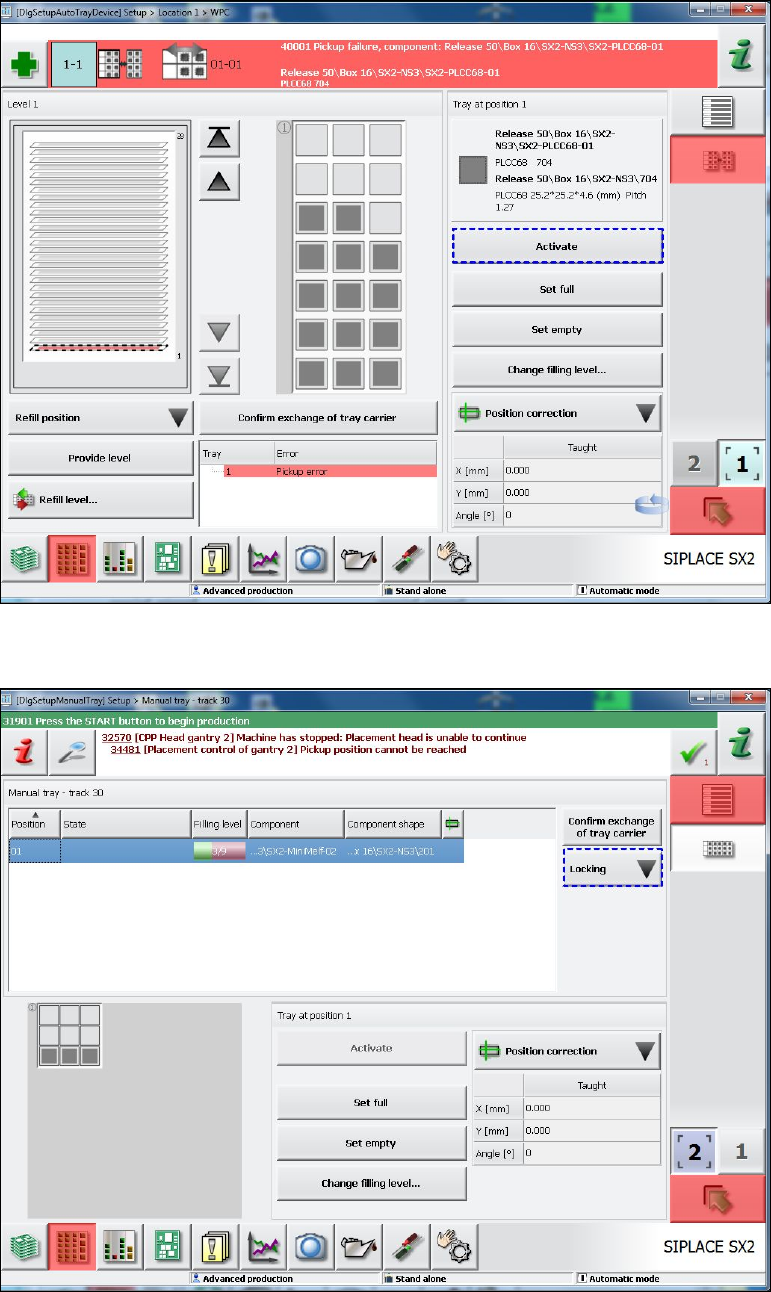
Figure 7-17: Setup view for MTC / WPC
– The Activate button is new and is activated if the operator can activate the selected tray.
Figure 7-18: Setup view for manual ray
– The Locking menu with the selection Lock/Unlock.
SIPLACE Station Software 70x / Feature Description Ausgabe 05/2014 Edition
76
7.21 Virtual Inkspot Handler
With the Virtual Inkspot Handler function the inkspot information can be read from a file, e.g. from
the board tester or inspection system. Thus, the inkspot do not have to be read by the PCB
camera.
Requirements
– A barcode reader has to be available in the machine or in the first machine of the line. Barcode
reader and assembly kit depend on the conveyor mode and machine type. The Read barcode
with PCB camera option is not used.
– WDTL license for PCB barcode included in the Line Operation package, item no. 116525-xx.
– Pure 706 line, mixed lines e.g. 706 and 605 are not supported.
Functionality
– The inkspot files (from PCB manufacturer or from an external system) can be used by every
station in the line.
– All settings are made locally at the station in XML files and activation is done in SIPLACE Pro.
– The inkspot files are named according to the barcode (e.g. SWT-LP3-O-0007). There is no
restriction for the suffix.
– The inkspot files are stored at a shared drive and can be moved or deleted automatically after
the board was placed (configurable).
– The board with its clusters is described in a matrix format (rows and columns). For each cluster,
the configuration "placement" or "no placement" has to be defined. The matrix is configurable.
– Configuration changes get effective after a new job download our machine reboot.