00197385-03_SR70x_FeatureDescription_DE_EN.pdf - 第95页
SIPLACE Statio n Softw are 70x / Feature D esc ription Ausgabe 05/2014 Edit ion 95 7.34 A utoma tic De activati on of the Component Sensor Com patible m ode: Compl ete To avoid s cattere d light , the com ponent s ensor …
SIPLACE Station Software 70x / Feature Description Ausgabe 05/2014 Edition
94
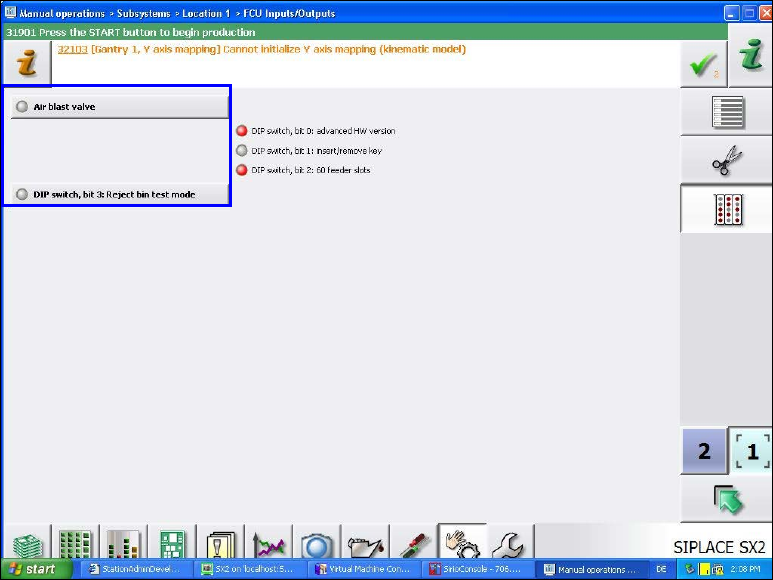
Items 3 to 5: LED for Air Blast Valve, DIP Switch and Reject Bin
These states are displayed in the new FCU Inputs/Outputs view under Manual operations –
Subsystems on the GUI and are accessible as of the Machine Service activity level.
Figure 7-33: States of air blast valve, DIP switch and reject bin
There are no sensors to check the state of the air blast valves. Only the ports to which the air blast
valves are connected can be tested - no matter what is actually connected and operable there.
With the Air blast valve button it is possible to enable the display of changes on these ports. The
displayed state can be modified on the GUI.
The test mode to check the presence / absence of a reject bin can be enabled and disabled with
the DIP switch, bit 3: Reject bin test mode button.
Only bit 3 (=reject bin test mode) can be enabled and disabled for the DIP switch.
7.33 DX4 Placement Machine - PCB Barcode Reader Functions
Compatible mode: Complete, if the barcode reader is upgraded
All PCB barcode reader functions that can be used on the SX4 placement machine can be
unrestrictedly used on the DX4 placement machine as of this station software version.
SIPLACE Station Software 70x / Feature Description Ausgabe 05/2014 Edition
95
7.34 Automatic Deactivation of the Component Sensor
Compatible mode: Complete
To avoid scattered light, the component sensor of the CPP placement head is automatically
deactivated before the component centering with the stationary camera or the coplanarity
measurement are performed.
7.35 Automatic Deactivation of the Compressed Air
If the compressed air was automatically deactivated for the CPP and C&P20 placement heads in
the 705 station software, this setting had to be manually deactivated under Settings – Machine
settings, before the embedded software was downloaded to the subsystems.
As of the 706 station software this setting is automatically deactivated.
7.36 Automatic Pin Positioning with Smart Pin Support
Compatible mode: Not supported
Smart Pin Support is also supported on the new X3S, X4S and X4Si placement machines. When
Smart Pin Support is used, each gantry has to be equipped with a pin picker.
The Auto Configuration has been adjusted to configure the installation location and position of the
pin pickers and the pin magazines correspondingly.
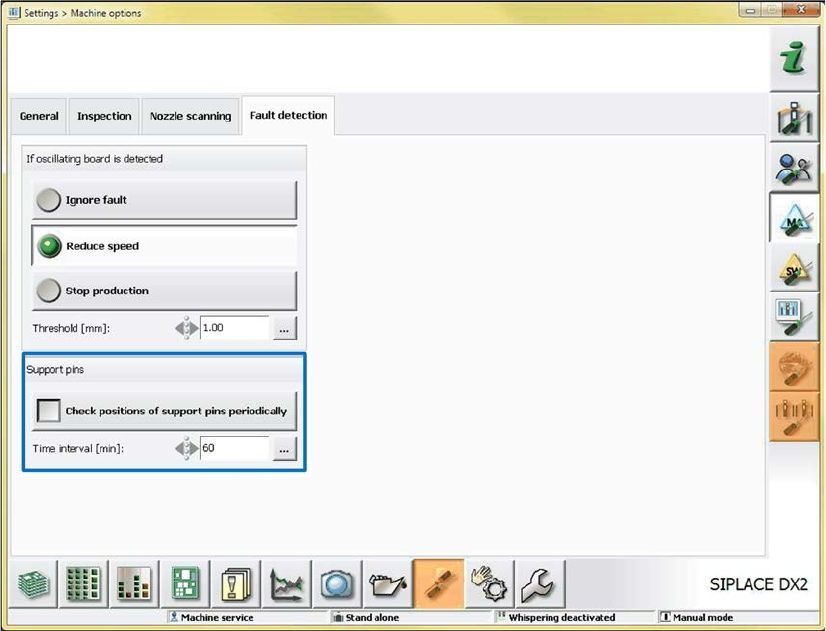
As of this station software version, the support pin positions can be periodically checked. The
setting to enable the check and time interval can be made under Settings – Machine options. If
necessary, the pin positions will be reset automatically.
SIPLACE Station Software 70x / Feature Description Ausgabe 05/2014 Edition
96
Figure 7-34: Periodically checking support pin positions
Detailed information about Smart Pin Support can be found in the corresponding User Manual, item
no. [00197001-xx], and in the Online Helps for SIPLACE Pro and the station software.
7.37 SIPLACE GlueFeeder Feeder Type
Compatible Mode: Hidden
The station software supports the following new functions for the GlueFeeder feeder type:
– Automatic contamination detection on the jet nozzle
– Displaying an editor on the GUI to edit the process parameters (from XML files). The sets can
be activated, copied, deleted, edited, exported and imported via the GUI.
– Management of different jet nozzle types. In the default XML file at least one default parameter
set is delivered for each jet nozzle type. This set can be copied and modified with the editor.
– After a defined number of shots or after a defined time interval, the jet nozzle has to be
maintained. For this, the number of shots is displayed in the Feeder view.
– Improved illumination setting for the glue dot inspection in the Vision system: Components do
not have to be rejected and re-picked anymore when the illumination setting is tested.
Additionally, the system can automatically propose a suitable illumination.
Detailed information about SIPLACE GlueFeeder can be found in the corresponding User Manual,
item no. [00197218-xx], and in the Online Helps for SIPLACE Vision and the station software.