00197385-03_SR70x_FeatureDescription_DE_EN.pdf - 第64页
SIPLACE Statio n Softw are 70x / Feature D esc ription Ausgabe 05/2014 Edit ion 64 7.11 A utoma tic Nozzl e ID Recogni tion In order t o sim plify and sp eed u p the no zzle s etup pro cedure f or e.g. a produc t change …
SIPLACE Station Software 70x / Feature Description Ausgabe 05/2014 Edition
63
Enhancement of the single calibration
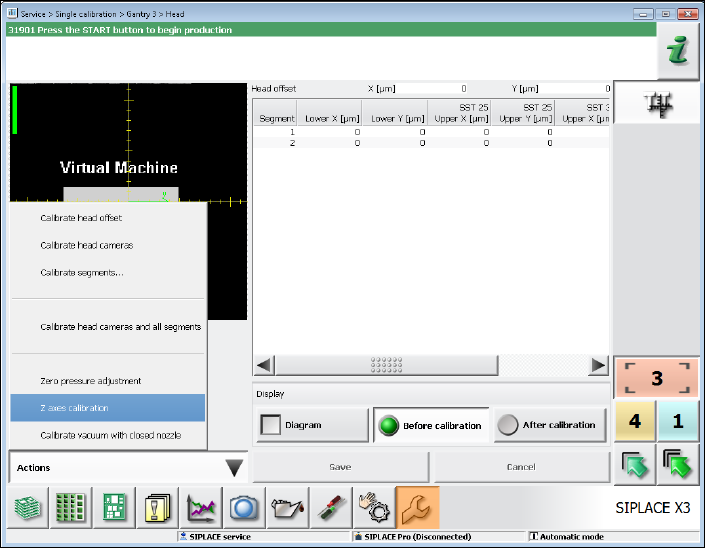
On the GUI to the single calibration of a head the following separately selectable calibrations have
been new included:
– Zero pressure adjustment (for all placement heads)
– Z axes calibration (for Twin heads only)
– Calibrate vacuum with closed nozzle (for Twin heads only)
The functions are provided in a menu:
Figure 7-4: Single calibration
7.10 Test Run after Placement Head Exchange or Maintenance
After a placement head exchange or machine maintenance the operator can start a test run (trial
run of the machine / reference runs) under the Machine service activity level by pressing the Test
run button in the Maintenance view (oilcan icon). The function is the same as the one available
under Manual operations – Endurance Tests – Machine endurance runs.
The test run starts immediately and is repeated ten times. Conveyor and tape cutter are
deactivated. During the endurance run all axes and the MTC/WPC are referenced and a nozzle
scan is performed if there are nozzles on the placement head.
SIPLACE Station Software 70x / Feature Description Ausgabe 05/2014 Edition
64
7.11 Automatic Nozzle ID Recognition
In order to simplify and speed up the nozzle setup procedure for e.g. a product changeover, the
nozzles are marked with a special identification in the nozzle shank that is automatically recognized
by SIPLACE Vision. The operator just has to put the right number of the right nozzle types into the
nozzle garage and do not have to bother about filling up the nozzles into the "correct" magazines.
NOTICE
Validity:
The automatic nozzle ID recognition can be performed für C&P placement heads only.
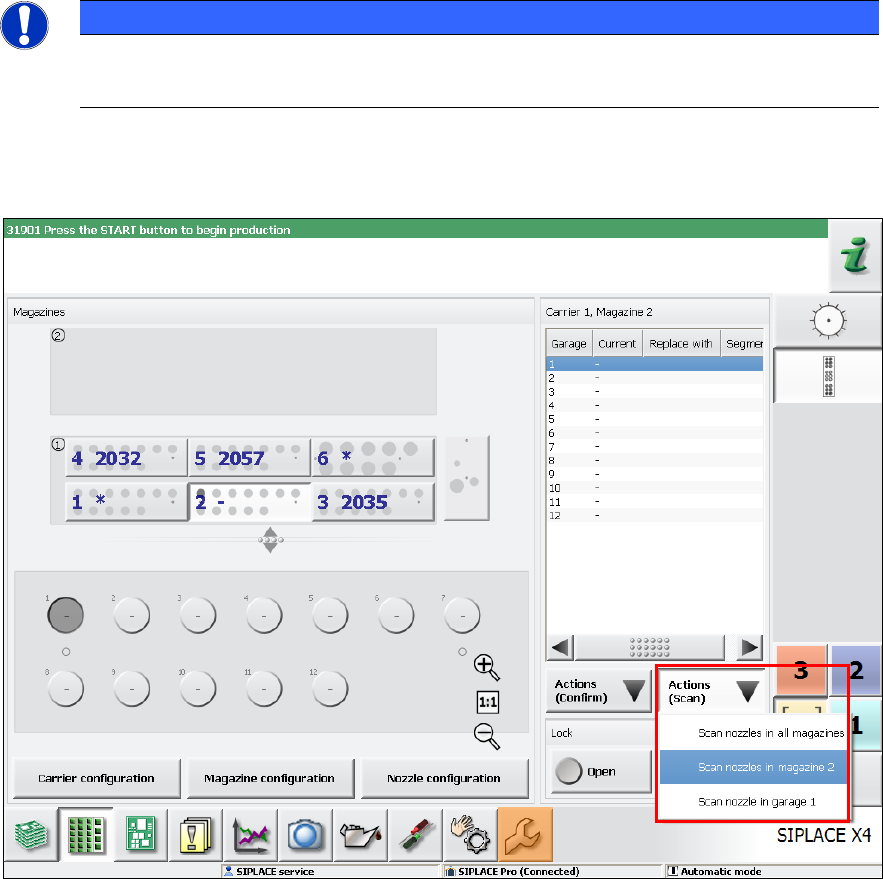
The operator has to start the nozzle scan manually in the Feeders, components and nozzles
view:
Figure 7-5: Nozzle scan
Via the Actions (Scan) button the operator can select, if a certain nozzle, the nozzles in a certain
magazine or all magazins shall be scanned.
The nozzles in magazine 2 are selected in the figure.
SIPLACE Station Software 70x / Feature Description Ausgabe 05/2014 Edition
65
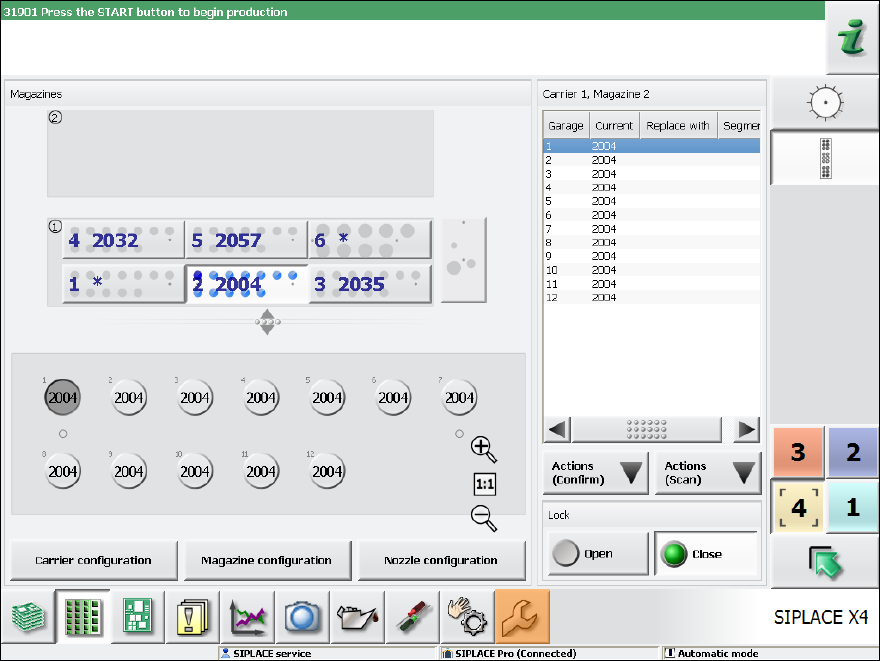
After successful scanning (ID recognized or garage empty) the garage is highlighted in the
overview and the detailed view:
Figure 7-6: Result of the nozzle scan
The scanned data is valid until the next scan but is not available after a machine reboot anymore.
The operator may change the nozzle type at any time.
SIPLACE Vision recognizes the following states of a nozzle in the nozzle changer:
– Garage is empty
– Nozzle ID can be determined (the nozzle is marked with an ID)
– Nozzle ID cannot be determined (the nozzle is marked with an ID)
– Nozzle has no ID (old nozzle)
– Standard nozzle or customer-specific nozzle
After the garage has been scanned the software behaves as follows:
Garage has been scanned and is empty
– If no nozzle is stored in the software nothing will be changed.
– If a nozzle is stored in the software it will be deleted.