00197385-03_SR70x_FeatureDescription_DE_EN.pdf - 第63页
SIPLACE Statio n Softw are 70x / Feature D esc ription Ausgabe 05/2014 Edit ion 63 Enhance ment of the single ca libration On the GU I to the s ingle c alibrati on of a head th e follo wing s eparatel y select able calib…
SIPLACE Station Software 70x / Feature Description Ausgabe 05/2014 Edition
62
To simplify the calibration, the automatic calibration has been enhanced to include the following
steps:
– Zero pressure adjustment (for all placement heads)
– Closed vacuum calibration (for Twin heads only)
Dependence on nozzle changer
● Due to the fact that the closed vacuum calibration for Twin heads has been included in the
calibration, there is a dependence on the nozzle changer. For the calibration, 518 type nozzles
are used that get picked-up during the head calibration. This dependence is eliminated, if the
nozzle changer calibration (if selected in the automatic calibration) is performed before the
sub-step "Calibrate vacuum with closed nozzle". The 518 type nozzles must not be located
in a garage that is required for the nozzle changer calibration (garage 1 of each magazine)! If
the nozzle changer has already been calibrated, the calibration of the heads and cameras can
be performed separately.
If the requirements for the closed vacuum calibration are not fulfilled (nozzle changer not
calibrated AND not selected, 518 type nozzles not available etc.), the head may be calibrated
step-by-step via the single calibration functions.
Partial calibrations that have been successfully performed during the head calibration can be
stored and are valid.
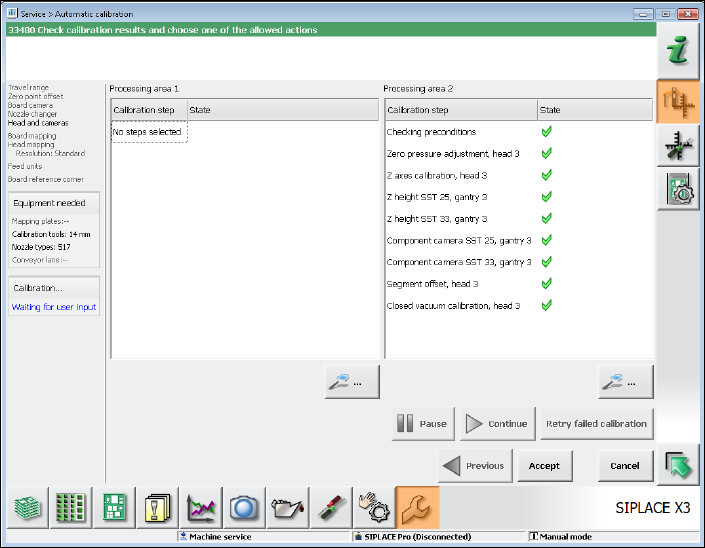
As for the Twin head, for example, the calibration results in the following sub-steps that are
displayed in the calibration sequence window.
Figure 7-3: Calibrating Twin head – Sub-steps
SIPLACE Station Software 70x / Feature Description Ausgabe 05/2014 Edition
63
Enhancement of the single calibration
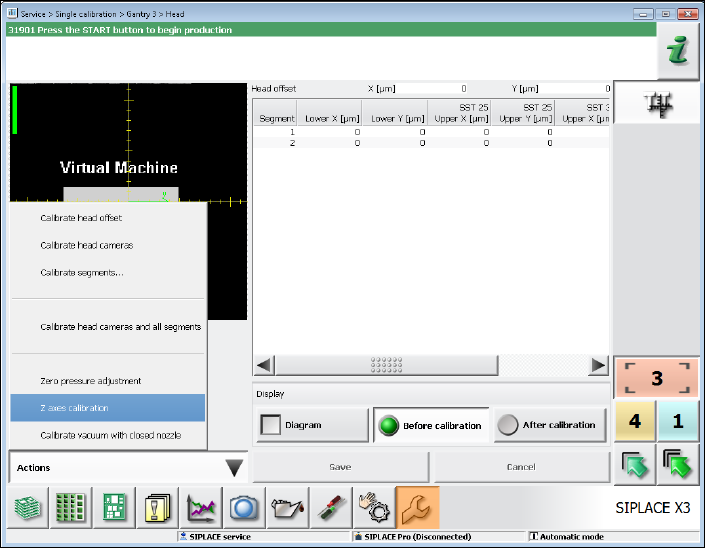
On the GUI to the single calibration of a head the following separately selectable calibrations have
been new included:
– Zero pressure adjustment (for all placement heads)
– Z axes calibration (for Twin heads only)
– Calibrate vacuum with closed nozzle (for Twin heads only)
The functions are provided in a menu:
Figure 7-4: Single calibration
7.10 Test Run after Placement Head Exchange or Maintenance
After a placement head exchange or machine maintenance the operator can start a test run (trial
run of the machine / reference runs) under the Machine service activity level by pressing the Test
run button in the Maintenance view (oilcan icon). The function is the same as the one available
under Manual operations – Endurance Tests – Machine endurance runs.
The test run starts immediately and is repeated ten times. Conveyor and tape cutter are
deactivated. During the endurance run all axes and the MTC/WPC are referenced and a nozzle
scan is performed if there are nozzles on the placement head.
SIPLACE Station Software 70x / Feature Description Ausgabe 05/2014 Edition
64
7.11 Automatic Nozzle ID Recognition
In order to simplify and speed up the nozzle setup procedure for e.g. a product changeover, the
nozzles are marked with a special identification in the nozzle shank that is automatically recognized
by SIPLACE Vision. The operator just has to put the right number of the right nozzle types into the
nozzle garage and do not have to bother about filling up the nozzles into the "correct" magazines.
NOTICE
Validity:
The automatic nozzle ID recognition can be performed für C&P placement heads only.
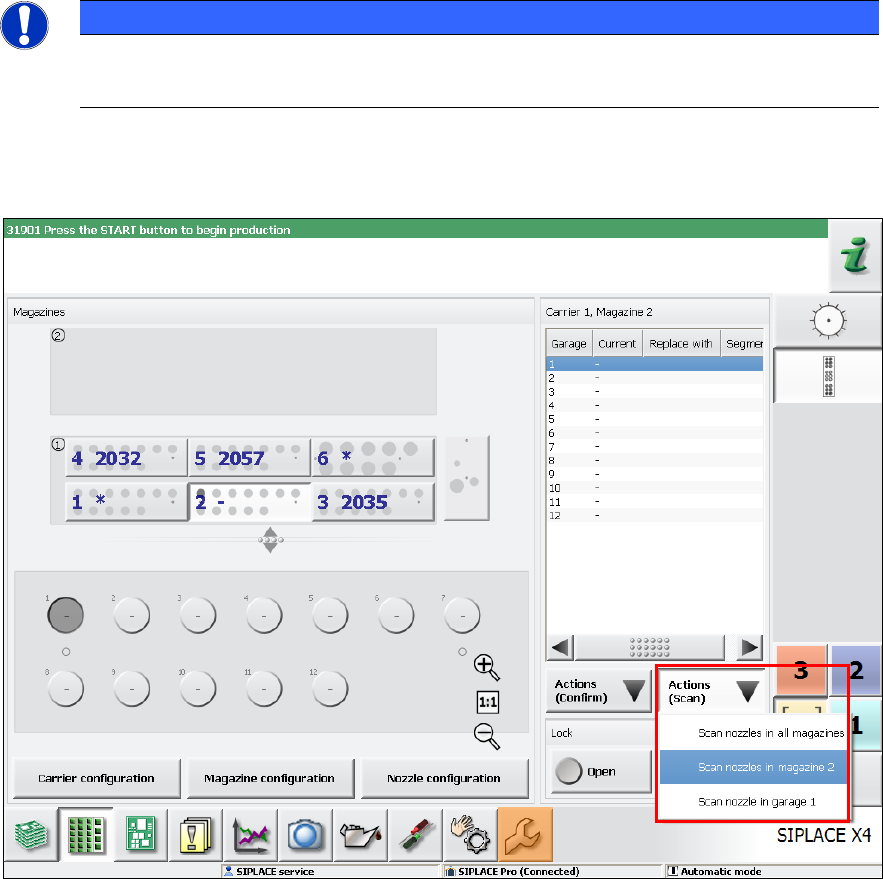
The operator has to start the nozzle scan manually in the Feeders, components and nozzles
view:
Figure 7-5: Nozzle scan
Via the Actions (Scan) button the operator can select, if a certain nozzle, the nozzles in a certain
magazine or all magazins shall be scanned.
The nozzles in magazine 2 are selected in the figure.