00197385-03_SR70x_FeatureDescription_DE_EN.pdf - 第136页
SIPLACE Statio n Softw are 70x / Feature D esc ription Ausgabe 05/2014 Edit ion 136 8.22 Virtual Ink Spot Handli ng As of this s tation softwar e vers ion, virtua l ink spots can be detec ted via an ex ternal Ma nufactur…

SIPLACE Station Software 70x / Feature Description Ausgabe 05/2014 Edition
135
8.20 Multiple LDU-X Modules on One Table
Multiple LDU-X modules can be placed on one table. This feature is supported by the station
software. The LDU-X modules can be equipped with different process material and flux thickness.
SIPLACE Pro controls that the entire dipping area can be reached and does not allow any LDU-X
position outside of the head travel range.
In the setup as many LDU-X modules are created as defined in SIPLACE Pro.
8.21 FCCS Calibration within the Line
An FCCS calibration can be performed to compare the brightness values of the cameras within the
line.
If the machine to be calibrated stands in a line, it is now possible for it to take over the FCCS
magazine from the preceding machine and transport it to the end of the line for removal.
WARNING
As the transport of the magazine with the calibration unit takes place without any
intervention by the operator, the entire line has to be switched into the FCCS mode!
At all machines in the line either Cameras for the FCCS calibration or only Feed through mode
has to be selected on the FCCS GUI. Thus, the correct width for the used conveyor lane is set
automatically. All preconditions (e.g. Remove Support Pins, Unload boards) must be complied
with so that the magazine is expected in the input conveyor of every machine in the line.
The FCCS magazine has to be inserted manually in the first machine. The calibration starts
automatically, and after the results have been stored or rejected, the magazine is transported to the
next waiting machine at which the calibration starts automatically. Machines in Feed through
mode transport the magazine to the next machine automatically.
At the end of the line the magazine remains in the output conveyor and can be removed manually.
SIPLACE Station Software 70x / Feature Description Ausgabe 05/2014 Edition
136
8.22 Virtual Ink Spot Handling
As of this station software version, virtual ink spots can be detected via an external Manufacturing
Execution System (MES) and the SIPLACE Board Gate Keeper (BGK) and released for the
stations in the line with the feature Whisper Down the Line (WDTL). Thus, the ink spots don't
have to be read by the PCB camera at each station.
The MES receives the ink spot information. The BGK inquires the ink spot information from the
MES and behaves like a preceding station to the first station in the line. The PCB barcode and the
ink spot information are transmitted via WDTL by the BGK to the first station. Thereafter, the ink
spot information is transferred via WDTL from the first station to the succeeding stations.
Prerequisites
– SIPLACE Pro Version from 11.1
– The "Whispering Down the Line" license is required for each station in the line.
– The Whisper Down the Line option must be enabled for all stations.
– The External Virtual Inkspot Handling feature must be enabled in SIPLACE Pro.
8.23 Indicator Lamps and Audible Signals – Enhancements
The placement machines are equipped with indicator lamps to inform the operator about the
machine status. Depending on the machine type, the indicator lamp systems can be two-colored
(green / white) or three-colored (green / yellow / red).
With the Distribute button in the user settings, the active indicator lamp system configuration can
be uploaded manually to SIPLACE Pro and be distributed to all placement machines in the line that
are switched-on at that time.
Prerequisites:
– A connection to SIPLACE Pro has been established.
– The current session is valid.
– All placement machines in the line are equipped with the same type of lamp indicator system
(two-colored or three-colored).
Optionally, an audible signal may be installed for the three-colored indicator lamp system.
If the audible signal is enabled, a corresponding button is shown in the Production view on the
GUI via which the signal may be disabled.
If the operator press the Stop button at the machine or opens the cover, the signal is disabled
automatically.
SIPLACE Station Software 70x / Feature Description Ausgabe 05/2014 Edition
137
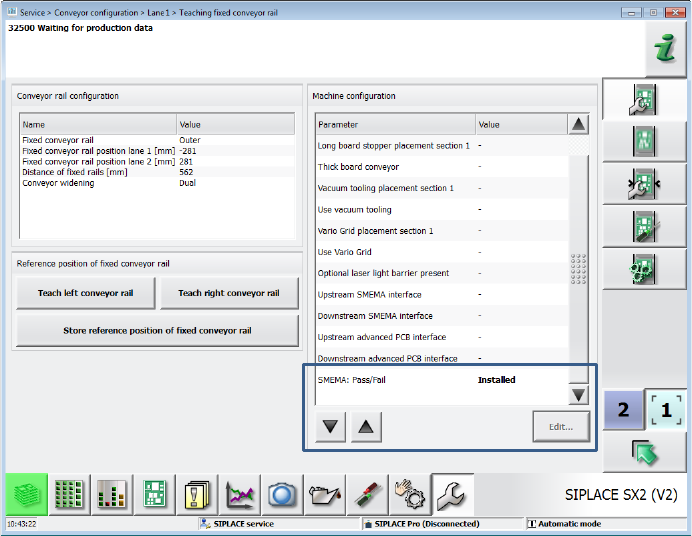
8.24 SMEMA Pass/Fail Conveyor Option
The new SMEMA: Pass/Fail conveyor option has been introduced for the SMEMA interface. With
this option an aborted board is announced to the succeeding station via another signal line. A
board that has been loaded via the new signal is identified as aborted in the machine and will thus
be passed over and locked out via the new signal line. For this, the advanced SMEMA hardware
and new SMEMA cables (item no.:[00334770-xx]) are required for the placement machines.
The option is supported on the X-series S placement machines.
The SIPLACE service activity level is required to set the option in the conveyor configuration on
the GUI.
Figure 8-11: Setting SMEMA: Pass/Fail option