00197385-03_SR70x_FeatureDescription_DE_EN.pdf - 第52页
SIPLACE Statio n Softw are 70x / Feature D esc ription Ausgabe 05/2014 Edit ion 52 6.19 Set ting L am p I ndica tor ( T wo -C ol ored or T hree -C olor ed) The tower s of the X - , SX - and DX - series placem ent m achin…
SIPLACE Station Software 70x / Feature Description Ausgabe 05/2014 Edition
51
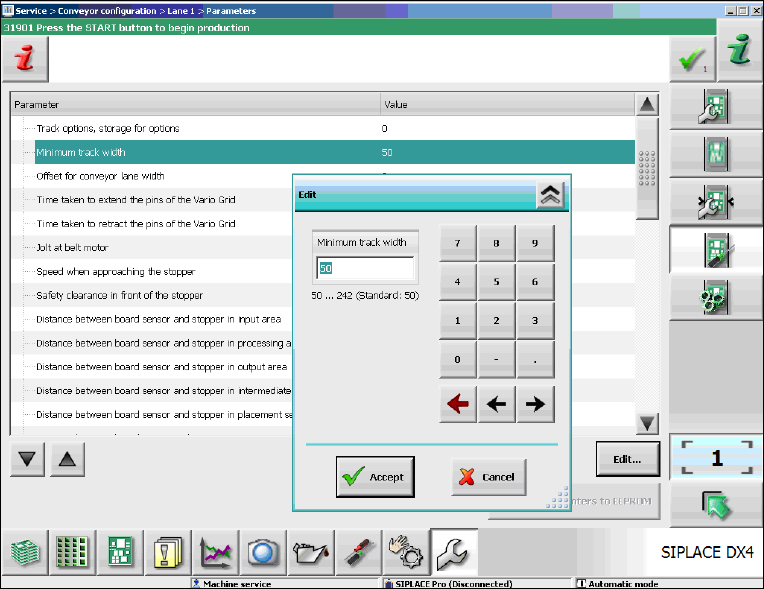
Figure 6-6: Adjusting the minimum track width
► Select the Minimum track width parameter.
► Click Edit.
► Set the desired rack width with the numeric pad in the edit window.
► Click Accept to save the setting.
SIPLACE Station Software 70x / Feature Description Ausgabe 05/2014 Edition
52
6.19 Setting Lamp Indicator (Two-Colored or Three-Colored)
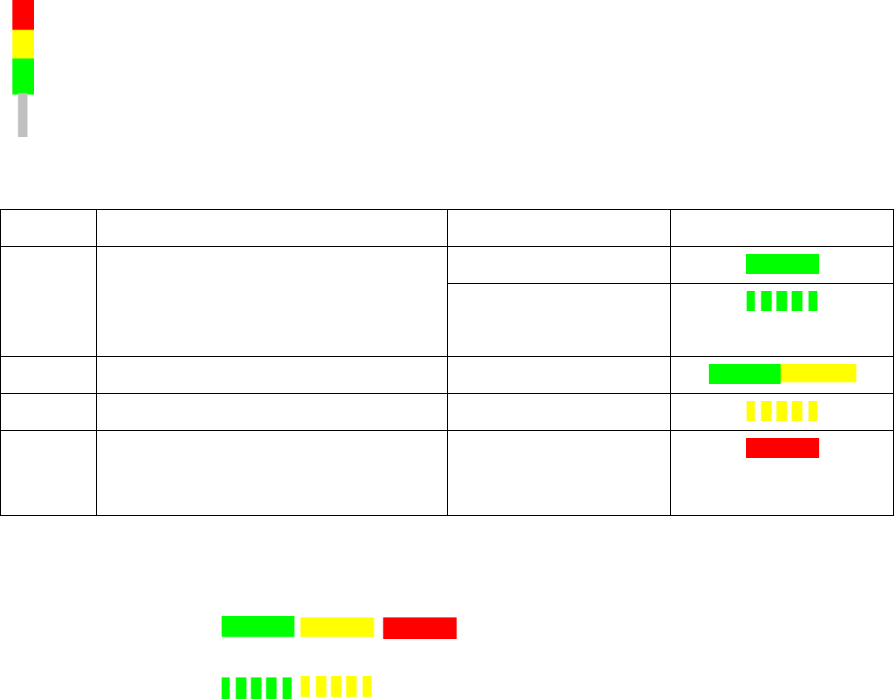
The towers of the X-, SX- and DX-series placement machines are equipped with two lamp
indicators (one on each side of the machine). Until now these lamp indicators were two-colored
(green / white) on the X- and SX-series placement machines. With the aid of the different states of
the single lamp indicators (including the flashing frequency) the operator can recognize the
machine status (i.e. production, waiting state, error type etc.). Additionally, a three-colored lamp
indicator (green / yellow / red) is supported as of this station software version:
The three-colored lamp indicator is explicated in the following table.
Level Action Machine state Lamp indicator
1 none Production
– Manual operation
– Idle production
2 Attention required Production
3 Immediate reaction Break / Stopped
4 Immediate reaction
(technical assistance might be
required)
Down
Table 6-1: Three-colored lamp indicator
Key
Constantly
illuminated:
Flashing:
The relative lamp indicator (two-colored or three-colored) has to be set in the Auto-configuration,
see the installation manual to the station software, item number 00196771-xx.
6.20 Two-Row Nozzle Changer on SX1/SX2 for C&P20A and CPP
The two-row nozzle changer is supported for the C&P20A and CPP placement heads on the
SX1/SX2-series placement machines.
6.21 Extended Range for Customized Nozzles for CPP and Twin Head
The range for customized nozzles has been extended as follows:
– Twin Head: 5500-5999 (5xx) nozzles
– CPP head: 2500-2799 (20xx) and 2900-2999 (28xx)
SIPLACE Station Software 70x / Feature Description Ausgabe 05/2014 Edition
53
6.22 Maintenance Due Status for C&P20A Placement Head and SX
Main Axes
As of this station software version, the maintenance due status can be calculated for the C&P20A
placement head and the SX main axes. The maintenance due status of the single components is
displayed in the Maintenance due status view on the GUI and informs about the maintenance due
date for the component.
6.23 Optimized Display and Format of Warnings / Alarms
The display and format of warnings / alarms have been optimized. Only the absolutely necessary
warnings are displayed in the status area on the GUI. Warnings / alarms are collected in a new
view. With this information problems that occurred on the machine in the last few days can be
specifically solved before a planned maintenance.
The collected warnings and alarms are displayed on the GUI in the Maintenance view.
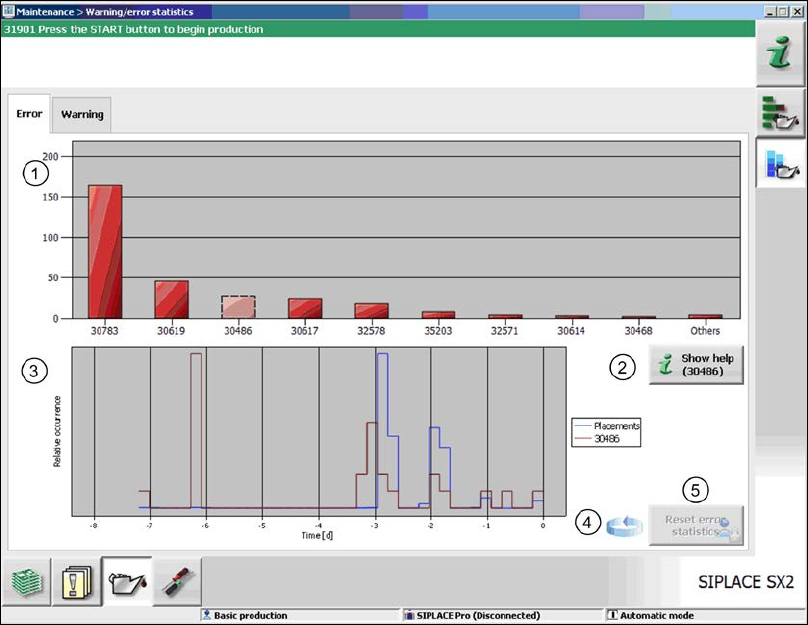
Figure 6-7: Statistics for warnings / alarms
In the upper part of the view, the ten most frequently occurred alarms / warnings are displayed (1).
After an error number has been selected in the diagram, the corresponding online help can be
accessed via the Show help button (2).
In the lower part of the view, the characteristics for the occurrence of the selected error message
are roughly displayed (red graph) in relation to the placement performance (blue graph) for the
observation period (3).
By clicking on the rotating arrow (4) a table appears, in which the assignment of the selected
messages to the messaging sub-systems is displayed. Thus the operator can easily find out where
they arose.
Old entries are automatically removed from the statistics. If necessary, the operator can reset the
statistics explicitly via the Reset error statistics button (5) as of the Machine service activity
level.