00197385-03_SR70x_FeatureDescription_DE_EN.pdf - 第125页
SIPLACE Statio n Softw are 70x / Feature D esc ription Ausgabe 05/2014 Edit ion 125 8.9 Editi ng Incom plete Waffle - P ack Tray Descri ptions W af f le - pack tr ay descript ions that are tagge d as incom plete in SI PL…
SIPLACE Station Software 70x / Feature Description Ausgabe 05/2014 Edition
124
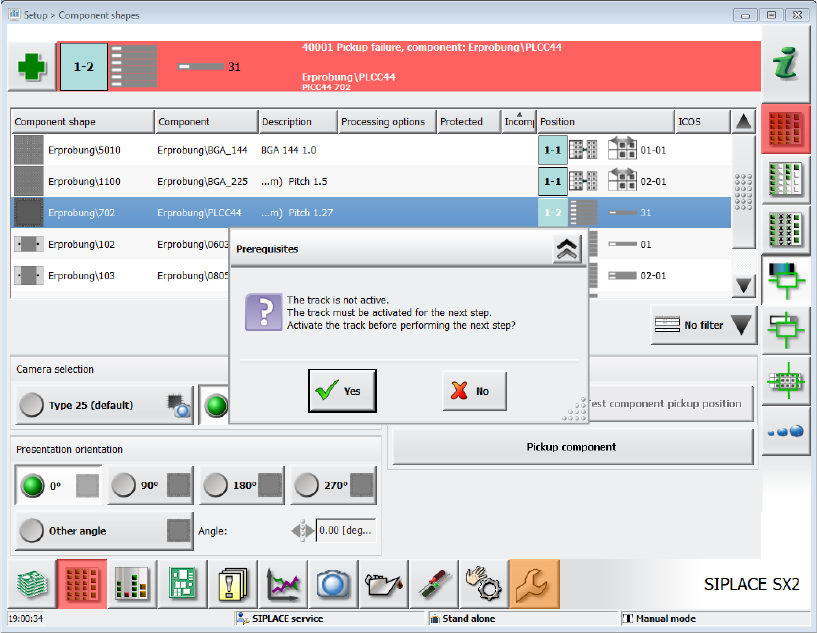
8.7 Teaching Component from Deactivated Track
A track that has been deactivated due to an error that may be corrected by the station software can
be reactivated via the GUI. Thus, it is possible to pick up components from this track without
leaving the GUI menu. Errors that may be corrected automatically by the software are, amongst
others, simple Vision errors, pickup errors or errors caused by a deactivated track in the setup.
Figure 8-4: Activate deactivated track
If the track has been deactivated due to another error it cannot be activated via the GUI.
8.8 Changing Data without Running Empty
Previously, when data was changed in the setup, the machine always had to be run empty even if
the setup was only slightly changed. I.e. in case that all placement positions could be placed by the
same heads in spite of the changes in setup, components or component shapes. For such small
product changes, the machine does not have to run empty when downloading the setup, e.g. in the
following cases:
– Feeder type changed (other reel size, tape feeder → label feeder, label feeder → waffle-pack
tray)
– Number of re-picks changed
– Pickup positions, pickup points and tolerance values changed
– Dimensions for component shapes changed
– Acceleration values changed
– Description of a component shape changed in SIPLACE Vision
Depending on the changes in the setup the changes will be effective immediately (= without
running empty) or for the next board (= running empty).
First, the feature has to be enabled in SIPLACE Pro.
SIPLACE Station Software 70x / Feature Description Ausgabe 05/2014 Edition
125
8.9 Editing Incomplete Waffle-Pack Tray Descriptions
Waffle-pack tray descriptions that are tagged as incomplete in SIPLACE Pro may now be edited at
the station. Waffle-pack trays with an incomplete tag must be completed or at least checked at the
station.
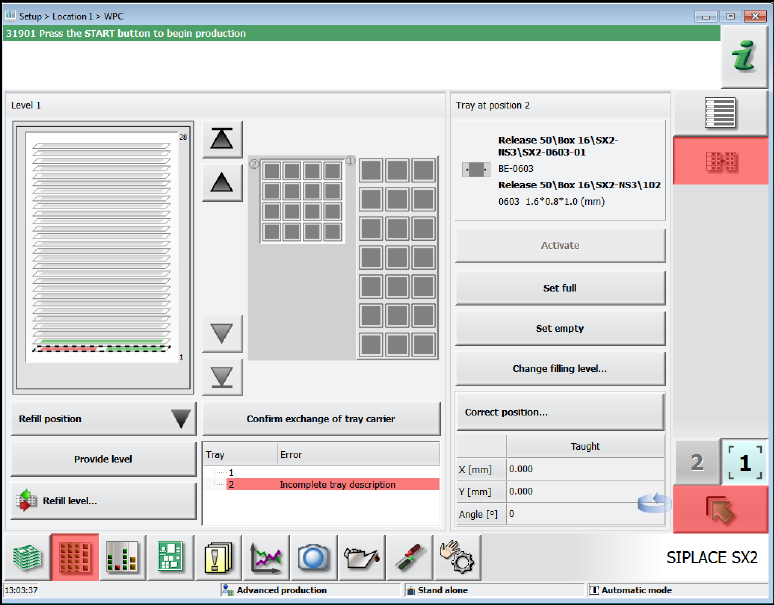
However, the machine is able to place as long as no components are required from waffle-pack
trays with incomplete descriptions. If the machine cannot place (any more) due to an incomplete
waffle-pack tray description, the pickup location will be locked and the waffle-pack tray displayed in
red in the setup.
Figure 8-5: Incomplete waffle-pack tray description
The Advanced production activity level is required to edit the waffle-pack tray descriptions at the
station. If SIPLACE Pro security is enabled it is also necessary to log in to SIPLACE Pro as an
authorized user.
SIPLACE Station Software 70x / Feature Description Ausgabe 05/2014 Edition
126
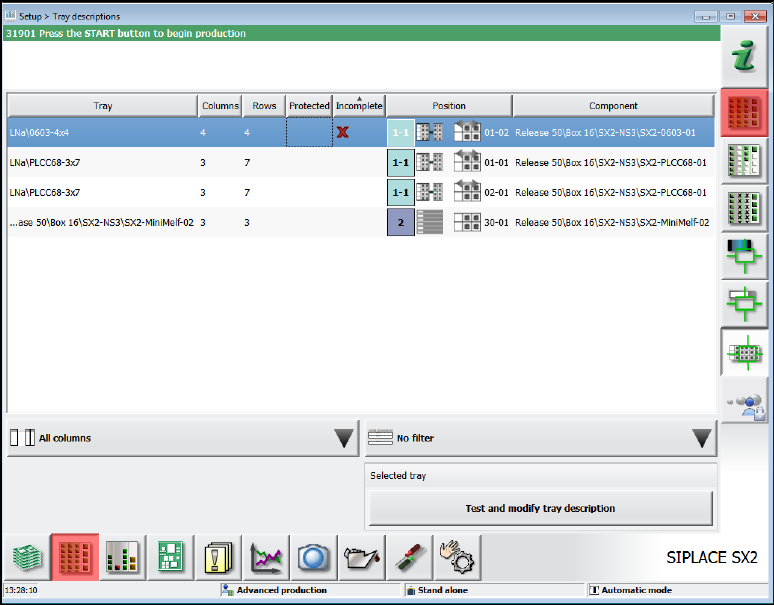
All available waffle-pack trays in the currently defined setup are listed in the Setup view.
Figure 8-6: Waffle-pack tray descriptions
The following information is displayed for the available waffle-pack tray descriptions:
– Waffle-pack tray name
– Number of columns and rows
– Tag if editable or protected (if SIPLACE Pro security is enabled).
– Tag if the waffle-pack tray description is incomplete.
– Waffle-pack tray position in the current setup.
– Waffle-pack tray component at the position in the current setup.
The list may be sorted by any column, columns may be hidden and the displayed entries filtered.
After a waffle-pack tray description has been selected with the Test and modify tray description
button, the Tray editor opens in which the waffle-pack tray description can be checked or
changed.
Preconditions before starting the Tray editor:
– A setup position must have been selected at which the waffle-pack tray is provided for the
image recording.
– The waffle-pack tray dimensions (length/width/height) must have been roughly measured (by
SIPLACE Pro or manually by creating the waffle-pack tray) in order to scan the waffle-pack tray
safely for the image recording.