00197385-03_SR70x_FeatureDescription_DE_EN.pdf - 第79页
SIPLACE Statio n Softw are 70x / Feature D esc ription Ausgabe 05/2014 Edit ion 79 Machine SpecificAc tions CreateAc tion : D efinitio n which m ac hine shall cr eate t he ink spot file ( define d b y the MID) and where …
SIPLACE Station Software 70x / Feature Description Ausgabe 05/2014 Edition
78
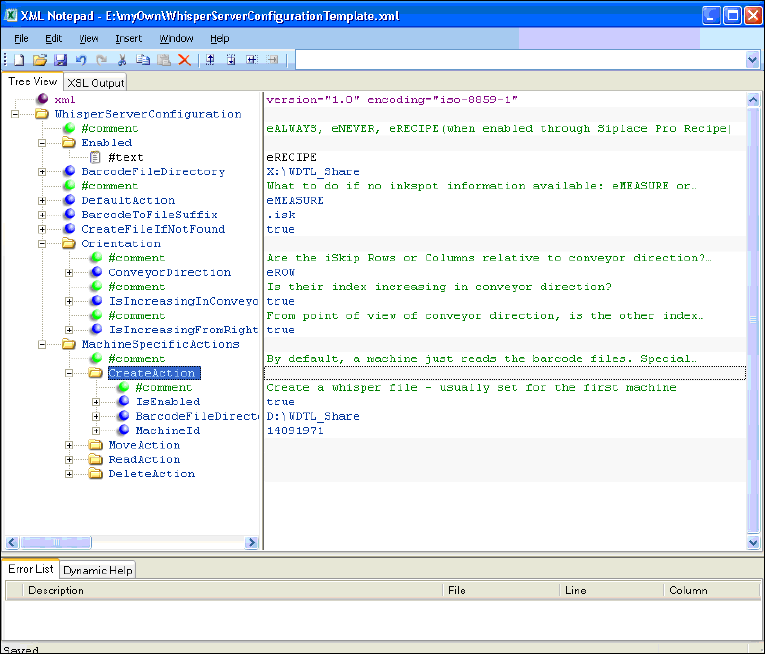
Figure 7-21: Configuring whisper file
Configuration example
Enabled
eRECIPE means that WDTL is active if activated in SIPLACE Pro as well (job-download).
BarcodeFileDirectory
Read and write access to the barcode files.
DefaultAction
Describes the behavior if the barcode files are not available or the barcode is not readable.
CreateFileIfNotFound
True if the file is created by the first station.
Orientation
Matrix definition or inkspot file handling (e.g. by iSkip).
SIPLACE Station Software 70x / Feature Description Ausgabe 05/2014 Edition
79
MachineSpecificActions
CreateAction: Definition which machine shall create the inkspot file (defined by the MID) and
where the file shall be saved.
MoveAction: Definition which station shall move the file to a spezial directory (e.g. for
traceability reasons). Usually, this is performed by the last machine.
ReadAction: Definition if the file shall be read from another shared drive.
DeleteAction: Definition if the file shall be deleted (usually performed by the last machine).
Example of an inkspot file in ASCII format
<?xml version="1.0" encoding="UTF-8"?>
<PCB_DATA CHECKSUM="666">
<PCB_DESCRIPTION NO_SINGLE_CIRCUITS="4" NO_ROWS="2" NO_COLUMNS="2"
SC1_X="0" SC1_Y="0">
<SC R="1" C="1" S="1"/>
<SC R="1" C="2" S="1"/>
<SC R="2" C="1" S="1"/>
<SC R="2" C="2" S="1"/>
</PCB_DESCRIPTION>
</PCB_DATA>
Explanations:
R="1" = Row 1
C="1" = Column 1
S="1" = 1 Placement, 0 No placement
SIPLACE Station Software 70x / Feature Description Ausgabe 05/2014 Edition
80
Checking the configuration
A feasibility check is performed for the configuration after machine booting (e.g., if WDTL is active
on the station only but not in SIPLACE Pro).
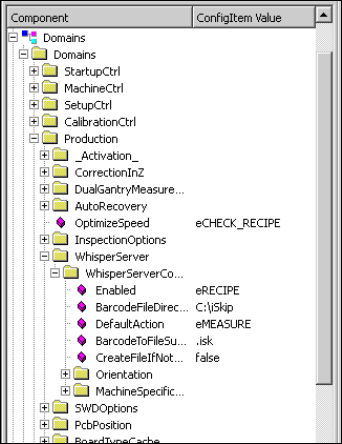
At the station the activation and configuration can be checked on the station console under
Configuration – Component …\Domains\Domains\Production\WhisperServer.
Figure 7-22: Checking configuration
If the barcode has been successfully read and the CreateAction feature was activated at the
station, the inkspot file will be created on the configured shared drive after the board has been
placed.