c921199.R00_EN.pdf - 第22页
1-2 1 Handling n Display indication (Pitch) T he following describes display indication when setting feed pitc h with a set-up station on machine or an Offline setup station. LED Indication state (msec) State – – Lightin…
1-1
1
Handling
1. Devices for F3 feeder
The following explains optional devices for setting tapes on the F3 feeder, pitch adjustment and setup.
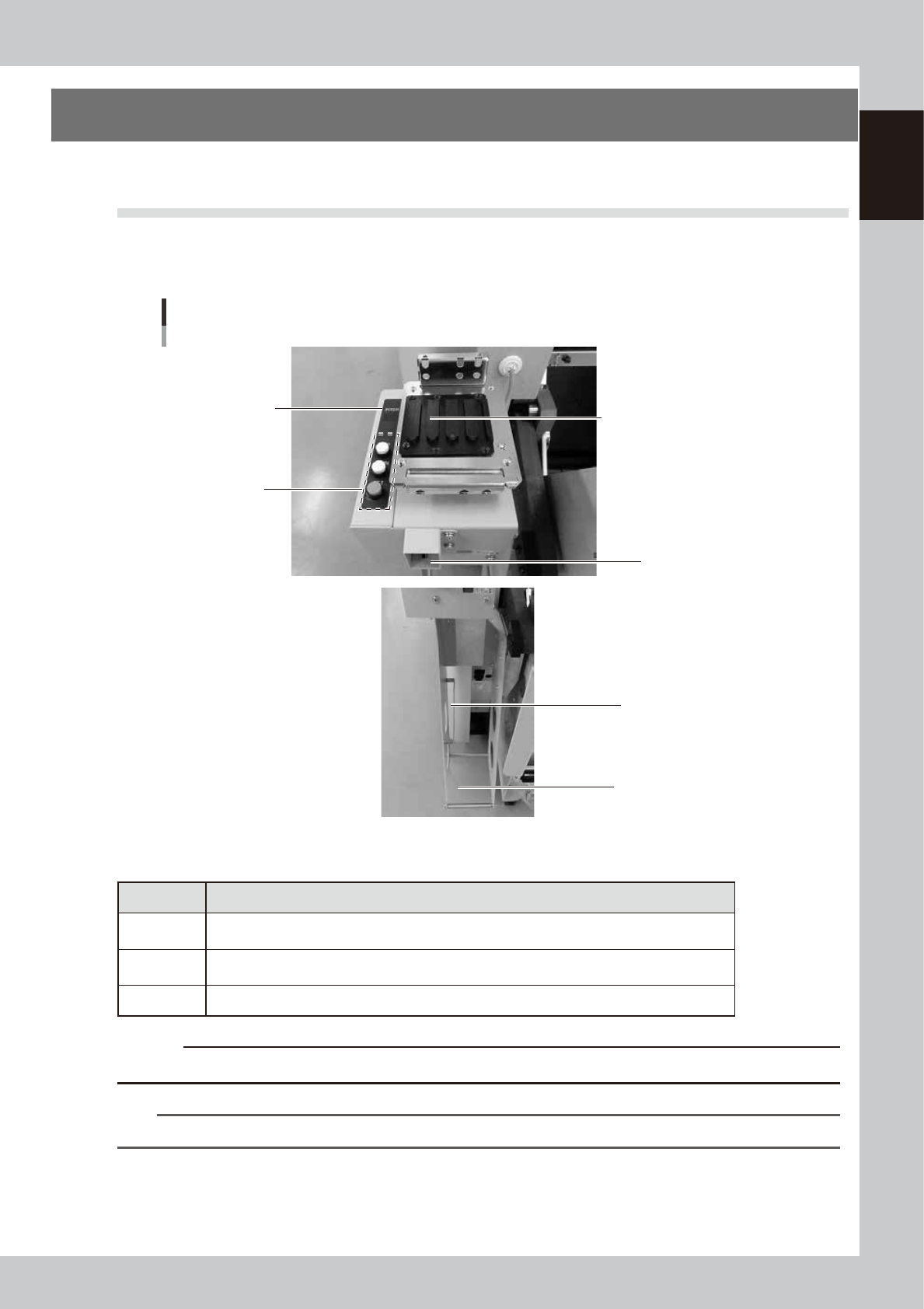
1.1 “Set-up station on machine”
The “Set-up station on machine” is directly installed on a machine to set the tape to the feeder.
It is installed on the left side of a machine (front side and rear side alike) and tape feeding or pitch can be
adjusted. Tape reel can be temporarily placed on the provided tape reel holder for operation.
Set-up station on machine
Display
(Pitch indication)
Panel button
(Pitch setting)
Dedicated tape
reel holder
Guide rail
(Set the feeder on
the leftmost rail)
Connector for
power/signal
7-inch tape reel set portion
15-inch tape reel set portion
63131-F3-00
n
Panel button
Button Function
UP
Increases the feeder pitch in increments of 4mm.
(Up to 4 mm in increments of 2 mm for 8 mm feeder)
DOWN
Decreases the feeder pitch in increments of 4mm.
(Up to 2mm in increments of 2 mm for of 8 mm feeder)
SET
Sets the feeder pitch.
c
CAUTION
Do not remove the feeder when pitch data is being loaded.
n
NOTE
Feed pitch options that can be adjusted with the panel buttons vary depending on feeder size.
1-2
1
Handling
n
Display indication (Pitch)
The following describes display indication when setting feed pitch with a set-up station on machine or an Offline setup
station.
LED
Indication
state (msec)
State
– –
Lighting When the feeder is not set
– –
Flashing (400) Period between completion of feeder setting and completion of loading pitch data
00 to 88
Lighting In case the pitch data in the feeder and the indication data are identical
00 to 88
Flashing (300)
In case the pitch data in the feeder and the indication data are not identical
(when selecting pitch)
00 to 88
Flashing (500)
In case the pitch data in the feeder and the indication data are not identical
(after pressing the “SET” button)
n
Display indication (Error number)
The following describes display indication when an error occurs on a set-up station on machine or an Offline setup
station.
Error
number
Error contents Remedy
E0
Communication error with the feeder (Reception data error, no
response)
Reset the feeder.
If the problem cannot be corrected by
the above method, contact us or our
agency.
E1
Pitch setting error
E2
Pitch value is out of range
E3
Error in the feeder
E4
Feeder communication port error
E6
Indication data value is out of range
E7
Pitch setting is not completed
1-3
1
Handling
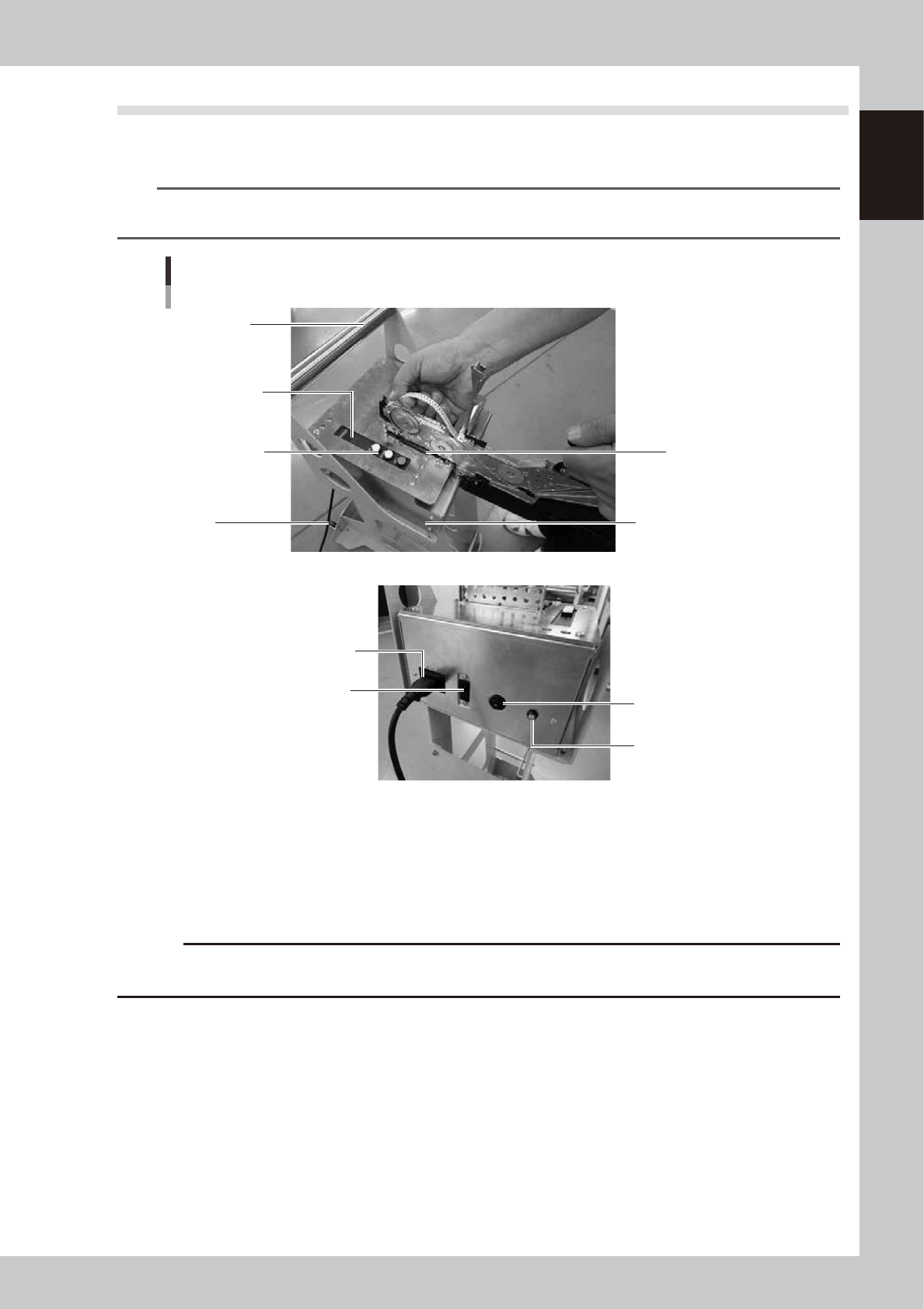
1.2 “Offline setup station”
The “Offline setup station” can supply power by itself to the feeder and this allows setting the tape to the
feeder without a machine. The tape feeding or the pitch can be set.
n
NOTE
Functions of the panel buttons and display indication of the Offline setup station are the same as those of "set-up
station on machine".
Offline setup station
Display
(pitch indication)
Panel button
(pitch setting)
Power cable
Power switch
Rear side of the Offline setup station
Guide rail
(Set the feeder on
the leftmost rail)
Temporal tape holder
Fuse (2A)
Power lamp
Handle
Caster
63132-F3-00
Power cable
There are two types: One is for Japan and the other is for overseas market. Refer to “Power supply for Offline setup
station” of “Before using the machine” for details.
Fuse (2A)
The fuse is a resettable one. Press the protruded portion to reset the fuse when it blows.
c
CAUTION
Install the Offline setup ststion in a safe place before use. If it is used in an unsafe place such as on an unstable table,
it may fall off resulting in injury. Organize the power cable with safety in mind.