444CEOM1-CM202.pdf - 第100页
Page 3-2 444C-E-OMA03-A01-01 3-1 Menu Configuration 3-1-1 Operator Mode Operator Production Describes star ting automatic production. Chapter 4 PRODUCTION Describes resetting production information. 3-3-4 Reset Describes…
Page 3-1
444C-E-OMA03-A01-01
Chapter 3
FUNCTIONS
Functions
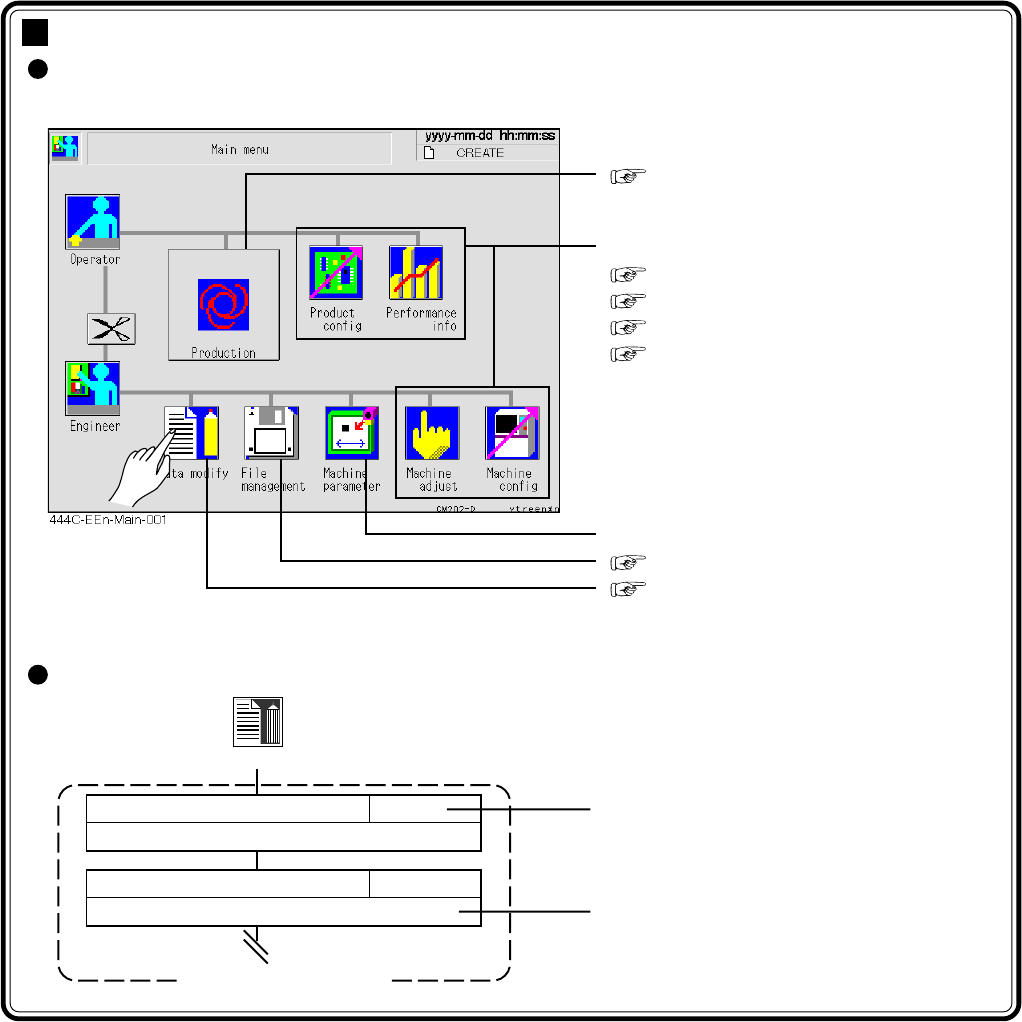
This chapter describes each function that can be chosen from the main menu as
follows.
∗ Pressing an icon displays each menu screen.
How to see the menu configuration
Chapter 4 PRODUCTION
The following are described in this chapter.
3-2 Production Settings
3-3 Production Information
3-4 Machine Adjustment
3-5 Machine Settings
Refer to the maintenance manual.
Chapter 6 FILE OPERATION
Chapter 7 DATA MODIFICATION
Data modify
Reference
Outline of function
Menu configuration
PCB data
Describes checking and modifying board data.
7-2
Board recognition data
Describes checking and modifying board recognition data.
7-3
Page 3-2
444C-E-OMA03-A01-01
3-1 Menu Configuration
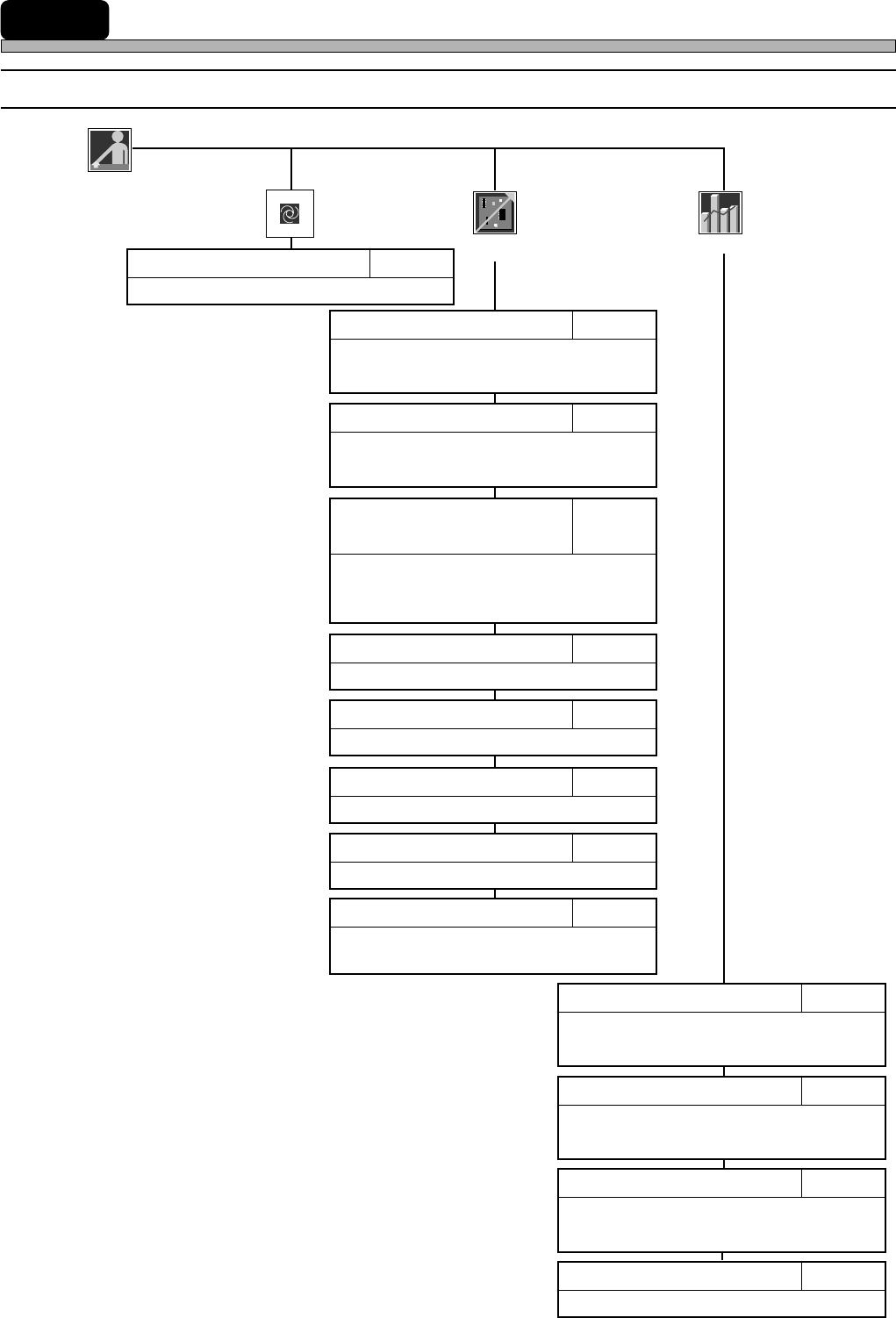
3-1-1 Operator Mode
Operator
Production
Describes starting automatic production.
Chapter 4PRODUCTION
Describes resetting production information.
3-3-4Reset
Describes checking the nozzle arrange-
ment of head.
3-2-1Nozzle Settings
Describes checking board transport motion.
3-2-4Board Transport
Describes checking feeder arrangement.
3-2-5Feeder Arrangement
Describes changing board supports.
3-2-6Changing Support Pins
Describes displaying the information
during running.
3-3-1Run Information
Describes calculating the consumption
of chips to the count of production
boards and setting the timing to cut tape.
3-2-3
Calculating Chip Consumption
/ Setting Tape Cut Timing
Displays the chip pick-up information
during production.
3-3-3Pick-up Information
Describes displaying the factors that made
the machine stop during production.
3-3-2Stop Information
Performance
info
Product
config
Describes setting the mobile table for the
exchange mode.
3-2-2Selecting Table Mode
Describes setting each motion.
3-2-7Motion Setup
Describes cutting off the vacuum to the
nozzles.
3-2-8Vacuum OFF
Page 3-3
FUNCTIONS
3
444C-E-OMA03-A01-02
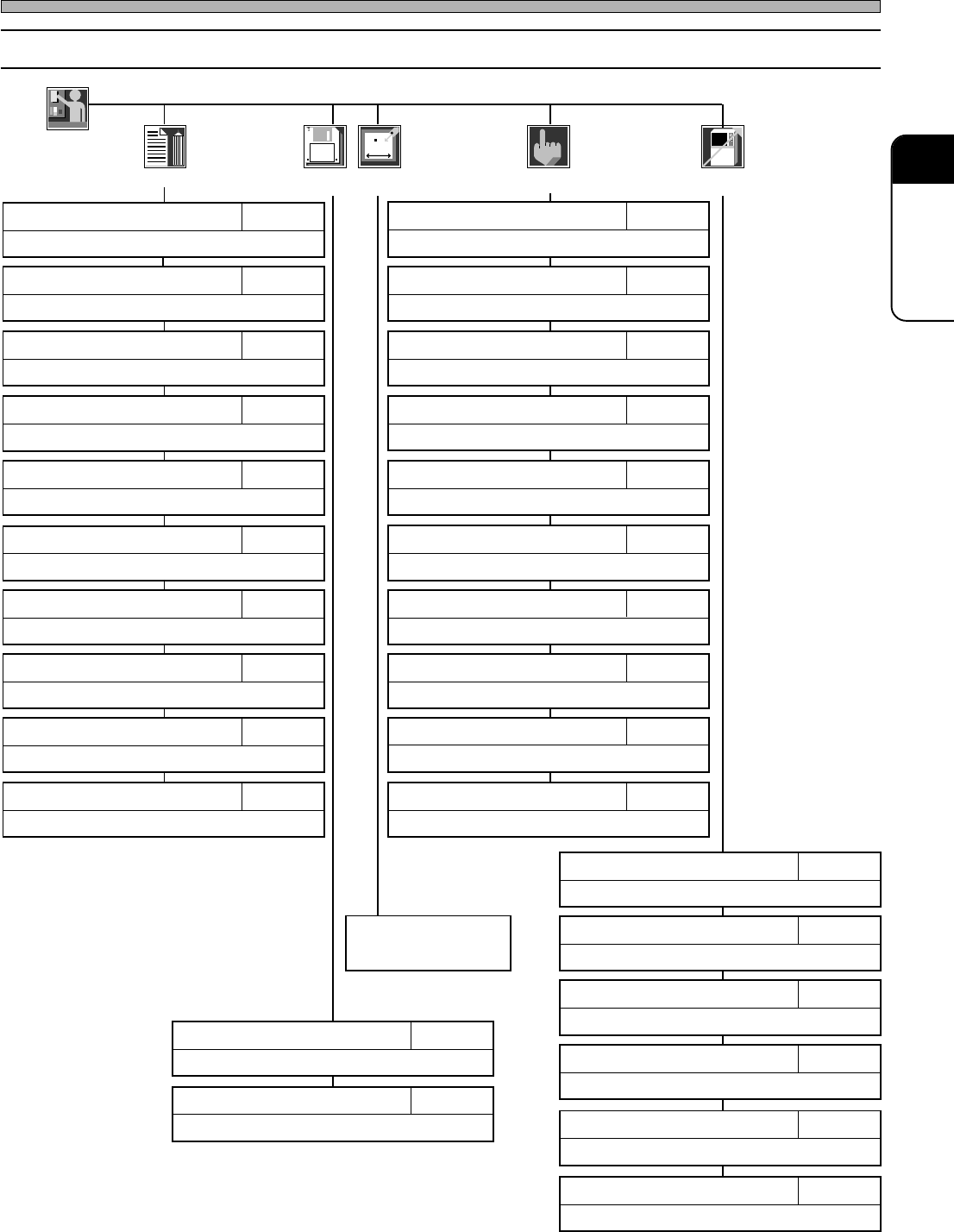
3-1-2 Engineer Mode
Menu Configuration
Engineer
Data modify
Describes customizing the functions of the operator mode.
3-5-5Customizing Operator Mode
Describes setting the time of the machine.
3-5-4Setting Time
Describes specifying and resetting defective nozzles.
3-5-3Defective Nozzle
Describes displaying the input addresses in bit.
3-4-6Input Check
Describes checking recognition processing motion.
APPENDIX A
RECOGNITION DEVICE
Describes checking nozzle stock data.
7-7Nozzle Stock Data
Describes checking and modifying mount data.
7-9Mount Data
Describes checking production data.
7-11Library Display
Describes checking and modifying board data.
7-2PCB Data
Describes checking nozzle arrangement data.
7-6Nozzle Arrangement Data
Describes teaching production data.
Chapter 8TEACHING
Describes returning all axes to their origins.
3-4-1Returning to Origin
Describes adjusting the width of conveyor.
3-4-2Conveyor Width Adjustment
Describes transporting board onto conveyor.
3-4-3Board Transport
Describes changing nozzles.
3-4-4Nozzle Changing (Option)
Describes displaying the load onto ring.
3-4-10Ring Load Information
Describes checking the state of valve and working it.
3-4-7Output Check
Describes checking and modifying board recognition data.
7-3Board Recognition Data
Describes checking feeder layout list and stock data.
7-4Feeder Layout / Stock Data
Describes checking the settings of function switches.
7-10Function Switch
Describes checking and modifying block attribute data.
7-8Block Attribute Data
Describes checking the current positions and states of all axes.
3-4-8Axis Information
Describes pick-up, recognition and mounting motions.
3-4-5Pick-up and Mounting Motions
Describes checking the correction value by pick-up position learning.
3-5-2Pick-up Position Learning
Describes changing the conditions for the motions for production.
3-5-1Switches for Adjustment
Describes loading/saving machine parameters.
Chapter 6Sub operation
Describes loading production data.
Chapter 6Main operation
Refer to the mainte-
nance manual.
File
managment
Machine
parameter
Machine
config
Machine
adjust
Describes setting the backlight-off time.
3-5-6Setting Backlight