444CEOM1-CM202.pdf - 第127页
Page 3-29 FUNCTIONS 3 444C-E-OMA03-A01-01 3-6 Others 3-6-1 Explanations of V acuum Sensor Functions For CM201-D/DU/DH/DHU and CM202-D/DU/DH/DHU, the vacuum sensor is an option. (For CM201-DS and CM202-DK/DS, it is a stan…
Page 3-28
Machine Settings
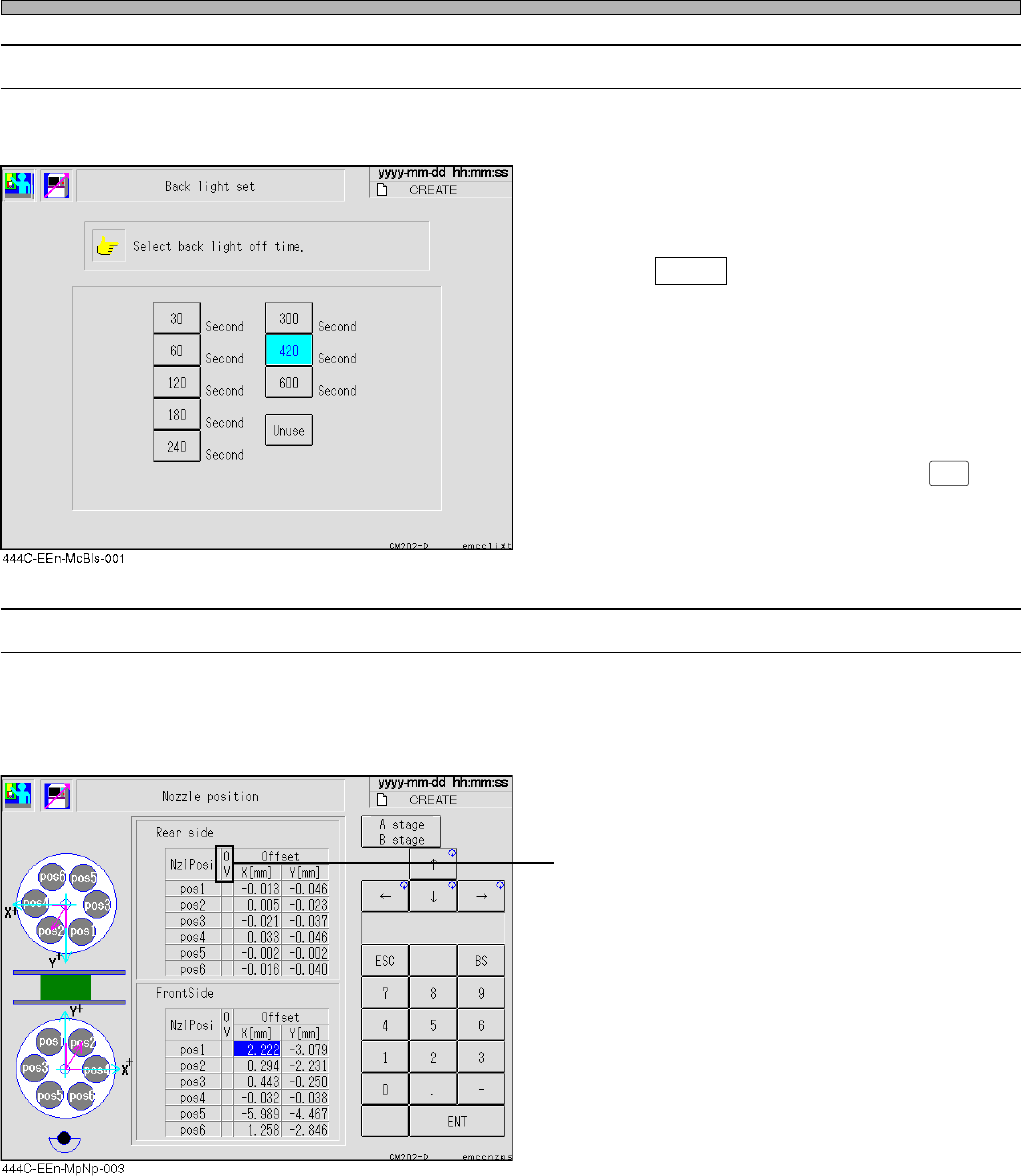
3-5-6 Setting Backlight
If the screen is left untouched until the set time has passed, the backlight turns off automatically.
• Set the off-time by pressing the desired button
indicating the off-time on the backlight setting
screen.
If wishing to disable the backlight-off function,
press Unuse .
∗ It is when the backlight setting screen is
changed to another screen that the backlight-
off time is actually set.
Only pressing the off-time button will not work
this function.
∗ To turn on the backlight again, press
LIGHT ON
on
the operating panel.
3-5-7 Nozzle Position
The center of the nozzle is measured and the nozzle position is changed when checking its diam-
eter before such as automatic operation.
It is reflected when picking up chips.
• If the value is out of range (±0.2 mm or over),
OV field is displayed in red.
444C-E-OMA03-A01-04

Page 3-29
FUNCTIONS
3
444C-E-OMA03-A01-01
3-6 Others
3-6-1 Explanations of Vacuum Sensor Functions
For CM201-D/DU/DH/DHU and CM202-D/DU/DH/DHU, the vacuum sensor is an option.
(For CM201-DS and CM202-DK/DS, it is a standard unit.)
If it is not installed, the following functions are not available.
1. Functions of the vacuum sensor
Detects the chip adhesion to nozzle that was caused by valve failures (also in mounting the
chip).
Detects the chip adhesion to nozzle in ejecting the chip.
Detects the clogging of nozzle or filter upon operation.
Detects the instability of the chip pick-up posture prior to mounting (including chip drop).
2. Details of detections
The other operational changes
1. After mounting on one board is completed, the chip eject error is checked with the chip above
the ejection tray.
2. Also in the chip recognition error, the chip eject error is checked.
∗ After an error, perform the corresponding operating procedure.
444C-618TE
1
2
3
4
detcetedeboT gninoitcnufrofsnoitidnoC gnimiT esuaC noitcas’enihcaM
rorretnuompihC
enihcaM
retemarap
”NOrosneS“
.dekcehcsillA
)sgnittesoN(
noitarepogniruD
detnuomsipihcretfA
elzzonotnoisehdapihC
evobapihcehthtiwpotsetaidemminA
yartnoitcejeeht
∗∗
∗
∗∗ yrevocertnuom-pihcehtnehW.1
lliwti”,esunU“ottessinoitcnuf
.tuodeirracebton
∗∗
∗
∗∗ noitcudorppotsnonehtnehW.2
enihcameht,desusinoitcnuf
.potstonlliw
rorretcejepihC
noitarepogniruD
pihcgnitcejenI
elzzonotnoisehdapihC
evobapihcehthtiwpotsetaidemminA
yartnoitcejeeht
↓
neercsunemehtotsnruterneercsehT
rorregniggolcelzzoNnoitareponopU
retliffogniggolC
elzzonfogniggolC
neercsehtnodeussisimralanA
↓
neercsunemehtotsnruterneercsehT
rorreytilibatsnipu-kciP
ehtrofylnO
hcihwotspihc
”NOnoitceteD“
ehtnitessi
atadpihc
noitarepogniruD
sipihcerofeB
detnuom
pu-kcipfoytilibatsnI
erutsop
tnenopmocmorfkaelriA
pordpihC
detnuomtonsipihcehT
↓
evobapihcehthtiwpotsetaidemminA
yartnoitcejeeht
∗∗
∗
∗∗ noitcudorppotsnonehtnehW
lliwenihcameht,desusinoitcnuf
.potston
Page 3-30
444C-E-OMA03-A01-02
3-6-2 Vacuum Sensor Function Settings
For CM201-D/DU/DH/DHU and CM202-D/DU/DH/DHU, the vacuum sensor is an option.
(For CM201-DS and CM202-DK/DS, it is a standard unit.)
If it is not installed, the following functions are not available.
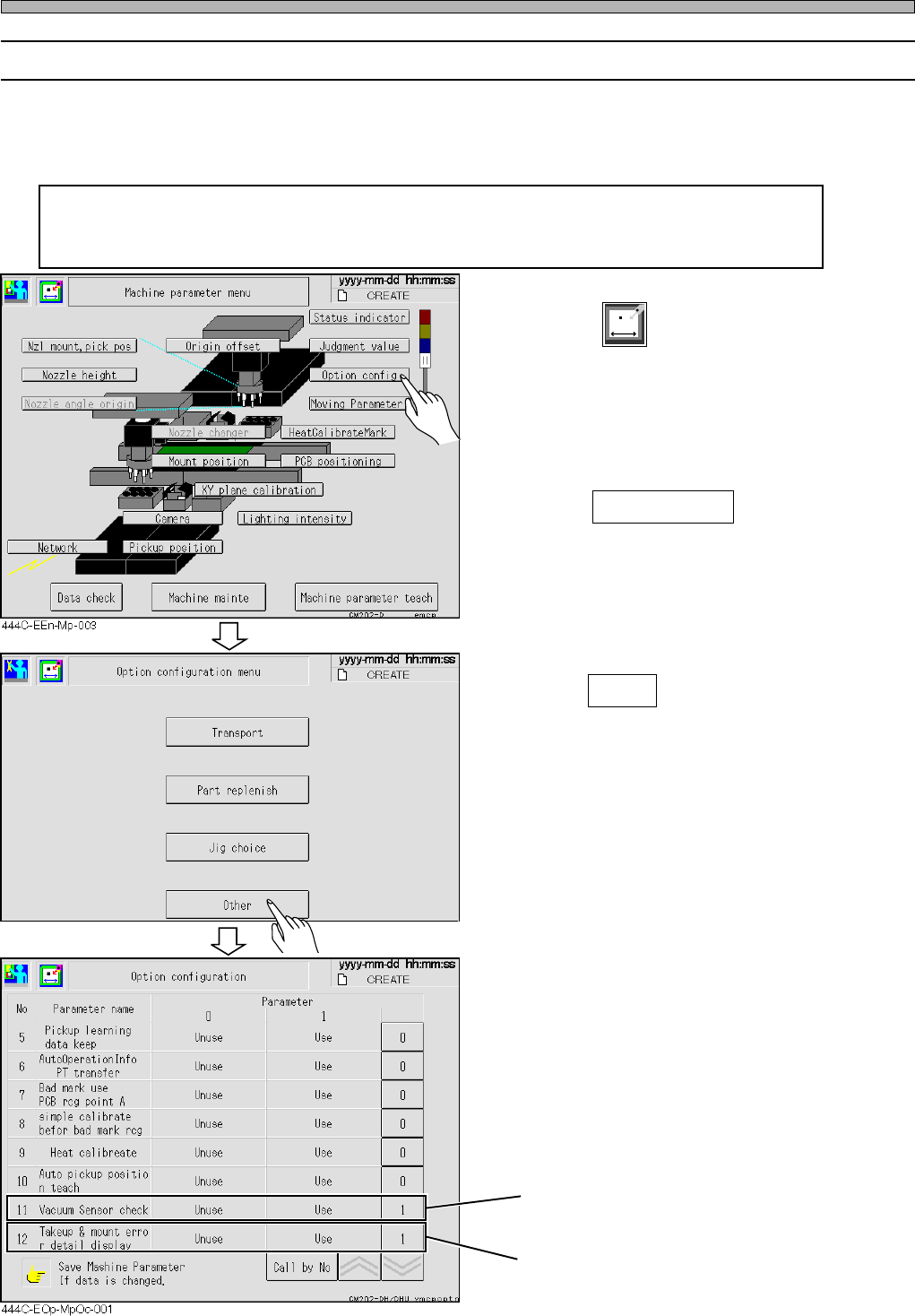
Setting “Vacuum Sensor check” in the option configuration to ON enables the
detections of a chip mount error, eject error, pick-up instability error, and nozzle
clogging error.
1. Press
Machine
parameter
in the main menu.
• The machine parameters menu is displayed.
2. Press Option config .
3. Press Other .
“Vacuum Sensor check” → 1
“Takeup & mount error detail display” → 1
(When this switch is set to ON, the details are
displayed.)
Others
4H4C-EEn-MpOcm-002