444CEOM1-CM202.pdf - 第103页
Page 3-5 FUNCTIONS 3 444C-E-OMA03-A01-05 With nozzle changer In addition to each head, the names of the nozzles set in the nozzle changer are displayed. • Press the head you would like to check. (CM201 has only the stage…
Page 3-4
444C-E-OMA03-A01-05
3-2 Production Settings
This is used for the settings requisite for production and to check the motion.
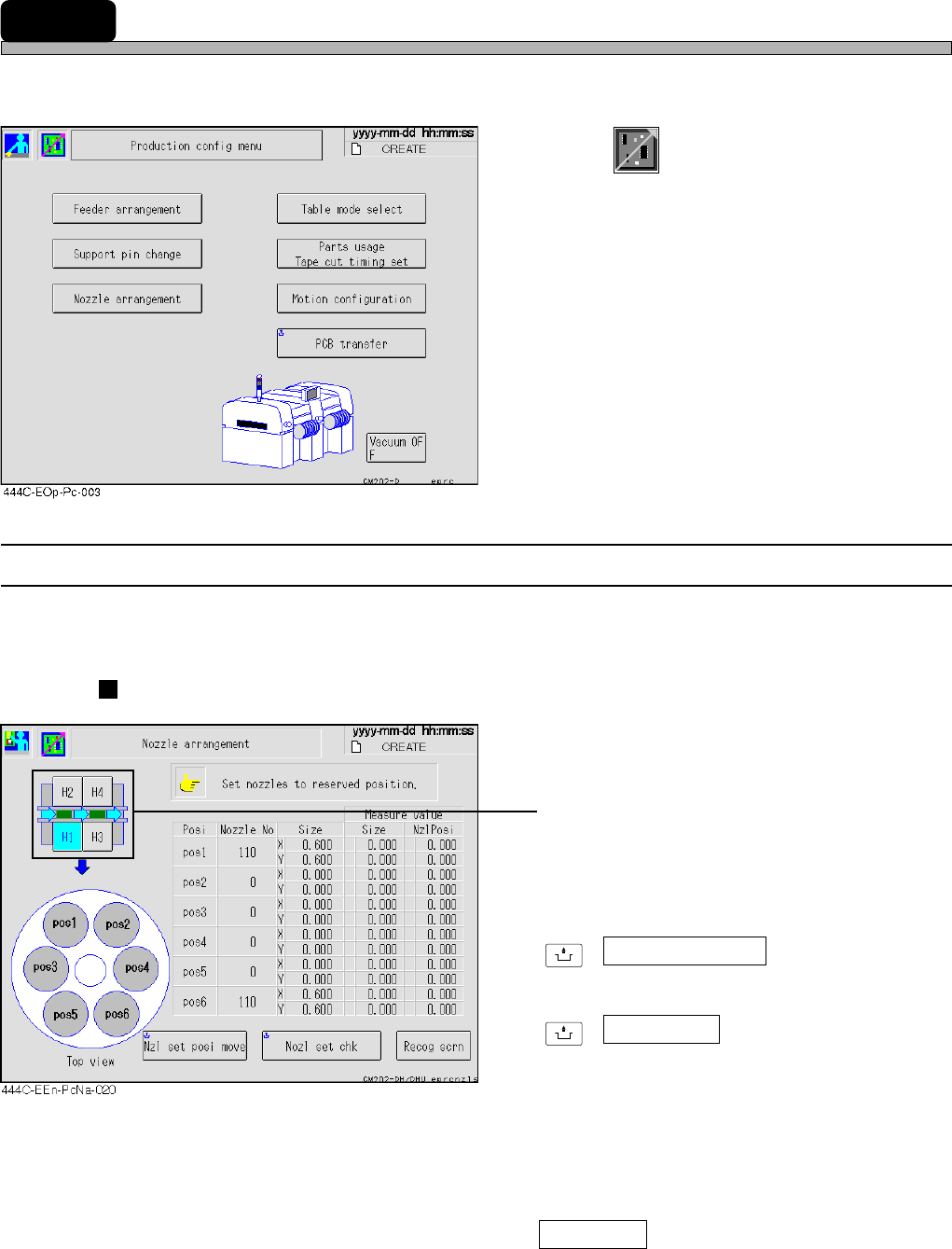
1. Press
Product
config
on the main menu.
• “Production config menu” is displayed.
∗ Pressing a function switch displays each
setting screen.
3-2-1 Nozzle Settings
You can check the nozzle arrangement of each head. The names of the nozzles attached to each
head now are displayed.
Without nozzle changer
• Press the head you would like to check.
(CM201 has only the stage A.)
∗ For information about how to change nozzles,
see “9-4 Nozzle Exchange”.
UNLOCK
+ Nzl set posi move
Moves head to the nozzle setting position.
UNLOCK
+ Nozl set chk
Recognizes whether the nozzles have been
attached correctly and displays the measured
values (nozzle diameter, nozzle inclination).
As for the nozzle position that has no nozzles
or before recognizing nozzles, 0.0 is displayed.
If they have been attached incorrectly, the
warning message appears.
Recog scrn
Displays the recognition image at when the
nozzle setting check was performed.
Page 3-5
FUNCTIONS
3
444C-E-OMA03-A01-05
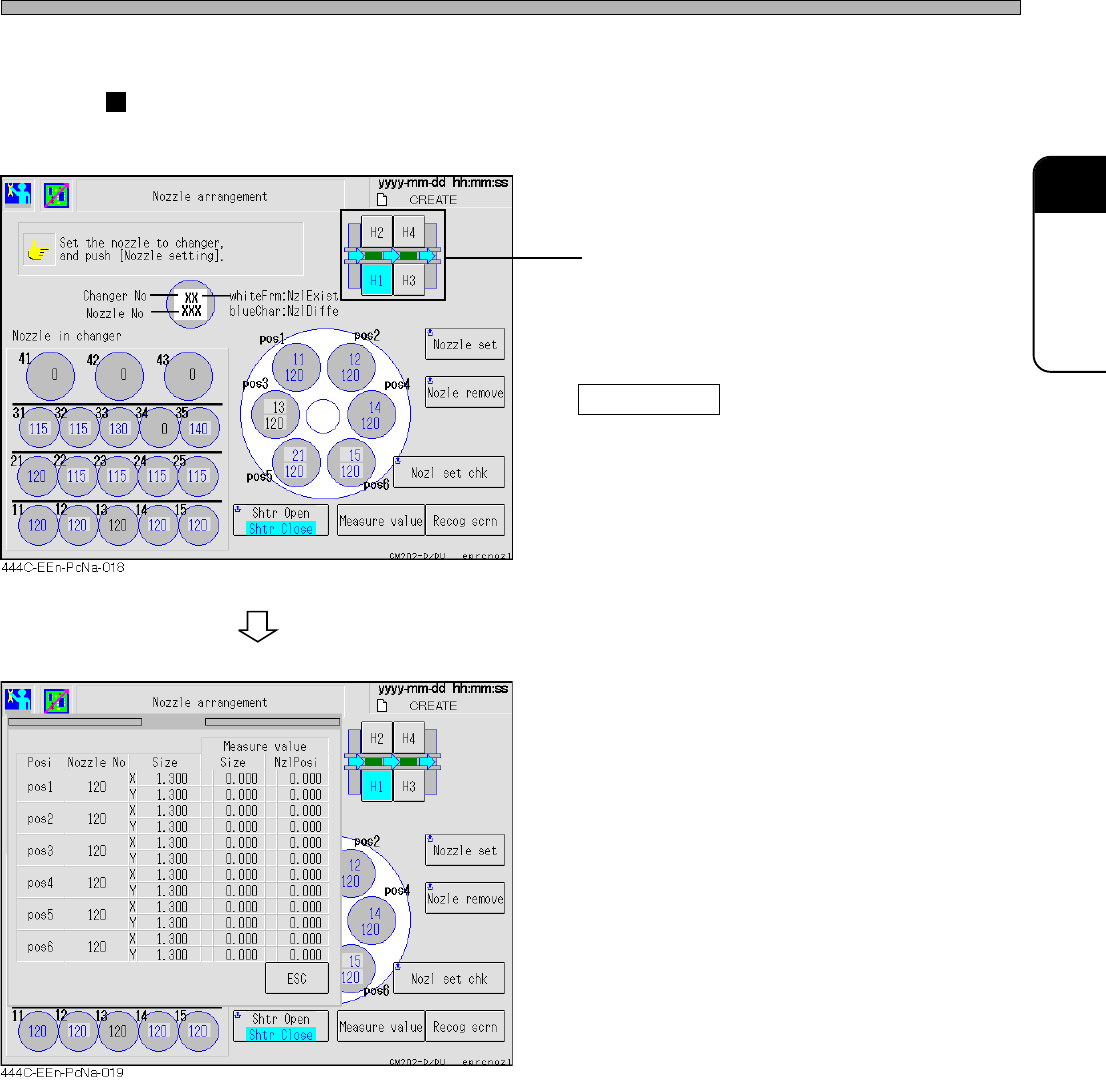
With nozzle changer
In addition to each head, the names of the nozzles set in the nozzle changer are displayed.
• Press the head you would like to check.
(CM201 has only the stage A.)
∗ For information about how to change nozzles,
see “9-4 Nozzle Exchange”.
Measure valve
When the nozzle changer is set, the measured
values (nozzle diameter, nozzle inclination) are
displayed on the separate screen.
As for the nozzle position that has no nozzles
or before recognizing nozzles, 0.0 is displayed.
Production Settings
Page 3-6
444C-E-OMA03-A01-07
Production Settings
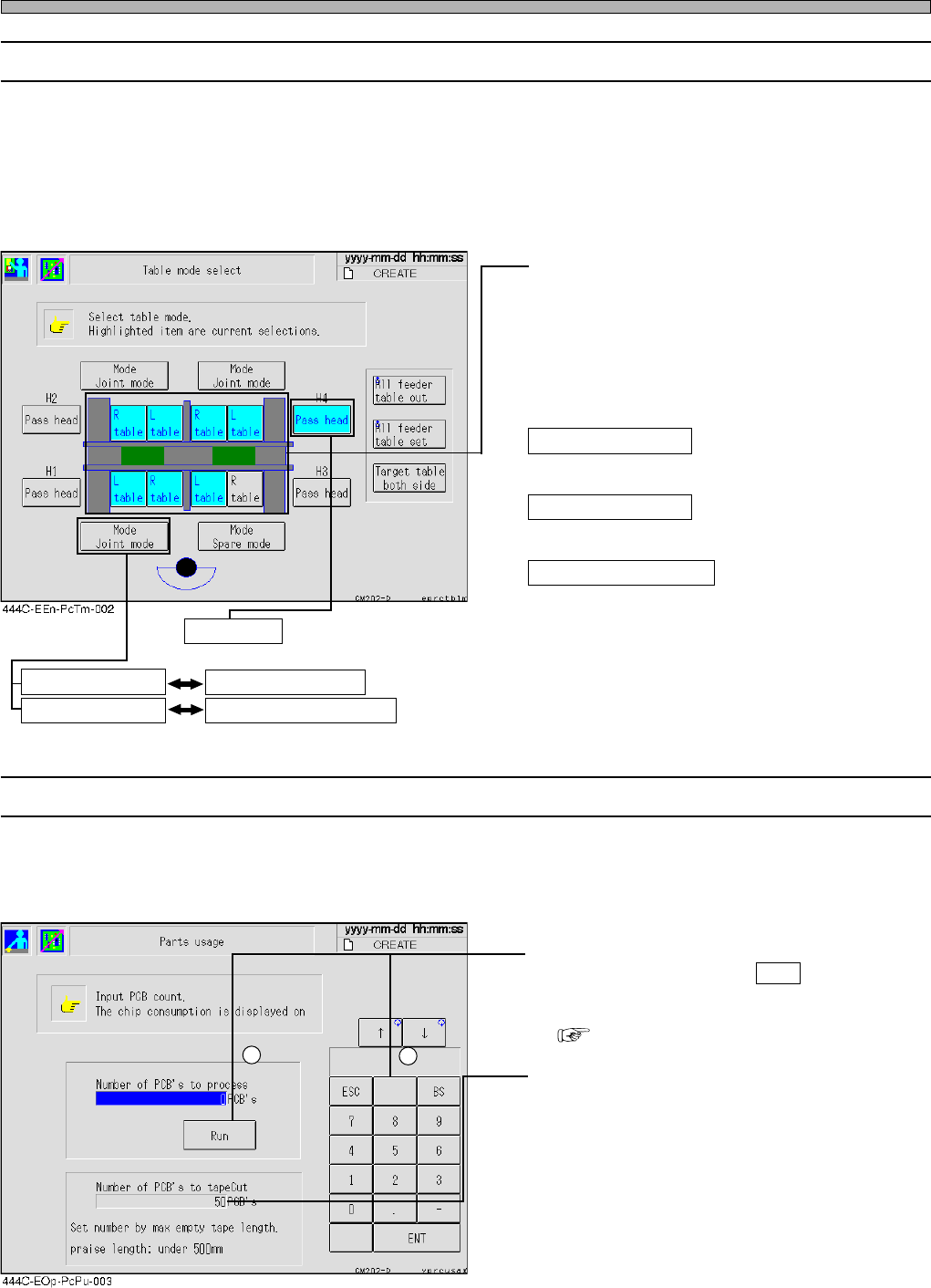
3-2-2 Selecting Table Mode
This is used to select the feeder table that will work first in the exchange mode.
∗ The mode of feeder table is switched on PT.
∗ When a “cutting unit” (option) has not been set in CM201-D/DU and CM202-D/DU, the spare and
exchange modes cannot be used. (CM202-DH/DHU/DK has been set the standard equipment of it.)
∗ For the standard CM201-DS or CM202-DS (not allowing the feeder tables to be drawn out), the
spare and the exchange mode are unavailable.
• Press the feeder table to be worked.
(CM201 has only the stage A.)
∗ The highlighted switch shows the feeder table
set now.
∗ When the power is on, changing motion is
performed.
All feeder table out
Draws out the targeted tables.
All feeder table set
Puts back the targeted tables.
Target table both side
You can select which tables are to be drawn
out/put back. Against all the beams, only the
left tables, only the right tables or the tables on
both sides is selectable. Pressing this button
will toggle the current selection.
∗ These functions are for the feeder tables with
the draw-out function.
3-2-3 Calculating Chip Consumption / Setting Tape Cut Timing
This machine can calculate the consumption of chips to the count of production boards beforehand.
And, through the result of the calculation, the timing to cut the tape of tape feeder is set.
(Only when the cutting unit (option) has been set)
• Enter the count of production boards with
numeric keys, then press Run .
The number of the chips required to be set in
the feeder is calculated and displayed.
( To the next page)
• Set the interval that the tape is cut. It is cut
every time the specified count of boards have
been produced. So enter the count with
numeric keys.
Up to 50 can be set as the number of boards
that indicates a tape cutting interval of during
automatic operation. However, the maximum
tape length must not exceed 500 mm.
(If the maximum tape length is too long, such
as the tape jamming will occur.)
∗ It is effective only when the cutting unit (option)
has been set.
2
1
Sets the pass mode to each head.
Pass head
Displays the feeder table mode.
Cannot toggle between the spare and the exchange mode.
Mode Joint mode Mode Spare mode
Mode Joint mode Mode Exchange mode